Hello! Welcome to the fourth lesson in our journey through AI workloads.
In our last lesson, we looked under the hood at the fundamental computational building blocks of neural networks: matrix multiplication (GEMM) and convolution. We established that these operations, executed as highly optimized GPU kernels, account for the vast majority of the computational work during training.
Today, we'll build directly on that knowledge. If GEMM and convolution are the engines, then batch size is the throttle. It's one of the most critical parameters you can control that directly impacts system performance. Your experience with optimizing data throughput in parallel file systems will provide a strong intuition here, as we'll be discussing how feeding data to the GPU in chunks of different sizes affects overall efficiency.
By the end of this lesson, you will be able to explain the role of batch size in trading off throughput (how fast you can train) and resource utilization (how effectively you use the hardware). This is a cornerstone concept for performance engineering and observability.
What is Batch Size?
First, let's establish a clear definition. In the last module, we saw that training involves a loop:
- Take some data.
- Perform a forward pass (make predictions).
- Calculate the loss.
- Perform a backward pass (calculate gradients).
- Update the model's weights (optimizer step).
The batch size is the number of training samples used in a single iteration of this loop. Instead of processing one sample at a time, or the entire dataset at once, we typically process a "mini-batch" of samples.
The Core Trade-Off: Throughput vs. Resource Utilization
The choice of batch size is not just about model accuracy; from a systems performance perspective, it's a fundamental decision that governs how efficiently you use your expensive GPU hardware.
1. The Throughput Argument: Why Larger Batches Can Be Faster
A GPU is a massively parallel processor with thousands of cores. To achieve high performance, you need to give it enough work to keep all those cores busy. This is where batch size comes in.
- Small Batches: Processing a small batch (e.g., 8 samples) might only generate enough computation to use a fraction of the GPU's power. The GPU finishes the work quickly and then sits idle waiting for the next small batch. The overhead of launching the computation kernel for each small batch also adds up.
- Large Batches: A larger batch (e.g., 256 samples) creates much larger matrices for multiplication. This large-scale computation can be effectively parallelized across the GPU's cores, leading to higher hardware utilization and, consequently, higher throughput (more samples processed per second).
Think of it like a large cargo truck (the GPU). It's far more efficient to fill the truck for a single long trip than to make many short trips with only a few boxes inside.
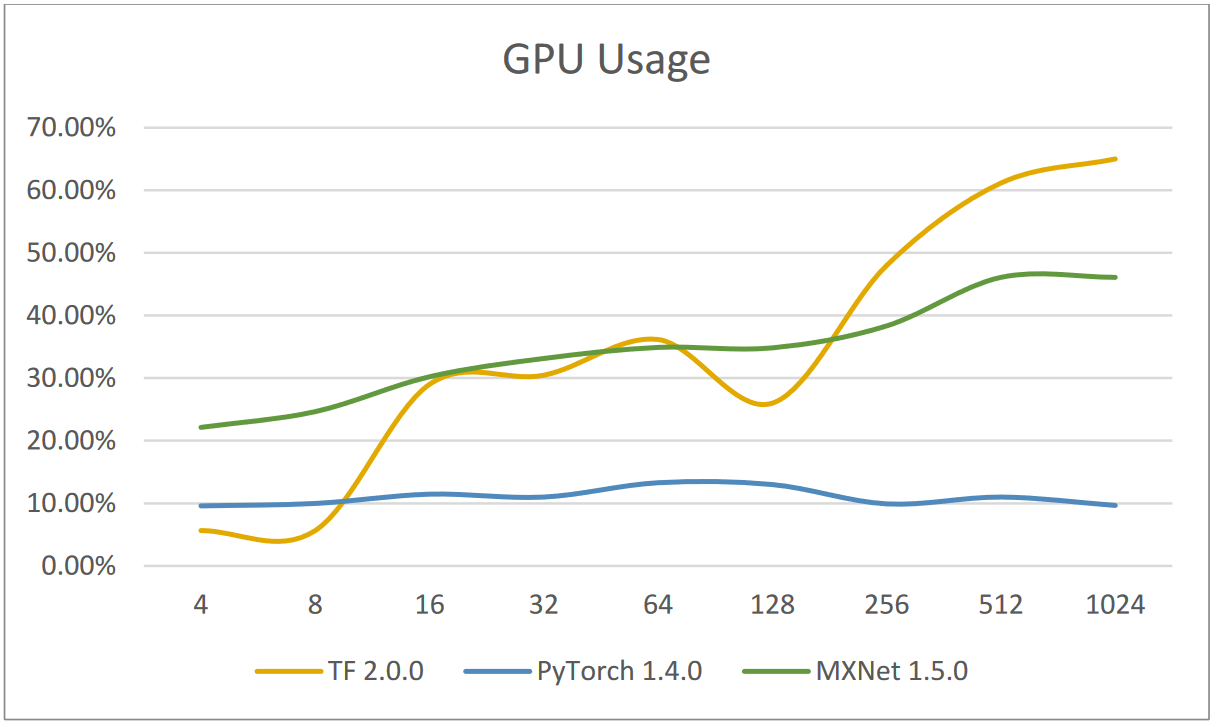
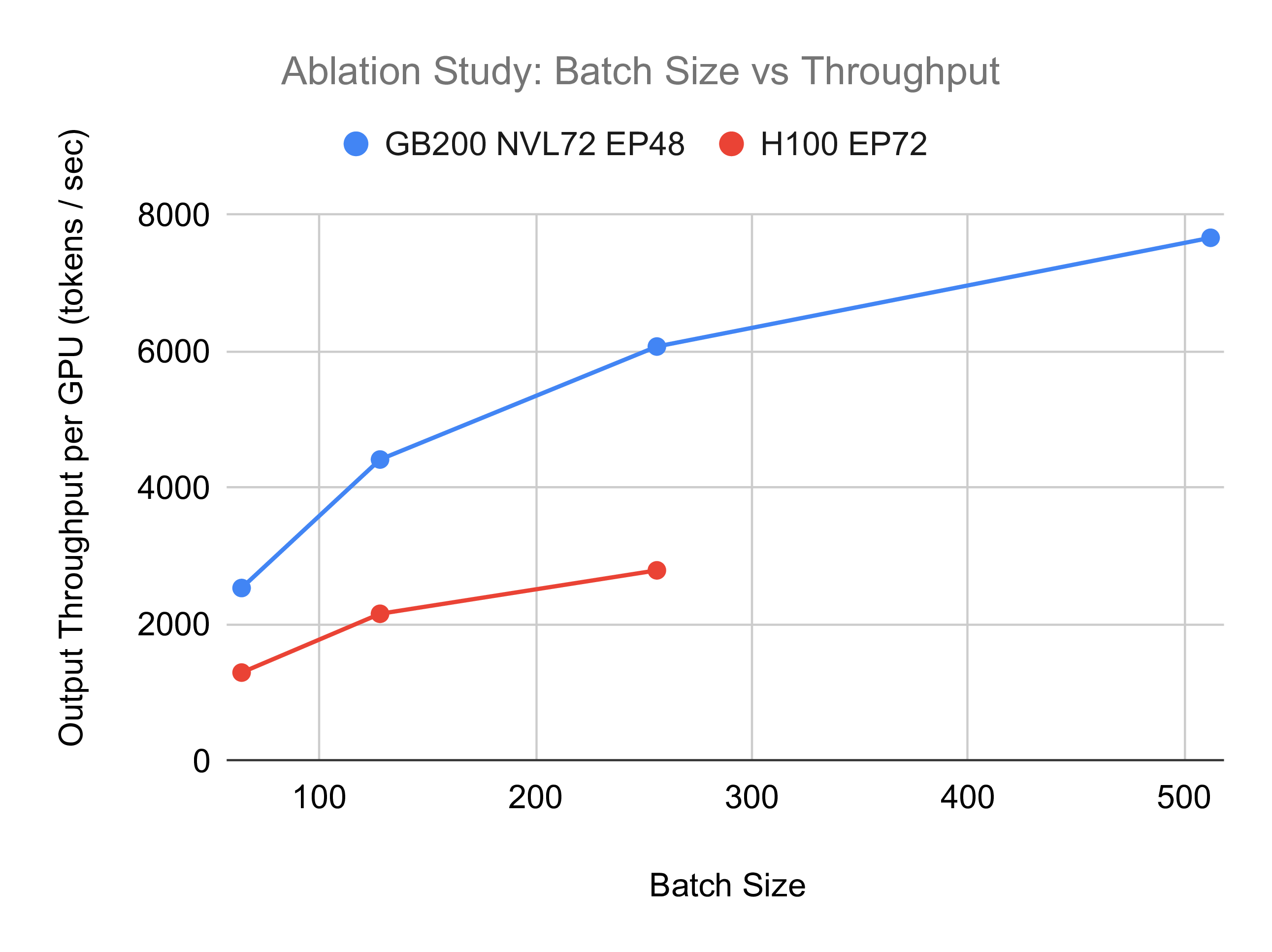
To hear this explained in the context of GPU architecture, watch the following short clip.
15. Batch Size and Learning Rate in CNNs
This clip from Weights & Biases explains the direct relationship between batch size, parallelism, and training speed on a GPU.
Watch from 01:31 to 02:18. Focus on the explanation of how a GPU can compute on all samples in a batch simultaneously, making larger batches computationally more efficient.
2. The Resource Constraint: GPU Memory
The primary limitation on how large your batch can be is GPU memory. Every sample in the batch, along with the model's parameters, intermediate results (activations) from the forward pass, and the gradients from the backward pass, must fit into the GPU's VRAM.
If you set the batch size too high, your program will crash with an "Out of Memory" (OOM) error. This is one of the most common errors in deep learning and a critical event for any observability system to detect.
A Practical Demonstration: Three Batching Scenarios
Let's see these trade-offs in action. The terms Stochastic, Batch, and Mini-Batch Gradient Descent refer to using a batch size of 1, the entire dataset, and something in between, respectively.
The following video runs an experiment comparing these three approaches. It's a fantastic demonstration of how batch size impacts training time and the learning process itself.
The Wrong Batch Size Will Ruin Your Model
The video 'The Wrong Batch Size Will Ruin Your Model' by Underfitted provides a clear, practical comparison of different batching strategies. We'll walk through the key results.
Please watch the video from 01:55 to 06:42. As you watch, pay close attention to the reported 'training time' and the 'number of weight updates' for each of the three experiments: Stochastic Gradient Descent (batch size = 1): Note the extremely long training time and high number of updates (01:55 - 03:37). Batch Gradient Descent (full dataset): Note the very fast training time but the significant memory warning (03:37 - 04:48). Mini-Batch Gradient Descent (batch size = 32): See how this offers a balance of speed and stability (04:48 - 05:39). The final summary (05:39 - 06:42) neatly wraps up the conclusions.
As the video shows, "Mini-Batch Gradient Descent" is the standard for a reason. It balances computational efficiency with the memory constraints of the hardware and the stability of the training process.
To solidify these concepts, let's consult a structured summary.
Maximize GPU Utilization for Model Training
The article 'Maximize GPU Utilization for Model Training' provides a concise summary of how batch size relates to GPU performance and includes a very useful table of pros and cons.
Please read the section 'Batching Strategies: Finding the Sweet Spot', which includes the table comparing Small, Medium, and Large batch sizes. This table is an excellent reference for the trade-offs we've been discussing.
Test your understanding!
You are tasked with training a large model on a GPU with limited memory. You try to run the training script with the default batch size of 128 but immediately get an "Out of Memory" error. Your colleague suggests reducing the batch size to 16. What are the likely consequences for training time and GPU utilization?
Show answer
- GPU Utilization will likely decrease. With a smaller batch size (16), the GPU may not have enough parallel work to do, causing it to be underutilized.
- Total training time will likely increase. Although each individual step might be faster, the number of steps required to process the entire dataset increases significantly (8 times more steps). This, combined with lower GPU utilization, almost always leads to a longer overall training duration.
Advanced Considerations
For a performance engineer, two more points are crucial.
1. Adjusting the Learning Rate
Changing the batch size also affects the learning dynamics. A common rule of thumb is that if you multiply your batch size by k, you should also multiply your learning rate by k (or sqrt(k)). From a systems perspective, this is important because it means you can't just crank up the batch size to improve throughput without considering its effect on the model's convergence.
The following clip demonstrates this principle perfectly.
15. Batch Size and Learning Rate in CNNs
This final clip from the Weights & Biases video shows that simply increasing the batch size for speed can hurt accuracy, but adjusting the learning rate can help you achieve both speed and performance.
Watch from 05:05 to 08:07. Notice how a larger batch size trains faster but initially performs worse, and how increasing the learning rate fixes this, giving the 'best of both worlds'.
2. Simulating Large Batches with Gradient Accumulation
What if you need the stability of a large batch, but it doesn't fit in memory? A clever technique called gradient accumulation lets you simulate a large batch. You perform the forward and backward passes for several small mini-batches, accumulating the gradients locally without updating the model weights. Only after a set number of these "micro-batches" do you perform the weight update. This achieves the same mathematical result as a large batch while keeping the memory footprint low. This is an essential trick for your performance engineering toolkit.
Conclusion
Today we've established batch size as a primary lever for controlling AI workload performance. It embodies a classic systems trade-off.
Key Takeaways:
- Batch size is the number of samples processed in one training iteration.
- Larger batches generally lead to higher throughput and GPU utilization by enabling more parallelism.
- The main constraint on batch size is GPU memory. Exceeding it results in an OOM error.
- Smaller batches use less memory but can underutilize the GPU, leading to longer training times.
- Finding the optimal batch size is about balancing throughput, memory constraints, and model convergence. This "sweet spot" is what Mini-Batch Gradient Descent aims for.
You now have the conceptual framework to understand why monitoring batch size, GPU utilization, and memory usage is so critical. In our next lesson, we will get hands-on. You will run a pre-existing script and use command-line tools to observe the effect of changing the batch size on training time and GPU memory usage, seeing these trade-offs with your own eyes.