Hello! In our last lesson, you successfully organized your collection of images into a storyboard. This visual blueprint, complete with scenes, action descriptions, and voiceover cues, is the narrative spine of your animation.
Now it's time to give your story its voice. Today, we'll focus on transforming those brief voiceover cues from your storyboard into a complete, polished script. This script is not just text; it's the audio counterpart to your visuals, dictating the rhythm, timing, and emotional tone of your entire animation. It's the final piece of the planning puzzle before we start generating audio and motion.
1. Writing for the Ear: The Short Film Mindset
A voiceover script is a unique form of writing. Unlike a novel or an article, it's meant to be heard, not read. This means your language should be clear, concise, and conversational. The goal is to create a script that flows naturally and complements the visuals on screen without overwhelming them.
For a 7-10 minute animation, every word counts. It's helpful to adopt the mindset of a short filmmaker: focus on a single, central idea and convey it with precision. Trying to cram too much into a short piece can dilute its impact. The following video offers fantastic insights into the power of a focused narrative.
The Secret Sauce for Writing Short Films
This video, "The Secret Sauce for Writing Short Films," explains why focusing on a single, core idea is essential for creating impactful short-form stories.
Please watch these key segments to grasp this "less is more" approach: Start with the opening, which humorously illustrates the problem of trying to do too much in a short film, and listen for the core advice to just pick one thing. Continue with the idea of thinking of your project not as a "short film" but as a small film, focusing only on the essentials. Pay close attention to the example of how a massive story like Titanic can be condensed to its essence. This is exactly what you'll be doing: distilling the essence of each scene into a few powerful lines of narration. Finally, absorb the advice to create a condensed, simple nugget of meaning.
As the video suggests, your script should serve a singular purpose for each scene, delivering just enough information or emotion to support the visual story you've laid out in your storyboard.
2. Structuring Your Script for Animation
Your script and storyboard are two halves of the same whole. They must work in perfect sync. The best way to ensure this is to structure your script document to mirror your storyboard. A simple two-column format is highly effective.
One column lists the visual information (Scene/Shot number and a brief action description from your storyboard), and the adjacent column contains the corresponding voiceover text. This format makes it easy to check timing and flow.
Here is an example of a professional storyboard that links visuals, voiceover, and action notes.
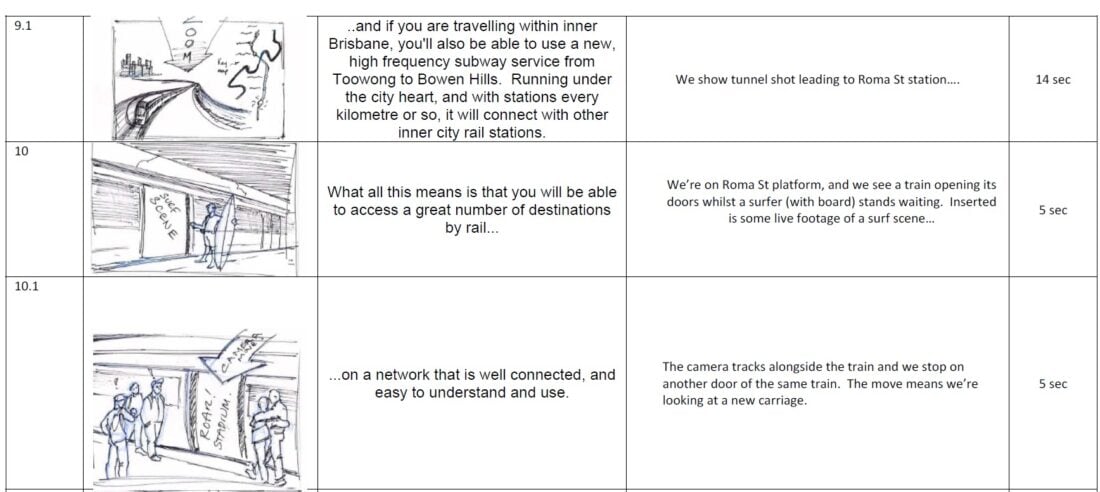
Your goal is to create a document where you can read down the columns and feel the animation coming to life, with the narration perfectly timed to the on-screen action.
3. Using AI as Your Scriptwriting Partner
Since you've already used AI to generate your images, you're familiar with the power of prompting. We'll apply the same principle here. Rather than starting from a blank page, you can use a large language model like ChatGPT or Claude as a creative partner to generate the first draft of your script based on the voiceover cues from your storyboard.
The key to getting a useful result is writing a high-quality prompt.
AI Scriptwriting for Video: Write Better Scripts Faster | DeepReel Blog
The DeepReel Blog article "AI Scriptwriting for Video" provides excellent guidance on crafting effective prompts.
Please read the section "Prompting techniques for better scripts." Focus on understanding the difference between a vague prompt and a specific one, and study the prompt formula provided. This structure is your key to getting a high-quality first draft from the AI.
By providing the AI with context—such as your target audience, desired tone, and the specific points you want to make (your voiceover cues)—you guide it to produce a script that's already 80% of the way there.
Here is a great, detailed prompt template you can adapt. It encourages the AI to adopt a specific persona, which often leads to better results.
15 AI prompts to generate video scripts fast | Clipchamp Blog
This article from the Clipchamp Blog includes a powerful prompt for generating voiceover scripts.
Read the prompt provided under "7. Generate a video voiceover script." Pay attention to how it specifies the persona, audience, purpose, tone, and length. You will use this elaborate prompt as the foundation for your own.
4. Practical Task: Write and Refine Your Script
Now, let's put this all together and create your voiceover script.
Step 1: Consolidate Your Cues
Go back to the storyboard you created in the last lesson. Collect all the "Voiceover Cues" you wrote for each scene. Organize them as a simple list or bullet points in the order they appear in your story.
Step 2: Craft Your Master Prompt
Using a tool like ChatGPT, combine the prompt formula you just learned about. Your prompt should look something like this:
Assume the role of a seasoned video scriptwriter. I have a collection of bullet points from my animation's storyboard that need to be transformed into a compelling voiceover script. The animation is a [describe your genre, e.g., fantasy adventure, sci-fi mystery] aimed at [mention your target audience, e.g., young adults, fans of epic stories]. Its purpose is to [briefly describe the message, e.g., tell a story of courage and discovery].
Please ensure the language is clear and evocative. The tone should be [specify tone, e.g., mysterious, inspiring, somber, energetic], and the total script should be suitable for a 7-10 minute animation. The pacing should be [specify pacing, e.g., slow and deliberate, fast-paced and exciting].
Here are the voiceover cues to build from:
[Paste your list of voiceover cues from Step 1 here]
Step 3: Generate and Refine
Run your prompt and review the first draft from the AI. It will likely not be perfect, and that's expected. The real craft is in the refinement. This is a collaborative process between you and the AI.
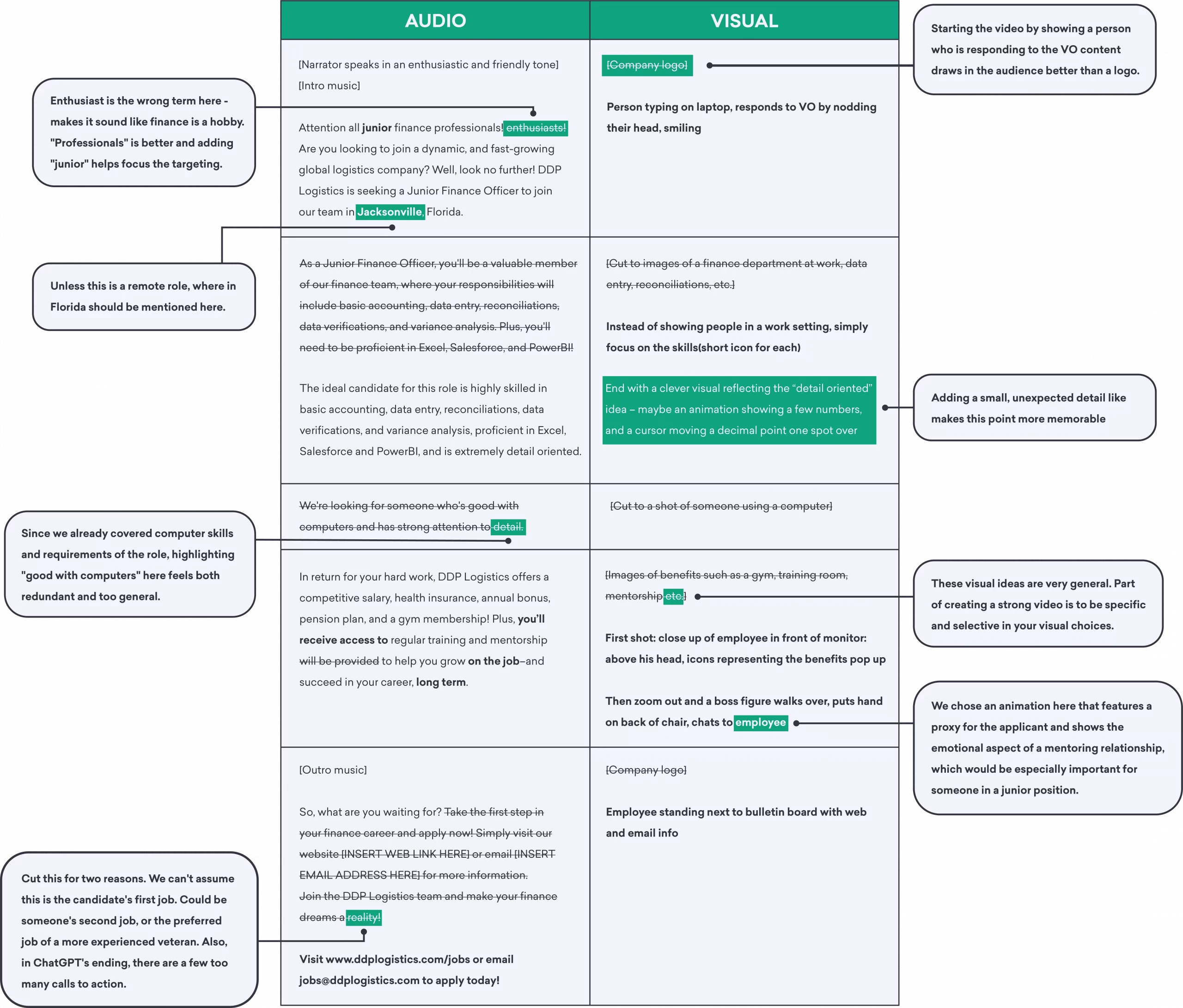
As you refine your script, follow these steps:
- Read it Aloud: This is the most crucial test. Does it sound natural? Are the sentences too long or complex? Edit it until it flows smoothly when spoken.
- Check Timing: Place the script into a two-column table next to your scene descriptions. Does the length of the narration for a scene match the action? If you have 30 seconds of narration for a shot where a character simply blinks, you need to either trim the script or adjust your storyboard.
- Iterate with the AI: Don't be afraid to go back to the AI with more prompts. This is the iterative approach.
AI Scriptwriting for Video: Write Better Scripts Faster | DeepReel Blog
The same article from DeepReel discusses this refinement process.
Re-read the short section on the iterative approach. You can give the AI feedback like, "Make this part more emotional," "Cut this section by 50%," or "Add a stronger hook at the beginning."
Keep refining until you have a final script that you're happy with, neatly organized by scene and shot number. This final document will be your guide for the rest of the project.
Conclusion
In this lesson, you've learned how to transition from visual planning to audio scripting. By adopting a "short film" mindset and leveraging AI as a creative partner, you've transformed your storyboard cues into a polished voiceover script ready for production.
Key Takeaways:
- A voiceover script must be concise, conversational, and written to be heard.
- Focusing on a single, core idea for your short animation will make it more impactful.
- A well-structured prompt, including audience, tone, and purpose, is key to getting a useful first draft from an AI.
- The final script is achieved through iterative refinement: reading it aloud, checking its timing against the storyboard, and collaborating with the AI to improve it.
You now have the two essential blueprints for your animation: a visual storyboard and a timed audio script. In our next lesson, we will take this script and use an AI voice generation tool to create the final voiceover audio track for your animation.