Hello! Welcome back to your web development journey.
In our first lesson, we explored the behind-the-scenes process of how a browser requests a web page from a server and renders it on your screen. We learned that the browser receives code and follows a series of steps—parsing, layout, and painting—to create the visual page you see.
Today, we'll focus on the three core technologies that make up that code: HTML, CSS, and JavaScript. The goal of this lesson is to describe the role each of these languages plays in web development. Understanding their distinct jobs is fundamental to building any website or web application and is a crucial step toward your goal of becoming a full-stack developer.
The Three Pillars of Web Development
Every website you visit is built using HTML, CSS, and JavaScript. They are the foundational languages of the frontend—the part of a website that you, the user, see and interact with in your browser.
A very common and effective way to think about their roles is to use a human body analogy:
- HTML (HyperText Markup Language) is the skeleton. It provides the fundamental structure and content of the page.
- CSS (Cascading Style Sheets) is the presentation. It's like our clothes, hair, and physical appearance, defining the website's visual style—colors, fonts, and layout.
- JavaScript is the behavior. It's what allows for action and interaction, much like our ability to walk, talk, and react to things.

To get a quick and clear overview of how these three "amigos" work together, let's start with a short video.
HTML, CSS, JavaScript Explained [in 4 minutes for beginners]
This video from Danielle Thé provides a concise and engaging explanation of what HTML, CSS, and JavaScript are and how they collaborate to build a webpage.
Please watch from the beginning until 01:46. The video introduces each language with the analogy of 'The Builder', 'The Artist', and 'The Wizard', and visually demonstrates what a website looks like with just HTML, then with CSS added, and finally with JavaScript.
Now that you have a high-level picture, let's explore each language in more detail. We'll use an excellent article from freeCodeCamp that breaks down each technology.
HTML: The Structure of the Web
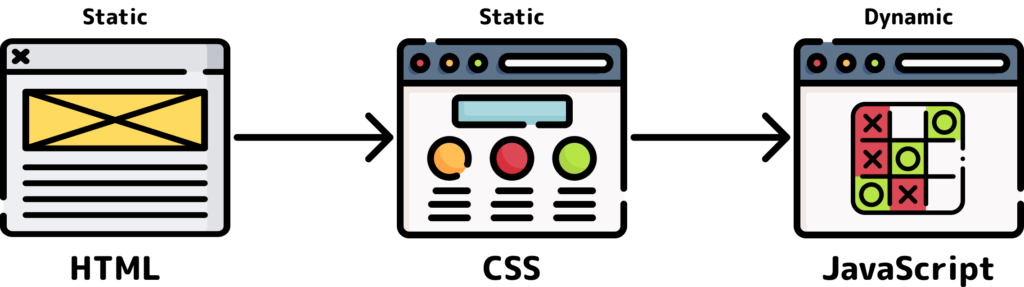
As the video showed, a website with only HTML is functional but not visually appealing. That's because HTML's job isn't to look pretty; its job is to give meaning and structure to the content.
HTML is a markup language, not a programming language. This means it uses a system of tags to "mark up" or annotate the content. For example, you use a tag to say "this text is a heading," "this is a paragraph," or "this is an image." The browser then uses this structure to build the initial DOM (Document Object Model) tree we discussed in the last lesson.
Learn Web Development Basics – HTML, CSS, and JavaScript ...
Let's read the first part of the article "HTML, CSS, and JavaScript Explained for Beginners" to solidify our understanding of HTML.
Please read the section titled 'What is HTML?'. It provides a great analogy for a markup language and shows what a basic HTML document looks like before any styling is applied.
Key takeaways for HTML:
- Stands for HyperText Markup Language.
- Defines the structure and content of a webpage.
- Uses tags (e.g.,
<h1>,<p>,<img>) to describe elements. - It is the skeleton of the page.
CSS: The Style of the Web
Once you have your HTML skeleton, CSS comes in to give it style. CSS is a design language used to control the presentation, layout, and appearance of the HTML elements. Without CSS, the web would be a very plain place!
CSS works by selecting HTML elements (like a heading or a paragraph) and applying style rules to them, such as color: blue; or font-size: 16px;. It is responsible for creating the CSSOM (CSS Object Model) that, when combined with the DOM, forms the Render Tree.
Let's continue with the same article to see how CSS transforms the basic HTML structure.
Learn Web Development Basics – HTML, CSS, and JavaScript ...
Now, let's explore the role of CSS.
Please read the next section, 'What is CSS?'. Pay attention to the 'human skin' analogy and how the provided code snippet targets the HTML elements to change their appearance.
Key takeaways for CSS:
- Stands for Cascading Style Sheets.
- Defines the visual presentation of a webpage.
- Uses selectors and rules to apply styles like colors, fonts, and spacing.
- It is the skin, hair, and clothes of the page.
JavaScript: The Behavior of the Web
With HTML and CSS, you can create a beautiful, static website. But what if you want to make it interactive? That's where JavaScript comes in.
JavaScript is a true programming language. Unlike HTML and CSS, it can perform calculations, manipulate data, and respond to user actions (like clicks and keyboard input). It allows you to dynamically change the HTML and CSS of a page after it has already loaded. Whether it's validating a form, creating a pop-up alert, or fetching new data from a server, JavaScript is what brings a webpage to life.
Let's read the final part of our article to understand JavaScript's role.
Learn Web Development Basics – HTML, CSS, and JavaScript ...
Finally, let's examine the role of JavaScript.
Please read the section 'What is JavaScript?'. Focus on how it enables a webpage to 'think and act' and see the simple example of how it can perform a calculation in response to a button click.
Key takeaways for JavaScript:
- A programming language for the web.
- Adds interactivity and dynamic behavior.
- Can manipulate HTML and CSS based on user events.
- It is the brain and muscles of the page, enabling action.
Putting It All Together
These three languages are designed to work together to create the rich web experiences we use every day.
Thought Exercise
To help solidify these concepts, think about a website you use frequently, like YouTube or a social media site:
- Identify the HTML: What are the structural elements? You can probably spot headings, paragraphs, lists of videos, images, and buttons.
- Identify the CSS: How is it styled? Look at the color scheme, the font choices, the spacing between elements, and how the page is laid out in columns or sections.
- Identify the JavaScript: Where is the interactivity? When you click a "like" button and the count updates without the page reloading, that's JavaScript. When you type in a search bar and suggestions appear, that's JavaScript. A video player's controls are also powered by JavaScript.
This exercise will help you start seeing the web through the eyes of a developer.
Conclusion
In this lesson, we've defined the distinct yet complementary roles of the three core frontend technologies:
- HTML is the markup language for creating the structure of a page.
- CSS is the style sheet language for controlling the presentation and look of a page.
- JavaScript is the programming language for adding interactivity and behavior to a page.
You now have a solid conceptual map of how websites are constructed. In our next lesson, we will get our hands dirty and start building that foundation. You will create your first basic HTML document, learning the essential tags needed to structure a simple webpage.