In our last lesson, you learned how to configure static and default routes, manually telling a router how to reach remote networks. You may have noticed the [1/0] that appeared next to your static routes in the show ip route output. Today, we'll demystify that first number: the Administrative Distance (AD).
This lesson explains how a router makes forwarding decisions when it learns about the same destination from multiple sources, such as a static route and a dynamic routing protocol. Understanding Administrative Distance is fundamental to predicting a router's behavior in a complex network, bridging the gap between the static routing you've mastered and the dynamic routing protocols we will explore next.
1. The Core Problem: Which Route to Trust?
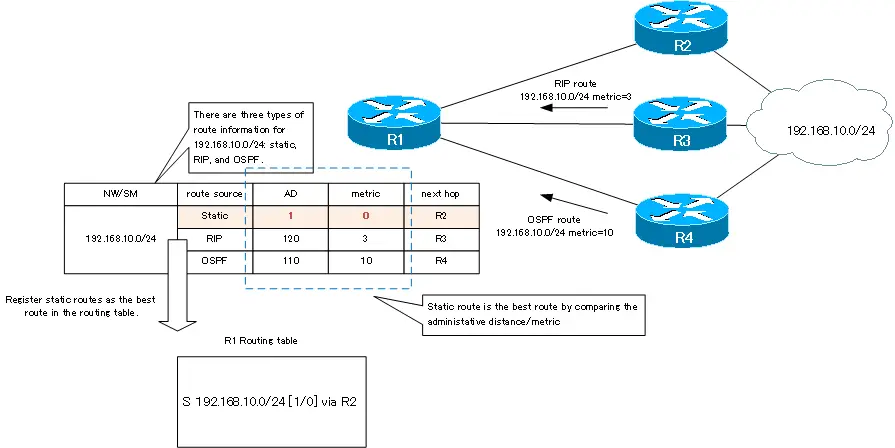
Imagine a router learns about the path to network 192.168.10.0/24 from three different sources:
- A static route that you configured.
- A route learned via the OSPF routing protocol.
- A route learned via the RIP routing protocol.
How does the router decide which of these routes is the most reliable and should be installed in the routing table? It can't compare their internal calculations (metrics) because each protocol calculates its "best path" differently. This is where Administrative Distance comes in.
Administrative Distance (AD) is a value from 0 to 255 that Cisco routers use to rate the trustworthiness of a routing source. The lower the AD, the more trustworthy the source.
2. Metric vs. Administrative Distance
It is crucial to distinguish between a metric and an Administrative Distance.
- A metric is used by a single routing protocol to determine the best path to a destination when it has learned multiple paths. For example, if OSPF learns two different ways to reach a network, it will use its metric (cost) to choose the better one.
- Administrative Distance is used to choose between different routing sources. When routes to the same destination are learned from different protocols (e.g., OSPF and EIGRP), the router uses AD to decide which protocol to trust.
The router's decision process is simple: AD is checked first, then the metric.
Let's watch a video that clarifies this distinction and introduces the core concept of AD.
Free CCNA | Dynamic Routing | Day 24 | CCNA 200-301 Complete Course
This video from Jeremy's IT Lab provides a clear explanation of why AD is necessary and how it differs from a metric.
First, watch from the explanation of metric to understand how a single protocol chooses its best path. Then, jump to the section on Administrative Distance, which explains why a different mechanism is needed to compare routes from different protocols.
3. The Hierarchy of Trust: Default AD Values
Every type of route source has a default AD value. For your project and the CCNA exam, you need to be familiar with the most common ones. A lower value always wins.
| Routing Source | Default AD | Trustworthiness |
|---|---|---|
| Directly Connected | 0 | Highest |
| Static Route | 1 | |
| EIGRP (internal) | 90 | |
| OSPF | 110 | |
| IS-IS | 115 | |
| RIP | 120 | |
| Unknown / Unusable | 255 | Lowest |
Notice that a directly connected interface (AD 0) is the most trustworthy source, followed by a manually configured static route (AD 1). Among the major dynamic protocols, EIGRP is preferred over OSPF, and both are far more trusted than RIP.
The following image provides an excellent visual summary of the decision-making process.
To reinforce these values and see where they appear in the routing table, let's watch two more short clips.
Free CCNA | Dynamic Routing | Day 24 | CCNA 200-301 Complete Course
Jeremy's IT Lab again, this time listing the key AD values you should memorize.
Watch the segment from the AD value list. Pay close attention to the values for OSPF and EIGRP, as they are central to modern CCNA topics.
This clip from Kevin Wallace Training clearly shows where the AD and metric appear in the output of the show ip route command.
Watch the short segment from AD in the CLI. It points out the [AD/Metric] values for static, EIGRP, and OSPF routes, solidifying your understanding.
4. A Practical Application: Floating Static Routes
Now that you know AD values can be changed, we can explore a powerful technique: the floating static route.
This is a static route that is manually configured with an AD higher than that of a dynamic routing protocol. It serves as a backup route. It "floats" above the dynamically learned route and is not installed in the routing table as long as the primary, dynamically learned route is available. If the primary route fails, it disappears from the routing table, and the floating static route is installed in its place.
This is a key concept for building resilient networks.
Cisco Administrative Distance Tutorial
This article from FlackBox provides a concise explanation and a practical configuration example for a floating static route.
Please read the sections titled Floating Static Routes and Floating Static Routes - OSPF. Focus on the command syntax: ip route 10.0.1.0 255.255.255.0 10.1.3.2 115. The final number, 115, is the manually configured AD. This makes the static route a backup for an OSPF route (which has a default AD of 110).
Conclusion
In this lesson, you've learned about a core principle of IP routing. Administrative Distance is the mechanism that allows a router to be a deterministic, predictable device, even when receiving conflicting information from multiple sources.
Key Takeaways:
- Administrative Distance (AD) is a measure of the trustworthiness of a routing source, with lower values being more trusted.
- AD is used to select the best route when a router learns about the same destination from different routing protocols.
- A metric is used to select the best path when a router learns multiple paths from the same routing protocol.
- The router's decision process is: 1. Lowest AD wins. 2. If ADs are equal, lowest metric wins.
- A floating static route is a backup route created by manually setting a static route's AD to a value higher than that of a primary, dynamic route.
In our next lesson, we will begin our exploration of dynamic routing protocols in more detail. We'll start by differentiating between the two main categories, distance-vector and link-state protocols, building directly on the concepts of AD and metric you learned today.