Hello! In our last lesson, we explored how a router uses its routing table and the longest prefix match rule to make forwarding decisions. We saw that the routing table is the "road map" a router follows. Now, we'll answer the next logical question: how is that map created?
This lesson will focus on the three primary ways a router's routing table is populated. Your goal is to be able to differentiate between directly connected, static, and dynamic routes. Understanding these route types is fundamental to building and troubleshooting any network, and it directly prepares you for configuring routing on the devices in your upcoming project.
1. The Three Ways a Router Learns Routes
A router can learn about networks in three distinct ways. To get a quick, high-level overview of these methods, we'll start with a short animated video that introduces each concept.
Routing Tables | CCNA - Explained
This video from PowerCert Animated Videos provides a clear and concise introduction to the three types of routes that populate a routing table.
First, watch the introductory segment from the beginning to the overview. Then, skip to the end and watch the summary, which reinforces the definitions of directly connected, static, and dynamic routes. This will give you a solid framework for the more detailed sections to follow.
Now that you have a basic mental model, let's examine each route type in more detail.
2. Directly Connected Routes: The Foundation
Directly connected routes are the most basic and fundamental entries in any routing table. A router doesn't need to be told about the networks it's physically attached to; it discovers them automatically.
A directly connected route is added to the routing table when:
- An interface is configured with an IP address and subnet mask.
- The interface is activated (using the
no shutdowncommand) and has a valid connection, resulting in an "up/up" status.
The following segment illustrates this automatic process.
Routing Tables | CCNA - Explained
Continuing with the PowerCert video, let's see how directly connected routes enable communication between adjacent networks.
Watch the section from directly connected routes. Notice how as soon as the router's interfaces are configured, it can immediately forward packets between the two connected networks.
When you look at a Cisco routing table using the show ip route command, you'll see two entries for each active interface:
- Connected (C): This route represents the entire network (subnet) that the interface is part of. It tells the router how to reach any host on that specific network.
- Local (L): This is a host-specific route with a /32 prefix for the exact IP address configured on the router's own interface. This tells the router that packets destined for this exact IP are for the router itself.
This next video provides a practical look at how these routes appear in the IOS command line.
Free CCNA | Routing Fundamentals | Day 11 (part 1) | CCNA 200-301 Complete Course
This video from Jeremy's IT Lab offers a more detailed look at the show ip route output, which will be essential for your project.
Please watch the segment from Connected and Local routes. Pay attention to the distinction between the /24 connected route and the /32 local route and what each one is used for.
3. Static Routes: Manual Control
Directly connected routes only get you so far. A router only knows about its immediate neighbors. To teach a router how to reach a remote network (one it is not directly connected to), you need to provide it with directions. This can be done manually using a static route.
A static route is a path that a network administrator manually programs into a router. You are essentially telling the router, "To reach Network X, send the packet to Next-Hop Router Y."
Routing Tables | CCNA - Explained
This next segment demonstrates why static routes are necessary and how they work in a multi-router topology.
Watch the detailed explanation of static routes. Focus on two critical points: Why the first router drops the packet initially (it has no route to the remote network). The fact that you must configure a static route for the return path as well. Communication is a two-way street.
Static routes give you precise control and are secure because the paths are fixed. However, they have significant drawbacks:
- Manual Configuration: You must configure them on every router for every remote network. This is not scalable in large networks.
- No Automatic Adaptation: If a link goes down, the static route remains in the table, and the router will continue trying to send traffic down a dead end. The administrator must manually intervene to change the route.
4. Dynamic Routes: Automated Discovery
To overcome the limitations of static routing, we use dynamic routing protocols. With dynamic routing, routers "talk" to each other, sharing information about the networks they know how to reach. They automatically build and maintain their routing tables.
When you enable a dynamic routing protocol like OSPF (Open Shortest Path First) or EIGRP (Enhanced Interior Gateway Routing Protocol) on a group of routers, they will:
- Discover each other as neighbors.
- Exchange their lists of known networks.
- Calculate the best path to each remote network.
- Automatically update their tables if the network topology changes (e.g., a link fails).
Routing Tables | CCNA - Explained
This final segment from the PowerCert video shows the concept of dynamic routing in action.
Watch the short explanation of dynamic routes. Notice how the routers automatically share their routing information, achieving the same result as static routes but without manual configuration.
5. Comparing Route Types
The choice between static and dynamic routing involves trade-offs between administrative simplicity, control, and network adaptability.
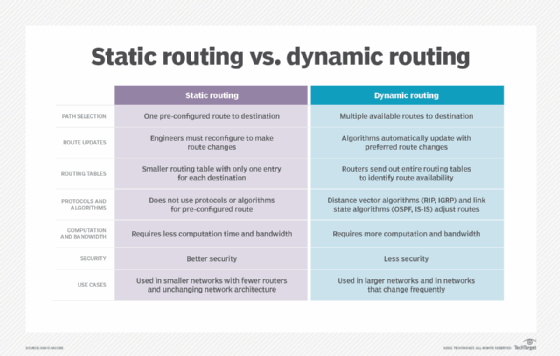
Ultimately, a router's routing table is often a mix of all three types. You can see how they are identified by looking at the code at the beginning of each line in the show ip route output.

Conclusion
In this lesson, you've learned how a router builds its essential "road map"—the IP routing table. Understanding the origin and characteristics of each route type is critical for network design and troubleshooting.
Key Takeaways:
- Directly Connected Routes (C, L): Are added automatically when an interface is configured and active. They are the foundation of all routing.
- Static Routes (S): Are manually configured by an administrator to provide a fixed path to a remote network. They are secure and efficient but not scalable or fault-tolerant.
- Dynamic Routes (O, D, R, etc.): Are learned automatically through routing protocols. Routers share information to build their tables and adapt to network changes. They are scalable and resilient but consume more router resources (CPU, memory, bandwidth).
You now understand how the routing table is populated. In our next lesson, we will put this knowledge into practice by configuring and verifying static and default routes on a Cisco router, a core skill for your project.