Hello! Welcome back to the course.
In our last module, we built a solid foundation for a robust API by implementing request validation and centralized exception handling. Now that we can handle bad data and errors gracefully, it's time to focus on the API's design and public contract. A well-designed API is intuitive, predictable, and easy for other developers to consume.
This lesson kicks off our module on API Design, and we'll start with the most visible part of your API: the endpoints themselves. Today, you will learn to apply RESTful URI naming conventions for resources. A Uniform Resource Identifier (URI) is the address for a piece of data or functionality. Getting this right is the first step toward creating a clean, professional API.
1. What is a Resource?
In REST, everything is a resource. A resource is any piece of information that can be named and accessed—a user, an order, a product, or even a collection of products. The URI is the unique identifier for that resource.
Let's look at the anatomy of a typical endpoint URI to see where resources fit in.
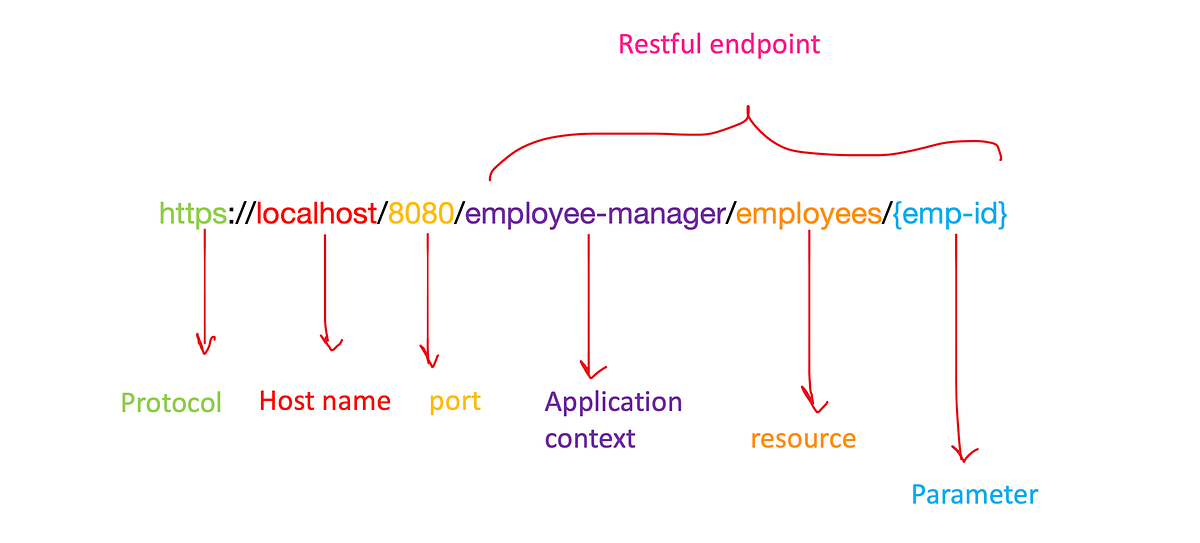
As you can see, the path of the URI (e.g., /employees/{emp-id}) is responsible for identifying the resource.
To understand how to structure this path, it's crucial to distinguish between two types of resources.
REST API URI Naming Conventions and Best Practices
This article, 'REST API URI Naming Conventions and Best Practices' from restfulapi.net, provides a clear definition of resources. Please read the introductory sections to understand the difference between collection and singleton resources.
Read the sections '1. What is a Resource?', '1.1. Singleton and Collection Resources', and '1.2. Collection and Sub-collection Resources'. Focus on how a collection (like /customers) is distinct from a single item within it (like /customers/{customerId}).
To summarize:
- Collection Resource: Represents a list or collection of items. For example,
/customersrepresents all customers. - Singleton (or Document) Resource: Represents a single, specific item. For example,
/customers/123represents the customer with the ID123.
2. The Golden Rule: URIs are for Nouns, Not Verbs
The single most important principle of RESTful URI design is that URIs identify resources (nouns), while HTTP methods (GET, POST, PUT, DELETE) specify the action (verb) to be performed on that resource.
Your URI should describe the "what," not the "how."
9 Must-Know REST API Design Principles for Developers
This short video from ByteMonk gives a concise explanation of this core principle.
Watch from 01:03 to 02:26. Pay close attention to the examples of good URIs (using nouns) versus bad URIs (using verbs).
Let's reinforce this with some clear examples from the Microsoft Azure documentation on API design.
Web API Design Best Practices - Azure Architecture Center
Microsoft's official best practices guide offers another great perspective on this rule.
Read the section titled 'Define RESTful web API resource URIs'. Note the clear distinction between the recommended /orders and the discouraged /create-order.
Here's the takeaway:
- Bad:
/getUsers,/createUser,/deleteUser/123 - Good: Use the single resource path
/usersand combine it with different HTTP methods:GET /users— Get a list of all users.POST /users— Create a new user.GET /users/123— Get the user with ID 123.DELETE /users/123— Delete the user with ID 123.
This separation makes your API logical and predictable. Once a developer knows the URI for your "users" resource, they can infer how to perform all standard operations on it.
3. Core Naming Conventions
Beyond the "nouns, not verbs" rule, several conventions help create consistent and intuitive APIs.
Use Plural Nouns for Collections
A widely adopted convention is to use plural nouns for collection resources. This reads naturally and aligns with the concept that the URI points to a collection of items.
8 Pragmatic REST API Design Tips (From Real Projects)
This video from Milan Jovanović explains the reasoning behind using plural nouns for resource names.
Watch from 04:00 to 04:41. The video makes a simple but effective case for /habits over /habit.
GET /users— Retrieves the collection of all users.GET /users/42— Retrieves the single user with ID 42 from the users collection.
Indicate Hierarchy with Forward Slashes
You can represent relationships between resources using the forward slash /. For instance, if a User has many Orders, you can model this relationship in the URI.
GET /users/42/orders— Retrieves all orders belonging to the user with ID 42.GET /users/42/orders/3— Retrieves order #3 that belongs to user #42.
Practical Tip: Avoid Deeply Nested URIs
While nesting is useful, it can quickly become cumbersome. A URI like /customers/1/orders/99/products/4 is complex, hard to read, and brittle if resource relationships change.
A good rule of thumb is to avoid nesting more than one or two levels deep.
8 Pragmatic REST API Design Tips (From Real Projects)
The same video from Milan Jovanović provides excellent advice on this topic, suggesting a more practical alternative.
Watch from 04:31 to 05:41. Notice the recommendation to use a top-level resource and filter it with query parameters instead of deep nesting.
Instead of /customers/1/orders/99/products, you could provide:
/orders/99to get the order details.- The response for that order could then contain a link or information to fetch its products, perhaps via
/orders/99/productsor even/products?orderId=99.
Test your understanding!
Imagine you are designing an API for a blog. The core resources are Authors and Posts. An author can have many posts, and a post belongs to one author. Each post can also have many Comments.
Design the URIs for the following operations:
- Get all authors.
- Get a single author with ID
auth-123. - Get all posts written by the author with ID
auth-123. - Get comment #5 on the post with ID
post-456. (Consider the deep nesting advice here).
Show answer
- Get all authors:
GET /authors - Get a single author:
GET /authors/auth-123 - Get all posts by an author:
GET /authors/auth-123/posts(This is a good use of one level of nesting). - Get a specific comment: A deeply nested URI like
/authors/auth-123/posts/post-456/comments/5is not ideal. A better approach would be:GET /posts/post-456/comments/5. This URI is simpler and still clearly identifies the resource hierarchy. Even better might beGET /comments/5, assuming comment IDs are globally unique, and the response would contain information linking back to the post and author.
4. URI Formatting and Style Guide
To ensure maximum readability and prevent technical issues, follow these simple formatting rules.
REST API URI Naming Conventions and Best Practices
The restfulapi.net article we looked at earlier also contains an excellent section on these formatting best practices.
Read sections '2.2. Consistency is the key' and '2.3. Do not use file extensions'. This covers all the key style points.
Here is a summary of the key style rules:
- Use lowercase letters: URI paths can be case-sensitive. Using lowercase consistently avoids confusion.
Good: /users/123/ordersAvoid: /Users/123/Orders
- Use hyphens (-) to separate words: Hyphens improve the readability of long resource names.
Good: /order-itemsAvoid: /orderitemsor/order_items(underscores can be hard to see).
- Do not use a trailing forward slash (/): A slash at the end of a URI path adds no semantic value.
Good: /usersAvoid: /users/
- Do not use file extensions: The server should determine the content format (e.g., JSON, XML) using the
Acceptheader in the request, not by putting.jsonin the URI.Good: /users/123Avoid: /users/123.json
5. Connecting URIs to Actions: A Preview
Let's bring everything together. The URI identifies the noun, and the HTTP method provides the verb. This table perfectly illustrates how different actions are performed on the same set of resources.

Looking at this table, you can see the power of this design. By defining just two URI patterns, /users and /users/{id}, you have established a predictable contract for a whole range of operations. This is the essence of a well-designed RESTful API.
Conclusion
Great job! You've just learned the fundamental principles for designing clean, predictable, and professional RESTful URIs. This is a crucial skill that makes your APIs easier for others to understand and consume.
Key Takeaways:
- URIs identify resources (nouns), not actions (verbs).
- Use plural nouns for collection resources (e.g.,
/users). - Use forward slashes (
/) to represent hierarchical relationships, but avoid nesting too deeply. - For formatting, stick to lowercase letters and use hyphens (
-) to separate words. - The HTTP method (GET, POST, etc.) determines the action to be performed on the resource identified by the URI.
What's Next?
Now that we've mastered how to name our resources, the next logical step is to dive deeper into the "verbs." In our next lesson, we will explore how to select appropriate HTTP methods (GET, POST, PUT, DELETE, PATCH) based on their specific properties, such as idempotency and safety. This will complete your understanding of how to structure basic REST interactions.