Hello! Welcome back.
In our last lesson, we saw how to implement automated data validation and got a sneak peek at using @RestControllerAdvice and @ExceptionHandler to create clean, custom error messages for validation failures. That handler, however, was very specific, targeting only the MethodArgumentNotValidException.
What about other errors? A user might request an ID that doesn't exist, try to create a duplicate entry, or cause an unexpected server error. Handling these case-by-case inside each controller method leads to repetitive, cluttered code.
Today, we will solve this by learning how to implement global exception handling using @ControllerAdvice and @ExceptionHandler. Your goal is to create a centralized mechanism that intercepts exceptions from anywhere in your application and transforms them into consistent, predictable, and user-friendly JSON responses. This is a hallmark of a professional-grade API.
1. The Problem: Scattered and Inconsistent Error Handling
Without a global strategy, you're forced to handle exceptions directly in your controllers.
Spring Boot @ControllerAdvice & @ExceptionHandler ...
First, take a look at the 'Rest API exception handling' section of this article from Baeldung. It shows a TutorialController with multiple try-catch blocks and if-else checks for handling errors like NOT_FOUND. This illustrates the problem we're about to solve.
Just read the introduction and skim the TutorialController code in the section 'Rest API exception handling'. Notice the repetition in error handling logic.
This approach has several major drawbacks:
- Code Duplication: The same error-handling logic is repeated across many controller methods.
- Mixed Concerns: Your controller methods become bloated with error-handling code, obscuring the primary business logic.
- Inconsistency: Different methods might return differently structured error messages for the same type of error.
The solution is to centralize this logic.
2. The Solution: @ControllerAdvice and @ExceptionHandler
Spring provides two powerful annotations that work together to create a global exception handling component:
@ControllerAdvice: This annotation marks a class as a "global controller advisor." It's a specialized@Componentthat allows you to share logic across all of your controllers. It acts as an interceptor, catching exceptions that are thrown from your controller methods.@ExceptionHandler: You place this annotation on a method within a@ControllerAdviceclass. It specifies which exception (or exceptions) the method is responsible for handling.
When an exception is thrown from a controller, Spring looks for an @ExceptionHandler method within any @ControllerAdvice bean that can handle that specific exception type.
This diagram illustrates the flow:
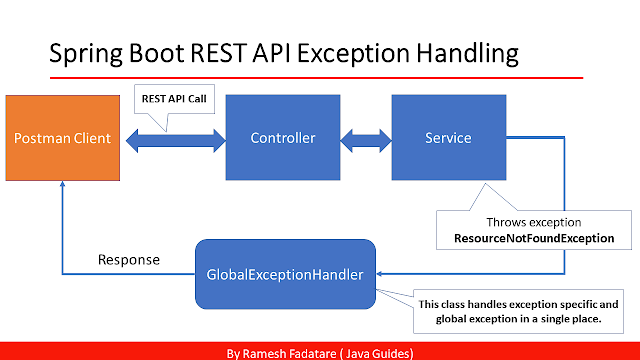
3. Implementing a Global Exception Handler
Let's build a global exception handler step-by-step. We will start by handling a very common scenario: a resource not being found.
Step 3.1: The Default Error Experience
First, let's see what happens by default when an unhandled exception occurs.
Custom Error Handling with @ControllerAdvice and @ExceptionHandler - Spring Tutorial
This video from Aneesh Mistry clearly demonstrates the default, unhelpful error messages Spring returns for common exceptions like NoSuchElementException (when an ID is not found) and SQLIntegrityConstraintViolationException (when a required field is null).
Watch from the beginning to 02:00. Pay attention to the JSON response when the API is called with an ID that doesn't exist. The generic 'Internal Server Error' message is what we aim to improve.
As you can see, the default response leaks implementation details (Internal Server Error) and lacks a clear, structured message for the API consumer.
Step 3.2: Creating the Handler and a Custom Error Response
To fix this, we'll create a new class. A common best practice is to have this class extend ResponseEntityExceptionHandler. This Spring class provides built-in handling for standard Spring MVC exceptions, which you can then override and customize if needed.
// In a new package, e.g., com.example.yourapp.exception
import org.springframework.web.bind.annotation.ControllerAdvice;
import org.springframework.web.servlet.mvc.method.annotation.ResponseEntityExceptionHandler;

@ControllerAdvice
public class GlobalExceptionHandler extends ResponseEntityExceptionHandler {
    // We will add our handler methods here
}
Next, we need to define a standard structure for our error responses. We'll create a plain Java object (a DTO) for this purpose.
Custom Error Handling with @ControllerAdvice and @ExceptionHandler - Spring Tutorial
Now, let's define a custom ErrorResponse class. This will ensure all our API errors have a consistent JSON structure.
Watch from 06:28 to 07:31. The video shows the creation of an ErrorResponse class with fields for status, timestamp, and a message. This is a very standard and effective pattern.
Your ErrorResponse class might look like this:
import java.time.LocalDateTime;

public class ErrorResponse {
    private int statusCode;
    private LocalDateTime timestamp;
    private String message;
    private String description;

    // Constructors, Getters...
}
Step 3.3: Handling Specific Exceptions
Now we can add a method to our GlobalExceptionHandler to handle the NoSuchElementException you saw earlier.
Custom Error Handling with @ControllerAdvice and @ExceptionHandler - Spring Tutorial
The following clip puts all the pieces together. It shows how to write a method using @ExceptionHandler to catch a specific exception and return our custom ErrorResponse object.
Watch the following segments: @ExceptionHandler introduction (05:12 - 06:28): Understand how to declare the handler method. Implementation (08:20 - 11:02, focus on the NoSuchElementException part): See how to create the ErrorResponse and return it in a ResponseEntity with the NOT_FOUND status. Verification (11:02 - 13:19): Observe the new, clean error response in Postman.
Here's what that handler method would look like:
import org.springframework.http.HttpStatus;
import org.springframework.http.ResponseEntity;
import org.springframework.web.bind.annotation.ExceptionHandler;
import org.springframework.web.context.request.WebRequest;
import java.util.NoSuchElementException;

// Inside your GlobalExceptionHandler class...

@ExceptionHandler(NoSuchElementException.class)
public ResponseEntity<Object> handleNoSuchElementException(NoSuchElementException ex, WebRequest request) {
    ErrorResponse message = new ErrorResponse(
        HttpStatus.NOT_FOUND.value(),
        LocalDateTime.now(),
        ex.getMessage(),
        request.getDescription(false) // This gets the URI path
    );

    return new ResponseEntity<>(message, HttpStatus.NOT_FOUND);
}
With this in place, any time NoSuchElementException is thrown from any controller, this handler will catch it and return a clean, informative 404 Not Found response.
4. A Cleaner Design: Custom Exceptions
Catching NoSuchElementException is good, but it has a flaw: it tightly couples our web layer (the exception handler) to an implementation detail of the persistence layer. A better design is to use your own custom exceptions to represent business-rule violations.
Spring Boot @ControllerAdvice & @ExceptionHandler ...
This article from bezkoder perfectly demonstrates a more robust approach. It involves creating a custom ResourceNotFoundException, throwing it from the controller or service layer, and then handling this specific custom exception in the @ControllerAdvice.
Read through these three sections: 'Create Custom Exception': See how to define ResourceNotFoundException. 'Create Controller Advice with @ExceptionHandler': Look at the handler for this new exception. 'Modify Controller for using @ControllerAdvice': Notice how the controller is now much cleaner. Instead of checking Optional.isPresent(), it uses .orElseThrow() to throw our custom exception.
This three-step pattern is extremely powerful:
- Define a Custom Exception:
public class ResourceNotFoundException extends RuntimeException { public ResourceNotFoundException(String message) { super(message); } } - Throw it from your Service/Controller:
// In your service or controller User user = userRepository.findById(id) .orElseThrow(() -> new ResourceNotFoundException("User not found with id: " + id)); - Handle it in the
GlobalExceptionHandler:@ExceptionHandler(ResourceNotFoundException.class) public ResponseEntity<Object> handleResourceNotFoundException(ResourceNotFoundException ex, WebRequest request) { // ... create and return your ErrorResponse with HttpStatus.NOT_FOUND }
This decouples your API's error contract from underlying implementation details.
5. The Catch-All Handler and @RestControllerAdvice
What happens if an unexpected error occurs—one you don't have a specific handler for? To prevent ugly stack traces from being sent to the client, you should always include a "catch-all" handler for the base Exception.class.
// Inside your GlobalExceptionHandler class...

@ExceptionHandler(Exception.class)
public ResponseEntity<Object> handleGlobalException(Exception ex, WebRequest request) {
    ErrorResponse message = new ErrorResponse(
        HttpStatus.INTERNAL_SERVER_ERROR.value(),
        LocalDateTime.now(),
        "An unexpected error occurred",
        ex.getLocalizedMessage() // Or a more generic message for production
    );

    return new ResponseEntity<>(message, HttpStatus.INTERNAL_SERVER_ERROR);
}
Finally, since we are building a REST API, we can use a more convenient annotation: @RestControllerAdvice.
Spring Boot - ControllerAdvice, RestControllerAdvice, ResponseBody | Simple Programming
The @RestControllerAdvice annotation is a simple but important refinement. This video from 'Simple Programming' explains that it's a shortcut that combines @ControllerAdvice and @ResponseBody, meaning your handler methods can return the error DTO directly without wrapping it in a ResponseEntity.
Watch from 03:21 to 04:46. This clearly demonstrates how @RestControllerAdvice simplifies your code.
When you use @RestControllerAdvice, Spring automatically handles serializing your return object to JSON and setting the response body. You can still return ResponseEntity if you need to control headers, but for simple cases, you can return your DTO directly.
Test your understanding!
Imagine your application has a business rule that a username must be unique. If a user tries to register with an existing username, your service layer throws a custom DuplicateUsernameException.
How would you implement a handler for this in your GlobalExceptionHandler? What HTTP status code would be most appropriate?
Show answer
First, you would add a new method to your @RestControllerAdvice class annotated with @ExceptionHandler. The most appropriate HTTP status for a duplicate resource conflict is 409 CONFLICT.
Here is the implementation:
import org.springframework.http.HttpStatus;
import org.springframework.web.bind.annotation.ExceptionHandler;
import org.springframework.web.bind.annotation.ResponseStatus;
import org.springframework.web.bind.annotation.RestControllerAdvice;
import org.springframework.web.context.request.WebRequest;
import java.time.LocalDateTime;

@RestControllerAdvice
public class GlobalExceptionHandler {

    // ... other handlers ...

    @ExceptionHandler(DuplicateUsernameException.class)
    @ResponseStatus(HttpStatus.CONFLICT) // Sets the HTTP status code
    public ErrorResponse handleDuplicateUsernameException(DuplicateUsernameException ex, WebRequest request) {
        return new ErrorResponse(
            HttpStatus.CONFLICT.value(),
            LocalDateTime.now(),
            ex.getMessage(),
            request.getDescription(false)
        );
    }
}
Note the use of @ResponseStatus(HttpStatus.CONFLICT). When using @RestControllerAdvice and returning the DTO directly, this is how you set the HTTP status code for the response.
Conclusion
Excellent work! You have now learned how to build a robust, centralized exception handling mechanism for your entire API. This is a critical skill for creating professional, maintainable, and user-friendly backend services.
Key Takeaways:
- Use
@RestControllerAdviceto create a global exception handling component for REST APIs. - Use
@ExceptionHandleron methods to handle specific exception types. - Create custom error DTOs (e.g.,
ErrorResponse) to ensure a consistent JSON structure for all errors. - Prefer defining and throwing your own custom exceptions (e.g.,
ResourceNotFoundException) to represent business errors, keeping your API decoupled from implementation details. - Always include a catch-all handler for
Exception.classto gracefully manage unexpected errors and return anHTTP 500 Internal Server Error. - The most appropriate HTTP status codes for common errors are
404 NOT FOUND(resource missing),400 BAD REQUEST(client error, like invalid data), and409 CONFLICT(duplicate resource).
What's Next?
With robust validation and consistent error handling in place, your API's foundation is becoming very solid. In the next module, "API Design and Data Transfer Objects," we'll shift our focus to the "contract" of the API itself. We will start by learning how to apply RESTful URI naming conventions for resources, ensuring that your API endpoints are intuitive, predictable, and easy for other developers to use.