Hello! Welcome to the first lesson in our new module, Securing APIs with Spring Security.
In our previous modules, we've built a solid backend foundation. You've learned how to create REST APIs, connect to a database, and even write efficient, isolated tests for your data layer using in-memory databases like H2. Now, it's time to address a critical aspect of any real-world application: security. How do we ensure that only authorized users can access our API endpoints?
This lesson kicks off our journey into Spring Security, the standard framework for securing Spring-based applications. Our learning outcome is to enable Spring Security and describe its default filter chain and authentication. By the end of this session, you will understand what happens the moment you add Spring Security to your project and get a high-level view of the architecture that makes it all work.
1. Enabling Spring Security: The Magic of Auto-Configuration
One of the best things about Spring Boot is its "convention over configuration" philosophy, and this shines with Spring Security. Enabling a baseline level of security in your application is remarkably simple.
To get started, you only need to add one dependency to your pom.xml file.
<dependency>
    <groupId>org.springframework.boot</groupId>
    <artifactId>spring-boot-starter-security</artifactId>
</dependency>
That's it. Once you add this starter, Spring Boot's auto-configuration kicks in.
Spring Security for Beginners — The Easiest Guide You'll ...
Let's read a brief explanation of the immediate effect of adding this dependency from the article "Spring Security for Beginners" by Jack Pritom Soren.
Read the first section, "Step 1: Add Spring Security Dependency". It explains what happens automatically when you add the starter.
As the article points out, the moment you add spring-boot-starter-security, your entire application is secured. If you run your application and try to access any of your existing API endpoints in a web browser, you will be redirected to a default login page.
What credentials do you use? Spring Security provides two things by default:
-
A default username:
user. -
A randomly generated password that is printed to your application's console log upon startup. It will look something like this:
Using generated security password: a1b2c3d4-e5f6-7890-g1h2-i3j4k5l6m7n8
This out-of-the-box behavior is Spring Security’s default authentication. It's a temporary, secure-by-default setup that ensures your application isn't left unprotected during development.
2. The Core Concept: The Security Filter Chain
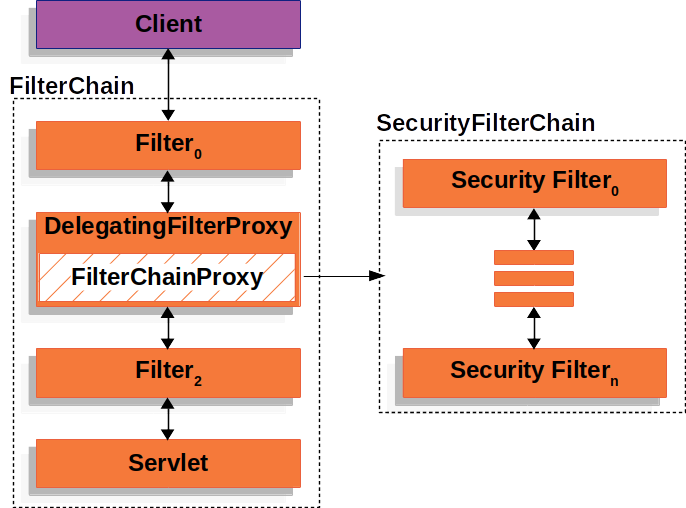
So, how does Spring Security intercept your request and show a login page? It doesn't magically alter your controllers. Instead, it uses a powerful mechanism that builds upon a concept you're already familiar with from our first module: Servlet Filters.
Spring Security introduces a Security Filter Chain, which is a series of special filters that every incoming request must pass through before it reaches your application code (like a @RestController). Each filter in the chain has a specific responsibility, such as handling logout, checking for CSRF attacks, or, most importantly for us right now, managing authentication.
This architecture is elegantly integrated into the standard Servlet container.
Demystifying Authentication in Spring Security
To understand this architecture and the key filters involved, let's turn to the article "Demystifying Authentication in Spring Security" on dev.to.
Please read the following sections: Start with "WHAT THE F*CK IS A FILTER?". This section defines the Security Filter Chain. Then, read "Key Filters in Spring Security". You don't need to memorize every filter, but focus on understanding the roles of the following key filters, which are central to the default behavior: UsernamePasswordAuthenticationFilter DefaultLoginPageGeneratingFilter AuthorizationFilter
To summarize, when a request arrives:
- It enters the
SecurityFilterChain. - It passes through filters that handle various tasks.
- For an unauthenticated user trying to access a protected resource, the
DefaultLoginPageGeneratingFilteris responsible for generating the login form you see. - When you submit that form, the
UsernamePasswordAuthenticationFilterintercepts the request to handle the username and password. - If authentication is successful, the
AuthorizationFilterlater checks if the now-authenticated user has permission to access the requested URL.
Test your understanding!
Imagine your Spring Boot application is running with Spring Security enabled by default. A user opens their browser and navigates to /api/products.
- Which filter is responsible for creating the HTML login page that the user sees?
- After the user enters 'user' and the generated password and clicks 'Login', which filter is responsible for processing these credentials?
Show answer
- The
DefaultLoginPageGeneratingFilteris responsible for generating the login page because the user is unauthenticated and trying to access a protected resource. - The
UsernamePasswordAuthenticationFilteris responsible for intercepting the POST request to the login endpoint and handling the submitted username and password.
3. A Closer Look at the Default Authentication Flow
Now that you know about the filter chain, let's zoom in on what happens inside the UsernamePasswordAuthenticationFilter. How does it actually verify your credentials?
The process involves a few key components working together.
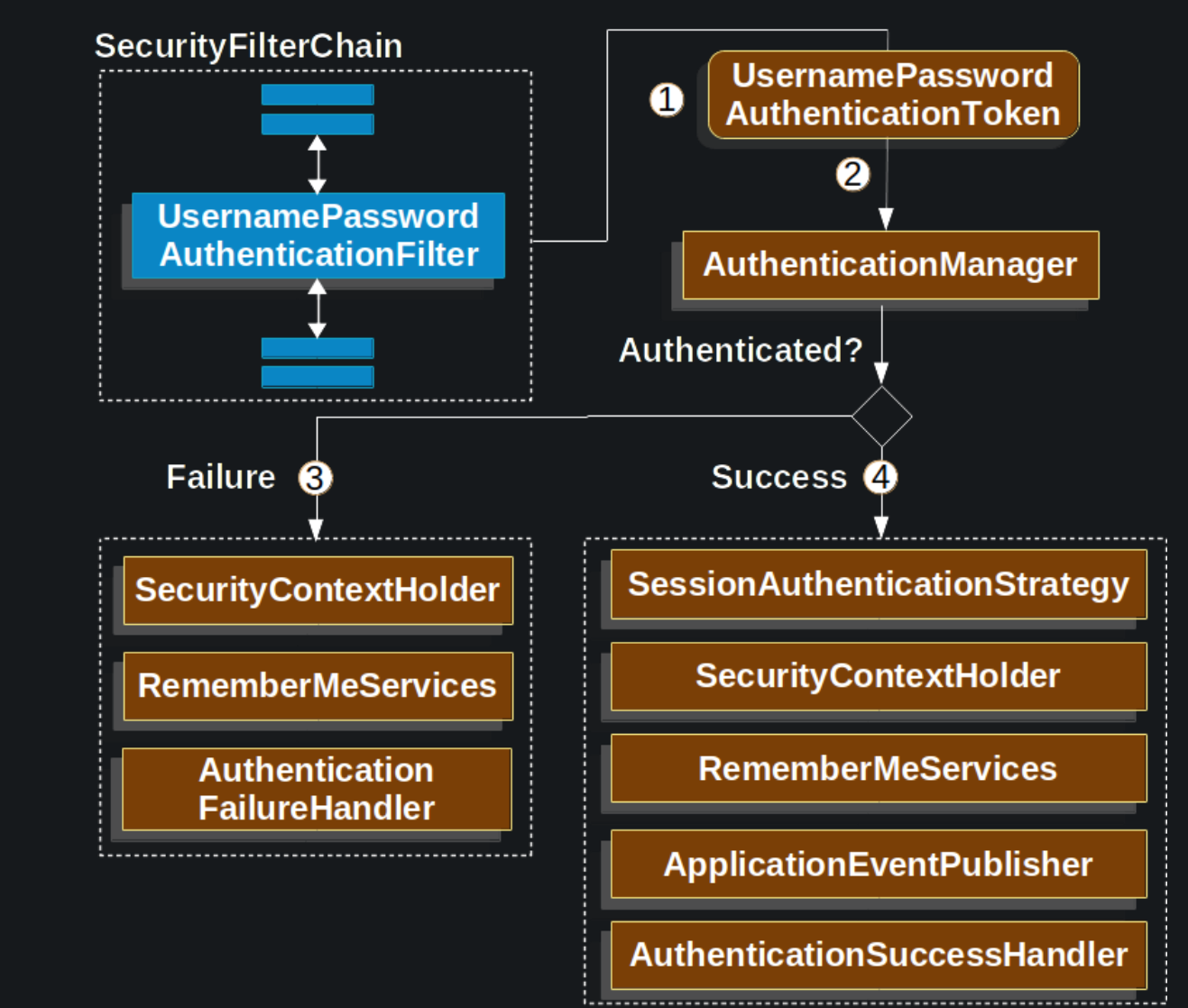
Here's the step-by-step flow illustrated in the diagram:
- The
UsernamePasswordAuthenticationFilterextracts the username and password from the login request. - It creates an
Authenticationobject (specifically, aUsernamePasswordAuthenticationToken) which acts as a container for the credentials. At this point, the token is marked as "unauthenticated." - The filter passes this token to the
AuthenticationManager. TheAuthenticationManageris the main orchestrator for authentication. Its job is to find anAuthenticationProviderthat can handle this type of token. - By default, Spring Boot configures an
AuthenticationProviderthat knows how to check credentials against the in-memory user (userand the generated password). - If the credentials are valid, the
AuthenticationManagerreturns a fully populatedAuthenticationobject, now marked as "authenticated" and containing the user's details and authorities (like roles). - This authenticated object is stored in the
SecurityContextHolder, a thread-local storage that holds the security details of the current user for the duration of the request. Downstream filters and your own application code can now access it to make authorization decisions.
This entire process provides a robust and extensible way to handle authentication. While we're currently using the default in-memory setup, we can easily swap out the AuthenticationProvider to validate credentials against a database, an LDAP server, or any other source, without changing the filter chain itself.
Conclusion
In this lesson, we took our first dive into the world of Spring Security. You've seen how easy it is to enable it and what powerful, secure-by-default features it provides right out of the box.
Key Takeaways:
- You can enable Spring Security by simply adding the
spring-boot-starter-securitydependency to yourpom.xml. - By default, all endpoints are protected, and Spring provides a login form with a default username (
user) and a randomly generated password. - The core of Spring Security's architecture is the
SecurityFilterChain, a series of filters that intercept every request to perform security-related tasks. - Key default filters include the
DefaultLoginPageGeneratingFilter(creates the login page) and theUsernamePasswordAuthenticationFilter(processes login credentials). - The authentication process is orchestrated by the
AuthenticationManager, which validates credentials and, on success, stores the user's authenticated state in theSecurityContextHolder.
What's Next?
Relying on a generated password isn't a sustainable solution. In our next lesson, we'll take our first step toward customizing Spring Security. We will learn how to configure password encoding using BCryptPasswordEncoder. This is a fundamental skill for storing user passwords securely and a prerequisite for implementing authentication against a database of your own users.