Hello! Welcome back to our module on securing APIs with Spring Security.
In our last lesson, you learned how to enable Spring Security and saw that it immediately locks down your application, providing a default login page with a username of user and a randomly generated password. While this is great for ensuring security by default, it's not a practical solution for a real application where users need to register and log in with their own credentials.
Today, we'll tackle the first and most critical step in managing user credentials: secure password storage. Storing passwords in plaintext is one of the most severe security vulnerabilities an application can have. Our goal for this lesson is to learn how to configure password encoding using BCryptPasswordEncoder. This will lay the essential groundwork for building our own database-backed authentication system in the next lesson.
1. The Critical Need for Secure Password Storage
Before we write any code, it's vital to understand why we need to handle passwords with such care. The history of password storage is a story of an ongoing battle between developers trying to protect user data and attackers finding new ways to compromise it.
Initially, passwords were stored as plaintext. After major data breaches, developers moved to hashing, a one-way function to transform the password into a fixed-length string. However, attackers developed "rainbow tables"—precomputed lists of hashes for common passwords—to quickly reverse-lookup the original password.
The next step was salting: adding a unique, random string (a "salt") to each password before hashing it. This made rainbow tables useless, as hash(password + salt1) is different from hash(password + salt2). However, even salted hashes using fast algorithms like SHA-256 are now vulnerable to brute-force attacks, as modern hardware can compute billions of hashes per second.
This leads us to the current best practice: adaptive one-way functions.
Password Storage :: Spring Security
To get a solid grasp of this evolution, let's read the official Spring Security documentation. It provides an excellent summary of why we've arrived at the current standards.
Please read the first major section, titled "Password Storage", which includes the subsection "Password Storage History". Stop just before you reach the "DelegatingPasswordEncoder" heading. Focus on understanding the vulnerabilities of each approach (plaintext, hashing, salting) and why 'adaptive one-way functions' are the solution.
As the documentation explains, adaptive functions like bcrypt, PBKDF2, and scrypt are designed to be computationally expensive. They can be tuned to remain slow even as computer hardware gets faster, making brute-force attacks impractical.
2. Understanding BCryptPasswordEncoder
Spring Security provides a robust implementation of the bcrypt algorithm through its BCryptPasswordEncoder class. Here are its key characteristics:
- Adaptive Strength: BCrypt has a configurable "strength" or "work factor" (an integer from 4 to 31) that determines how many rounds of hashing are performed. A higher strength means the hashing process is slower and more secure. The default in Spring is 10.
- Automatic Salting: You don't need to generate or manage salts yourself.
BCryptPasswordEncoderautomatically generates a random salt for each password and stores it as part of the final hash string.
Because a new salt is generated every time, encoding the same password twice will produce two different hash strings. This is expected and desirable.
Let's look at the structure of a bcrypt hash:
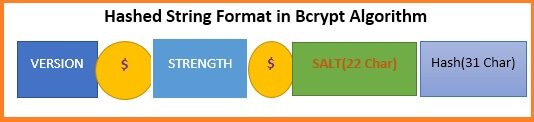
The BCryptPasswordEncoder's matches() method knows how to parse this format. It extracts the salt from the stored hash, applies it to the raw password provided during login, and compares the result with the stored hash.
Test your understanding!
Consider the following Java code:
BCryptPasswordEncoder encoder = new BCryptPasswordEncoder();
String rawPassword = "mySecretPassword";

String encodedPassword1 = encoder.encode(rawPassword);
String encodedPassword2 = encoder.encode(rawPassword);

System.out.println(encodedPassword1.equals(encodedPassword2)); // What does this print?
System.out.println(encoder.matches(rawPassword, encodedPassword1)); // What does this print?
System.out.println(encoder.matches(rawPassword, encodedPassword2)); // What does this print?
What will be printed to the console for the three println statements?
Show answer
false: BecauseBCryptPasswordEncodergenerates a new random salt each timeencode()is called, the two resulting hash strings will be different.true: Thematches()method correctly compares the raw password with the first encoded hash.true: Thematches()method also correctly compares the raw password with the second encoded hash, demonstrating that it can verify a password against any valid hash generated from it.
3. Configuring the PasswordEncoder Bean
To integrate BCryptPasswordEncoder into our Spring application, we need to declare it as a Spring bean. A bean is simply an object that is instantiated, assembled, and managed by the Spring IoC (Inversion of Control) container.
By defining a PasswordEncoder bean, we are telling Spring Security which password encoding strategy to use throughout the application. Spring will automatically detect this bean and wire it into the authentication process.
You can add this bean to any @Configuration class. A common practice is to create a dedicated security configuration class.
import org.springframework.context.annotation.Bean;
import org.springframework.context.annotation.Configuration;
import org.springframework.security.crypto.bcrypt.BCryptPasswordEncoder;
import org.springframework.security.crypto.password.PasswordEncoder;

@Configuration
public class SecurityConfig {

    @Bean
    public PasswordEncoder passwordEncoder() {
        return new BCryptPasswordEncoder();
    }
}
That's all it takes. Now, whenever another component in the security context needs a PasswordEncoder, Spring will inject this BCryptPasswordEncoder instance.
Registration with Spring Security – Password Encoding
The Baeldung article on password encoding provides a concise guide to this configuration and its practical implications.
Read section 2, "Define the Password Encoder". It reinforces how to create the bean and provides a crucial practical tip about the database column length required for a bcrypt hash (60 characters).
A Note on DelegatingPasswordEncoder
It's worth knowing that since Spring Security 5, the default PasswordEncoder is actually DelegatingPasswordEncoder. This is a special encoder that prefixes the hash with an ID (e.g., {bcrypt}) to indicate which algorithm was used. This allows an application to support multiple encoding schemes at once and smoothly migrate from older algorithms to newer ones.
By defining our own BCryptPasswordEncoder bean, we are overriding this default. For a new application that will only use bcrypt, this is perfectly fine and slightly simpler.
4. Using the Encoder in Your Application
Now that we have our PasswordEncoder bean, how do we use it? The most common use case is encoding a user's password when they register.
You can inject the PasswordEncoder directly into your services (like a UserService) and call its encode() method before saving the user entity to the database.
Registration with Spring Security – Password Encoding
Let's look at a practical example of this.
Read section 3, "Encode the Password on Registration". This shows a clear example of injecting and using the PasswordEncoder within a UserService to hash a password from a DTO before saving the user.
The key line from that example is:user.setPassword(passwordEncoder.encode(accountDto.getPassword()));
This ensures that the plaintext password from the registration form never touches the database.
5. How Spring Security Uses the Encoder for Authentication
We've covered how to encode the password for storage. The other half of the process is verifying the password when a user tries to log in.
You don't need to manually call passwordEncoder.matches(). Spring Security handles this for you. As we discussed in the previous lesson, the AuthenticationManager is responsible for authenticating users. When configured to work with a database (which we'll do in the next lesson), its provider (DaoAuthenticationProvider) will:
- Use your custom
UserDetailsServiceto fetch the user's data (including the stored hash) from the database by username. - Use the
PasswordEncoderbean you defined to compare the plaintext password from the login form with the stored hash using thematches()method. - If they match, authentication succeeds. If not, it fails.
This is why defining the PasswordEncoder as a central bean is so powerful—it provides a single, consistent strategy for both encoding and verification across the entire application.
Conclusion
Today, you've learned the most fundamental practice for user security: how to properly store passwords. We've moved away from Spring's temporary generated password and established a robust, production-ready strategy.
Key Takeaways:
- Storing plaintext passwords is unacceptable. Modern security relies on adaptive one-way functions like bcrypt that are intentionally slow to compute.
BCryptPasswordEncoderis Spring Security's implementation of bcrypt. It handles salting automatically and stores the salt within the final hash.- You configure password encoding in Spring by declaring a
PasswordEncoderbean in a@Configurationclass. Spring Security automatically detects and uses this bean. - You use the
PasswordEncoderby injecting it into your services to.encode()raw passwords before saving them to the database. - During login, Spring Security's authentication provider uses the same
PasswordEncoderbean to.matches()the submitted password against the stored hash.
What's Next?
We now have our password encoding strategy in place. In the next lesson, Implement authentication against a database by creating a custom UserDetailsService, we will put this to use. You'll learn how to tell Spring Security to load user information from your database, enabling users to log in with the credentials you are now storing securely.