Hello! Welcome to the next step in securing your backend application.
In our last lesson, we set up a crucial piece of the security puzzle: the PasswordEncoder. You now have a BCryptPasswordEncoder bean ready to securely hash passwords for storage and verify them during login. However, Spring Security still doesn't know where to find your users. It's currently using a default, in-memory user.
Today, we will bridge that gap. Our goal is to implement authentication against a database by creating a custom UserDetailsService. This is a fundamental skill for building any real-world application where users need to log in with their own accounts. By the end of this lesson, you will have replaced Spring's default user with a system that loads user information directly from your own database.
1. The Contract: UserDetailsService and UserDetails
To integrate our own user data, we need to fulfill a contract with Spring Security. This contract is defined by two core interfaces:
-
UserDetailsService: Its job is to load user-specific data. It has only one method:loadUserByUsername(String username). Spring Security will call this method during authentication, passing the username entered in the login form. Your implementation is responsible for finding the user in your database (or any other data source) and returning an object that represents them. -
UserDetails: This interface provides the essential user information that Spring Security needs to perform authentication and authorization. An object implementingUserDetailsis whatloadUserByUsernamemust return. It includes methods likegetUsername(),getPassword()(which should return the hashed password from the database), andgetAuthorities()(to provide roles like "USER" or "ADMIN").
Let's look at where these components fit into the overall authentication flow.
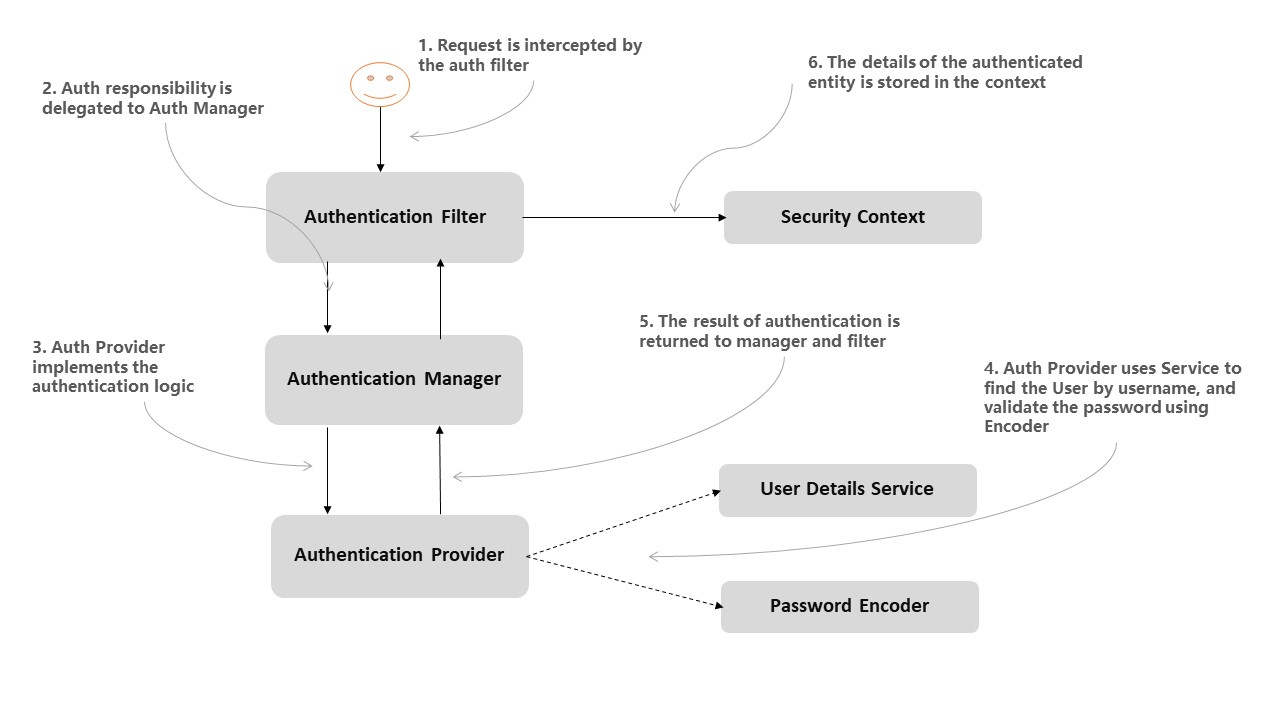
As the diagram shows, the UserDetailsService is the bridge between the Spring Security framework and your user data model.
Spring Security: Database-backed UserDetailsService
For a concise introduction to this concept, let's start with a well-regarded article from Baeldung.
Please read section 2, titled "UserDetailsService". It clearly explains the purpose of this interface and its single method, loadUserByUsername().
Now, let's implement this step-by-step.
2. Step 1: The User Model and Repository
Before we can load a user, we need a way to store them. Leveraging your knowledge from Module 5 on Spring Data JPA, we'll define a User entity and a corresponding repository.
First, you need a User entity that maps to a database table. This class will hold the user's credentials and roles. A typical implementation looks like this:
@Entity
@Table(name = "users")
public class User {
    @Id
    @GeneratedValue(strategy = GenerationType.IDENTITY)
    private Long id;

    private String username;
    private String password;
    private String role;
    private boolean enabled;

    // Getters and setters...
}
Notice the password field. This column in your database will store the bcrypt-encoded hash, not the plaintext password.
Next, we need a repository to access the data. We'll create a UserRepository interface that extends one of Spring Data JPA's repository interfaces, like CrudRepository or JpaRepository. We also need a method to find a user by their username.
public interface UserRepository extends JpaRepository<User, Long> {
    User findByUsername(String username);
}
Thanks to Spring Data JPA's query creation from method names, you don't even need to write the query yourself. Spring will automatically implement a method that searches for a User entity where the username field matches the provided string.
Spring Boot Security Authentication with JPA, Hibernate ...
The following resource provides excellent code examples for both the User entity and the UserRepository. We will follow its structure for the rest of the lesson.
Please review sections 4 ("Code User class") and 5 ("Code UserRepository class"). You can adapt the code for your own project. Notice that their repository uses @Query—this is also a valid approach, but findByUsername is often sufficient and more concise.
3. Step 2: The UserDetails Implementation
Spring Security doesn't work directly with our User entity. It requires an object that implements the UserDetails interface. We need to create an adapter class that wraps our User entity and exposes its properties in the way Spring Security expects.
Let's call this class CustomUserDetails.
import org.springframework.security.core.GrantedAuthority;
import org.springframework.security.core.authority.SimpleGrantedAuthority;
import org.springframework.security.core.userdetails.UserDetails;
import java.util.Collection;
import java.util.Collections;

public class CustomUserDetails implements UserDetails {

    private User user;

    public CustomUserDetails(User user) {
        this.user = user;
    }

    @Override
    public Collection<? extends GrantedAuthority> getAuthorities() {
        // We convert our user's role string into a SimpleGrantedAuthority
        // Spring Security uses this for authorization (e.g., @PreAuthorize("hasRole('ADMIN')"))
        return Collections.singletonList(new SimpleGrantedAuthority("ROLE_" + user.getRole()));
    }

    @Override
    public String getPassword() {
        return user.getPassword(); // Returns the hashed password
    }

    @Override
    public String getUsername() {
        return user.getUsername();
    }

    // You can implement these methods to check against fields in your User entity
    @Override
    public boolean isAccountNonExpired() {
        return true;
    }

    @Override
    public boolean isAccountNonLocked() {
        return true;
    }

    @Override
    public boolean isCredentialsNonExpired() {
        return true;
    }

    @Override
    public boolean isEnabled() {
        return user.isEnabled(); // Delegates to the 'enabled' field of our User entity
    }
}
The most important part here is the getAuthorities() method. This is where we provide the user's roles or permissions. It's a convention in Spring Security to prefix roles with ROLE_.
Spring Boot Security Authentication with JPA, Hibernate ...
The CodeJava article provides a similar implementation. Let's study it.
Read section 6, "Implement UserDetails". Compare their MyUserDetails class with the CustomUserDetails example above. The logic is the same: wrap the domain entity and adapt it for Spring Security.
Test your understanding!
Which method in the UserDetails interface is responsible for providing the user's roles and permissions to Spring Security for authorization purposes?
Show answer
The getAuthorities() method. It must return a Collection of objects that implement the GrantedAuthority interface. This is how you tell Spring Security if a user has roles like 'USER', 'ADMIN', etc.
4. Step 3: The UserDetailsService Implementation
Now we can create the main component: the service that uses our repository to find a User and wrap it in a CustomUserDetails object.
We'll create a class called CustomUserDetailsService and mark it with @Service to make it a Spring bean.
import org.springframework.beans.factory.annotation.Autowired;
import org.springframework.security.core.userdetails.UserDetails;
import org.springframework.security.core.userdetails.UserDetailsService;
import org.springframework.security.core.userdetails.UsernameNotFoundException;
import org.springframework.stereotype.Service;

@Service
public class CustomUserDetailsService implements UserDetailsService {

    @Autowired
    private UserRepository userRepository;

    @Override
    public UserDetails loadUserByUsername(String username) throws UsernameNotFoundException {
        User user = userRepository.findByUsername(username);

        if (user == null) {
            throw new UsernameNotFoundException("User not found with username: " + username);
        }

        return new CustomUserDetails(user);
    }
}
This implementation is straightforward:
- It injects the
UserRepository. - In
loadUserByUsername, it calls the repository to find the user. - Crucially, if the user is
null, it throwsUsernameNotFoundException. This is a required part of the contract and signals to Spring Security that the authentication attempt has failed. - If the user is found, it wraps the
Userentity in ourCustomUserDetailsadapter and returns it.
Spring Boot Security Authentication with JPA, Hibernate ...
Let's see how the CodeJava article implements this service.
Read section 7, "Implement UserDetailsService". Their UserDetailsServiceImpl is functionally identical to our example and completes this part of the implementation.
5. Step 4: Configuring Spring Security
We have all the pieces: a User entity, a UserRepository, a UserDetails implementation, and a UserDetailsService. Now we just need to tell Spring Security to use them.
We do this in our security configuration class (the one annotated with @Configuration and @EnableWebSecurity). We need to configure an AuthenticationProvider that uses our custom UserDetailsService and the PasswordEncoder we created in the last lesson. The DaoAuthenticationProvider is perfect for this.
@Configuration
@EnableWebSecurity
public class SecurityConfig {

    @Bean
    public UserDetailsService userDetailsService() {
        return new CustomUserDetailsService();
    }

    @Bean
    public PasswordEncoder passwordEncoder() {
        return new BCryptPasswordEncoder();
    }

    @Bean
    public DaoAuthenticationProvider authenticationProvider() {
        DaoAuthenticationProvider authProvider = new DaoAuthenticationProvider();
        authProvider.setUserDetailsService(userDetailsService()); // Our custom service
        authProvider.setPasswordEncoder(passwordEncoder()); // The encoder from the last lesson
        return authProvider;
    }

    // You also need to update the HttpSecurity configuration to use this provider.
    // In newer Spring Security versions, defining the provider as a bean is often enough
    // for Spring Boot to wire it in automatically.
}
By defining a DaoAuthenticationProvider bean and setting our custom service and password encoder on it, we are instructing Spring Security's AuthenticationManager to use our database-backed authentication logic.
Spring Boot Security Authentication with JPA, Hibernate ...
The final configuration step is detailed in the CodeJava article. It shows how to assemble all the beans.
Read section 8, "Configure authentication provider and HTTP security". Focus on the authenticationProvider() bean method. This is where all the components we've built are wired together.
Test your understanding!
Imagine you implement loadUserByUsername but forget to handle the case where a user is not found in the database. Instead of throwing a UsernameNotFoundException, your method simply returns null. What would be the likely consequence during a login attempt for a non-existent user?
Show answer
If the method returns null, the DaoAuthenticationProvider will not be able to proceed. This will typically result in an internal NullPointerException or a similar generic server error, rather than a clear "Bad credentials" message for the end-user. Throwing UsernameNotFoundException is the correct way to signal to the framework that the user lookup failed, allowing it to handle the authentication failure gracefully.
Conclusion
Congratulations! You have successfully configured Spring Security to authenticate users against a database. You've moved from a static, default user to a dynamic, production-ready authentication system.
Key Takeaways:
UserDetailsServiceis the central interface for loading user data. ItsloadUserByUsernamemethod is the entry point for Spring Security to find a user.UserDetailsis the adapter that represents your user model to the framework, providing essential details like username, hashed password, and authorities (roles).- The implementation requires several connected components: a JPA
@Entity, a Spring DataRepository, aUserDetailsimplementation, and aUserDetailsServiceimplementation. - You wire everything together by configuring a
DaoAuthenticationProviderbean with your customUserDetailsServiceandPasswordEncoder.
What's Next?
Now that users can log in and have assigned roles, the next logical step is to control what they can do. In our next lesson, Secure REST endpoints using method-level security with @PreAuthorize, you will learn how to use the roles we've just set up to restrict access to specific API endpoints, ensuring that only authorized users can perform certain actions.