Hello! Welcome to the next lesson on securing your Spring Boot application.
In our last session, you did some excellent work setting up a database-backed authentication system. By implementing a custom UserDetailsService, you've enabled your application to authenticate users based on credentials stored in your database and assign them specific roles. This is a massive step towards a real-world, secure backend.
Now that we have authenticated users with roles, the natural next question is: How do we control what they are allowed to do?
So far, our security rules have been configured at the URL level in the SecurityFilterChain. Today, we will learn how to apply more fine-grained control directly on your business logic. Our goal is to secure REST endpoints using method-level security with the @PreAuthorize annotation. This powerful tool will allow you to define access rules not just for URLs, but for individual methods in your controllers and services.
1. From URL-Based to Method-Level Security
In your SecurityConfig class, you've likely written rules like this:
// Example of URL-based security
http.authorizeHttpRequests(auth -> auth
    .requestMatchers("/api/admin/**").hasRole("ADMIN")
    .requestMatchers("/api/users/**").hasAnyRole("USER", "ADMIN")
    .anyRequest().authenticated()
);
This is called URL-based (or request-based) authorization. It's great for broad rules. However, what if you have a method that needs more complex logic? For example, a user should only be able to view or edit their own data. Trying to enforce this with URL patterns alone can be cumbersome or impossible.
This is where method-level security comes in. It allows you to place authorization logic directly on the method that performs the sensitive operation. Spring Security's primary tool for this is the @PreAuthorize annotation.
2. Enabling Method-Level Security
Before you can use @PreAuthorize, you must explicitly enable it in your application. This is a one-time setup in your main security configuration file.
You need to add the @EnableMethodSecurity annotation to your SecurityConfig class.
@Configuration
@EnableWebSecurity
@EnableMethodSecurity // Add this annotation!
public class SecurityConfig {
    // ... your existing beans and configuration
}
By default, @EnableMethodSecurity enables support for Spring's pre/post annotations, including @PreAuthorize. This annotation signals to Spring to look for security annotations on your beans and wrap them with a security proxy that enforces the rules.
Introduction to Spring Method Security
For a clear guide on the setup process, let's refer to an article from Baeldung.
Please read section 2, "Enabling Method Security". It explains the necessary configuration. Note that if you are using Spring Boot with the spring-boot-starter-security dependency, the necessary JAR files are already included; you just need to add the annotation.
3. Using @PreAuthorize for Role-Based Checks
The most common use case for @PreAuthorize is to restrict method access based on user roles. Let's say you have a controller with an endpoint that should only be accessible to administrators.
You can secure it by adding the @PreAuthorize annotation directly to the controller method.
@RestController
@RequestMapping("/api/greetings")
public class GreetingController {

    @GetMapping("/hello")
    public String sayHello() {
        return "Hello, authenticated user!";
    }

    @GetMapping("/admin")
    @PreAuthorize("hasRole('ADMIN')") // Only users with the 'ADMIN' role can access this
    public String adminGreeting() {
        return "Hello, Administrator!";
    }
}
How does this work?
- The string
"hasRole('ADMIN')"is an expression written in Spring Expression Language (SpEL). - Before executing the
adminGreeting()method, Spring Security evaluates this expression. - The
hasRole('ADMIN')function checks if the currently authenticated user's authorities includeROLE_ADMIN. - Note that Spring Security automatically adds the
ROLE_prefix when usinghasRole(). You provide the role name without the prefix. - If the expression evaluates to
true, the method is executed. - If it evaluates to
false, Spring Security throws anAccessDeniedException, which results in an HTTP 403 Forbidden response.
Spring Security @PreAuthorize Annotation for Method ...
Let's look at a practical, step-by-step implementation. This article from GeeksForGeeks walks through the entire process, from configuration to testing.
Please review "Step 4: Create the SecurityConfig Class" to see the @EnableMethodSecurity annotation in context, and "Step 7: Create the UserController Class" to see how @PreAuthorize is applied to a method. You can ignore the in-memory authentication part, as you already have a database-backed setup.
4. The Power of Spring Expression Language (SpEL)
The real flexibility of @PreAuthorize comes from SpEL. You can write much more than simple role checks.
-
Logical Operators: Combine multiple conditions.
// Accessible by users with either ADMIN or MANAGER role @PreAuthorize("hasRole('ADMIN') or hasRole('MANAGER')") -
Other built-in expressions:
// Accessible by any user who is authenticated, regardless of role @PreAuthorize("isAuthenticated()") // Accessible only by users who are NOT authenticated (e.g., a signup confirmation page) @PreAuthorize("isAnonymous()") -
Accessing Method Arguments: This is where method security truly shines. You can make authorization decisions based on the parameters passed to your method. To refer to a method argument in SpEL, you use the
#symbol followed by the argument's name.Imagine an endpoint for fetching a user's profile by their ID. You want to enforce a rule that a regular user can only fetch their own profile, but an admin can fetch anyone's.
@GetMapping("/users/{username}")
// A user can access this if their username matches the path variable, OR if they are an admin.
@PreAuthorize("#username == authentication.principal.username or hasRole('ADMIN')")
public UserProfileDto getUserProfile(@PathVariable String username) {
    // ... logic to fetch user profile
}
In this expression:
#usernamerefers to theusernameparameter of thegetUserProfilemethod.authentication.principal.usernameaccesses the username of the currently logged-in user. Theauthenticationobject is implicitly available in SpEL security expressions.
Introduction to Spring Method Security
The Baeldung article provides more excellent examples of using SpEL for advanced authorization rules.
Please read section 3.3, "Using @PreAuthorize and @PostAuthorize Annotations". Focus on the @PreAuthorize examples, especially the one that uses a method argument in the expression.
Test your understanding!
You are building an e-commerce application. You have a service method cancelOrder(Long orderId, String username). The business rule is that a user can only cancel their own orders. How would you write a @PreAuthorize annotation to enforce this rule?
Show answer
You would use SpEL to compare the username parameter with the username of the currently authenticated principal:
@PreAuthorize("#username == authentication.principal.username")
public void cancelOrder(Long orderId, String username) {
    // ... cancellation logic
}
This ensures that the method call will be rejected unless the user attempting the cancellation is the one who owns the order.
5. How It Works Under the Hood
Since you're interested in the mechanics of the framework, let's briefly touch upon how Spring achieves this.
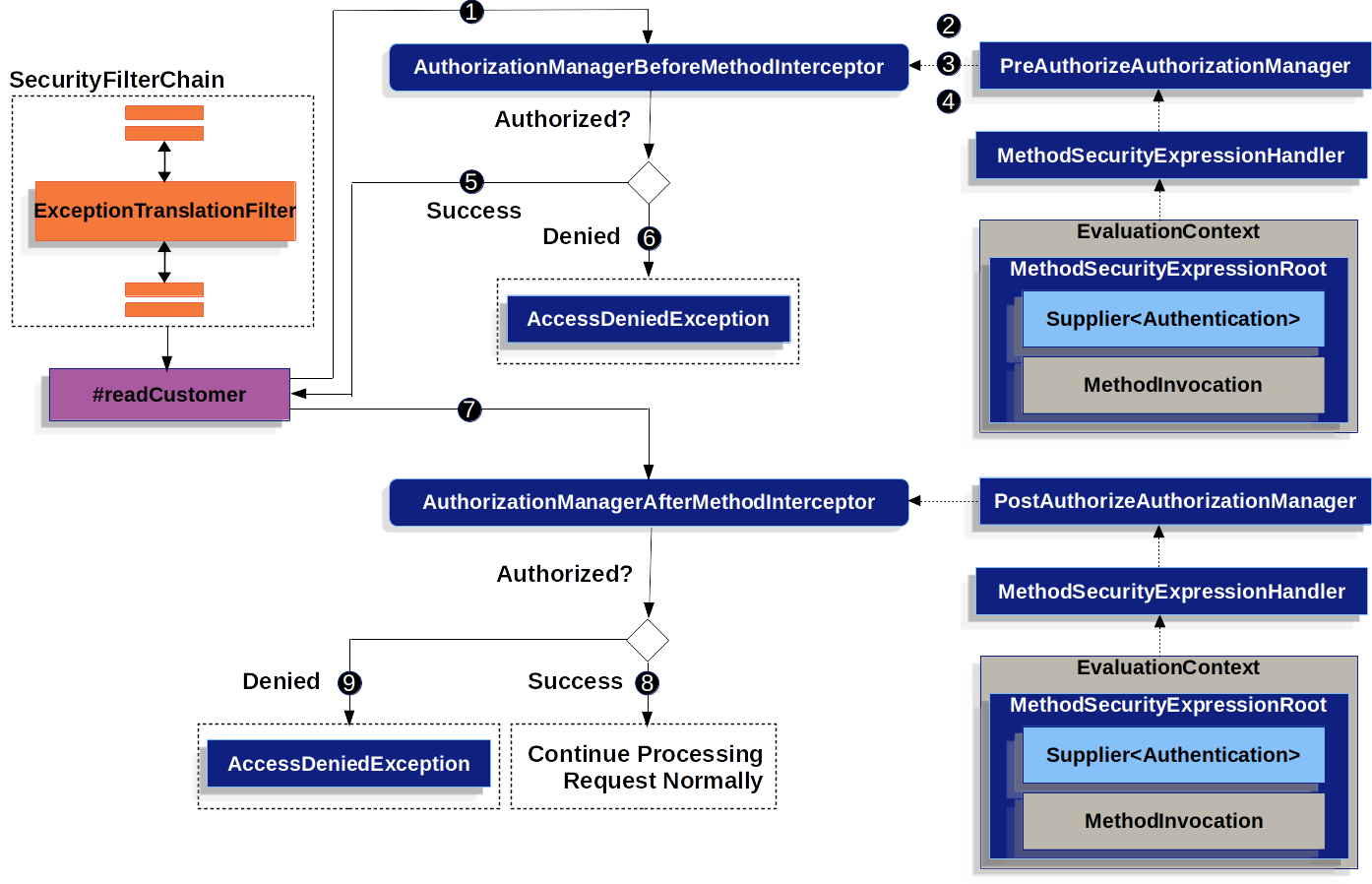
Spring Security uses Aspect-Oriented Programming (AOP) to enforce method security. When you annotate a bean with @EnableMethodSecurity, Spring creates a proxy around your beans (like controllers and services) that have security annotations.
When a secured method is called:
- The call is intercepted by the proxy.
- An interceptor (specifically,
AuthorizationManagerBeforeMethodInterceptor) checks for a@PreAuthorizeannotation. - It evaluates the SpEL expression using a
PreAuthorizeAuthorizationManager. This manager has access to the currentAuthenticationobject from theSecurityContext. - If the expression returns
true, the proxy invokes the original method. - If it returns
false, the interceptor throws anAccessDeniedExceptionimmediately, and the original method is never called.
This entire flow happens before your method's code even begins to execute.
Conclusion
You have now added a powerful and flexible tool to your security toolkit. Method-level security with @PreAuthorize allows you to move authorization logic out of cluttered if-else blocks and into clean, declarative annotations that live right next to the business logic they protect.
Key Takeaways:
- Method-level security provides fine-grained control that complements broader URL-based rules.
- It is enabled by adding
@EnableMethodSecurityto your security configuration. - The
@PreAuthorizeannotation evaluates a SpEL expression before a method is executed. - SpEL allows for complex rules, including checks based on user roles (
hasRole), authentication status (isAuthenticated), and even method arguments (#argumentName). - This mechanism is implemented using AOP proxies that intercept method calls.
What's Next?
In this lesson, you've learned the fundamental mechanism for securing methods. In our next lesson, Configure role-based access control (RBAC) for API endpoints, we will build on this foundation. We'll discuss strategies for designing and implementing a comprehensive RBAC system, ensuring your API is secure, scalable, and easy to manage as your application grows.