Hello! Welcome back to our journey into backend development.
In our last lesson, we saw how to create JpaRepository interfaces to get a full suite of CRUD (Create, Read, Update, Delete) methods without writing any implementation code. This is incredibly powerful for basic database operations. However, real-world applications often require more specific queries. For instance, how would you find a product by its name? Or search for all products within a certain price range? The default findAll() and findById() methods won't be enough.
This is where today's topic comes in. Our goal is to learn how to write custom query methods using Spring Data JPA's naming conventions. This feature, often called "derived queries," allows Spring to automatically generate the necessary database queries simply by analyzing the names of the methods you declare in your repository interface. It's a powerful way to extend your data access layer while keeping your code clean and readable.
Let's dive in and see how we can "teach" our repositories to perform more complex searches.
1. The Anatomy of a Derived Query Method
The magic of derived queries lies in a specific naming structure that Spring Data JPA understands. By following this convention, you can express surprisingly complex query logic.
A derived query method name is composed of two main parts, separated by the keyword By:
[Introducer]By[Criteria]
- Introducer: This prefix tells Spring Data JPA what the query should do. Common introducers are
find,get,read, andquery, which all retrieve entities. Another useful introducer iscount, which returns the number of matching entities. - Criteria: This part describes the conditions for the query. It's formed by combining the names of your entity's properties (like
nameorprice) with special keywords (likeContainingorLessThan).
For example, in our ProductRepository, a method to find products by their name would be:
List<Product> findByName(String name);
Here, find is the introducer, and Name is the criteria, which corresponds to the name property in our Product entity. When you call this method, Spring Data JPA automatically generates and executes a query similar to SELECT * FROM products WHERE name = ?.
To get a formal introduction to this concept, the following resource provides a great starting point.
Spring Data JPA Derived Queries
The article "Spring Data JPA Derived Queries" from CodingNomads clearly explains the fundamental concept and structure of derived query methods.
Please read the sections "What is a Derived Query Method?" and "How are Derived Query Methods Structured?". This will reinforce the core idea of the introducer and criteria separated by the By keyword.
2. Building Criteria with Keywords
The real power of derived queries comes from the rich set of keywords you can use in the criteria part of the method name. Let's explore the most common ones.
We'll use our Product entity as a reference, assuming it has properties like name (String), price (BigDecimal), and dateAdded (LocalDate).
Equality and Similarity Keywords
These are for exact matches, non-matches, and pattern matching on strings.
| Keyword | Example Method | Generated SQL (Conceptual) |
|---|---|---|
(none) or Is |
findByName(String name) |
... WHERE name = ? |
IsNot |
findByNameIsNot(String name) |
... WHERE name <> ? |
IsNull / IsNotNull |
findByDescriptionIsNull() |
... WHERE description IS NULL |
StartingWith |
findByNameStartingWith(String prefix) |
... WHERE name LIKE 'prefix%' |
EndingWith |
findByNameEndingWith(String suffix) |
... WHERE name LIKE '%suffix' |
Containing |
findByNameContaining(String infix) |
... WHERE name LIKE '%infix%' |
IgnoreCase |
findByNameContainingIgnoreCase(String infix) |
... WHERE UPPER(name) LIKE UPPER('%infix%') |
Notice that for keywords like StartingWith or Containing, you don't need to add the % wildcard characters to the input string; Spring Data JPA handles that for you. The IgnoreCase modifier is particularly useful for user-driven search functionality.
Comparison Keywords
These are essential for working with numerical values and dates.
| Keyword | Example Method | Generated SQL (Conceptual) |
|---|---|---|
LessThan |
findByPriceLessThan(BigDecimal price) |
... WHERE price < ? |
GreaterThan |
findByPriceGreaterThan(BigDecimal price) |
... WHERE price > ? |
LessThanEqual |
findByStockLessThanEqual(int stock) |
... WHERE stock <= ? |
GreaterThanEqual |
findByStockGreaterThanEqual(int stock) |
... WHERE stock >= ? |
Between |
findByPriceBetween(BigDecimal min, BigDecimal max) |
... WHERE price BETWEEN ? AND ? |
After / Before |
findByDateAddedAfter(LocalDate date) |
... WHERE date_added > ? |
In |
findByNameIn(Collection<String> names) |
... WHERE name IN (?, ?, ...) |
The Between and In keywords are very powerful for building filters. For example, findByPriceBetween could power a price range slider on a website, and findByNameIn could retrieve a specific list of products based on a user's selection.
The following resource provides excellent examples for all these keywords.
Derived Query Methods in Spring Data JPA Repositories
Baeldung's article on derived queries is a comprehensive reference. It covers a wide range of keywords with clear code examples.
Please read sections 4 ("Equality Condition Keywords"), 5 ("Similarity Condition Keywords"), and 6 ("Comparison Condition Keywords"). Pay attention to the variety of keywords available, especially Between, In, After, and Before, which are very practical.
Test your understanding!
Imagine our Product entity has a boolean property isAvailable. How would you write a derived query method to find all products that are currently available? What about a method to find all products with a stock level of less than 10?
Show answer
- To find available products:
List<Product> findByIsAvailableTrue(); - To find products with low stock:
List<Product> findByStockLessThan(int stockLevel);(You would then call it with the value10).
3. Combining Conditions and Advanced Techniques
Derived queries can be much more than single-condition lookups. You can combine criteria, query into related entities, and control the result set.
Combining with And and Or
You can chain multiple criteria together using And and Or to build more complex logic. The order of method parameters must match the order of the criteria in the method name.
findByIsAvailableTrueAndPriceLessThan(BigDecimal maxPrice): Finds available products cheaper than a given price.findByNameContainingOrDescriptionContaining(String query, String query): A basic search that looks for a term in either the name or the description.
Querying Nested Properties
What if you want to find all products belonging to a category with a specific name? In our data model, Product has a Category object. You can "traverse" this relationship using an underscore (_).
// Assuming Product has a 'Category category' field, and Category has a 'String name' field
List<Product> findByCategory_Name(String categoryName);
This is extremely useful for filtering based on the properties of related entities without having to fetch them first.
Limiting and Sorting Results
You can control the sorting and size of your results directly in the method name.
- Sorting: Use the
OrderBykeyword followed by the property name and an optional direction (Ascfor ascending,Descfor descending).findByCategory_NameOrderByPriceAsc(String categoryName): Finds products in a category, sorted by price from lowest to highest.
- Limiting: Use the
ToporFirstkeywords to limit the number of results. You can specify a number, likefindTop5....findFirstByOrderByDateAddedDesc(): Returns the single newest product.findTop5ByOrderByPriceDesc(): Returns the 5 most expensive products.
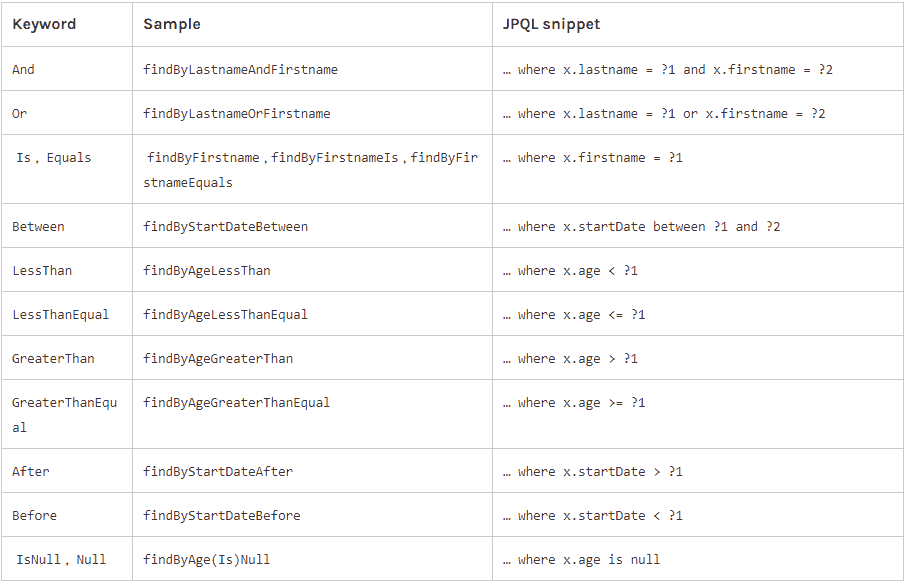
This summary table provides a fantastic visual overview of how these keywords map to query logic.
4. Practical Application
Now, let's put this into practice. In your project, you should have a ProductRepository interface. Try adding the following method declarations to it:
public interface ProductRepository extends JpaRepository<Product, Long> {

    // Find products by name, ignoring case
    List<Product> findByNameContainingIgnoreCase(String name);

    // Find products within a specific price range
    List<Product> findByPriceBetween(BigDecimal startPrice, BigDecimal endPrice);

    // Find the 10 most recently added products
    List<Product> findTop10ByOrderByDateAddedDesc();

    // Find products belonging to a specific category by the category's name
    List<Product> findByCategory_Name(String categoryName);

    // Count how many products are in a given category
    long countByCategory_Name(String categoryName);

}
You don't need to write any implementation! Just declare these methods. You can then inject your ProductRepository into a service or a CommandLineRunner and call them to see them in action.
Conclusion
Today you've learned one of Spring Data JPA's most productive features. By adhering to a clear naming convention, you can create a wide range of custom queries without writing a single line of SQL or JPQL.
Key Takeaways:
- Derived queries follow the structure
[Introducer]By[Criteria]. - You can build criteria using keywords for equality (
Is,IsNot), similarity (Containing), comparison (LessThan,Between), and more. - Conditions can be combined with
AndandOr. - You can query properties of related entities using the underscore character (e.g.,
findByCategory_Name). - Results can be sorted (
OrderBy...Desc) and limited (findTop5...).
What's Next?
Derived queries are excellent for a majority of use cases. However, method names can become very long and unreadable for highly complex queries. What if your logic is too complicated to be expressed in a method name? In our next lesson, we will address this limitation by learning how to implement custom queries using the @Query annotation with JPQL. This will give you full control to write any query you can imagine.