Hello! Welcome back to our course on backend development.
In the last lesson, we explored derived queries, a powerful feature of Spring Data JPA that lets us create custom queries just by naming our repository methods correctly. This is fantastic for common, straightforward lookups. However, you might have imagined scenarios where the query logic becomes too complex for a method name, or the name itself becomes long and hard to read.
This lesson addresses that exact limitation. Our learning outcome is to implement custom queries using the @Query annotation with JPQL. This approach gives you complete control to write powerful, readable, and complex queries directly within your repository, moving beyond the constraints of method naming conventions.
1. When Derived Queries Aren't Enough: Introducing @Query and JPQL
Derived queries are excellent for their simplicity and "convention over configuration" approach. But they have their limits:
- Complex Logic: Logic involving multiple joins, subqueries, or complex calculations is difficult or impossible to express in a method name.
- Readability: A method like
findByCategory_NameAndIsAvailableTrueAndPriceBetweenOrderByPriceAscis valid, but it's a mouthful and hard to maintain. - Flexibility: You are limited to the keywords provided by Spring Data JPA.
The @Query annotation is the solution. It allows you to define a query as a String directly on your repository method. This query is typically written in JPQL (Java Persistence Query Language).
Think of JPQL as a sibling to SQL. The key difference is that JPQL operates on your Java entities and their fields, not on database tables and columns. This makes your queries object-oriented and, importantly, database-agnostic. The same JPQL query will work whether you're using MySQL, PostgreSQL, or another database.
Ultimate Guide: Custom Queries with Spring Data JPA's ...
To start, let's get a formal introduction to the @Query annotation and the role of JPQL. The article "Ultimate Guide: Custom Queries with Spring Data JPA's @Query Annotation" by Thorben Janssen provides a concise overview.
Please read the introduction and the section "JPQL Queries". Focus on understanding why JPQL is often preferred (it's based on your domain model and is database-agnostic).
2. Writing Your First JPQL Query
Using @Query is straightforward. You annotate a method in your repository interface and provide the JPQL query as a string.
Let's say we have our ProductRepository. A derived query to find a product by its exact name would be findByName(String name). Here's how you'd write the same thing using @Query:
import org.springframework.data.jpa.repository.Query;
import org.springframework.data.repository.query.Param;
// ... other imports

public interface ProductRepository extends JpaRepository<Product, Long> {

    @Query("SELECT p FROM Product p WHERE p.name = :name")
    Optional<Product> findProductByName(@Param("name") String name);

}
Let's break this down:
@Query(...): The annotation that holds our query.SELECT p FROM Product p: This is JPQL. Notice we are selecting fromProduct, the entity class, and assigning it an aliasp. We then refer to its fields likep.name.WHERE p.name = :name: This is the condition.:nameis a named parameter.@Param("name") String name: The@Paramannotation links the method parameternameto the named parameter:namein the query string. This is the recommended way to pass parameters as it's explicit and not dependent on parameter order.
The image below shows more examples of this syntax in action.
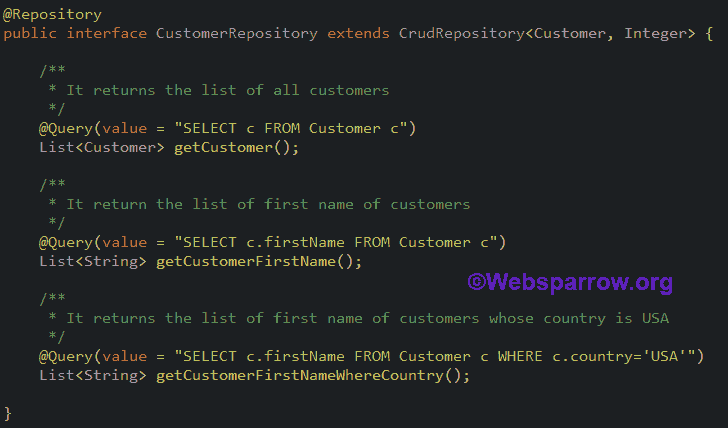
While you can also use indexed parameters (e.g., ?1, ?2), named parameters are strongly preferred because they make your queries more readable and less prone to errors if you change the order of method arguments.
The following article from Baeldung provides clear examples of basic queries and how to handle both indexed and named parameters. It's a great reference for the fundamental syntax.
Please read section 2.1 ("JPQL") for a basic query example. Then, read sections 6 ("Indexed Query Parameters") and 7 ("Named Parameters"). Pay close attention to the syntax for named parameters with @Param, as this is the best practice.
Test your understanding!
In the previous lesson, we wrote a derived query findByNameContainingIgnoreCase(String name). How would you rewrite this using @Query with JPQL and a named parameter?
Hint: JPQL has functions like LOWER() and you can use the LIKE operator with % wildcards.
Show answer
Here's one way to do it:
@Query("SELECT p FROM Product p WHERE LOWER(p.name) LIKE LOWER(CONCAT('%', :searchTerm, '%'))")
List<Product> findByNameSearch(@Param("searchTerm") String searchTerm);
In this query:
LOWER()is used on both the product name and the search term to make the comparison case-insensitive.CONCAT('%', :searchTerm, '%')wraps the search term with wildcard characters, achieving the same result as theContainingkeyword.
3. Modifying Data with @Modifying
The @Query annotation isn't just for reading data. You can also perform UPDATE or DELETE operations. Since these queries modify the state of the database, you must add another annotation: @Modifying.
This is crucial because it tells Spring Data JPA that the query is not a SELECT and requires a different execution path. Modifying queries typically return an int or void. An int return type will indicate the number of rows affected by the query.
Here’s an example of a bulk update to set a new price for all products in a given category:
@Modifying
@Query("UPDATE Product p SET p.price = :newPrice WHERE p.category.id = :categoryId")
int updatePriceForCategory(@Param("newPrice") BigDecimal newPrice, @Param("categoryId") Long categoryId);
Notice two things:
- The presence of
@Modifyingabove@Query. - The JPQL uses
UPDATE Product...syntax.
Ultimate Guide: Custom Queries with Spring Data JPA's ...
The article from Thorben Janssen explains the need for the @Modifying annotation clearly. This is a critical concept for writing update or delete queries.
Read the section "Modifying Queries" to understand how and why to use the @Modifying annotation.
4. Advanced Control: Sorting and Pagination
Just like with derived queries, you can easily apply sorting and pagination to your @Query methods.
-
Pagination: To enable pagination, simply add a
Pageableparameter to your method and make the return typePage<EntityType>. Spring Data JPA will automatically add the necessary limit and offset clauses to the generated SQL.@Query("SELECT p FROM Product p WHERE p.category.name = :categoryName") Page<Product> findByCategory(@Param("categoryName") String categoryName, Pageable pageable); -
Sorting: You have two options for sorting:
- Static Sorting: Hard-code an
ORDER BYclause directly in your JPQL string.
@Query("SELECT p FROM Product p ORDER BY p.price DESC") - Dynamic Sorting: Add a
Sortparameter to your method. Spring Data JPA will append theORDER BYclause for you based on theSortobject you provide when you call the method. This is more flexible.
@Query("SELECT p FROM Product p WHERE p.isAvailable = true") List<Product> findAvailableProducts(Sort sort); // You could then call it like this: // productRepository.findAvailableProducts(Sort.by("price").ascending()); - Static Sorting: Hard-code an
The Baeldung article provides excellent, focused examples of implementing both pagination and sorting with @Query.
Please read section 5.1 ("JPQL") on pagination and section 3.2 ("JPQL") on sorting. Note how Pageable and Sort can be added as method parameters to make your queries dynamic.
Conclusion
You now have the most powerful tool in the Spring Data JPA toolbox at your disposal. While derived queries are perfect for simple cases, the @Query annotation gives you the ultimate control to handle any data access requirement your application might have.
Key Takeaways:
- Use
@Querywith JPQL for complex or highly specific database queries that are difficult to express with derived query method names. - JPQL is an object-oriented query language that works with your entities and fields, making it database-independent.
- Always use named parameters (
:paramName) with the@Paramannotation for clarity and safety. - For
UPDATEorDELETEoperations, you must add the@Modifyingannotation. - You can still leverage dynamic sorting (
Sort) and pagination (Pageable) by adding them as parameters to your@Query-annotated methods.
What's Next?
So far, we've focused on how to create, read, update, and delete data. But often, we need to perform actions automatically whenever an entity is saved or updated—for example, setting createdAt and updatedAt timestamps. In our next lesson, we will dive into configuring entity lifecycle callbacks using @PrePersist and @PreUpdate to automate this kind of behavior.