Welcome back! In our previous lessons, we've focused on the practical side of React: writing JSX, creating functional components, and passing data using props. You're now comfortable building the "what" of a UI. In this lesson, we'll peel back a layer of abstraction to understand the "how" and "why" behind React's rendering process.
This session addresses a fundamental concept that is a frequent topic in senior developer interviews: the distinction between a React element and a React component. Mastering this difference is not just academic; it's the key that unlocks a deeper understanding of React's performance, its virtual DOM, and its entire rendering philosophy. This knowledge will be invaluable as you progress toward building complex, high-performance applications.
The Blueprint and the Description
At a high level, the relationship between a component and an element is best understood through an analogy from your programming background: a component is like a class (or a factory function), while an element is like a description of an object to be created from that class.
- A Component is the blueprint or recipe. It's the function or class you write that defines a piece of your UI and its behavior. It can accept inputs (props) and have its own internal state.
- An Element is an immutable description of what to render. It's a lightweight, plain JavaScript object that React creates as a result of calling your component. It tells React, "I want a
divwith this class name" or "I want aUserProfilecomponent with thisuserprop."
You write components. React uses them to produce elements, which it then uses to manage the UI. Let's break this down.
What is a React Component?
As we've seen, a component is a reusable, self-contained piece of UI. In modern React, this is typically a JavaScript function that accepts props and returns what should be rendered.
// This is a COMPONENT. It's a function definition. A blueprint.
function Welcome({ name }) {
  // It returns an ELEMENT.
  return <h1>Hello, {name}</h1>;
}
The key takeaway is that the component is the definition itself. It's the code you write and export. React takes this blueprint and uses it when it needs to render that part of the UI.
What is a React Element?
When React sees <Welcome name="Sarah" /> in your JSX, it doesn't immediately create a DOM node. First, it calls your Welcome component with props as { name: 'Sarah' }. Your component returns a description of the UI it wants. This description is the React element.
In our first lesson, we learned that JSX is syntactic sugar for React.createElement(). This function call is what produces the element object.
The video below provides an excellent deep dive, showing exactly how JSX is transpiled by Babel into React.createElement() calls and what the resulting element objects look like.
How Does React Actually Work? React.js Deep Dive #1
This video from the channel Philip Fabianek clearly illustrates the transformation from JSX to React elements.
Watch the segment from the beginning. Pay close attention to the structure of the plain JavaScript object that React.createElement returns. You'll see properties like type, props, and $$typeof. This object is the React element.
As you saw in the video, an element is just a simple object. For <h1 className="greeting">Hello</h1>, the element object looks something like this:
{
  type: 'h1',
  props: {
    className: 'greeting',
    children: 'Hello'
  },
  // ... and other internal properties
}
Crucially, elements are immutable. Once you create one, you don't change its properties. If you want to render something different, you create a new element. This immutability is fundamental to how React efficiently checks for changes.
Putting It All Together: Components, Elements, and Instances
So, a component is a function that returns an element. But what happens when the type of an element is another component, like <Welcome name="Sarah" />?
This creates an element where the type is not a string (like 'h1') but a function (the Welcome component itself).
{
  type: Welcome, // The component function!
  props: {
    name: 'Sarah'
  },
  // ...
}
When React encounters an element of a component type, it knows it needs to do more work. It calls the Welcome component with { name: 'Sarah' } to find out what element it renders. React continues this process recursively until it has a complete tree of elements with simple string types (like div, h1, p, etc.). This final tree of elements is often called the Virtual DOM.
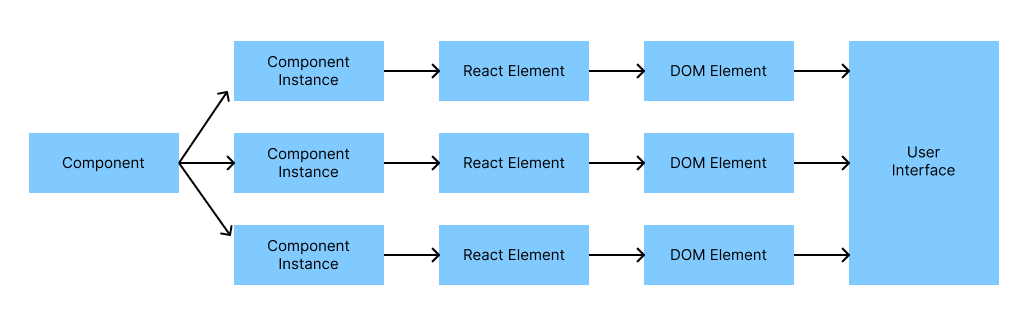
This flow introduces a third important term: the component instance. An instance is the "living" version of a component that React manages. It's what holds the local state and lifecycle. While class components made this concept explicit with this, in functional components, the instance is the conceptual "place" where hooks like useState attach their data.
The following flowchart provides a clear visual summary of this entire process.
For a concise, interview-ready summary of these definitions, the following article is an excellent resource.
This article from GreatFrontend frames the distinction as a quiz question, making it perfect for interview preparation.
Read the definitions provided for React Element and React Component. Note the keywords: an element is an immutable, plain object, while a component is a reusable piece of UI (a function or class) that returns elements.
To see these concepts explained in a slightly different way, tying together elements, components, and the recursive rendering process, this short video is also very helpful.
Understanding this React concept will make you a pro React developer!
This video by Code Sketched provides a quick, animated explanation of the rendering process from component to element tree.
Watch from the beginning. The video's visualization of React creating an "element definition" (a JSON representation) for each component and recursively resolving them is a great mental model to have.
The Canonical Explanation
Dan Abramov, a key figure on the React team, wrote a blog post that is considered the definitive explanation of this topic. It's a bit older and uses some class component syntax, but the concepts are timeless. Reading just the summary will solidify your understanding.
React Components, Elements, and Instances – React Blog
This classic post from the official React blog provides an authoritative summary of these core concepts.
Read the Summary at the end of the article. It perfectly encapsulates the role of each piece: elements describe the UI, components are the functions/classes that return them, and instances are the stateful entities managed by React.
Conclusion
Understanding the difference between components and elements moves you from being a user of React to an engineer who understands its inner workings. This is a critical step on the path to senior-level proficiency.
Key Takeaways:
- A Component is a blueprint: a function or class you write to define a reusable piece of UI.
- An Element is an immutable description: a plain JavaScript object returned by a component that tells React what to render. JSX compiles to
React.createElement()calls that produce these objects. - An Instance is the stateful entity that React creates and manages for each component in the tree, which holds state and lifecycle information.
- React builds a tree of elements (the "virtual DOM") by recursively calling your components and managing their instances.
In our next lesson, we will build directly on this foundation. We will explore the purpose of the virtual DOM and the basics of reconciliation—the process React uses to compare element trees and efficiently update the actual browser DOM. Your understanding of elements as lightweight descriptive objects will be essential.