Welcome back. In our last lesson, we established a crucial distinction: you write components, and React uses them to create elements—lightweight, descriptive objects that form a blueprint of your UI. We called this blueprint a "tree of elements."
Today, we will explore what React does with this blueprint. This lesson dives into the heart of React's performance model, covering the purpose of the virtual DOM and the fundamentals of the reconciliation process. Understanding this mechanism is non-negotiable for any senior developer, as it explains how React achieves its speed and why certain coding patterns are essential for building performant applications.
The Core Problem: The Expensive DOM
Before React, web applications often manipulated the Document Object Model (DOM) directly. The DOM is the browser's tree-like representation of a webpage's structure. While powerful, direct and frequent manipulation of the DOM is computationally expensive. Every time you change a DOM node, the browser might need to perform a "reflow" (recalculating the layout of elements) and a "repaint" (redrawing the affected parts of the screen). These are blocking operations that can easily lead to a slow, janky user experience if not handled carefully.
React's Solution: The Virtual DOM
React's solution is to minimize direct interaction with the DOM. It does this by keeping an in-memory representation of the UI—this is the Virtual DOM (VDOM). The VDOM is not a special technology; it's simply the tree of React elements we discussed in the last lesson, living as a plain JavaScript object.
Think of it this way:
- The Real DOM is like a physical building. Making changes—like moving a wall—is slow, labor-intensive, and disruptive.
- The Virtual DOM is the architect's blueprint for that building. You can erase, redraw, and modify the blueprint almost instantly with no real-world cost.
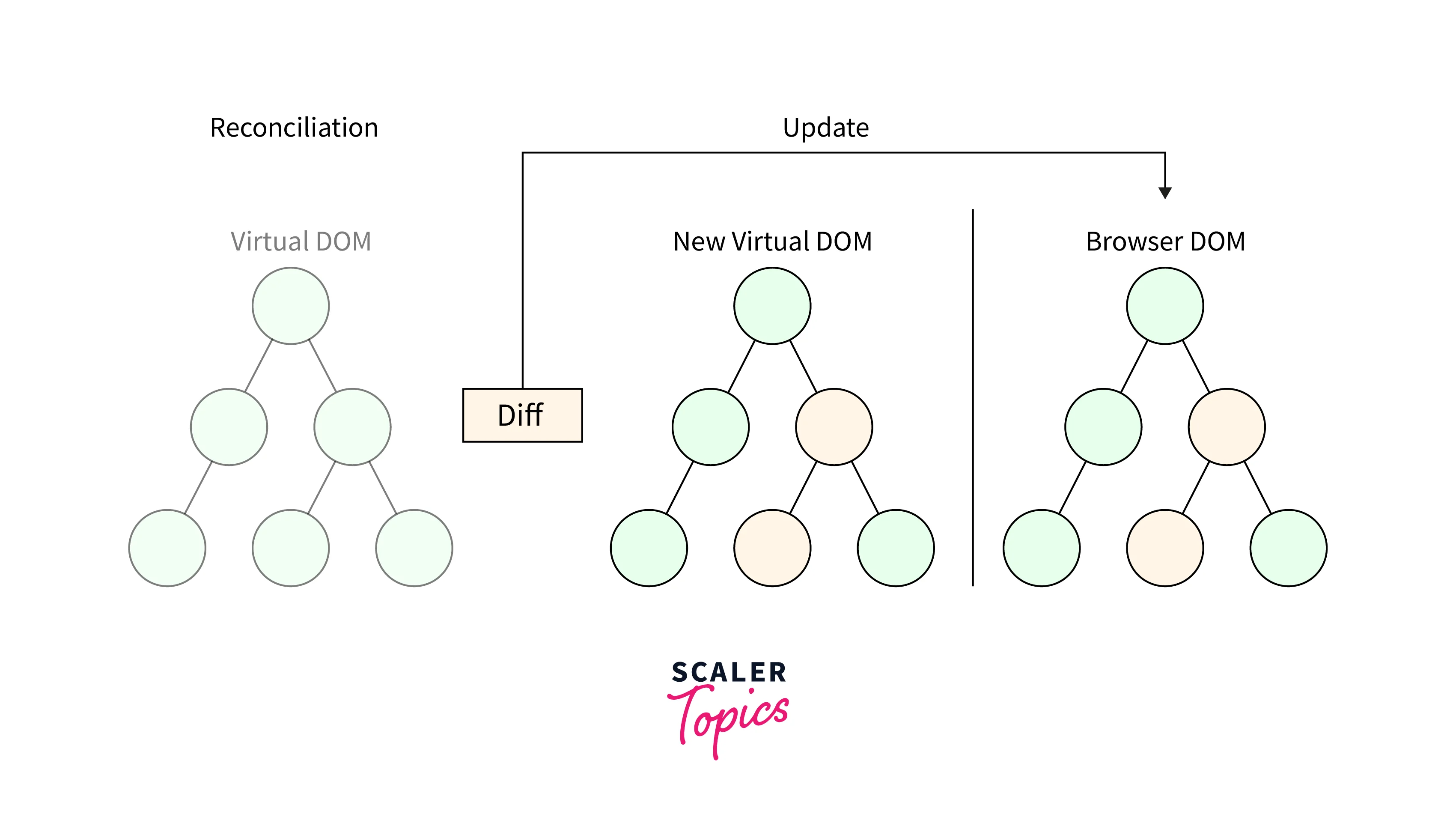
When you update your application's state, React doesn't immediately rush to change the physical building. Instead, it creates a new blueprint (a new VDOM tree) and compares it to the old one. This comparison process is called reconciliation.
Reconciliation: Finding the Difference
After a state update, React has two VDOM trees in memory: the old one representing the current UI, and a new one representing the next UI. The goal of reconciliation is to figure out the most efficient way to transform the old tree into the new one. The algorithm it uses for this comparison is known as the "diffing" algorithm.
Once React calculates the minimal set of changes required (e.g., "change the className on this element," "add a new child element here," "remove this element"), it then executes these changes in a single, optimized batch on the real DOM.
This entire flow is visualized below.
The "Rules" of Reconciliation
Comparing two arbitrary trees is a complex problem, typically with O(n³) complexity. To make this process fast enough for UIs, React's diffing algorithm employs a set of heuristics, or "rules," based on common developer patterns. Understanding these rules is key to writing efficient React code.
The following article from DeveloperWay provides an excellent, practical exploration of these rules by starting with a common "mystery" in conditional rendering. It will walk you through exactly how React thinks about updates.
React reconciliation: how it works and why should we care
This article explains the core concepts of reconciliation through a practical, problem-solving approach.
Start by reading the introduction to understand the "mystery" scenario. Then, read the sections React reconciliation algorithm, which explains how React elements form the VDOM tree, and Reconciliation and state update, which introduces the first major rule of the diffing algorithm. Finally, read The answer to the mystery to see how this rule explains the initial puzzling behavior. Focus on how React compares the type of elements.
As you've just read, the first and most important heuristic is:
Rule #1: If the element type at the same position changes, React tears down the old tree and builds a new one from scratch.
When React sees <div /> change to <span />, or a <Profile /> component change to a <Login /> component, it doesn't try to find similarities. It unmounts the old component (destroying its state and DOM nodes) and mounts the new one. This is why, in the article's example, swapping between two <Input /> components in a ternary expression didn't reset the state—because the type (Input) remained the same. React just updated its props.
This rule also explains a critical anti-pattern: defining a component inside another component's render body.
// Anti-pattern: Do not do this!
function ParentComponent() {
  // InnerComponent is re-created on every render of ParentComponent.
  const InnerComponent = () => <input />;

  // React sees a different 'type' on every render, causing unmount/remount.
  return <InnerComponent />;
}
Every time ParentComponent re-renders, InnerComponent is a new function definition. From React's perspective, the type has changed, leading to unnecessary and buggy re-mounts.
Reconciling Lists of Children
The first rule works well for single elements, but what about lists? This brings us to the second heuristic, which revolves around a prop you've likely seen before: key.
Let's continue with the same article to see how keys solve the problem of efficiently updating lists.
React reconciliation: how it works and why should we care
This section explains the second major rule of reconciliation.
Now, read the sections Reconciliation and "key" and the two paragraphs that follow. This part is crucial for interviews. Pay close attention to why React needs keys for lists and how providing a stable key allows React to correctly identify elements that have moved, been added, or been removed.
The second heuristic is:
Rule #2: The developer can use a key prop to provide a stable identity for elements in a list across re-renders.
When React diffs a list of children, it first compares the lists with and without keys.
- Without
keys: React compares items by their index (the first new item with the first old item, etc.). If you insert an item at the beginning of the list, React will think every item has changed, leading to inefficient updates and potential bugs with component state. - With
keys: React uses thekeyto match children in the old tree with children in the new tree. Akeyshould be a string or number that is unique and stable among its siblings. This allows React to understand that an element has simply been re-ordered, not deleted and re-created.
For a great visual summary of these rules, the following video is an excellent supplement.
The Magic of React's Reconciliation: Behind the Scenes with a Microsoft Frontend Developer
This short video from Code Sketched provides a concise, animated overview of the reconciliation process and its rules.
Watch from the main explanation. This will visually reinforce the concepts of the VDOM, diffing based on element type, updating attributes, and the importance of the key prop for lists.
Preview of Modern React: The Fiber Reconciler
The reconciliation process we've described was, until React 16, a synchronous, blocking operation. If you had a very large component tree to update, the reconciliation could take longer than 16ms, causing the browser to drop frames and the UI to appear "frozen" or "janky."
To solve this, the React team rewrote the entire reconciliation algorithm. The new engine is called React Fiber.
The core idea of Fiber is to break the work of reconciliation into small, individual "units of work." Instead of a single, synchronous recursive traversal, Fiber can work on a few components, then pause and yield control back to the browser's main thread. This allows the browser to handle high-priority events (like user input or animations) without being blocked.

This asynchronous nature of Fiber is what enables modern concurrent features in React, which we will cover in depth later in the course. For now, it's important to understand the motivation behind it.
This LogRocket article gives a great overview of Fiber's purpose and high-level strategy.
Read the introduction, What is React Fiber?, to understand what it is. Then, jump to the section Problems with dropped frames to understand the "why" behind Fiber's creation. Finally, read the conceptual overview of how Fiber solves this problem by reimplementing the call stack. Don't worry about the specific implementation details for now; focus on the concepts of prioritization and interruptible work.
Conclusion
You've now uncovered the "magic" behind React's performance. By understanding the VDOM and the rules of reconciliation, you can make conscious decisions in your code to work with React, not against it.
Key Takeaways:
- Virtual DOM (VDOM): A lightweight, in-memory representation of the UI (a tree of JavaScript objects). It's cheap to create and modify.
- Reconciliation: The process of comparing two VDOM trees (the old and the new) to find the minimum number of changes needed to update the real DOM.
- Diffing Heuristics: React's reconciliation algorithm is fast because it uses two main rules:
- Different element types are assumed to produce different trees, causing a full tear-down and rebuild.
keyprops provide stable identities to elements in a list, enabling efficient re-ordering and updates.
- React Fiber: The modern reconciliation engine that makes rendering asynchronous and interruptible, preventing UI jank and enabling concurrent features.
In our next lesson, we will do a practical deep dive specifically on the key prop. We'll explore common pitfalls, best practices for choosing keys, and solidify your understanding of how to correctly render dynamic lists—a skill you will use in almost every React application.