Welcome back! In our last lesson, we covered the fundamentals of writing and running tests with pytest. You learned how pytest discovers tests, how to use assert for clear and powerful assertions, and how the "Arrange-Act-Assert" pattern gives tests a clean structure.
We concluded by noting that the "Arrange" and "Cleanup" phases, while simple for individual tests, can become repetitive and complex as a test suite grows. This lesson tackles that challenge head-on by introducing one of pytest's most powerful features: fixtures. Fixtures are pytest's elegant solution for managing test dependencies, state, and the setup/teardown lifecycle, allowing you to write cleaner, more scalable, and more maintainable tests.
By the end of this lesson, you'll be able to use fixtures to provide data to your tests, manage stateful resources like database connections or temporary files, and control their lifecycle for optimal performance.
From Repetition to Reusability: Introducing Fixtures
In any non-trivial test suite, you'll find yourself setting up the same objects or data structures repeatedly. Consider testing functions that operate on a predefined dataset. Copying and pasting that dataset into every test is inefficient and makes maintenance difficult.
Fixtures solve this by extracting the "Arrange" step into a reusable function. A fixture is a function decorated with @pytest.fixture that provides a resource to your tests. The tests that need this resource simply declare it as an argument, and pytest handles the rest through a mechanism that works like dependency injection.
Let's start with a practical guide from Real Python that illustrates this exact scenario.
Effective Python Testing With pytest
This article provides an excellent, step-by-step example of identifying duplicated test data and refactoring it into a fixture.
Read the section on creating fixtures. Pay close attention to how the people list is defined once in the example_people_data fixture and then simply passed as an argument to the test functions that need it. This is the fundamental pattern of fixture usage.
As you saw, the core idea is simple but powerful. Instead of setting up data inside each test, you define a fixture that returns the data. Then, any test that needs it can access it just by adding a parameter with the same name as the fixture function.
Managing Resources: Setup and Teardown with yield
Fixtures are far more powerful than just providing static data. Their primary purpose in large-scale applications is to manage the lifecycle of stateful resources—database connections, API clients, temporary directories, or even complex object graphs. In your work with data pipelines, this is analogous to managing a Spark session or a connection to a message queue; you want to initialize it before your tasks run and ensure it's properly closed afterward.
To handle this setup and teardown logic, pytest fixtures use the yield keyword. A fixture that uses yield becomes a generator. The code before the yield is the setup phase, which runs before the test starts. The yield statement passes control (and optionally, the resource object) to the test. Once the test completes, the code after the yield is executed as the teardown phase.
The video below gives a very clear demonstration of this process.
pytest: everything you need to know about fixtures (intermediate) anthony explains #487
This segment from anthonywritescode clearly explains how yield fixtures work for setup and teardown.
Watch the part from data to state. The example of creating a temporary directory is a classic use case. Notice how the with statement neatly handles the teardown when the fixture's execution resumes after the yield. The second, more explicit example with print("setup") and print("teardown") makes the execution order crystal clear.
Encapsulating the teardown logic with the setup logic in this way is a robust pattern. A common and highly recommended practice is to wrap the setup and yield in a try...finally block to guarantee that the cleanup code runs, even if the test fails.
import pytest

@pytest.fixture
def db_connection():


    # Setup phase: create and open the connection
    print("\nSetting up DB connection...")
    connection = create_database_connection()
    connection.open()

    try:


        # Yield the resource to the test
        yield connection
    finally:


        # Teardown phase: close the connection
        print("\nTearing down DB connection...")
        connection.close()

def test_query_data(db_connection):


    # The 'db_connection' argument receives the yielded connection object
    print("Running test_query_data...")
    assert db_connection.query("SELECT * FROM users;") is not None
In this example, connection.close() is guaranteed to be called after test_query_data finishes, ensuring that resources are never left dangling.
Optimizing Performance: Fixture Scope
By default, a fixture is set up and torn down for every single test function that uses it. For a lightweight object, this is fine. But for an expensive resource like a database connection or a Spark context, this is incredibly inefficient.
To control this behavior, pytest provides the scope parameter in the fixture decorator. The scope determines how long a fixture's instance will live.
The four main scopes are:
function: (Default) One fixture instance per test function.class: One fixture instance per test class.module: One fixture instance per test module (i.e., per.pyfile).session: One fixture instance for the entire test session (i.e., for the entirepytestrun).
The image below provides a great visual summary of these scopes.

Choosing the right scope is a trade-off between performance and test isolation. A session-scoped database connection is very fast, but you must ensure that your tests don't leave the database in a dirty state that could affect other tests.
Let's watch a demonstration of how changing the scope impacts execution.
pytest: everything you need to know about fixtures (intermediate) anthony explains #487
This segment demonstrates the practical effect of changing a fixture's scope from the default (function) to session.
Watch from scoping. Notice how the "setup" and "teardown" print statements appear multiple times with the default scope but only once at the beginning and end of the entire run when the scope is changed to session.
Scaling Your Test Suite: Sharing Fixtures with conftest.py
As you build out your test suite, you'll want to reuse fixtures across multiple test files. Defining them in each file would defeat the purpose of reusability.
pytest solves this with a special file named conftest.py. Fixtures defined in a conftest.py file are automatically available to all tests in the same directory and any subdirectories, without needing to be imported.
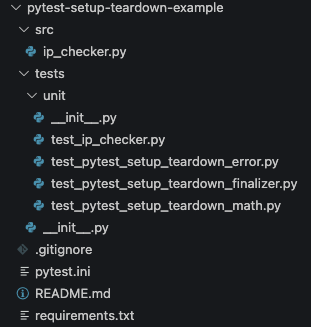
This is the standard mechanism for sharing project-wide fixtures, such as a database connection, an API client, or application configuration objects.
The anthonywritescode video explains this concept well.
pytest: everything you need to know about fixtures (intermediate) anthony explains #487
This final segment explains how conftest.py allows fixtures to be shared across files and directories.
Watch the explanation starting at conf test dot pi. The key takeaway is that conftest.py acts as a central, automatically-discovered repository for your shared fixtures.
A final powerful feature to be aware of is fixture composition. Fixtures can request other fixtures as dependencies, just like tests do. This allows you to build complex setup logic from smaller, modular, and reusable components.
# in conftest.py

@pytest.fixture(scope="session")
def app_config():


    # Loads configuration from a file
    return load_config("config.yaml")

@pytest.fixture(scope="session")
def db_connection(app_config): # This fixture uses another fixture


    # Uses the loaded config to connect to the database
    conn = connect_to_db(app_config["database_url"])
    yield conn
    conn.close()


# in test_users.py
def test_user_creation(db_connection):


    # This test only needs to know about the final resource
    # It doesn't need to know how the connection was configured or created
    ...
Conclusion
In this lesson, you've learned how to leverage pytest fixtures to build a robust and scalable testing foundation. They are the key to managing dependencies and state in a clean, explicit, and reusable manner.
Here are the main takeaways:
- Fixtures provide test resources: They replace repetitive setup code and are injected into tests by matching the argument name to the fixture function name.
yieldfor setup and teardown: Use ayieldstatement to separate resource creation (setup) from resource cleanup (teardown), ensuring reliable state management.scopecontrols lifecycle and performance: You can optimize your test runs by setting the fixturescopetofunction,class,module, orsession, controlling how often expensive setup is performed.conftest.pyfor sharing: Place your widely-used fixtures in aconftest.pyfile to make them automatically available across your test suite.
You are now equipped to manage the "Arrange" and "Cleanup" phases of your tests professionally. In the next lesson, we will build upon this by exploring test parameterization. You'll learn how to use the @pytest.mark.parametrize decorator to run a single test function with multiple sets of inputs, often in combination with data provided by fixtures, allowing you to cover many scenarios with minimal code.