Welcome back! In our previous lesson, we explored Python's powerful collection data types—lists, tuples, sets, and dictionaries—which allow us to store and organize groups of data. Now that we have ways to structure our data, the next logical step is to learn how to make decisions and control the flow of our programs based on that data.
This lesson addresses exactly that. We will cover conditional statements, the fundamental building blocks of decision-making in any programming language. You will learn to write if, elif, and else statements to execute different code blocks based on specific conditions. We'll also dive into the comparison and logical operators that form these conditions. Given your background, we'll move at a brisk pace through the basic concepts and focus on Python's unique syntax and idiomatic approaches, such as truthiness, chained comparisons, and the distinction between value and identity.
The Foundation: if Statements and Indentation
At its core, a conditional statement checks if an expression is true and, if so, executes a block of code. In Python, the syntax is clean and relies on a colon (:) and indentation.
Unlike many languages that use curly braces {} to define code blocks, Python uses whitespace. This is known as the "off-side rule," and it's a defining feature of the language that enforces readable code. All lines indented to the same level after a colon belong to the same block.
Let's begin with a video from Corey Schafer that introduces the basic structure of if, elif, and else.
Python Tutorial for Beginners 6: Conditionals and Booleans - If, Else, and Elif Statements
This video from Corey Schafer's acclaimed Python series provides a clear, step-by-step introduction to conditional logic.
First, watch the segment on the basic if statement to see how a condition is evaluated: basic if. Next, see how to provide an alternative path of execution when the if condition is false using the else clause: else statement. Finally, learn how to handle multiple, mutually exclusive conditions in a sequence with the elif (else if) statement: elif statement. Notice his point about elif chains being Python's equivalent of a switch-case structure found in other languages.
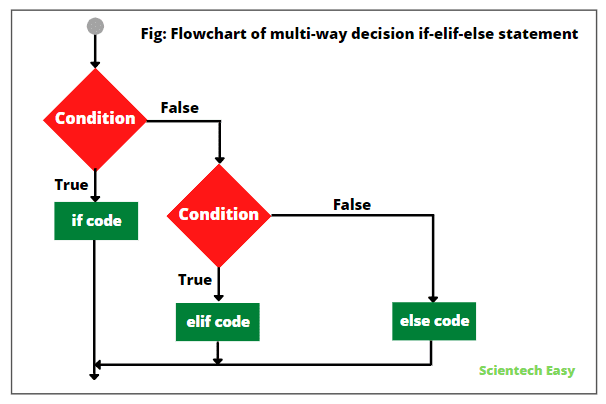
The logical flow of an if-elif-else chain can be visualized as a series of decision points. The program evaluates each condition sequentially until one is found to be true, at which point its corresponding code block is executed, and the rest of the chain is skipped. If no conditions are met, the final else block is executed.
Building Conditions: Comparison and Logical Operators
The power of conditional statements comes from the expressions they evaluate. These are built using comparison and logical operators.
Comparison operators determine how two values relate (e.g., equality, inequality, magnitude).
Logical operators (and, or, not) allow you to combine or invert boolean expressions to create more complex logic.
The table below provides a convenient summary of the most common operators.

Let's return to Corey Schafer's video to see these operators in action. Pay close attention to his explanation of the difference between == and is.
Python Tutorial for Beginners 6: Conditionals and Booleans - If, Else, and Elif Statements
This part of the video covers the operators used to construct boolean expressions.
Watch the overview of comparison operators, which are used to compare values: comparisons. Next, learn how to combine multiple conditions using the logical operators and, or, and not: logical operators. Finally, focus on the critical distinction between value equality (==) and object identity (is). This is a subtle but vital concept for any serious Python developer: equality vs identity.
As a brief summary of that last point:
a == bchecks if the values ofaandbare equal.a is bchecks ifaandbrefer to the exact same object in memory. It's equivalent to checkingid(a) == id(b).
For mutable objects like lists, you can have two distinct objects that are equal in value but not identical.
list_a = [1, 2, 3]
list_b = [1, 2, 3]

print(list_a == list_b)  # True, their contents are the same
print(list_a is list_b)  # False, they are two different objects in memory
Pythonic Conditionals and Nuances
Beyond the basic syntax, Python offers several idiomatic features that make conditional code more concise and readable.
Truthiness
In Python, you don't always need an explicit comparison that results in True or False. Values can be evaluated in a boolean context, where they are considered either "truthy" or "falsy." This is extremely useful for checking for things like empty collections or zero values.
The following values are considered falsy in Python:
NoneFalse0(of any numeric type, e.g.,0,0.0,0j)- Any empty sequence, such as
'',[],() - Any empty mapping, such as
{}
Everything else is considered truthy.
Python Tutorial for Beginners 6: Conditionals and Booleans - If, Else, and Elif Statements
Corey Schafer provides an excellent summary of what Python considers to be a falsy value.
Watch this segment to see a demonstration of the different values that evaluate to False in a boolean context: falsy values.
This allows for concise checks like:
my_list = get_data()
if my_list:  # This is much cleaner than if len(my_list) > 0:
    process(my_list)
else:
    print("No data to process.")
Short-Circuit Evaluation
When evaluating a logical expression with and or or, Python uses short-circuiting. This means it stops evaluating as soon as the final outcome is determined.
- For
expr1 and expr2,expr2is only evaluated ifexpr1is truthy. - For
expr1 or expr2,expr2is only evaluated ifexpr1is falsy.
This behavior is not just a performance optimization; it can be used to prevent errors, such as avoiding a division by zero or accessing an attribute on a None object.
Control Flow in Python - If Elif Else Statements
The video "Control Flow in Python" by Programming with Mosh provides a very clear explanation of short-circuiting.
Watch this segment for a quick but effective demonstration of how short-circuiting works with both and and or operators: short-circuiting.
Advanced Conditional Patterns
For a deeper dive into more advanced and Pythonic conditional patterns, the Real Python article on this topic is an excellent textual resource.
Conditional Statements in Python
This article covers some powerful, concise ways to write conditional logic in Python.
Please read the following two sections: First, study the section on Conditional Expressions. This construct, often called the "ternary operator," provides a compact syntax for choosing a value based on a condition and is ideal for simple assignments. Next, review the brief section on The pass Statement. This is a null operation—nothing happens when it executes. It's used as a placeholder where a statement is syntactically required but you haven't yet written the code, such as in an empty function or if block.
Another elegant Python feature is the ability to chain comparison operators, which mirrors mathematical notation and improves readability.
Control Flow in Python - If Elif Else Statements
This final clip from Mosh's video demonstrates chained comparisons.
Watch this short segment to see how you can write more natural and readable range checks, such as 18 <= age < 65: chaining comparisons.
Conclusion
In this lesson, you've reviewed how to control the logical flow of your programs using Python's conditional statements. We've gone beyond basic syntax to explore the details that make Python's approach both powerful and expressive.
Here are the key takeaways:
- Control Flow:
if,elif, andelsestatements direct the execution of your code based on conditions. - Indentation is Syntax: Python uses indented blocks, not curly braces, to group statements.
- Operators are Key: Conditions are built with comparison operators (like
==,>) and logical operators (and,or,not). - Equality vs. Identity:
==checks for equal value, whileischecks for the same object in memory. - Truthiness: Many objects have an inherent boolean value, allowing for concise checks (e.g.,
if my_list:). - Pythonic Idioms: You can write cleaner, more readable code using conditional expressions (ternary operator) and chained comparisons.
Now that you can make decisions in your code, the next step is to execute code repeatedly. In the next lesson, we will explore loops, learning how to use for and while to iterate over data collections and automate repetitive tasks.