Welcome to the second lesson of our Python course. In the previous lesson, we established a solid understanding of Python's fundamental, single-value data types: int, float, str, and bool. Now, we will build upon that foundation by exploring Python's versatile built-in collection data types.
This lesson focuses on the four primary workhorses for organizing data in Python: lists, tuples, sets, and dictionaries. You'll learn how to create each of these structures, manipulate them using their key operations, and, most importantly, understand their distinct characteristics to choose the most appropriate one for a given programming task. This knowledge is crucial for writing efficient and readable code, a cornerstone of effective software engineering.
Choosing the Right Data Structure
Before diving into the specifics of each type, it's helpful to have a high-level overview of their defining features. The choice between a list, tuple, set, or dictionary often comes down to three key properties:
- Mutability: Can the object be changed after it's created?
- Order: Do the elements maintain a consistent, predictable order?
- Uniqueness: Can the collection contain duplicate elements?
The following table provides a concise comparison of these characteristics, which we will explore in detail throughout this lesson.
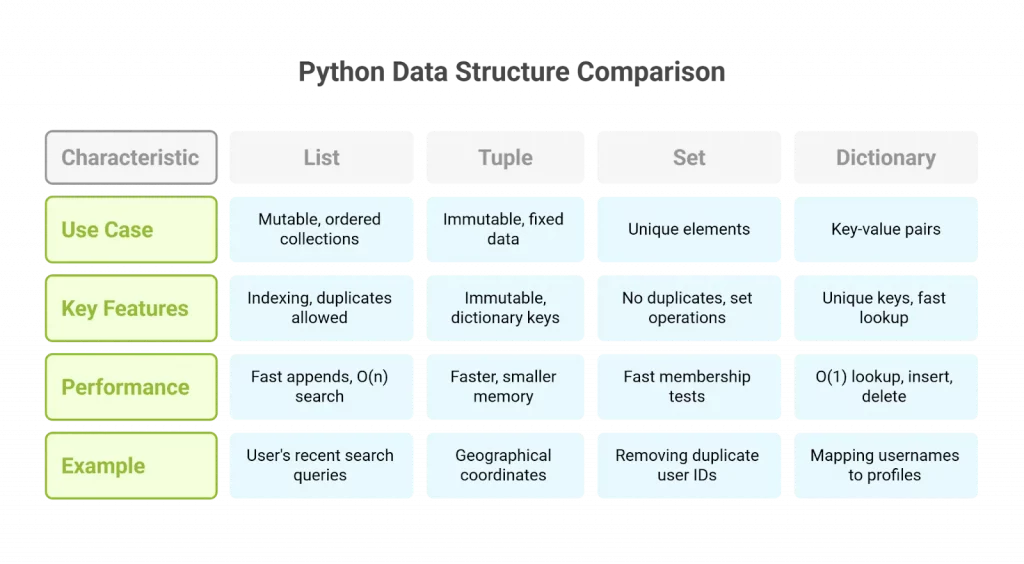
Given your computer science background, you'll recognize that these properties have direct implications for performance. For instance, the O(1) lookup time for dictionaries and sets is a result of their underlying hash table implementation, making them ideal for fast membership testing and retrieval.
Lists: Mutable, Ordered Collections
Lists are arguably the most common and flexible collection type in Python. They are ordered, mutable sequences of objects, which means you can change them after creation by adding, removing, or reordering elements.
Corey Schafer's tutorial provides an excellent practical walkthrough of list operations. As you watch, pay attention to the distinction between methods that modify the list in-place (like sort()) and functions that return a new, modified list (like sorted()).
Python Tutorial for Beginners 4: Lists, Tuples, and Sets
This video, "Lists, Tuples, and Sets," will be our guide for the next few sections. We'll start with its comprehensive coverage of lists.
Creation, Access, and Slicing: Watch from the beginning to learn how to create lists and access elements using zero-based indexing, negative indexing, and slicing: creating and accessing. Modifying a List: This segment covers adding elements with .append(), .insert(), and .extend(). Note the crucial difference between append and extend when adding another list: adding elements. Removing and Sorting: Next, see how to remove elements with .remove() and .pop(), and how to reorder a list with .reverse() and .sort(). The distinction between the in-place .sort() method and the sorted() function is a key concept: removing and sorting. Utility Functions and Methods: Learn about useful built-in functions like min(), max(), and sum(), and how to find an element's position with .index() or check for its existence with the in operator: helpers. Iteration and String Conversion: Finally, watch how to loop through a list using a for loop and enumerate(), and how to convert between lists and strings with .join() and .split(): iteration and conversion.
Tuples: Immutable, Ordered Collections
Tuples are nearly identical to lists, but with one critical difference: they are immutable. Once a tuple is created, you cannot add, remove, or change its elements. This makes them predictable and safe for use in situations where you want to ensure data remains constant. Their immutability also allows them to be used as keys in dictionaries, which we'll see later.
Let's return to the video to see this immutability in action.
Python Tutorial for Beginners 4: Lists, Tuples, and Sets
This segment directly contrasts the mutable nature of lists with the immutable nature of tuples.
Watch the section on tuples from this timestamp. The core takeaway is the TypeError you get when you try to modify a tuple. Because they are immutable, tuples have far fewer methods than lists—essentially only those that don't change the tuple's content.
Creating a tuple with a single item has a unique syntax. You must include a trailing comma: my_tuple = (1,). Without the comma, Python would interpret (1) as just the integer 1 enclosed in parentheses for order of operations.
Sets: Unordered, Unique Collections
Sets are unordered collections of unique elements. Their primary strengths lie in two areas:
- Enforcing uniqueness: They automatically discard any duplicate elements you try to add.
- High-performance membership testing: Checking if an element exists in a set is significantly faster than checking for it in a list, especially for large collections.
This makes them the perfect tool for tasks like removing duplicates from a list or performing mathematical set operations like union, intersection, and difference.
Python Tutorial for Beginners 4: Lists, Tuples, and Sets
The video now moves on to sets, highlighting their unordered nature and their powerful methods for comparison.
Watch the segment on sets, starting at this point. It covers their creation using curly braces {}, their ability to remove duplicates, and demonstrations of the .intersection(), .difference(), and .union() methods.
A small but important detail is how to create an empty set. Using empty curly braces {} creates an empty dictionary, not an empty set. To create an empty set, you must use the set() constructor.
Python Tutorial for Beginners 4: Lists, Tuples, and Sets
The video concludes with a crucial tip about initializing empty collections.
Watch the final segment on creating empty collections to see the correct syntax for creating empty lists, tuples, and especially sets.
Dictionaries: Key-Value Pairs
Dictionaries are collections that store data in key-value pairs. Instead of being indexed by a numerical position, they are indexed by unique keys. You can think of them as a lookup table or, as the name suggests, a real dictionary where the "key" is the word and the "value" is its definition. Keys must be of an immutable type (like a string, integer, or tuple), while values can be any Python object.
Dictionaries are incredibly powerful for modeling structured data and are optimized for fast retrieval of values when the key is known.
Python Tutorial for Beginners 5: Dictionaries - Working with Key-Value Pairs
Corey Schafer's next video is dedicated entirely to dictionaries.
Watch the introduction to understand the key-value pair concept: introduction and access. Learn the safe way to access values using the .get() method, which can prevent KeyError exceptions by providing a default value: using get. See how to add new key-value pairs or update existing ones, including using the .update() method for multiple changes at once: adding and updating. Review the two ways to remove entries: the del keyword and the .pop() method, which also returns the removed value: deleting entries. Finally, learn how to iterate through a dictionary's keys, values, or both (as key-value pairs) using the .keys(), .values(), and .items() methods: looping.
Practical Reference and Operations
While the videos provide excellent demonstrations, a text-based reference can be useful for quickly looking up syntax and operations. The following article provides a clear, structured overview of all four data structures.
Python data structures: a guide to lists, sets, tuples and dictionaries
This guide from Plain English offers concise code examples for the most common operations on all four data structures. It's a great resource to bookmark for future reference.
Focus on the following sections to consolidate your understanding: Comparison: The introductory section "Lists, sets, tuples, and dictionaries" provides a great text-based summary of the core properties. Creation: Review the syntax for creating each type. Manipulation: Skim the section on adding, editing, and deleting elements to see the different methods side-by-side. Iteration: The section on iteration shows the standard for loop patterns for each type. Membership and Set Logic: These sections demonstrate practical use cases. Review how to <span data-type="resource_reading_textrange" data-resource-subitem-id="458873dd" data-range-start="Check for existence" data-range-end="found in the dictionary")">check for existence with the in keyword. Then, quickly look through the set-based operations: Intersection, Union, Difference, and Symmetric difference. Notice how lists and tuples are often converted to sets to perform these operations efficiently.
Conclusion
In this lesson, we explored Python's four fundamental collection types, moving from single-value variables to structures that can hold multiple objects. Understanding when to use each is key to writing effective Python code.
Here are the key takeaways:
- Lists (
[]): The default choice for an ordered collection of items. They are mutable, so you can change them freely. - Tuples (
()): Use these when you need an ordered collection that should not be changed after creation. They are immutable, making them predictable and usable as dictionary keys. - Sets (
{}): The best tool for ensuring all elements are unique and for performing mathematical set logic (union, intersection, etc.). They are unordered and offer very fast membership testing. - Dictionaries (
{key: value}): Perfect for storing structured data as key-value pairs. They provide fast lookups based on a unique key.
In our next lesson, we will cover conditional statements (if, elif, else). This will allow us to start controlling the flow of our programs and make decisions based on the data stored in the very collections we've just learned about.