In our last session, we established the building blocks of decision-making in Python with conditional statements. You learned to direct your program's flow using if, elif, and else. Now, we'll build on that by introducing loops, which allow you to execute a block of code repeatedly, a cornerstone of automating tasks.
This lesson will cover how to write for and while loops to iterate over sequences and execute code based on conditions. To make this review efficient, we will also incorporate the next logical topic: using break, continue, and the loop else clause to precisely control loop execution. This combined approach will give you a comprehensive understanding of iteration in Python. Given your background, we'll also briefly touch on the underlying mechanism that powers for loops, connecting it to concepts that will be crucial when we later explore dunder methods.
The for Loop and the Iterator Protocol
The for loop in Python is designed to iterate over the items of any sequence or collection, such as a list, a string, or a range of numbers. Unlike loops in some other languages that rely on manual index management, Python's for loop elegantly handles the process for you.
At its core, the for loop uses what is known as the iterator protocol. When you write for item in my_list:, Python first calls iter() on my_list to get an iterator object. It then repeatedly calls next() on this iterator to get the next item, assigning it to item, until there are no items left and a StopIteration exception is raised, which gracefully ends the loop.
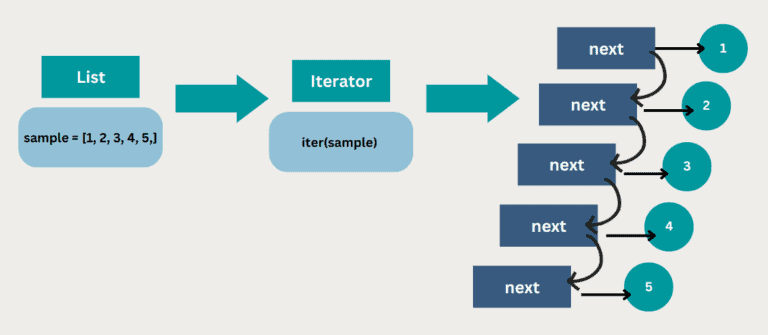
This protocol is fundamental to Python's iteration model and is a concept you'll revisit when building your own iterable objects later in the course.
For a formal introduction to the for loop's syntax, the Real Python article "Python for Loops" is an excellent starting point.
Python for Loops: The Pythonic Way
This article provides a clear definition of the for loop's syntax and components.
Please read the introductory section, Getting Started. Focus on understanding the roles of the iterable and the loop variable in the for variable in iterable: structure.
Now, let's see this in action. Corey Schafer's video provides a clear, practical demonstration of iterating through a list.
Python Tutorial for Beginners 7: Loops and Iterations - For/While Loops
This clip from Corey Schafer's tutorial on loops shows the basic for loop in action.
Watch the first part of the video where he demonstrates iterating over a list of numbers. Notice how the loop variable num takes on the value of each element in the list nums during each pass.
Iterating a Specific Number of Times with range()
A common use case for loops is to repeat an action a specific number of times. Instead of creating a list of numbers manually, you can use the built-in range() function. It generates a sequence of numbers, which is memory-efficient as it only produces numbers as they are needed by the loop.
The range() function can take one, two, or three arguments:
range(stop): Generates numbers from 0 up to (but not including)stop.range(start, stop): Generates numbers fromstartup tostop.range(start, stop, step): Generates numbers fromstartup tostop, incrementing bystep.
Dave Gray's tutorial has a great segment explaining how to use range() with these different parameters.
Python While Loops & For Loops | Python tutorial for Beginners
This video by Dave Gray clearly explains how to use the range() function to control loop iterations.
Watch the segment on using ranges. Pay attention to how he demonstrates the one-, two-, and three-argument versions of range() to specify the start, stop, and step values.
The while Loop
While a for loop is used to iterate over a known sequence of items, a while loop is used to repeat a block of code as long as a certain condition remains true. This is useful when you don't know in advance how many times you need to loop.
The structure is while condition:, and the indented code block will execute repeatedly until condition evaluates to False. A critical responsibility when writing while loops is to ensure the condition will eventually become false to avoid an infinite loop. This usually involves modifying a variable inside the loop that is part of the condition.
Python Tutorial for Beginners 7: Loops and Iterations - For/While Loops
Let's return to Corey Schafer's video to see how while loops work.
First, watch the introduction to while loops. Note the importance of incrementing the counter variable x to eventually terminate the loop. Next, watch his explanation of an infinite loop using while True:. This is a common and powerful pattern when combined with a break statement, often used in event loops, servers, or applications that need to run continuously until a specific exit signal is received. He also shows how to stop an accidental infinite loop with Ctrl+C.
Advanced Control Flow: break, continue, and else
Python provides keywords to give you more granular control over loop execution beyond just the main condition.
break: Immediately terminates the innermost loop it's in. The program execution continues at the statement following the loop.continue: Skips the rest of the code inside the current iteration of the loop and proceeds directly to the next iteration.
Python Tutorial for Beginners 7: Loops and Iterations - For/While Loops
Corey Schafer's video offers a concise demonstration of break and continue.
Watch the segment where he explains and demonstrates the break keyword to exit the loop when a condition is met, and then the continue keyword to skip an iteration.
The loop else Clause
Python loops have a unique feature that often surprises developers: an optional else clause. The else block associated with a loop executes only if the loop completes its iterations without being terminated by a break statement.
This is particularly useful for search operations. You can use the for loop to search for an item. If found, you break. The else block can then contain code that runs only if the search completed without finding the item.
Python While Loops & For Loops | Python tutorial for Beginners
Dave Gray's tutorial provides clear examples of the else clause for both while and for loops.
First, watch his explanation of the else clause with a while loop. Then, see how it applies to a for loop. Notice his emphasis that the else block does not run if the loop is broken.
Nested Loops
You can place one loop inside another. This is known as a nested loop and is commonly used for working with two-dimensional data structures, like a list of lists (a matrix), or for generating all combinations of items from multiple sequences.
For each iteration of the outer loop, the inner loop will complete its entire sequence of iterations.
Python Tutorial for Beginners 7: Loops and Iterations - For/While Loops
Corey Schafer's video demonstrates how a nested loop works by generating combinations.
Watch this segment on nested loops. He loops through numbers in the outer loop and letters in the inner loop, showing how every combination is printed.
A very common and Pythonic way to iterate over 2D data is by using nested loops, often with the enumerate() function to get both the index and the value. The following image shows a practical example.

We will cover enumerate() formally in a future lesson, but you can see here how it provides a clean way to track your position within a sequence.
Conclusion
In this lesson, you've taken a fast-paced tour of Python's iteration tools. You are now equipped to handle most repetitive tasks programmatically.
Here are the key takeaways:
- Iteration Types: Use
forloops to iterate over a known sequence of items andwhileloops to iterate as long as a condition holds true. - The Iterator Protocol:
forloops operate on iterables by creating an iterator and repeatedly callingnext()on it. range(): A memory-efficient way to generate numeric sequences for looping a specific number of times.- Flow Control:
breakexits a loop entirely, whilecontinueskips to the next iteration. loop elseClause: A unique Python feature that allows you to run code only when a loop finishes naturally (without abreak).- Nested Loops: A powerful construct for working with multi-dimensional data or creating combinations.
Having covered the fundamentals of structuring and controlling program flow, our next lesson will shift focus to organizing your code. We will start Module 3 by exploring how to use modules and packages, allowing you to create reusable code and leverage Python's vast ecosystem of libraries.