Welcome to the final lesson of our foundational review module. In our previous session, we introduced for and while loops and got a first glimpse of the control flow statements break, continue, and the loop else clause. Now, we will solidify your understanding of these tools, ensuring you can use them with precision and confidence.
This lesson is dedicated to mastering loop control. We will take a deeper look at break and continue, introduce the related pass statement, and demystify the powerful but often misunderstood loop else clause. Finally, we'll examine practical patterns for controlling nested loops, a common challenge in data processing and algorithmic tasks.
Fine-Tuning Iteration: break, continue, and pass
In the last lesson, you saw how break and continue can alter the standard flow of a loop. Let's formalize their behavior.
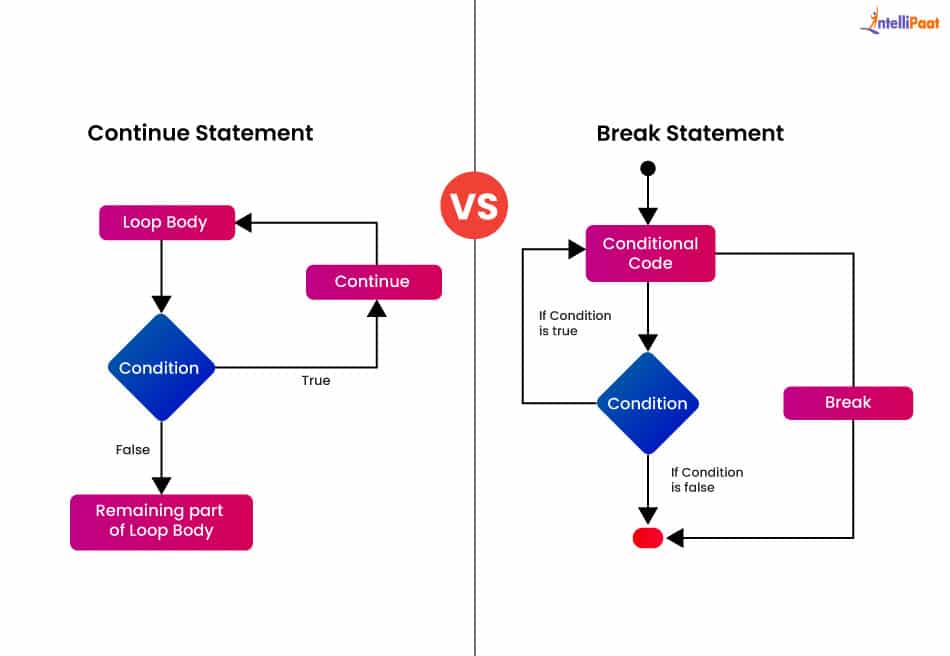
break: Immediately terminates the innermost loop it is in. Execution resumes at the first statement after the loop body.continue: Immediately stops the current iteration and jumps to the beginning of the next one. The loop itself continues to run.
The following flowchart provides a clear visual distinction between their effects on a loop's control flow.
To get a detailed review of these statements, along with the pass statement, the following article from DigitalOcean is an excellent resource.
How to Break Out of Multiple Loops in Python
This article provides clear definitions and code examples for break, continue, and pass.
Please read the following three sections: Break Statement: Focus on how the loop terminates as soon as number == 5. Continue Statement: Note how the output skips the number 5 but the loop completes for all other numbers. Pass Statement: Understand that pass is a null operation, a placeholder that does nothing.
The pass statement might seem trivial, but it's syntactically useful. In Python, indentation defines code blocks. You cannot have an empty block. If you are designing a function or a conditional branch that you intend to implement later, you can use pass to make the code syntactically valid in the meantime.
def my_future_function():
    pass # I'll implement this later

for i in range(10):
    if i % 2 == 0:


        # I only care about odd numbers for now
        pass
    else:
        print(i)
A common and powerful pattern you'll encounter, especially in systems that need to run continuously (like servers or event listeners), is the while True: loop combined with a break. This creates a loop that runs indefinitely until a specific exit condition is met inside the loop.
Let's revisit a segment from Corey Schafer's video that demonstrates this pattern.
Python Tutorial for Beginners 7: Loops and Iterations - For/While Loops
This clip shows how to create and manage an infinite loop using while True and break.
Watch the segment from this point. Notice how the loop is intentionally designed to run forever, and the break statement provides the only controlled way out. This is a fundamental pattern in many applications.
The loop else Clause: The "No Break" Rule
Python's else clause for loops is a unique feature that often causes confusion. It does not behave like the else in an if/else statement. A better way to think about it is as a "no break" clause.
The else block of a loop executes if and only if the loop completes all its iterations without being terminated by a break statement.
This is extremely useful for search operations. You can loop through a sequence to find an item. If you find it, you break. The else block can then contain code that should only run if the entire sequence was searched and the item was not found.
Corey Schafer has an excellent short video that clarifies this concept perfectly.
Python Tutorial: Else Clauses on Loops
This video is dedicated to explaining the loop else clause and introduces the "no break" mental model.
Watch the introduction here, where he sets up the initial confusion. Pay close attention to the explanation of the "no break" rule with a for loop in this section. See how the same logic applies to while loops here. Finally, watch the practical example of a find_index function. This demonstrates how loop else can produce cleaner code than using a boolean "found" flag.
To reinforce this, the Real Python article provides another concise explanation.
Python for Loops: The Pythonic Way
This reading reinforces the behavior of the loop else clause.
In the article "Python for Loops," find the section on the else clause. The example of searching for a target and printing "Target not found" is a classic use case.
Advanced Application: Controlling Nested Loops
A crucial point to remember is that break and continue only affect the innermost loop in which they are placed. What if you need to break out of a nested loop structure entirely?
Consider searching for a value in a 2D matrix:
matrix = [
    [1, 2, 3],
    [4, 5, 6],
    [7, 8, 9]
]

for row in matrix:
    for item in row:
        if item == 5:
            print("Found 5!")
            break # This only breaks the inner loop!


    # The outer loop continues to the next row
In the code above, after finding 5, the program would still proceed to the next row [7, 8, 9]. To exit both loops, you need a different strategy. There are two common patterns for this.
-
Using a Flag Variable: A boolean flag is set in the inner loop, and then checked in the outer loop to trigger a second
break. This is simple but can make the code slightly more cluttered. -
Encapsulating in a Function: The nested loops are placed inside a function. When the desired condition is met, you can simply use
returnto exit the function—and thus all loops—immediately. This is often the cleanest and most "Pythonic" approach, as it promotes modular code.
The DigitalOcean article you read earlier has an excellent section covering these real-world scenarios and patterns.
How to Break Out of Multiple Loops in Python
This resource provides practical solutions for breaking out of nested loops.
Please review the following sections: In the FAQ, read question #7, "Does Python break exit all loops?", which clearly states that break only affects the innermost loop. Next, read question #8, "How to break from multiple nested loops in Python?". This directly presents the flag and function-based solutions. Finally, read question #10, "How to exit an outer loop from inside an inner loop?", for a final reinforcement of these two key patterns.
Practice Exercise
To put these concepts into practice, complete the following short exercise.
Task: Write a Python function find_first_negative(matrix) that takes a 2D list (a matrix of numbers) as input. Your function should search the matrix row by row, column by column, and return the coordinates (row_index, col_index) of the first negative number it finds. If no negative numbers are found in the entire matrix, the function should return None.
Requirements:
- You must use nested loops to iterate through the matrix.
- You must stop searching as soon as the first negative number is found (i.e., don't continue searching the rest of the matrix).
- Use the
loop elsepattern to handle the case where no negative number is found.
Click to see a possible solution
def find_first_negative(matrix):
    """
    Finds the coordinates of the first negative number in a 2D matrix.

    Args:
        matrix: A list of lists of numbers.

    Returns:
        A tuple (row_index, col_index) of the first negative number,
        or None if no negative numbers are found.
    """
    for r_idx, row in enumerate(matrix):
        for c_idx, value in enumerate(row):
            if value < 0:
                print(f"Negative number found at ({r_idx}, {c_idx})")
                return (r_idx, c_idx)


    # This else belongs to the outer for loop.
    # It will only run if the outer loop completes without a return (break).
    else:
        print("No negative numbers found in the matrix.")
        return None


# Example usage:
matrix1 = [[1, 2, 3], [4, -5, 6], [7, 8, -9]]
find_first_negative(matrix1) # Should return (1, 1) and stop.

print("-" * 20)

matrix2 = [[1, 2, 3], [4, 5, 6], [7, 8, 9]]
find_first_negative(matrix2) # Should search all and return None.
In this solution, using return inside the nested loop is the function-based approach to breaking out of all loops. The else on the outer for loop elegantly handles the "not found" case.
Conclusion
This lesson concludes our fast-paced review of Python's fundamental control flow. You now have a robust toolkit for managing iteration.
Key Takeaways:
breakterminates a loop, whilecontinueskips to the next iteration.passis a null statement, used as a placeholder where syntax requires a block.- The
loop elseclause is a "no break" check: it runs only when a loop finishes naturally, without hitting abreak. - To exit nested loops, use a flag variable or, more cleanly, encapsulate the loops in a function and use
return.
With control flow mastered, we are now ready to build more organized and reusable code. In the next lesson, we will begin Module 2 by learning how to define and use functions, a topic we've just seen is invaluable for writing clean and effective programs.