Hello! Welcome back.
In our previous lesson, we successfully established an asynchronous connection between our FastAPI application and a PostgreSQL database. We configured the engine and sessionmaker, and we created a dependency to manage database sessions for each request. We laid the groundwork; now it's time to build upon it.
Today's lesson focuses on this learning outcome: Define database tables using SQLAlchemy declarative models and compare the approach to Django's models.py.
This is where you'll see the direct parallel to creating a models.py file in a Django app. You'll leverage your existing knowledge of defining models, fields, and relationships, but you'll learn SQLAlchemy's modern, type-annotated syntax. We'll pay close attention to the conceptual similarities and the important syntactical differences, just as you requested.
1. The Anatomy of a SQLAlchemy Model
In Django, your models inherit from django.db.models.Model. SQLAlchemy has a similar concept. In the modern, 2.0 style, our models will inherit from a DeclarativeBase. This base class gives our simple Python classes the power of the ORM.
The core components of a SQLAlchemy model are:
- A Base Class: All our models will inherit from this.
__tablename__: An attribute to explicitly name the database table.- Type-Annotated Columns: We define columns using Python's type hints combined with SQLAlchemy's
Mappedandmapped_column.
This is a significant departure from Django's approach, where table names are often inferred and fields are defined by instantiating models.Field subclasses. SQLAlchemy's modern approach embraces Python's typing system, which provides better static analysis and IDE support.
Let's look at the syntax difference.
Django models.py:
# Django
from django.db import models

class User(models.Model):
    name = models.CharField(max_length=50)
    email = models.EmailField(unique=True)
SQLAlchemy models.py:
# SQLAlchemy
from sqlalchemy import String
from sqlalchemy.orm import DeclarativeBase, Mapped, mapped_column

class Base(DeclarativeBase):
    pass

class User(Base):
    __tablename__ = "users"

    id: Mapped[int] = mapped_column(primary_key=True)
    name: Mapped[str] = mapped_column(String(50))
    email: Mapped[str] = mapped_column(unique=True)
Notice a few key points in the SQLAlchemy version:
Baseclass: We define our ownBaseby inheriting fromDeclarativeBase.__tablename__: We must explicitly name our table.idprimary key: Unlike Django, which automatically adds anidprimary key, SQLAlchemy requires you to define it explicitly.Mappedandmapped_column: The syntaxname: Mapped[str] = mapped_column(String(50))separates the Python type (str), which your IDE and type checkers understand, from the database column definition (mapped_column(...)), which specifies SQL-level details like length and constraints.
To better understand this modern syntax and why it's beneficial, please read the following article. It draws a direct comparison to Django's models, which will be very familiar to you.
SQLAlchemy for Django Developers - Model Definition
This article from OddBird, 'SQLAlchemy for Django Developers', provides a fantastic side-by-side comparison of model definitions.
Read the section titled 'Model Definition: Surprisingly Similar'. Focus on how it contrasts a Django User model with a SQLAlchemy User model, explaining the role of DeclarativeBase, type hints (Mapped), and mapped_column.
2. Defining Columns, Keys, and Relationships
Now that you have the basic structure, let's dive deeper into defining fields and relationships.
Column Types and Constraints
In Django, you use classes like CharField, IntegerField, and BooleanField. SQLAlchemy has corresponding types like String, Integer, and Boolean, which you typically pass into mapped_column.
Common constraints look very similar:
primary_key=Trueunique=Truenullable=False(In SQLAlchemy, columns are nullable by default, whereas in Django they are not. You must be explicit.)default=<value>index=True
One key difference from Django is that SQLAlchemy does not automatically create an index for foreign key columns. If you expect to filter or sort by a foreign key often, you should explicitly add index=True.
SQLALchemy vs Django ORM - Keys and Nullability
This article by Alexey Evseev provides a concise breakdown of the differences in how Django and SQLAlchemy handle primary and foreign keys.
Read the sections 'Primary Key', 'Foreign Key', and 'Nullable'. These short sections clearly explain the differences in default behavior that you need to be aware of.
Relationships: The Biggest Difference
This is where the syntax diverges most significantly from Django. In Django, defining a ForeignKey is a one-line operation that handles both the database column and the Python object relationship.
In SQLAlchemy, it's a two-step process:
- Define the Foreign Key Column: You create a column that holds the foreign key, using
sqlalchemy.ForeignKey. - Define the Relationship Navigation: You use
sqlalchemy.orm.relationshipto create the Python attribute that allows you to navigate between related objects (e.g.,post.author). This function also configures how the relationship loads data and how it connects to the other model.
The back_populates argument in relationship is the direct equivalent of setting a related_name in Django and then having the corresponding accessor on the other side. It creates a bi-directional link.
Let's read a clear explanation of this.
SQLAlchemy for Django Developers - Relations
The OddBird article also has an excellent section on how relationships are defined.
Read the section titled 'Relations Require More Work'. It shows exactly how to set up a one-to-many relationship between a User and Address and contrasts it with the simpler Django ForeignKey syntax.
3. Practical Implementation: Building Our Models
Theory and comparisons are essential, but seeing it all come together is what makes it stick. The following video provides a complete, practical walkthrough of creating a models.py file for a blog application, defining User and Post models with a one-to-many relationship.
This video puts all the pieces we've just discussed into practice.
Python FastAPI Tutorial (Part 5): Adding a Database - SQLAlchemy Models and Relationships
Corey Schafer's tutorial is a great practical guide. This segment shows how to define SQLAlchemy models with columns, types, primary keys, and relationships.
Watch the segment from 08:32 to 16:23. As you watch, pay close attention to: How the User and Post classes inherit from Base. The definition of column types (String, Integer, DateTime). The use of primary_key=True, unique=True, and nullable=False. The two-part definition of the relationship: the user_id ForeignKey column in the Post model, and the relationship() calls in both the User and Post models using back_populates.
After watching, your models.py file for a simple User/Post relationship would look something like this, tying together all the concepts:
# models.py
from datetime import datetime
from sqlalchemy import (
    Column,
    Integer,
    String,
    DateTime,
    ForeignKey,
    func,
)
from sqlalchemy.orm import DeclarativeBase, Mapped, mapped_column, relationship
from typing import List


# 1. Define the Declarative Base
class Base(DeclarativeBase):
    pass


# 2. Define the User Model
class User(Base):
    __tablename__ = "users"


    # Columns
    id: Mapped[int] = mapped_column(primary_key=True)
    username: Mapped[str] = mapped_column(String(50), unique=True, index=True)
    email: Mapped[str] = mapped_column(unique=True)
    created_at: Mapped[datetime] = mapped_column(
        DateTime(timezone=True), server_default=func.now()
    )


    # Relationship to Post model
    # The `back_populates` string must match the attribute name in the Post model
    posts: Mapped[List["Post"]] = relationship(back_populates="author")


# 3. Define the Post Model
class Post(Base):
    __tablename__ = "posts"


    # Columns
    id: Mapped[int] = mapped_column(primary_key=True)
    title: Mapped[str] = mapped_column(String(100), index=True)
    content: Mapped[str]


    # Foreign Key column linking to the users table
    # This is the actual DB column, analogous to Django's user_id field
    author_id: Mapped[int] = mapped_column(ForeignKey("users.id"))


    # Relationship to User model
    # This provides the `post.author` navigation attribute in Python
    author: Mapped["User"] = relationship(back_populates="posts")
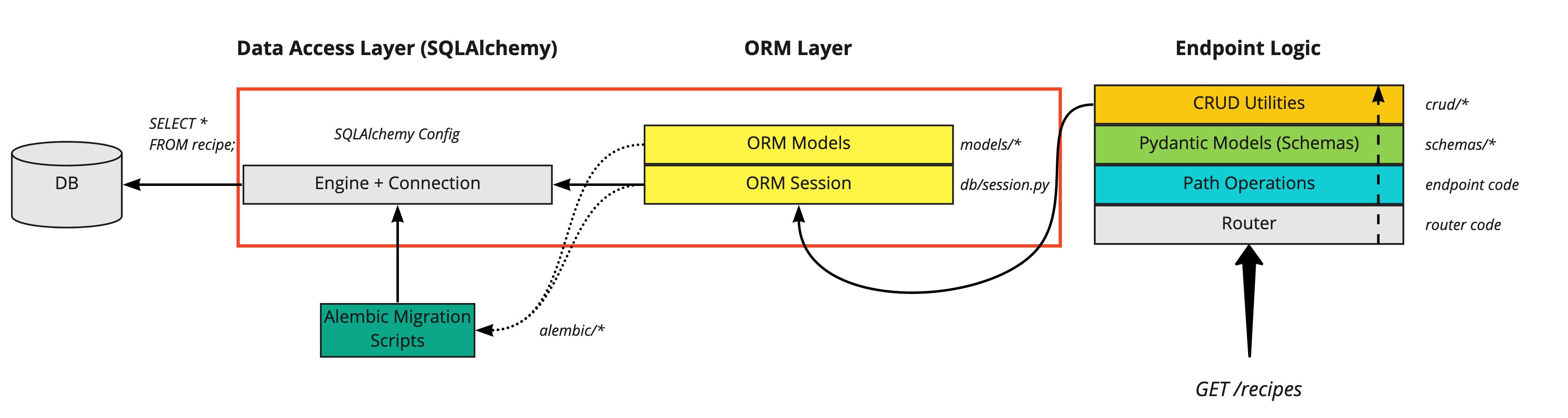
4. Creating Tables in the Database
Once your models are defined, you need to instruct SQLAlchemy to create the corresponding tables in the database. As we briefly touched on in the last lesson, you can do this using Base.metadata.create_all().
This is a simple mechanism suitable for development. It checks for the existence of tables before creating them, so it's safe to run multiple times.
# In your main.py or a startup script
from .database import engine
from . import models

async def create_tables():
    async with engine.begin() as conn:


        # This command creates all tables that inherit from models.Base
        await conn.run_sync(models.Base.metadata.create_all)


# You can run this function from a FastAPI lifespan event
# to ensure tables are created when the app starts.
This is functionally similar to running python manage.py migrate for the first time in a new Django app. However, it's not a migration system. It won't handle changes to your models once you have data in your database. That's a job for Alembic, which we'll cover in the next lesson.
Conclusion
Great work! You've now learned how to translate your knowledge of Django models into the world of SQLAlchemy. We've defined the schema for our data using a modern, explicit, and type-safe approach.
Key Takeaways:
- Explicit is Better than Implicit: SQLAlchemy requires you to be more explicit than Django's ORM (e.g., table names, primary keys, foreign key indexes).
- Modern, Type-Safe Syntax: Using
Mappedandmapped_columnprovides excellent integration with Python's typing ecosystem, leading to more robust and maintainable code. - Relationships are a Two-Step Process: You must define both the
ForeignKeycolumn (the database reality) and therelationshipattribute (the Python ORM convenience). back_populatesis Key: This argument is the SQLAlchemy way to create the bidirectional relationships you're used to in Django.
Preview of the Next Lesson:
Your models are defined, but how do you manage changes to them over time without losing data? In Django, you use makemigrations and migrate. The equivalent in the SQLAlchemy ecosystem is a tool called Alembic. In our next lesson, we will set up and use Alembic for database migrations, comparing the workflow to Django's built-in system.