Hello! Welcome back to our course on FastAPI.
In our last lesson, we defined our database schema using SQLAlchemy's declarative models. We saw how this compares to Django's models.py, focusing on the modern, type-annotated syntax. Now that we have a blueprint for our data, it's time to bring it to life.
Today's lesson will focus on this learning outcome: Implement Create and Read (single and list) operations using async SQLAlchemy sessions and queries.
This is where we build the core functionality of our API—creating new data and retrieving existing data. For you, this will feel very similar to using Django's ORM methods like .create(), .all(), and .get(). We'll explore the asynchronous SQLAlchemy equivalents and, as you requested, structure our code using a pattern that separates database logic from our API endpoint logic, setting a strong foundation for the more advanced architectural patterns we'll cover later.
1. The CRUD Layer: Separating Concerns
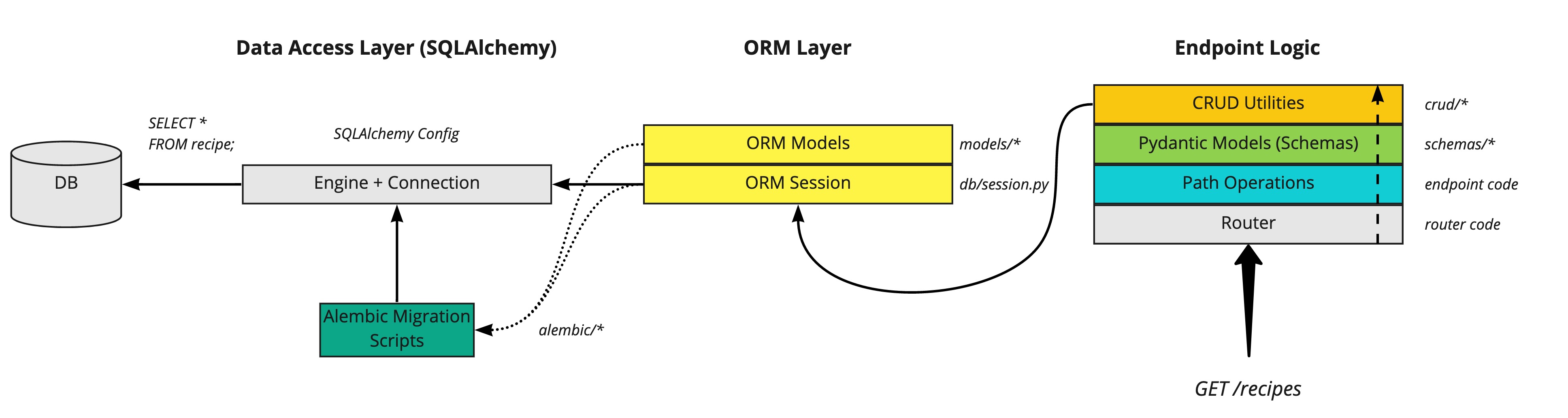
Before we write any queries, let's talk about structure. In a Django project, it's common for database queries to be written directly inside view functions. While this works, it can mix HTTP-related logic with database logic.
In modern FastAPI applications, a common and highly effective pattern is to create a "CRUD" or "Repository" layer. This is simply a set of functions (or a class) whose sole responsibility is to interact with the database.
Why do this?
- Separation of Concerns: Your API path operations handle HTTP requests, validation, and responses. Your CRUD layer handles database queries. This makes the code cleaner and easier to maintain.
- Reusability: The same
get_userfunction can be called from multiple API endpoints or even from background tasks. - Testability: You can test your database logic independently of the web framework.
We will create a crud.py file to house these functions. Each function will take an AsyncSession object as an argument, which will be provided by the dependency injection system we set up earlier.
2. Implementing Read Operations (the 'R' in CRUD)
Let's start by fetching data. The fundamental tool for this in SQLAlchemy is the select() function.
Reading a List of Objects
To get all records from a table, you construct a select statement and execute it using the session.
- Django ORM:
Note.objects.all() - SQLAlchemy Async:
await session.execute(select(Note))
The result of session.execute() is not a list of objects directly. To get our model instances, we need to call .scalars().all().
Let's watch a video that walks through creating a get_all function in a crud.py file and integrating it into an endpoint.
Building a REST API with FastAPI, Async SQLAlchemy, and PostgreSQL
The video 'Building a REST API with FastAPI, Async SQLAlchemy, and PostgreSQL' by Ssali Jonathan demonstrates this process clearly. We'll watch the segments for creating the get_all function and then using it in a route.
Watch from 00:33:11 to 00:40:11, where the get_all function is implemented. Then, watch from 00:49:45 to 00:54:34, which shows this function being used in the /notes GET endpoint. Focus on: The select(Note).order_by(Note.id) statement. The use of await session.execute(statement). How the result is processed with result.scalars().all() (though the video uses a slightly different but equivalent method result.scalars). How the get_all function is called from the FastAPI path operation, with the session being passed in.
Based on the video and best practices, here's how a get_all function in your crud.py would look:
# crud.py
from sqlalchemy.ext.asyncio import AsyncSession
from sqlalchemy import select
from . import models, schemas # Assuming you have schemas.py

async def get_all_notes(session: AsyncSession, skip: int = 0, limit: int = 100):
    """
    Retrieves a list of notes with pagination.
    """
    statement = select(models.Note).offset(skip).limit(limit)
    result = await session.execute(statement)
    return result.scalars().all()
Reading a Single Object
To get a single record by its ID, we add a .where() clause to our select statement.
- Django ORM:
Note.objects.get(id=note_id) - SQLAlchemy Async:
await session.execute(select(Note).where(Note.id == note_id))
To get just one object (or None if it doesn't exist), we use .scalar_one_or_none(). This is the perfect tool for API "detail" views, as it gracefully handles the "not found" case.
This next video segment demonstrates implementing a get_by_id function.
Building a REST API with FastAPI, Async SQLAlchemy, and PostgreSQL
Let's continue with the same video to see how to fetch a single item.
First, watch from 00:41:50 to 00:44:49 to see the implementation of get_by_id. Then, watch from 01:11:12 to 01:13:24 to see it integrated into the /notes/{note_id} GET endpoint. Notice: The query select(Note).filter(Note.id == node_id) (Note: .filter() is another way to write .where()). The use of .scalar_one() to get the result (we will prefer .scalar_one_or_none() in our code to avoid an exception on not found). How the note_id from the path is passed to the CRUD function.
Here is the corresponding code for your crud.py:
# crud.py (continued)
async def get_note_by_id(session: AsyncSession, note_id: int):
    """
    Retrieves a single note by its ID.
    """
    statement = select(models.Note).where(models.Note.id == note_id)
    result = await session.execute(statement)
    return result.scalar_one_or_none()
3. Implementing the Create Operation (the 'C' in CRUD)
Creating a new record involves three main steps:
- Create an instance of your SQLAlchemy model.
- Add the instance to the session using
session.add(). - Commit the session with
await session.commit(), which writes the changes to the database.
- Django ORM:
Note.objects.create(title="My Title", content="...") - SQLAlchemy Async:
new_note = Note(title="My Title", content="...")
session.add(new_note)
await session.commit()
Let's see this in action.
Building a REST API with FastAPI, Async SQLAlchemy, and PostgreSQL
This final clip from the video shows how to implement the add (create) function and use it in a POST endpoint.
Watch from 00:40:11 to 00:41:50 for the add function implementation. Then watch from 00:59:44 to 01:06:51 to see how the POST endpoint uses a Pydantic schema for the request body and calls the add function. Pay attention to: How a model instance is created from the data in the Pydantic schema. The use of session.add(note) and await session.commit(). The use of await session.refresh(note) (or similar logic) to get the DB-generated data like the ID back into the object instance.
To structure this cleanly, our create function in crud.py will accept the Pydantic schema containing the input data.
# crud.py (continued)
async def create_note(session: AsyncSession, note_in: schemas.NoteCreate):
    """
    Creates a new note in the database.
    """


    # Create a SQLAlchemy model instance from the Pydantic schema data
    db_note = models.Note(**note_in.model_dump())


    # Add the instance to the session
    session.add(db_note)


    # Commit the session to write the record to the database
    await session.commit()


    # Refresh the instance to get the new ID and other DB-generated values
    await session.refresh(db_note)

    return db_note
This function nicely encapsulates the database creation logic. The path operation is now only responsible for receiving the HTTP request and calling this function.
For a more advanced and highly reusable implementation of these CRUD functions, you can refer to the CRUDBase class described in the article "How to Use SQLAlchemy with FastAPI". This article demonstrates a generic class that can handle CRUD for any model, a pattern you might find useful for larger projects.
CRUD Operations with a Generic Base Class
For a deeper look into a professional and reusable way to structure your CRUD operations, this article from OneUptime is an excellent resource.
Read the section titled 'CRUD Operations'. You don't need to implement the full generic class now, but observe the structure of the get, get_multi, and create methods. Notice how they are designed to work with any SQLAlchemy model, which is a powerful pattern for reducing boilerplate code.
Conclusion
Excellent! You have now implemented the foundational "Create" and "Read" operations for your FastAPI application using async SQLAlchemy. You've also taken the first important step toward a clean, modern application architecture by separating your database logic into a dedicated crud.py layer.
Key Takeaways:
- CRUD/Repository Layer: Separating database logic into files like
crud.pyimproves organization, reusability, and testability. - Reading Data:
- Use
select(Model)to start a query. - Use
.where()to filter results. - Execute with
await session.execute(...). - Extract results with
.scalars().all()for a list or.scalar_one_or_none()for a single item.
- Use
- Creating Data:
- Create a model instance from your input data.
session.add(instance)to stage the object.await session.commit()to save it to the database.await session.refresh(instance)to load database-generated values back into your object.
Preview of the Next Lesson:
We've covered 'C' and 'R'. To complete the set, our next lesson will focus on implementing Update and Delete operations using async SQLAlchemy sessions and queries. We'll learn how to modify existing records and remove them from the database, rounding out our full CRUD capabilities.