Hello! Welcome to the third lesson in our module on Routing and Request Handling.
In the last lesson, we focused on extracting data from the URL, covering both path parameters (like /items/123) and query parameters (like /items?limit=10). You learned how FastAPI uses simple Python type hints to automatically validate and convert this incoming data.
So far, we've only dealt with simple data that can fit in a URL. But what about creating or updating resources, which often involves sending complex, structured data? For that, we use the request body. Today's lesson is all about how FastAPI handles this, and it's where you'll see one of the framework's most celebrated features in action.
Learning Outcome: Receive and process JSON request bodies using Pydantic models.
This is a pivotal concept in FastAPI. For you, coming from Django REST Framework (DRF), this is the direct answer to DRF's Serializers. We'll explore how FastAPI uses a library called Pydantic to achieve data validation, serialization, and documentation in a way that feels incredibly natural to a Python developer.
1. From DRF Serializers to Pydantic Models
Before we dive into the code, let's establish the connection to what you already know. In DRF, you use Serializer classes to define the shape of your data, validate incoming payloads, and serialize outgoing data. FastAPI uses Pydantic models to accomplish the same goals.
To get a high-level overview of this parallel, please read the following brief section from a comprehensive guide.
Ultimate guide to FastAPI library in Python - Deepnote
This section from the 'Ultimate guide to FastAPI' directly compares DRF Serializers to Pydantic models. Reading this first will help you frame the rest of the lesson in familiar terms.
Read the short bullet point titled 'Serializers -> Pydantic'. It provides a direct and concise analogy for your transition from DRF.
As you just read, the role is the same, but the implementation is different. Instead of inheriting from serializers.Serializer and defining fields with serializers.CharField, serializers.IntegerField, etc., you'll inherit from Pydantic's BaseModel and use standard Python type hints (str, int).
2. Defining Your Data "Schema" with Pydantic
A request body contains data sent by the client to your API, usually in JSON format. To handle this in a structured and safe way, you first need to declare the "shape" of the data you expect. This is where Pydantic's BaseModel comes in.
Let's watch a video that walks through the process of creating a schema file and defining your first models. This is a common pattern in larger FastAPI applications to keep schemas separate from your routing logic, much like you might have a dedicated serializers.py file in a Django app.
Python FastAPI Tutorial (Part 4): Pydantic Schemas - Request and Response Validation
This segment from Corey Schafer's highly-regarded FastAPI tutorial demonstrates how to define Pydantic models to represent the data you expect to receive and send.
Watch from 03:20 to 10:23. Pay close attention to: How BaseModel is used as the parent class. The use of standard Python type hints (str, int) for fields. The pattern of creating a PostBase model with common fields, and then inheriting from it to create PostCreate (for request bodies) and PostResponse (for responses). This is a professional best practice similar to using different serializers for read and write operations in DRF.
To summarize the key points from the video:
- You define a class that inherits from
pydantic.BaseModel. - You declare the fields as class attributes with type hints.
- Fields are required by default. To make them optional, you can either use
typing.Optional(e.g.,description: Optional[str] = None) or provide a default value.
Here's a static image showing a simple Pydantic model definition. Notice how the IDE can provide autocompletion based on the model's structure, a direct benefit of using standard Python classes and types.

The practice of using separate Create and Response models, as shown in the video, is a powerful pattern that gives you fine-grained control over your API contract. For instance:
- The
PostCreatemodel defines what the client must send to create a post (e.g.,title,content). - The
PostResponsemodel defines what the server sends back, which might include server-generated fields likeidanddate_postedthat were not part of the original request.
3. Using the Model in a POST Endpoint
Now that we have a Pydantic model (PostCreate in the video's example), how do we use it to receive a JSON request body? It's as simple as using it as a type hint for a function parameter.
Let's continue with the video to see this in action.
Python FastAPI Tutorial (Part 4): Pydantic Schemas - Request and Response Validation
This next segment shows how to integrate the Pydantic model into a POST path operation. This is where the magic happens.
Watch from 12:39 to 15:31. Focus on how the post: PostCreate parameter is declared in the create_post function. The video explains what FastAPI does automatically when it sees this.
When FastAPI sees a path operation parameter with a type hint of a Pydantic model (like post: PostCreate), it knows you're expecting a request body and does the following:
- Parses the Body: It reads the request body as JSON.
- Validates the Data: It checks if the JSON data matches the fields, types, and constraints defined in your
PostCreatemodel. - Handles Errors: If the data is invalid (e.g., a required field is missing, or a field has the wrong type), FastAPI immediately stops and returns a
422 Unprocessable Entityresponse. The response body contains a detailed JSON object explaining exactly which fields are incorrect and why. You don't need to write anyif/elsechecks for this. - Provides a Typed Object: If the data is valid, FastAPI creates an instance of your
PostCreatemodel, populates it with the data, and passes it as the argument to your function. Inside your function,postis a full Python object, and you can access its data with dot notation (e.g.,post.title), with full editor autocompletion.
This automated process is a huge time-saver and makes your code much cleaner and more robust compared to manually handling request.body or request.POST in other frameworks.
4. Automatic Documentation and Testing
One of the most satisfying results of using Pydantic models is the automatic, interactive documentation it generates.
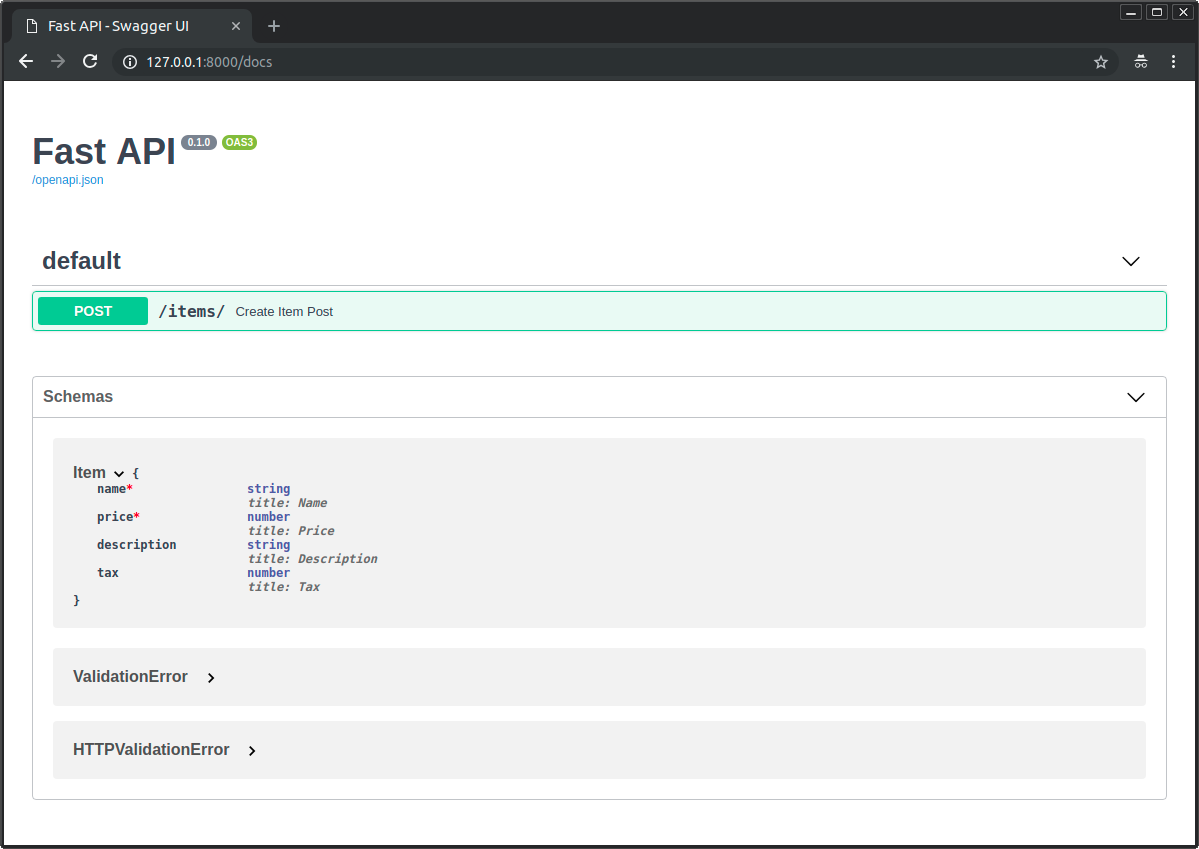
Let's see how you can use this interactive documentation to test the POST endpoint we just created.
Python FastAPI Tutorial (Part 4): Pydantic Schemas - Request and Response Validation
Finally, let's see the end result in the browser. This part of the video demonstrates how the Pydantic schemas are reflected in the Swagger UI and how to test the endpoint with both valid and invalid data.
Watch from 15:31 to 19:28. Observe how the API docs show the exact schema for the request body. Follow along as he tests the endpoint successfully and then triggers validation errors by providing incomplete or incorrect data.
This interactive "Try it out" feature is an invaluable tool for development and testing, both for you and for any frontend developers who will consume your API.
5. Practical Exercise
Let's put all this together. Here is a complete, runnable example. Create a file named main.py, paste this code, and run it with uvicorn main:app --reload.
from fastapi import FastAPI
from pydantic import BaseModel
from typing import Optional


# 1. Define the Pydantic Model
class Item(BaseModel):
    name: str
    description: Optional[str] = None
    price: float
    tax: Optional[float] = None

app = FastAPI()


# A simple in-memory storage
items_db = []


# 2. Use the model in a POST endpoint
@app.post("/items/")
async def create_item(item: Item):
    """
    Receives an item JSON, validates it, and stores it.
    """
    items_db.append(item.model_dump()) # .model_dump() converts the Pydantic model to a dict
    return {"status": "success", "item_added": item}

@app.get("/items/")
async def get_items():
    """
    Returns all items currently in our 'database'.
    """
    return {"items": items_db}
Once it's running, go to http://127.0.0.1:8000/docs and try the following:
- Use the
POST /items/endpoint to create a new item. Try a valid payload first:{ "name": "MacBook Pro", "price": 2499.99, "tax": 225.00 } - Now, try sending an invalid payload. For example, make the price a string:
Observe the detailed{ "name": "Faulty Item", "price": "a lot of money" }422error response. - After successfully creating a few items, use the
GET /items/endpoint to see the list of items you've added.
Conclusion
Today, you've learned one of the most powerful features of FastAPI: how to handle request bodies declaratively. You've seen how a simple Pydantic class can define a complex data schema, and how FastAPI leverages it to give you automatic parsing, validation, error handling, and documentation.
Key Takeaways:
- Request bodies are used to send complex data to the server, typically with
POST,PUT, orPATCHrequests. - Pydantic models, inheriting from
BaseModel, are FastAPI's way of defining the schema for this data. This is the direct equivalent of DRF Serializers. - By using a Pydantic model as a type hint in your path operation function, you enable FastAPI's automatic pipeline: parse -> validate -> create object.
- If validation fails, FastAPI returns a detailed
422 Unprocessable Entityerror without you writing any code. - This entire process is reflected in the automatic interactive documentation (
/docs), which becomes an essential tool for development and collaboration.
In the last few lessons, we've created several endpoints. As an application grows, putting all routes in a single main.py file becomes unmanageable. In the next lesson, we will address this by learning how to organize routes into modules using APIRouter. This will be analogous to how you use Django's app-based urls.py files and the include() function to structure a large project.