Hello! Welcome back to our second module on Routing and Request Handling.
In the last lesson, we established the foundation of FastAPI routing: the path operation. You learned how to map a URL and an HTTP method to a specific function using decorators, and we contrasted this explicit approach with the abstractions of Django's urls.py and DRF's ViewSets.
So far, our endpoints have been static, like /posts. Today, we'll make our APIs dynamic and interactive. We'll explore how FastAPI extracts data directly from the request URL, a crucial step in building any real-world application.
Learning Outcome: Extract and validate path parameters and query parameters using type annotations and default values.
This lesson is where you'll start to see the "magic" of FastAPI's type system in action. We'll cover two fundamental ways of passing data in a URL:
- Path Parameters: For identifying a specific resource (e.g.,
/items/123). - Query Parameters: For filtering, sorting, or paginating a collection of resources (e.g.,
/items?skip=0&limit=10).
This is conceptually similar to Django's URL converters (<int:pk>) and parsing request.GET, but as you'll see, FastAPI's approach is more declarative and deeply integrated with standard Python features.
1. Path Parameters: Identifying Resources
A path parameter allows you to capture a segment of the URL path. In FastAPI, this is done with the same curly brace syntax you might have seen in Python's f-strings.
Let's see how this works.
FastAPI #2 - Path Parameters / Data Validation with Type-Hints & Enums
This video from BugBytes gives a clear, practical demonstration of how to define and use path parameters with type hints for automatic validation.
Watch from 02:18 to 03:44. Pay close attention to how a variable in the decorator's path string ({band_id}) is linked to a function parameter with a type hint (band_id: int).
As the video demonstrates, the process is straightforward:
- Define a placeholder in the path decorator string:
@app.get("/items/{item_id}"). - Declare a function parameter with the exact same name and a type hint:
def read_item(item_id: int):.
FastAPI then automatically handles two things for you:
- Validation: It ensures the path segment can be converted to the specified type. If you request
/items/foowhen the type isint, FastAPI will automatically return a422 Unprocessable Entityerror with a helpful message. - Conversion: If validation passes, it converts the value (e.g., the string
"123") to the correct Python type (e.g., the integer123) before passing it to your function.
This is analogous to Django's path converters, but instead of using a special syntax like <int:item_id>, you use standard Python type hints directly in your function signature.
Here is a minimal example. Try running this code:
from fastapi import FastAPI

app = FastAPI()

@app.get("/items/{item_id}")
async def read_item(item_id: int):
    return {"item_id": item_id, "type": str(type(item_id))}

@app.get("/users/{username}")
async def read_user(username: str):
    return {"username": username}
After running uvicorn main:app --reload, test these URLs in your browser:
http://127.0.0.1:8000/items/42-> You'll see theitem_idis correctly identified as an integer.http://127.0.0.1:8000/items/abc-> You'll get an automatic validation error.http://127.0.0.1:8000/users/prabesh-> Works as expected for a string.
Pre-defined Path Parameter Values with Enums
What if you want a path parameter to only accept a few specific values? For example, a model name that can only be alexnet, resnet, or lenet.
You could use a str and validate it inside your function, but a more robust and self-documenting way is to use a standard Python Enum.
FastAPI #2 - Path Parameters / Data Validation with Type-Hints & Enums
The same video has an excellent section on using Enums for path parameters. This is a powerful validation technique that also improves your API documentation.
Watch from 11:43 to 15:08. Notice how using an Enum as the type hint not only validates the input but also automatically lists the available choices in the Swagger UI docs.
This is a fantastic feature. By using an Enum as your type hint, you get validation, conversion, and documentation for free.
2. Query Parameters: Filtering and Paginating
Now let's move on to query parameters. These are the key-value pairs that appear at the end of a URL after a ?, like ?skip=0&limit=10.
FastAPI's rule for query parameters is simple: any function parameter that is not a path parameter is interpreted as a query parameter.
If you provide a default value, the parameter becomes optional. If you don't, it's required.
Let's start with a foundational reading.
Ultimate guide to FastAPI library in Python
This article provides a concise explanation of how FastAPI distinguishes between path and query parameters based on the function signature.
Read the sections 'Syntax and parameters' and 'Examples'. Focus on how parameters like user_id become path parameters while verbose, q, limit, and active become query parameters based on how they are defined.
Here’s a practical example for pagination, a common use case you've likely implemented in Django/DRF:
from fastapi import FastAPI

app = FastAPI()


# A dummy database of items
fake_items_db = [{"item_name": f"Item {i}"} for i in range(50)]

@app.get("/items")
async def read_items(skip: int = 0, limit: int = 10):


    # In a Django view, this would be similar to:
    # skip = int(request.GET.get('skip', 0))
    # limit = int(request.GET.get('limit', 10))
    return fake_items_db[skip : skip + limit]
Notice how much cleaner this is compared to manually parsing request.GET. FastAPI handles:
- Checking for
skipandlimitin the query string. - Using the default values
0and10if they are not provided. - Converting the values to
int. - Returning a
422validation error if the values are not valid integers.
3. Advanced Validation with Query() and Annotated
Simple type checks are great, but what if you need more complex validation? For example, what if a search query q should have a minimum length of 3 and a maximum length of 50?
For this, FastAPI provides the Query function. The modern and recommended way to use it is with Annotated from Python's built-in typing module. This might look a little strange at first, but it's a very powerful pattern.
Python & FastAPI - Annotated Type for Data Validation + Metadata!
Let's watch a video that introduces the concept of Annotated and why it's used in FastAPI for adding metadata and validation.
Watch from 00:40 to 02:27, and then from 04:43 to 06:46. The first segment explains what Annotated is in general Python. The second segment shows how FastAPI uses it with the Query object to enforce a max_length on a query parameter.
The core idea is that Annotated lets you "attach" extra information (like validation rules) to a type hint without changing the type itself.
q: Annotated[str | None, Query(max_length=50)] = None
Let's break this down:
q:: The parameter name.Annotated[...]: The type annotation.str | None: The actual Python type. The parameter is a string, or it can beNone.Query(max_length=50): The extra metadata for FastAPI. This tells FastAPI that this is a query parameter and it should have a max length of 50.= None: The default value, which makes the parameter optional.
Now, let's dive into the official documentation, which is the ultimate source of truth for all the options you can use with Query.
Query Parameters and String Validations - FastAPI
The official FastAPI documentation provides a comprehensive guide on string validations for query parameters. It also explains the modern Annotated syntax and contrasts it with older styles you might see in other projects.
Please review the following sections: Additional validation: See the main example of using Annotated with Query. Use Annotated in the type...: This reinforces the syntax. Alternative (old): Query as the default value: It's important you recognize this older syntax, as you will encounter it. The article also explains the advantages of Annotated. Add more validations: See how to add min_length. Declare more metadata: Shows how to add title and description for documentation. Alias parameters: Explains how to accept a query parameter like item-query and map it to a valid Python variable name like item_query.
The Query object is incredibly powerful. You can specify:
min_lengthandmax_lengthfor strings.ge(greater than or equal to) andle(less than or equal to) for numbers.- A
patternfor regular expression matching. - An
aliasto use a different name in the URL. titleanddescriptionto enrich your API documentation.deprecated=Trueto mark parameters that should no longer be used.
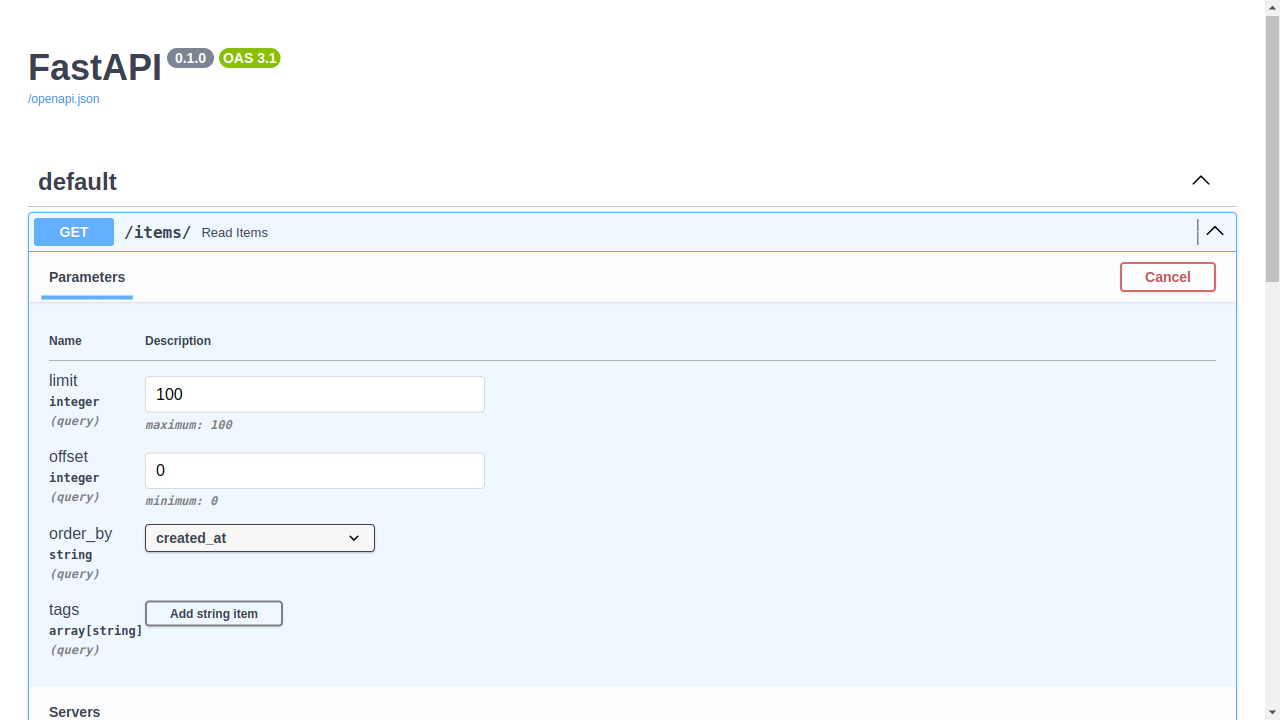
All this metadata is then used to generate the rich, interactive API documentation that you can see at /docs.
Conclusion
In this lesson, you've made your API endpoints dynamic and interactive. You now have the tools to extract and validate data sent by the client directly in the URL.
Key Takeaways:
- Path parameters are defined with
{placeholder}in the decorator's path and are used to identify specific resources. Their names must match the function arguments. - Query parameters are any other function arguments not found in the path. They are used for filtering, sorting, and pagination.
- Type hints are fundamental. FastAPI uses them for automatic data conversion and validation for both path and query parameters.
- Providing a default value to a function argument makes a query parameter optional.
- Enums can be used as type hints to restrict a parameter's value to a pre-defined set of choices.
- For advanced validation and metadata, you use
Annotated[<type>, Query(...)]. This allows you to specify constraints like length, value ranges, and regex patterns, as well as providing documentation details.
You've now seen how FastAPI handles data coming from the URL path and query string. But what about data in the request body, like the JSON payload in a POST or PUT request?
In the next lesson, we will tackle exactly that. You'll learn how to receive and process JSON request bodies using Pydantic models. This is FastAPI's answer to DRF's Serializers and is one of the framework's most powerful and praised features.