Welcome to our new module on serverless computing with Azure Functions. In the previous lesson, we saw how a Cosmos DB trigger, which is a type of Azure Function, can react to database changes in real time. That was a perfect preview of the event-driven power that Functions offer. Now, we'll take a step back and look at the foundation of any Function App: its hosting environment.
This lesson addresses the learning outcome: Compare Azure Functions hosting plans (Consumption, Premium, Dedicated) and their trade-offs. Understanding these plans is crucial for making the right architectural decisions regarding cost, performance, and scalability for your serverless applications, and it's a core topic for the AZ-204 exam.
We'll explore how your choice of plan dictates everything from how you're billed to how your application performs under load.
1. Introduction to Azure Functions and Hosting Plans
At its core, Azure Functions is a "serverless" compute service. For a developer with your background, you can think of it as a way to execute small pieces of code (functions) in the cloud without having to manage the underlying infrastructure like virtual machines or web servers.
When you create a Function App to host your functions, you must choose a hosting plan. This plan defines the resources your app runs on, how it scales, and its billing model.
To start, let's get a clear understanding of the "serverless" model that defines the default hosting option.
Microsoft Azure Functions Introduction
This video, "Microsoft Azure Functions Introduction" from BestITCourses, provides a great overview of the serverless concept and how it differs from traditional provisioned compute.
Watch from the beginning up to the serverless compute explanation. Focus on the key ideas: Dynamic allocation of resources (memory, CPU) on demand. The "pay for what you use" billing model, where there's no cost if the function isn't running. The contrast with a traditional App Service Plan, where you pay for reserved capacity regardless of usage.
2. The Three Core Hosting Plans
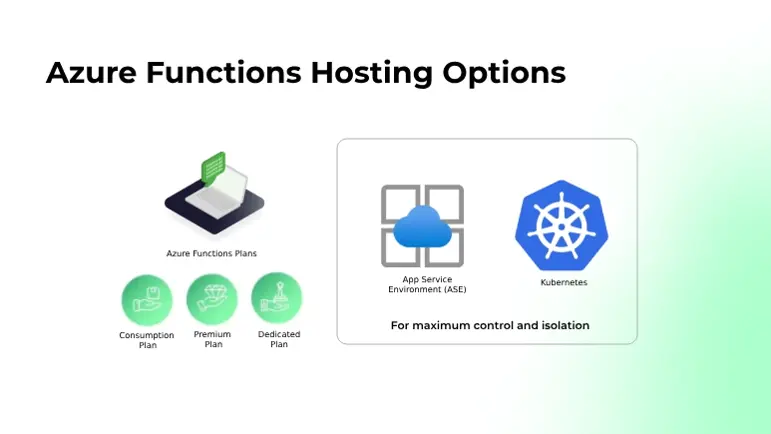
As the video introduced, the serverless model is powerful, but it's not the only option. Azure provides three primary hosting plans, each with distinct trade-offs.
- Consumption Plan: The true serverless, pay-per-execution plan.
- Premium Plan: A hybrid that offers serverless scale with enhanced performance and features.
- Dedicated (App Service) Plan: Runs your functions on the same infrastructure as your App Service web apps, offering predictable costs.
The official Microsoft documentation offers the most comprehensive comparison. As you go through it, focus on creating a mental checklist of the key differences in billing, scaling, performance, and features.
Azure Functions Scale and Hosting | Microsoft Learn
This official Microsoft Learn document is the definitive guide to Functions hosting plans. We'll use it as our primary reference to understand the trade-offs.
Please read the following sections. Focus on building a comparison between the Consumption, Premium, and Dedicated plans. Start with the "Overview of plans" table. This provides excellent "when to use" scenarios for each plan. Next, read the "Billing" section to understand the fundamental differences in their cost models. Review the "Scale" table. Note how scaling is "event-driven" for two plans but "manual/autoscale" for the Dedicated plan. Look at the "Function app timeout duration" table. The 10-minute maximum on the Consumption plan is a critical limitation to remember. Read the "Cold start behavior" section. This is a key performance consideration in serverless architectures. Finally, review the "Networking features" table. Virtual Network (VNet) integration is a major differentiator for the Premium and Dedicated plans. You can skim the other details for now. The goal is to absorb these six key comparison points.
3. A Detailed Comparison
After reading the documentation, you should have a good sense of the pros and cons of each plan. Let's synthesize this information into a summary table. This is the kind of mental model you'll want for the exam.
| Feature | Consumption Plan | Premium Plan | Dedicated (App Service) Plan |
|---|---|---|---|
| Billing Model | Pay-per-execution & resource consumption (GB-seconds). Includes a generous free monthly grant. | Per-second for pre-warmed and active instances, based on vCPU and memory. | Fixed cost of the App Service Plan you choose, regardless of function executions. |
| Scaling | Automatic, event-driven. Scales from zero to hundreds of instances based on load. | Automatic, event-driven. Faster scaling than Consumption, with no cold starts. | Manual scaling or configured autoscale rules, just like a Web App. Doesn't scale to zero. |
| Performance | Can experience "cold starts" (a delay for the first request after a period of inactivity). | No cold starts. Instances are "pre-warmed" and always ready to run your code. | No cold starts if "Always On" is enabled. Your code runs on dedicated VMs. |
| Max Timeout | 10 minutes (configurable, defaults to 5). Functions running longer will be terminated. | Unbounded (60-minute guarantee, but practically unlimited for a single execution). | Unbounded (with "Always On" enabled). |
| VNet Access | No. Cannot connect to resources in a private Virtual Network. | Yes. Supports VNet integration for accessing private resources. | Yes. Supports VNet integration. |
| Best For | Event-driven tasks, unpredictable traffic, microservices, and cost-sensitive workloads. | Business-critical APIs, apps needing both rapid scale and VNet access, and workloads sensitive to cold starts. | Predictable workloads, long-running tasks, and consolidating functions with existing web apps to maximize resource utilization. |
Let's watch one more video that reinforces these concepts by showing where you make these choices in the Azure portal.
Microsoft Azure Functions Introduction
This segment walks through the creation of a Function App and explains the plan choices in context.
Watch the clip from the plan comparison. The speaker discusses the same key differences we've covered: variable vs. fixed billing, cold starts vs. warmed-up instances, execution limits, and VNet connectivity.
4. Choosing the Right Plan: Scenarios
To solidify your understanding, consider these common scenarios and decide which plan is the best fit.
-
Scenario 1: You need to create a function that is triggered whenever a new
.csvfile is uploaded to Blob Storage. It parses the file and inserts the rows into a database. This might happen five times a day or five thousand times during a bulk import. The processing for each file takes about 30 seconds.Answer
The **Consumption Plan** is ideal here. The traffic is event-driven and unpredictable, and the execution time is very short. Paying only for when the function actually runs will be the most cost-effective solution. -
Scenario 2: You are building an API backend for a financial services mobile app. The function must retrieve account balances from a database that is secured within a private Virtual Network. The API must always respond in under a second, even during off-peak hours.
Answer
The **Premium Plan** is the best choice. It provides the two critical features required: VNet integration to securely access the database and pre-warmed instances to eliminate cold starts, ensuring consistently fast responses for users. -
Scenario 3: Your team manages several web apps running on a large, underutilized App Service Plan (e.g., a P2V2). You need to add a new function that runs a CPU-intensive data aggregation job for 25 minutes every night. You want a predictable monthly bill for your department.
Answer
The **Dedicated (App Service) Plan** makes the most sense. You can host the function on your existing plan at no extra cost, leveraging idle capacity. The long execution time (25 minutes) exceeds the Consumption plan's 10-minute limit, and the predictable workload doesn't require the elastic scaling of the Premium plan.
Conclusion
In this lesson, you've learned to compare the three fundamental hosting plans for Azure Functions. This knowledge is essential for designing solutions that meet your specific requirements for cost, performance, and features.
Here are the key takeaways:
- Consumption Plan: The default serverless option. It offers event-driven scaling and a pay-per-use model but comes with cold starts, a 10-minute execution limit, and no VNet integration.
- Premium Plan: A high-performance option that eliminates cold starts and adds VNet integration while retaining event-driven scaling. It's more expensive as you pay for pre-warmed instances.
- Dedicated Plan: Runs your functions on a standard App Service Plan, providing predictable costs and performance. It's ideal for long-running tasks or for sharing resources with existing web apps, but it does not scale based on events automatically.
Now that you understand the "where" and "how" of hosting functions, our next lesson will dive into the "what." We'll get hands-on and learn how to create, test, and deploy your first .NET HTTP-triggered Azure Function.