Welcome to our next lesson on Azure Functions. So far, we've focused on functions that perform single, self-contained tasks, triggered by events like a schedule, a new blob, or a queue message. These are powerful but are fundamentally stateless and designed for discrete units of work. A natural question arises: how do we manage complex, stateful, multi-step workflows in a serverless environment?
This lesson answers that question by introducing you to a powerful extension of Azure Functions. We will be covering the learning outcome: Describe the core concepts and common patterns of Durable Functions. We will explore what makes these functions "durable" and how they enable you to write long-running, reliable, and stateful orchestrations using ordinary code, a concept that will be very familiar given your development experience.
1. What are Durable Functions?
Standard Azure Functions are stateless; each invocation is independent. Durable Functions, on the other hand, are a framework extension that allows you to write stateful workflows in a serverless environment. They manage state, create checkpoints, and handle restarts for you, so you can focus on the business logic of your workflow.
The core idea is to move beyond simple event-driven triggers and start defining entire processes in code.
How To Orchestrate Workflows With Azure Durable Functions? (With real-life example)
To start, watch this brief segment from the video "How To Orchestrate Workflows With Azure Durable Functions?" by Codewrinkles. It clearly states the primary use case for Durable Functions.
Watch from the primary use case to understand why standard functions are insufficient for stateful coordination.
At its heart, the "durability" comes from an architectural pattern called Event Sourcing. The Durable Functions extension uses a storage provider (typically Azure Storage) to maintain a reliable, append-only history of all actions an orchestration takes. When a function needs to resume after being idle or after a host restart, it replays this history to rebuild its local state before continuing. This replay mechanism is the reason for some important coding rules we'll cover later.
2. The Building Blocks: Orchestrators, Activities, and Clients
A durable workflow is composed of a few specialized function types that work together. Understanding their distinct roles is key.
How To Orchestrate Workflows With Azure Durable Functions? (With real-life example)
The same video provides an excellent breakdown of the different function types.
Watch the section from function types, which explains the roles of the orchestrator, client, and activity functions.
To summarize the roles you just saw in the video:
- Client Function: This is the entry point that starts, queries, or manages a workflow. It's often an HTTP-triggered function but can be any function type. It "talks" to the orchestration but isn't part of the workflow's logic itself.
- Orchestrator Function: This is the "conductor" of your workflow. You write C# code here that defines the steps, loops, and conditional logic of your process. Crucially, the orchestrator does not perform the actual work. It only schedules and coordinates other functions.
- Activity Function: This is the "worker" that performs the actual tasks. An activity function is a standard, stateless function that is called by the orchestrator. It's where you'll put your I/O-intensive code, like making database calls, calling external APIs, or performing CPU-intensive computations.
When you create a Durable Function from a template, you'll often get these three types generated for you, demonstrating their interconnectedness.
3. Common Application Patterns
Durable Functions are not just a technical curiosity; they are designed to solve common, complex workflow problems. The framework makes implementing these patterns surprisingly straightforward.
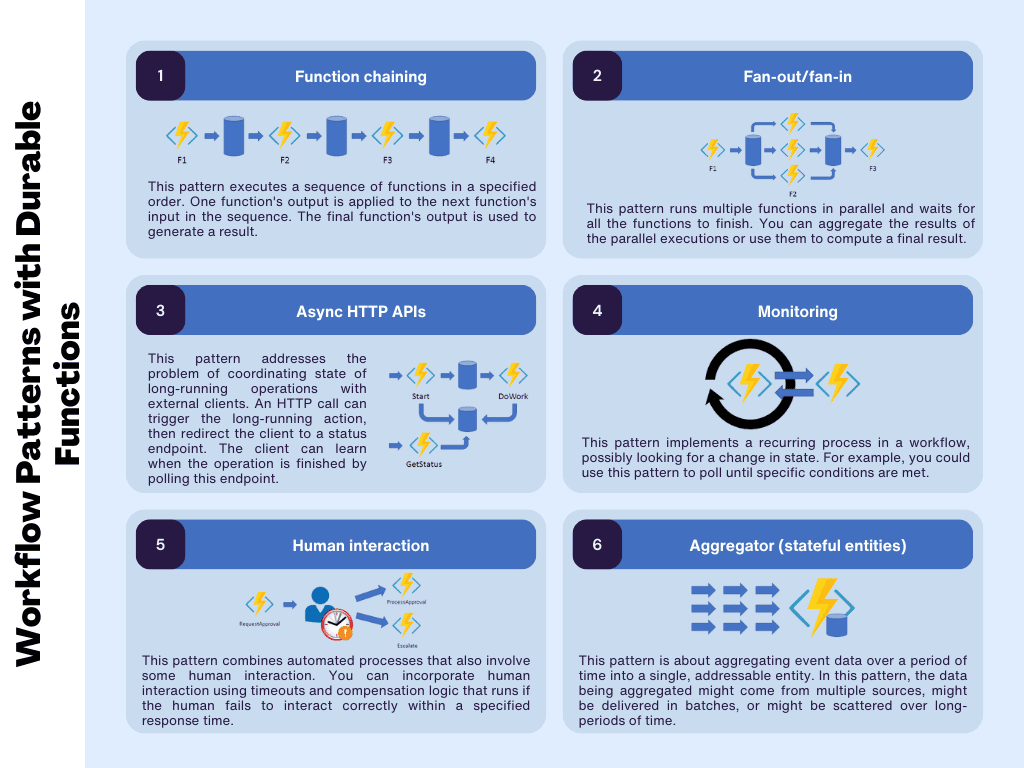
The following reading from the official Microsoft documentation provides the definitive guide to these patterns.
Durable Functions Overview - Azure
This document is the best resource for understanding the canonical use cases for Durable Functions. As you read, notice how each pattern solves a specific coordination challenge.
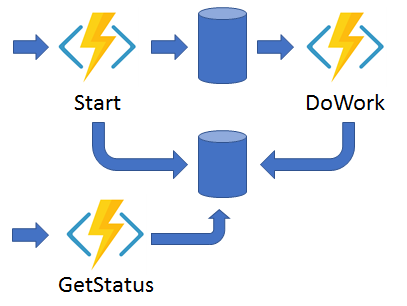
Read through the descriptions and look at the C# code samples (Isolated worker process tab) for the following patterns: Function chaining: A sequence of functions executing one after another. Fan-out/fan-in: Running multiple functions in parallel and waiting for them all to complete before aggregating the results. Async HTTP APIs: A crucial pattern for long-running operations started by an HTTP call. Monitor: A flexible, recurring process, like polling an endpoint until a condition is met. Human interaction: Workflows that pause to wait for input from a person, with timeouts and escalation logic. Aggregator (stateful entities): A pattern for aggregating event data over time. This is handled by a feature called Durable Entities, which builds on the same principles.
The Async HTTP API pattern is particularly important and a frequent topic in the AZ-204 exam. It directly solves the problem of long-running backend processes initiated from a web request, without forcing the client to maintain an open connection.
4. Orchestrator Code Constraints: The Golden Rules
The event sourcing and replay mechanism that makes orchestrations reliable also imposes strict rules on the code you can write inside an orchestrator function. Because the code is replayed to rebuild state, it must be deterministic. This means it must produce the same result every time it runs with the same input.
Failing to follow these rules is the most common source of bugs in Durable Functions.
How To Orchestrate Workflows With Azure Durable Functions? (With real-life example)
Before diving into the official documentation, watch this segment for a practical take on why determinism is so important.
The clip from orchestration constraints covers the most common pitfalls: using DateTime.Now and creating infinite loops.
The video highlighted two key issues. Now, let's review the complete list of constraints from the official documentation.
Durable orchestrator code constraints - Azure Functions
This document details the rules for writing deterministic orchestrator code. Understanding these rules is non-negotiable for working with Durable Functions.
Read through the article, focusing on the following sections and their prohibitions for orchestrator functions: Using deterministic APIs: Understand the core principle. Dates and times: Never use DateTime.Now. Use context.CurrentUtcDateTime instead. GUIDs and UUIDs: Never use Guid.NewGuid(). Use context.NewGuid() instead. Random numbers: These must be generated in an activity function. Bindings: Orchestrators cannot use input or output bindings. All I/O must happen in activity or client functions. Static variables and Environment variables: Their values can change between replays. Pass configuration as input to the orchestration. Network and HTTP: All external calls must be done in activity functions (or using the special durable HTTP APIs). Async APIs: You can only await tasks provided by the orchestration context, like CallActivityAsync or CreateTimer. Do not use Task.Run or Task.Delay. .NET threading APIs: Avoid threading APIs as the orchestrator runs on a single thread.
The rule of thumb is simple: An orchestrator's job is only to orchestrate. Any actual "work"—anything that talks to the outside world, is non-deterministic, or is CPU-intensive—must be delegated to an activity function.
5. Seeing it in Action: The Orchestration Lifecycle
Let's conclude by watching a video that demonstrates the full lifecycle of a durable orchestration, from the perspective of a client. This will tie together the concepts of client functions, status polling, and external events.
Serverless but Stateful! - Azure Durable Functions Are AWESOME!
This video, "Serverless but Stateful!" by Nick Proud, provides an excellent end-to-end demonstration.
Introduction: The video starts by explaining the problem of managing state in a serverless environment and introduces the async API pattern. Creating the Functions: Observe how adding a durable function orchestration from a template creates three functions: the HTTP start (client), the orchestrator, and a sample activity. Starting and Polling: Watch how a simple GET request to the HTTP start function kicks off the workflow and returns a set of management URIs, including the statusQueryGetUri which is used to poll for completion. Waiting for External Events: This is a great demonstration of the Human Interaction pattern. The orchestrator is modified to pause using context.WaitForExternalEvent. A separate POST request is then made to the sendEventPostUri to inject data into the running orchestration and allow it to continue. Other Management Actions: The video briefly mentions other powerful actions you can take, such as terminating or restarting a running workflow via dedicated API endpoints.
Conclusion
In this lesson, we've moved from single, stateless functions to orchestrating complex, stateful workflows. You've learned the fundamental concepts that make Durable Functions a powerful tool for building robust serverless applications.
Here are your key takeaways:
- Durable Functions are an extension for writing stateful workflows in a serverless environment, managing state and restarts for you via event sourcing.
- Workflows are built using three function types: Client Functions to start/manage, Orchestrator Functions to define the workflow logic, and Activity Functions to do the actual work.
- Common application patterns like function chaining, fan-out/fan-in, and async HTTP APIs are simplified with Durable Functions.
- Orchestrator code must be deterministic due to the replay mechanism. This means no direct I/O, no random or time-based APIs, and only awaiting tasks from the durable context.
In our previous lessons, we've covered the what and the why. In our next session, we'll dive into the how. You will get hands-on experience and implement a function chaining pattern using Durable Functions to orchestrate a simple workflow, putting these powerful concepts into practice.