In our last session, we explored the theoretical foundations of Durable Functions, understanding their core components and the common patterns they enable. You learned that these stateful functions are perfect for orchestrating complex, long-running workflows in a serverless environment.
Today, we transition from theory to practice. This lesson focuses on implementing one of the most fundamental and widely used durable patterns. We'll be working towards the learning outcome: Implement a function chaining pattern using Durable Functions to orchestrate a simple workflow. You will see how to write the C# code to define a sequence of tasks, passing data from one step to the next, which is a common requirement in many software processes.
1. The Function Chaining Pattern: A Visual Review
As we discussed, function chaining involves executing a sequence of functions in a specific order. The key characteristic is that the output of one function becomes the input for the next, creating a processing pipeline.
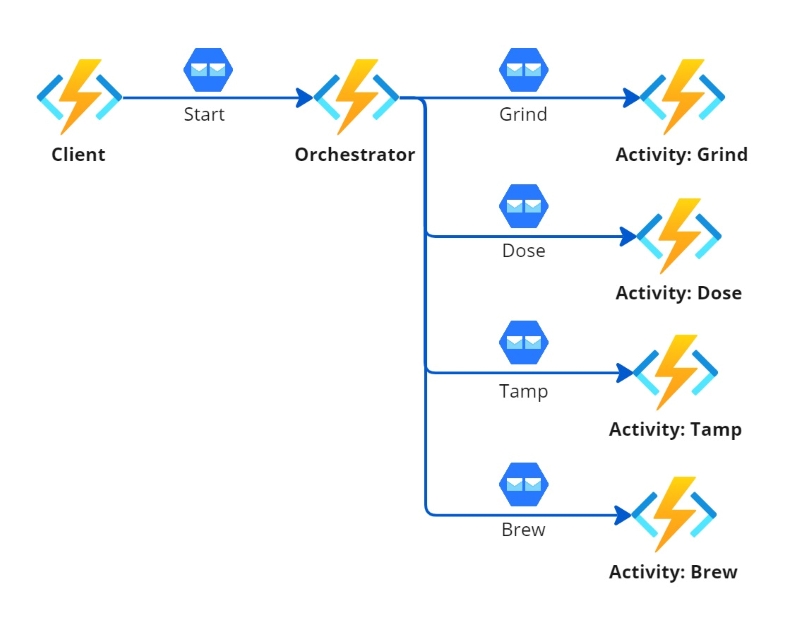
This pattern is ideal for workflows where tasks are dependent and must be completed sequentially, such as an e-commerce order processing pipeline or a document transformation process.
2. The Code Behind the Chain
Implementing a function chain involves coordinating the three types of Durable Functions we covered previously: a client, an orchestrator, and one or more activities. Your deep experience with .NET and C# will make the code structure feel very natural.
The official Microsoft documentation provides the canonical code structure for each piece.
Function chaining - Azure Durable - Microsoft Learn
This documentation provides the essential boilerplate for building a function chain. Focus on understanding the role and structure of each function type.
As you read, pay close attention to the C# code samples for the following components: The Orchestrator: In the "Orchestrator" section, examine the E1_HelloSequence function. Notice the use of [OrchestrationTrigger] and IDurableOrchestrationContext. The key takeaway is how context.CallActivityAsync<T> is await-ed to execute activities sequentially and how their results are collected. The Activity: In the "Activity" section, look at the E1_SayHello function. It's a simple function marked with [ActivityTrigger], which takes an input, performs an action, and returns a result. This is where the actual "work" happens. The Client: In the "Client" section, review the HttpStart function. This HTTP-triggered function uses the [DurableClient] binding to get an IDurableClient instance. This client is the interface used to start a new orchestration via starter.StartNewAsync.
3. A Practical Example: Order Processing Workflow
While the "Hello, World" example from the documentation is good for demonstrating the basic structure, a more realistic scenario helps solidify the concepts. Let's walk through an order processing pipeline, a classic use case for function chaining.
This example will show you how to pass more complex data objects between activities and how to include conditional logic within your orchestration.
How to Implement Function Chaining in Azure Durable Functions
This article provides an excellent, end-to-end C# example of an order processing workflow. It's a perfect illustration of function chaining in a real-world context.
Please read the following sections: Building the Order Processing Pipeline: Start by examining the C# class definitions for the data models (Order, ValidatedOrder, PaidOrder, etc.). Notice how each step in the pipeline enriches the data model. The Orchestrator Function: This is the most important part. Analyze the ProcessOrderOrchestrator code. See how it calls a sequence of activities: ValidateOrder, CheckInventory, ProcessPayment, FulfillOrder, and SendConfirmation. Pay special attention to the conditional logic (if (!validatedOrder.IsValid)) and the inclusion of retry options for the payment step. The Activity Functions: Briefly review the code for each activity function. Each one performs a discrete task (validation, inventory check, payment processing) and returns an updated data object for the next step in the chain.
The order processing example demonstrates the power of the orchestrator. It's not just calling functions; it's defining the entire business process in code, including validation checks, retries, and the flow of data.
4. Handling Failures: Compensation Logic
What happens if a step in the chain fails? A robust workflow must be able to handle errors gracefully. For example, if payment processing fails after inventory has been reserved, that inventory should be released to prevent it from being locked indefinitely. This is known as compensation logic.
You can implement this in your orchestrator using a standard try...catch block.
How to Implement Function Chaining in Azure Durable Functions
Continuing with the same article, let's look at how to make our workflow resilient.
Read the section on Error Handling in Chains. The code snippet shows the orchestrator wrapped in a try...catch block. If an activity like ProcessPayment fails, the catch block executes compensation logic by calling another activity, ReleaseInventory.
This pattern is crucial for building reliable systems. The orchestrator centralizes the error handling logic for the entire multi-step workflow, making it much easier to manage than in a traditional, distributed system where each service would need to handle its own failures and compensation.
5. Tying It All Together: A Complete Walkthrough
Now let's watch a detailed video that builds a complete, stateful workflow. While it incorporates multiple patterns (including timers and external events, which you saw in the previous lesson), its core is a function chain. This will help you see how these concepts fit together in a complete solution within Visual Studio.
How To Orchestrate Workflows With Azure Durable Functions? (With real-life example)
The video "How To Orchestrate Workflows With Azure Durable Functions?" by Codewrinkles provides an excellent, code-focused demonstration of building a durable orchestration.
Focus on these key segments to see the function chaining pattern in action: Solution Overview: First, get an overview of the solution structure. The presenter introduces the different function types: the client function (HTTP trigger to start the process), the orchestrator function (which defines the workflow), and the activity functions (which do the work). The Client Function: Watch how the HTTP-triggered client function receives a request, uses the IDurableOrchestrationClient to call startNewAsync, and kicks off the orchestration. The Orchestrator and Activities: This is the core of the function chain. Observe how the orchestrator first calls the getSupportContacts activity. Once that completes, it enters a loop where it sequentially calls the sendEmailToContact activity. This await context.CallActivityAsync(...) pattern is the essence of function chaining.
This video reinforces how you, as a .NET developer, can write complex, stateful, and resilient serverless workflows using familiar C# syntax and concepts.
Conclusion
In this lesson, you've seen how to translate the theory of Durable Functions into a practical implementation of the function chaining pattern. This is a foundational skill for building stateful serverless applications on Azure.
Here are your key takeaways:
- Function chaining is implemented by an orchestrator function that calls a series of activity functions in sequence.
- You use
await context.CallActivityAsync<T>within the orchestrator to ensure sequential execution and to pass the output of one activity as the input to the next. - Activity functions are the workhorses; they perform the actual tasks, such as database queries, API calls, or computations.
- Client functions, often triggered by HTTP, use the
IDurableClientto start and manage orchestration instances. - Robust workflows should include error handling and compensation logic using
try...catchblocks within the orchestrator to gracefully handle failures.
So far in this module, we've explored building individual functions and orchestrating them into complex workflows. Many applications, however, also require simpler, decoupled communication between services. In our next module, we will dive into message-based solutions, starting with a comparison of Azure Service Bus and Azure Queue Storage to understand when to use each.