Introduction
In our last lesson, we laid the groundwork for content delivery by creating an Azure CDN profile and endpoint. You now have a CDN ready to serve content from an origin like Azure Storage. However, simply setting up the CDN is only half the story. To truly optimize performance and ensure your users receive the correct content, you need to control what gets cached, for how long, and under what conditions.
This lesson focuses on exactly that: controlling caching behavior using caching rules and query string settings in Azure CDN. We will explore how to move beyond the default settings to implement a sophisticated caching strategy that treats different types of content appropriately—caching static images for long periods while refreshing HTML pages more frequently. This is a critical skill for managing high-performance web applications and a key area for the AZ-204 exam.
1. The Foundation: How Caching is Communicated
Before we configure rules in Azure, it's helpful to understand the underlying mechanism that governs web caching: HTTP headers. When your origin server (e.g., an Azure App Service or Blob Storage) sends a file, it can include headers that instruct the CDN and browsers on how to handle it.
The video below explains the two most important concepts: duration and validation.
AZ-204 Part 4 - Monitor, troubleshoot, and optimize Azure solutions (15-20%) Study Cram
This video from Abdullah Abu-Hassan's AZ-204 study cram explains the core principles of cache duration and validation.
Watch the section from validation and duration. Focus on these two key ideas: Duration: Controlled by the Cache-Control header from the origin server. This header tells the CDN how long it's allowed to store a copy of the content (its Time To Live or TTL). Validation: Handled using E-Tag headers. An E-Tag is like a version number for a file. The CDN can ask the origin, "I have version XYZ, is it still valid?" This avoids re-downloading the entire file if it hasn't changed.
Azure CDN caching rules give you the power to enforce a caching policy at the CDN level, allowing you to override or supplement the headers sent by your origin server.
2. Implementing Caching Rules
Azure CDN (specifically the Standard Microsoft SKU) uses a rules engine to define caching logic. Rules are processed in order, and once a request matches the conditions of a rule, that rule is applied, and no subsequent rules are evaluated for that request.
You can set two types of rules:
- Global Caching Rules: A default policy that applies to all traffic to your endpoint.
- Custom Caching Rules: More specific rules that apply only to requests matching certain criteria, like a specific file path or file extension.

Global and Custom Rule Behavior
The primary action for a caching rule is to set the Cache-Behavior. This tells the CDN how to interact with the origin's Cache-Control headers.
How to Configure Azure CDN Caching Rules for Maximum ...
This article from OneUptime provides practical guidance on configuring both global and custom caching rules.
First, read the section "Setting Up Global Caching Rules". Focus on understanding the three values for the cache-behavior parameter: Override: Ignores the origin's headers and always uses the duration specified in the CDN rule. SetIfMissing: Uses the CDN rule's duration only if the origin server does not send any cache-control headers. This is a great safety net. BypassCache: Tells the CDN not to cache the response at all. Every request will be passed to the origin. Next, read "Configuring Custom Caching Rules by File Extension". This section demonstrates a common and powerful strategy: setting different cache durations based on the type of content. For example, you can cache versioned CSS/JS files for a very long time, images for a medium duration, and HTML files for a short duration.
A typical strategy looks like this:
- Global Rule: Use
SetIfMissingwith a moderate duration (e.g., 1 day). This acts as a fallback. - Custom Rule for Static Assets: Create a rule that matches on file extensions (
.css,.js,.woff2). SetCache-BehaviortoOverridewith a long duration (e.g., 30 days), as these files are often versioned. - Custom Rule for Images: Create a rule for image extensions (
.jpg,.png,.svg). UseOverridewith a long duration (e.g., 90 days). - Custom Rule for HTML: Create a rule for
.htmlfiles. UseOverridewith a very short duration (e.g., 1 hour) to ensure content updates are reflected relatively quickly.
3. Controlling Cache with Query Strings
By default, Azure CDN treats URLs with different query strings as completely separate, cacheable items.
https://my-cdn-endpoint.azureedge.net/images/logo.png?v=1https://my-cdn-endpoint.azureedge.net/images/logo.png?v=2
These are cached as two distinct objects. This is the desired behavior for cache-busting, where you change the query string to force clients to download a new version of a file.
However, sometimes query strings are used for other purposes, like analytics tracking (?utm_source=...), and do not affect the content of the file. In these cases, caching each unique URL is inefficient and reduces your cache hit ratio.
Azure CDN gives you three options to control this behavior.
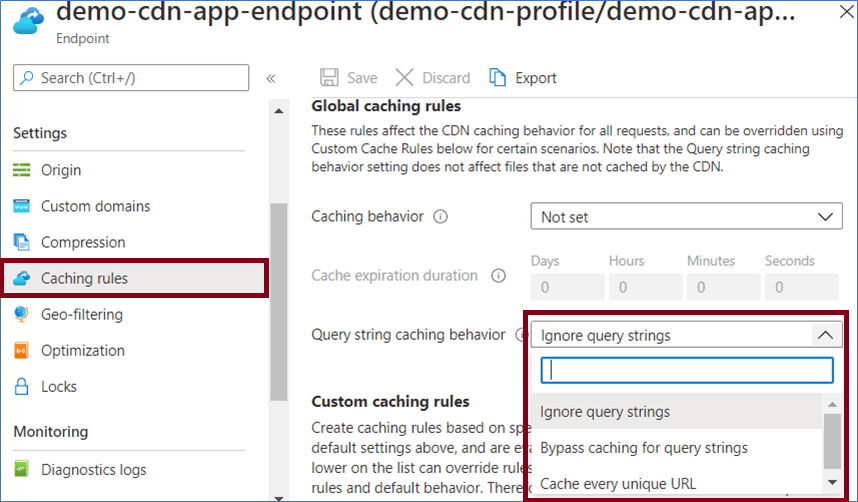
How to Configure Azure CDN Caching Rules for Maximum ...
This section of the OneUptime article explains the different ways Azure CDN can handle query strings.
Read the section "Handling Query Strings" to understand the three available behaviors: Ignore query strings: The CDN removes the query string before caching. All requests for logo.png, regardless of query parameters, will be served the same cached object. Bypass caching for query strings: The CDN will not cache any content if the URL includes a query string. Cache every unique URL: The default behavior. Each unique URL (including its query string) is cached as a separate object.
The choice depends on your application's design:
- If you use query strings for versioning/cache-busting, stick with the default "Cache every unique URL".
- If your query strings are only for tracking and don't change the file content, switch to "Ignore query strings" to improve your cache hit ratio.
You can also configure this using the Azure CLI. This is often faster for automation and scripting.
# Example: Set the endpoint to ignore query strings
az cdn endpoint update \
    --resource-group YourResourceGroup \
    --profile-name YourCdnProfileName \
    --name YourCdnEndpointName \
    --query-string-caching-behavior IgnoreQueryString
Conclusion
In this lesson, we moved from basic CDN setup to fine-grained control over caching behavior. By mastering caching rules and query string settings, you can build a highly efficient delivery pipeline that reduces load on your origin servers and provides a faster experience for your users.
Here are the key takeaways:
- CDN caching behavior is fundamentally driven by HTTP headers like
Cache-ControlandE-Tagfrom the origin. - Caching rules in Azure CDN allow you to
Override,SetIfMissing, orBypassCachebased on global or custom criteria (like file path or extension). - A robust strategy involves setting different cache durations for different content types: long for static assets, short for dynamic content like HTML.
- Query string caching behavior is critical for efficiency. You must choose whether to cache every unique URL, ignore query strings, or bypass caching for them based on how your application uses query parameters.
This completes our module on performance optimization with caching and CDN. You now have the skills to implement both application-level caching with Redis and edge-level caching with Azure CDN.
In our next lesson, we will begin a new module, "Managing APIs with Azure API Management," starting with an overview of its core components and tiers.