Welcome to the first lesson in our module on managing APIs with Azure API Management (APIM). In our previous module, we focused on optimizing the delivery of content to users with Azure CDN. Now, we shift our attention from the content itself to the interfaces that expose your application's logic and data: your APIs. As a senior software engineer, you're undoubtedly familiar with building and consuming APIs, but managing them at scale across an organization introduces a new set of challenges.
This lesson addresses the learning outcome: Describe the components and tiers of Azure API Management. We will explore how APIM acts as a centralized facade for your backend services, enabling you to secure, publish, and analyze your APIs. We'll break down its three core components and then examine the different service tiers to help you understand which one to choose for a given scenario—a critical skill for both real-world application and the AZ-204 exam.
1. Why Do We Need API Management?
Before diving into the "what," let's start with the "why." In any organization, you might have numerous APIs hosted in different places: on-premises servers, Azure App Services, Azure Functions, or even other cloud providers. This can lead to a scattered landscape where it's difficult to enforce security standards, monitor usage, or even for developers to simply discover what APIs are available.
Azure API Management is designed to solve these problems by providing a single, consistent abstraction layer.
Azure API Management Deep Dive
To get a clear picture of the problems APIM solves, watch this introductory segment from John Savill's Technical Training.
Watch the first part of the video, from the beginning to the core problem. Pay attention to how he frames APIM as an abstraction layer that sits between API consumers and API providers to address challenges like: Discoverability Security and authentication Protection (e.g., rate limiting) Governance
2. The Core Components of API Management
An Azure API Management instance is built on three fundamental components, each serving a different audience within the API ecosystem.
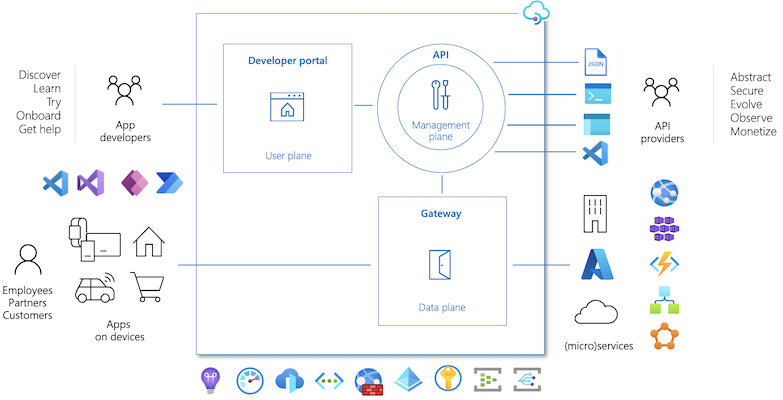
Let's explore each of these components.
Azure API Management - Overview and Key Concepts
This official Microsoft Learn article provides a concise and authoritative description of each core component.
Read the sections titled "API Management components", "API gateway", "Management plane", and "Developer portal". As you read, focus on the distinct purpose of each component: API Gateway: The runtime that processes all API traffic. Management Plane: The configuration interface for API administrators. Developer Portal: The documentation and onboarding site for API consumers.
To reinforce these concepts with a different perspective, the videos below offer clear explanations of each part.
a) The API Gateway: The "Front Door"
The API Gateway is the heart of the runtime engine. It intercepts all incoming client requests and routes them to the appropriate backend service. It's the only part of APIM that your end-users' applications will ever interact with directly.
As the reading highlights, the gateway is responsible for:
- Acting as a facade for your backend APIs.
- Enforcing security policies like API key validation, JWT validation, and client certificates.
- Applying usage quotas and rate limiting to prevent abuse.
- Caching responses to improve latency and reduce load on your backends.
- Emitting logs and metrics for monitoring.
Azure API Management Deep Dive
John Savill's video provides a great visual explanation of the Gateway and its relationship with the Management Plane.
Watch the segment from Gateway and Control Plane. Notice how the Management Plane (what he calls the Control Plane) is used for configuration via Azure Resource Manager (ARM), while the API Gateway is the deployed component that actually handles the requests.
b) The Management Plane: The "Control Room"
The Management Plane is the administrative interface for APIM. As an API provider, this is where you interact with the service to configure its behavior. Given your experience with Azure DevOps and other Azure services, you'll recognize the standard tools used here: the Azure Portal, Azure CLI, PowerShell, and ARM templates.
You use the management plane to:
- Define or import your API schemas (e.g., from an OpenAPI specification).
- Package APIs into "products" for consumption.
- Configure policies (the rules that the gateway enforces).
- Manage users and groups.
- Analyze API usage and performance.
c) The Developer Portal: The "Storefront"
The Developer Portal is an automatically generated, fully customizable website that serves as the public-facing documentation for your APIs. This is where external or internal developers (API consumers) go to learn about and start using your APIs.
Introduction to Azure API Management
This video from Houssem Dellai provides a focused look at the Developer Portal.
Watch the sections on the Developer Portal and the summary. This highlights the key functions for developers: Discovering and reading API documentation. Testing API endpoints directly in the interactive console. Subscribing to products to get API keys. Analyzing their own API usage.
3. Understanding the Service Tiers
Now that you know what APIM is composed of, the next question is how to provision it. Azure offers several pricing tiers, each providing a different balance of features, performance, and cost. Choosing the right tier is a common exam topic.
Azure API Management - Overview and Key Concepts
This section of the Microsoft Learn article introduces the high-level groupings of the available tiers.
Read the section "API Management tiers" to understand the three main categories: Classic: The original tiers (Developer, Basic, Standard, Premium). V2: A newer set of tiers with faster provisioning (Basic v2, Standard v2, Premium v2). Consumption: A serverless, pay-per-execution tier.
For the AZ-204 exam, you need to know the specific features that differentiate these tiers. The most comprehensive resource for this is the official feature comparison table.
Feature-based comparison of Azure API Management tiers
This documentation provides a detailed breakdown of which features are available in each tier. It's an essential resource for exam preparation.
Carefully study the table in this document. Don't try to memorize every single cell, but focus on the key differentiators that determine which tier you would choose for a specific requirement. Pay special attention to: Developer Portal: Note that the Consumption tier lacks a developer portal. Virtual Network (VNet) Support: This is a major differentiator. Notice how only Premium and the v2 tiers offer robust VNet integration, which is essential for accessing privately hosted backend services. Multi-region Deployment: This is a Premium-only feature, critical for high availability and global performance. Self-hosted Gateway: Another Premium (and Developer) feature, allowing you to deploy the gateway component on-premises or in other clouds. Scale Units: Observe how the capacity and scaling limits increase significantly as you move up the tiers from Basic to Premium.
4. A Modern Concept: Federated Management with Workspaces
Finally, for more complex organizational structures, APIM offers a feature called Workspaces. This allows a central platform team to manage a single APIM instance while delegating the management of specific sets of APIs to different development teams. This feature is available in the Premium and Premium v2 tiers.
Azure API Management Deep Dive
This closing segment from John Savill's video clearly explains the organizational problem that Workspaces solve.
Watch the section from Workspaces and Federated Management. This will help you understand the trade-offs between centralized, siloed, and federated API management models, which is excellent context for a senior engineer.
Conclusion
In this lesson, we established the foundational knowledge of Azure API Management required for the rest of this module and for the AZ-204 exam. You are now equipped to describe what APIM is, why it's used, what its core components are, and how its features differ across service tiers.
Here are the key takeaways:
- Purpose: APIM acts as a managed facade to abstract, secure, and govern your APIs, regardless of where they are hosted.
- Core Components: It consists of the API Gateway (runtime proxy), the Management Plane (admin interface), and the Developer Portal (consumer storefront).
- Service Tiers: Tiers range from the serverless Consumption tier to the enterprise-grade Premium tier. Key features like VNet integration, multi-region deployments, and the developer portal are the primary differentiators.
- Workspaces: A feature in the Premium tiers that enables a federated management model, balancing central governance with team autonomy.
In our next lesson, we will put this theory into practice. You will learn how to import and publish an API using your new API Management instance, taking the first step towards hands-on management.