Introduction
In our last lesson, we focused on optimizing application performance by caching dynamic data with Azure Cache for Redis. Today, we'll continue exploring performance optimization, but we'll shift our focus from application data to static content. We will learn how to configure Azure CDN profiles and endpoints to deliver content efficiently.
A Content Delivery Network (CDN) is a system of distributed servers that deliver web content to users based on their geographic location. By caching static files like images, CSS, and JavaScript closer to your users, a CDN dramatically reduces latency and improves the user experience. This is a fundamental technique for any global-facing web application and a key topic for the AZ-204 exam.
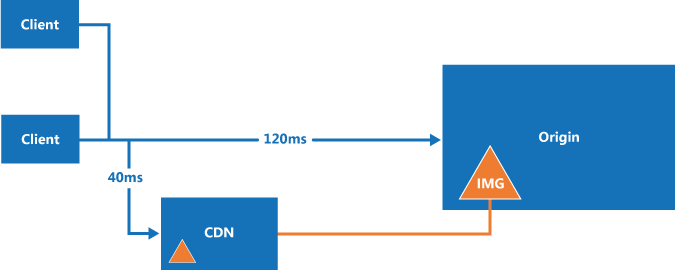
By the end of this lesson, you will understand the key components of Azure CDN and be able to set one up to serve static assets from Azure Storage.
1. Core Concepts: CDN Profiles and Endpoints
Before creating a CDN, it's important to understand its two main building blocks: profiles and endpoints.
- A CDN Profile is a collection of one or more CDN endpoints. It acts as a container for billing and configuration settings that can be shared across multiple endpoints. You also select your CDN provider (e.g., Microsoft, Akamai, Verizon) at the profile level.
- A CDN Endpoint represents the specific URL (
your-endpoint-name.azureedge.net) from which your cached content will be served. Each endpoint is configured to pull content from a specific origin (like an Azure Storage account or a web app) and has its own set of delivery rules and caching behavior.
Azure CDN for Static Assets, APIs, and Front Door
This article from Last9 provides a clear and concise explanation of the relationship between CDN profiles and endpoints.
Read the section titled "How to Organize Delivery with Azure CDN Profiles and Endpoints." Pay close attention to how a profile serves as a container and how an endpoint connects to a specific origin with a unique URL.
2. Setting Up an Azure CDN with a Storage Origin
Now let's walk through the most common use case: setting up an Azure CDN to serve static files stored in an Azure Blob Storage container. This involves three main steps:
- Create the origin (the Blob Storage account).
- Create the CDN profile.
- Create the CDN endpoint and link it to the storage origin.
The following video provides a complete walkthrough of this process using the Azure Portal.
How To Setup an Azure CDN Backed by an Azure Blob Storage Account
This video by Jon Gallant demonstrates the end-to-end process of creating an Azure CDN backed by a Blob Storage account.
Watch the entire video. As you watch, focus on these key steps: Creating storage: A standard Blob Storage account is created to act as the origin. Creating the profile: A CDN profile is created, and a pricing tier/provider is selected. Creating the endpoint: An endpoint is created within the profile, and its Origin type and Origin hostname are set to the storage account you created earlier. Uploading and testing: A container is made public, a file is uploaded, and it's tested via both the direct storage URL and the new CDN endpoint URL.
Configuring the Endpoint
As you saw in the video, linking the endpoint to the origin is the most critical configuration step. The Azure Portal provides a clear interface for this.

An Alternative: Using the Azure CLI
As a developer, you'll often find the Azure CLI to be a faster and more scriptable way to manage resources. The process is the same conceptually: create a profile, then create an endpoint within it.
The following resource gives you the exact commands to accomplish what you just saw in the video.
Azure CDN for Static Assets, APIs, and Front Door
This section of the Last9 article provides the CLI commands for creating a CDN profile and endpoint.
Read the section "How to Set Up Azure CDN" and focus specifically on the part titled "Option 2: Using Azure CLI". Compare the az cdn profile create and az cdn endpoint create commands to the steps you saw performed in the Azure Portal. Notice how the --origin parameter in the CLI command corresponds to the "Origin hostname" field in the portal.
Here's a quick summary of the CLI commands for your reference:
# Define variables
RESOURCE_GROUP="YourResourceGroup"
CDN_PROFILE_NAME="my-unique-cdn-profile-name"
CDN_ENDPOINT_NAME="my-unique-cdn-endpoint-name"
STORAGE_ACCOUNT_NAME="yourstorageaccountname"


# 1. Create the CDN Profile
az cdn profile create \
    --name $CDN_PROFILE_NAME \
    --resource-group $RESOURCE_GROUP \
    --sku Standard_Microsoft


# 2. Get the origin hostname
# The origin for a storage account is formatted as <account-name>.blob.core.windows.net
ORIGIN_HOSTNAME="$STORAGE_ACCOUNT_NAME.blob.core.windows.net"


# 3. Create the CDN Endpoint
az cdn endpoint create \
    --name $CDN_ENDPOINT_NAME \
    --profile-name $CDN_PROFILE_NAME \
    --resource-group $RESOURCE_GROUP \
    --origin $ORIGIN_HOSTNAME
3. Understanding Origin Types and Providers
While we focused on Azure Blob Storage, Azure CDN supports several origin types:
- Storage: An Azure Storage account, ideal for static files.
- Cloud service: An Azure Cloud Service.
- App service: An Azure App Service, for caching content generated by your web app.
- Custom origin: Any publicly accessible web server, which could be on-premises or in another cloud.
Additionally, Azure CDN offers several providers, with "Azure CDN Standard from Microsoft (classic)" being the most common choice for general-purpose delivery. Other providers like Akamai and Verizon (which have been rebranded in some contexts) offer different features and network footprints, which can be relevant for advanced scenarios. For the AZ-204 exam, being able to configure the standard Microsoft offering is the key skill.
Conclusion
In this lesson, we explored how to use Azure CDN to accelerate the delivery of static content to users around the world. You learned how to configure the fundamental components of this service and saw how they work together in a practical scenario.
Here are the key takeaways:
- A CDN Profile is a container for endpoints, defining the provider and pricing tier.
- A CDN Endpoint provides the public URL and connects to an origin (like a storage account) where your content lives.
- You can configure CDN profiles and endpoints using either the Azure Portal or the Azure CLI.
- The most common use case is to pair an Azure CDN with an Azure Blob Storage account to serve static assets like images, scripts, and stylesheets.
You have successfully configured the basic infrastructure for a CDN. However, a crucial part of using a CDN effectively is controlling what gets cached and for how long. In our next lesson, we will build directly on today's work by learning how to control caching behavior using caching rules and query string settings in Azure CDN.