Hello! In our last lesson, you successfully published a .NET API to Azure API Management, establishing a managed gateway for your backend service. You saw how the gateway becomes the new front door, enforcing basic access control with subscription keys.
Today, we'll dive into the heart of APIM's power: policies. This lesson addresses the learning outcome: Describe the structure of an API Management policy document and the purpose of its sections (inbound, backend, outbound, on-error). Understanding this structure is fundamental, as it's the framework where you will implement all the advanced behaviors that make APIM so valuable, from security and performance optimization to request and response transformation. This knowledge will be the foundation for the next several lessons where we'll implement specific policies.
1. Understanding the Policy Document Structure
At its core, an API Management policy is a set of instructions, defined in an XML document, that the API gateway executes during the processing of a request. These instructions allow you to modify the behavior of your API without changing any backend code.
The policy document is organized into four main sections, each corresponding to a different stage of the request/response lifecycle.
Policies in Azure API Management | Microsoft Learn
This official Microsoft Learn documentation provides the definitive explanation of the policy structure. It's a foundational read for this topic.
Focus on the section titled "Understanding policy configuration". Pay close attention to the XML snippet that shows the four key sections: inbound, backend, outbound, and on-error.
As you saw in the reading, the basic structure looks like this:
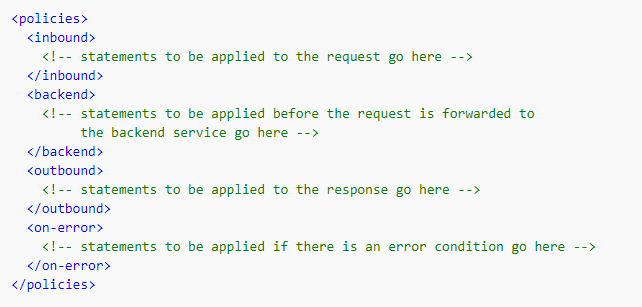
Let's break down the purpose of each section:
-
<inbound>: This section contains policies that are executed as soon as a request is received by the gateway. This is where you'll handle tasks related to the incoming request before it's sent to your backend.- Common uses: Authentication (e.g., validating a JWT token), authorization (e.g., checking for required claims), rate limiting and quotas, and transforming the incoming request (e.g., converting XML to JSON, adding or removing headers).
-
<backend>: These policies are executed right before the request is forwarded to the backend service. This section is primarily for modifying the request just for the backend's benefit.- Common uses: Setting the backend service URL (especially for dynamic routing), managing backend authentication (e.g., adding an API key required by the backend), configuring retry logic, and implementing a circuit breaker pattern.
-
<outbound>: This section processes the response after it has been received from the backend service but before it's sent back to the calling client.- Common uses: Transforming the response body (e.g., removing sensitive data, converting JSON to XML), adding or removing response headers, and caching the response for future requests.
-
<on-error>: This is a special section that acts as an error handler. Policies in this section are executed if an error or exception occurs during the processing in theinbound,backend, oroutboundsections.- Common uses: Logging the error details, setting a custom error response body and status code, and performing cleanup actions.
This structure provides a clear separation of concerns for manipulating the request and response as they flow through the gateway.
2. The Flow of Policy Execution
Understanding the order in which these sections are processed is crucial. A typical successful request does not execute all four sections sequentially.
Azure API Management visually explained - Blog by Max Ivanov
This blog post by Max Ivanov provides a very clear and concise explanation of the execution order.
Please read the section "Order of processing". It lays out the exact sequence for a request and response.
The standard flow for a successful API call is as follows:
- A client sends a request to the APIM gateway.
- Policies in the
inboundsection are executed. - Policies in the
backendsection are executed. - The gateway forwards the request to the backend API.
- The backend API processes the request and returns a response.
- Policies in the
outboundsection are executed on the response. - The gateway sends the final response back to the client.
If an error occurs at any point in steps 2, 3, or 6, the normal flow is interrupted, and execution immediately jumps to the on-error section.
This short video segment provides a great visual summary of this request/response flow.
Azure API Management Deep Dive
John Savill's "Azure API Management Deep Dive" video effectively illustrates how policies intercept the request and response.
Watch the clip from the request flow. Notice how he describes policies being applied "on the way in" (inbound) and "on the way back" (outbound), with the backend call happening in the middle.
3. Policy Sections in Action: Practical Examples
Let's look at some concrete examples to see how these sections are used in practice. As a senior engineer, you'll appreciate how this structure enables complex, real-world scenarios.
Example 1: Caching (Inbound & Outbound)
Caching is a classic use case that involves both the inbound and outbound sections.
inbound: Acache-lookuppolicy checks if a valid cached response exists for the current request. If found, the gateway immediately returns the cached response, and thebackendandoutboundsections are skipped entirely.outbound: If no cached response was found, the request goes to the backend. On its way back, acache-storepolicy in theoutboundsection saves the response from the backend into the cache.
This video demonstrates exactly this pattern.
Mastering Azure API Management - Demos and Best practices
This demo from "Mastering Azure API Management" by AzureTar shows the implementation of a caching policy.
Watch from implementing caching. Observe how the cache-lookup policy is placed in the inbound section and the cache-store policy is placed in the outbound section.
Example 2: Request Transformation (Inbound)
Sometimes you need to enrich or modify a request before it hits your backend. A common scenario in multi-tenant applications is to identify the caller and add that information to the payload.
Mastering Azure API Management - Demos and Best practices
The same video provides a great example of an inbound transformation.
Watch the segment from adding patient data. Here, the policy in the inbound section uses a C# expression to get the caller's subscription ID and injects it into the JSON body of the request. This is a perfect example of inbound processing.
You may have noticed the @(context.Subscription.Id) syntax. Policies can include policy expressions, which are C# statements that allow for dynamic and conditional logic. Given your background in C# and .NET, you can leverage this feature to implement very sophisticated logic directly within the APIM gateway.
Example 3: Advanced Conditional Logic (Inbound)
Policies can handle much more than simple transformations. They can implement complex orchestration logic. A great example is the "claim check" pattern, used to handle large messages that might exceed the limits of a messaging system.
The logic is as follows:
- In the
inboundsection, check the size of the request body. - If it's too large, use a
send-requestpolicy to upload the body to an external store like Azure Blob Storage. - Replace the original request body with a small "claim check" message containing a pointer to where the full message is stored.
- If the body is small, do nothing and let it pass through.
This complex orchestration happens entirely within the inbound section before the request ever reaches the backend policy or the actual backend service.
Mastering Azure API Management - Demos and Best practices
This final demo from the AzureTar video showcases the powerful claim check pattern.
Watch from the claim check logic. Notice the use of the <choose> policy for conditional logic. This is an advanced but excellent illustration of the power and purpose of the inbound section for complex request pre-processing.
Conclusion
In this lesson, we dissected the structure and purpose of Azure API Management policies. You now understand how the distinct processing sections provide a powerful framework for manipulating API traffic without altering your backend code.
Here are the key takeaways:
- XML-Based Structure: Policies are defined in an XML document containing four sections:
<inbound>,<backend>,<outbound>, and<on-error>. - Specific Roles: Each section has a clear purpose.
inboundhandles the incoming request,backendprepares the call for the backend service,outboundprocesses the response, andon-errormanages exceptions. - Execution Flow: Policies execute in a defined order (
inbound->backend->outbound), with theon-errorsection acting as a universal catch block. - Powerful Capabilities: This structure enables a wide range of functionality, from simple transformations and caching to complex conditional logic and orchestration patterns.
Now that you have a firm grasp of the policy structure, we are ready to start filling it with content. In our next lesson, we will focus on a critical real-world use case: implementing rate limiting and quota policies to control API usage, which are configured almost exclusively in the inbound section.