Hello! In our last lesson, we focused on using Azure API Management policies for control, implementing rate limits and quotas to protect your backend services. You saw how the inbound section is the perfect place to enforce rules before a request goes any further.
Today, we'll continue exploring the power of policies, but we'll shift our focus from control to performance and modification. This lesson addresses the learning outcome: Implement caching and transformation policies to modify API behavior. We'll first see how to dramatically improve API responsiveness and reduce costs with caching. Then, we'll explore how to reshape requests and responses on the fly, a crucial skill for integrating diverse systems and modernizing legacy APIs.
1. Enhancing Performance with Caching Policies
One of the most effective ways to improve API performance is to avoid calling the backend service altogether for frequently requested, slow-changing data. API Management provides a built-in caching mechanism to store and serve responses directly from the gateway.
This not only makes your API faster for consumers but also reduces the load and operational cost of your backend services. To see a powerful real-world example of this, let's watch a short clip.
Azure API Management Deep Dive
In this segment from his "Azure API Management Deep Dive," John Savill explains a modern application of caching called "semantic caching" for AI models. While the specifics are advanced, his explanation of the benefits—saving money, reducing latency, and improving the user experience—applies to all forms of caching.
Watch the segment from semantic caching. Focus on the "why": caching avoids expensive and time-consuming backend operations.
How APIM Caching Works
As the video illustrates, caching can have a major impact. The mechanism in APIM is implemented using two primary policies that work together:
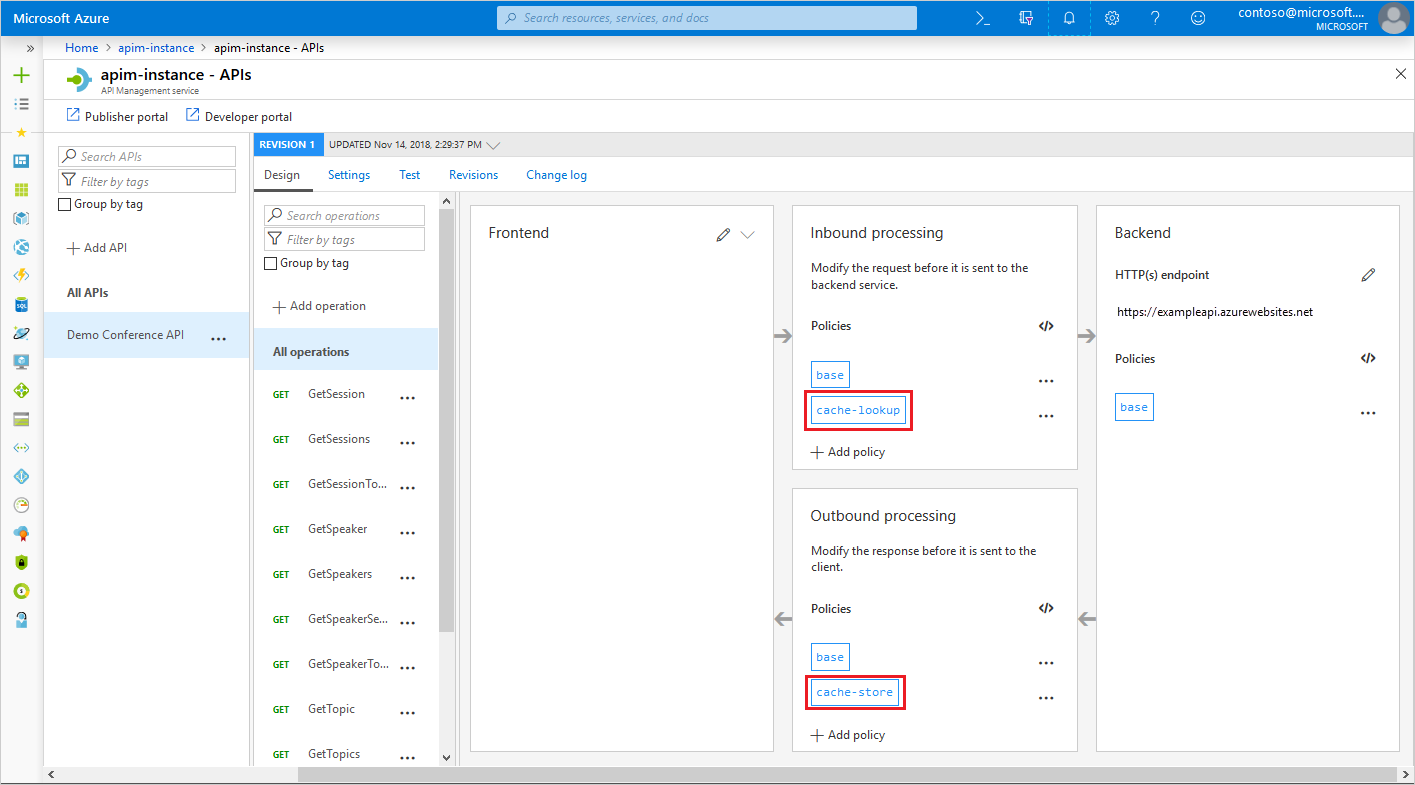
<cache-lookup />: Placed in theinboundsection. It checks if a valid response for the incoming request already exists in the cache. If it finds one (a "cache hit"), it immediately returns the cached response, and the rest of the policy pipeline (including the call to the backend) is skipped.<cache-store />: Placed in theoutboundsection. On a "cache miss," the request proceeds to the backend. As the response travels back through APIM, this policy stores it in the cache for a specified duration before sending it to the client.
The following image from the Azure portal shows exactly where these policies live in the processing flow.
Let's look at the basic XML structure for these policies.
How to Set Up Response Caching in Azure API Management
This article from the OneUptime blog provides a clear, practical walkthrough of APIM caching with excellent code examples.
Please read the first two sections, "How APIM Caching Works" and "Enabling Basic Response Caching." This will show you the fundamental XML for a simple caching strategy.
A basic caching policy looks like this:
<policies>
    <inbound>
        <base />
        <cache-lookup />
    </inbound>
    <outbound>
        <base />
        <cache-store duration="60" /> <!-- Duration in seconds -->
    </outbound>
</policies>
Customizing the Cache Key
By default, APIM uses the request URL (including query parameters) to create a unique key for each cached item. However, you often need more granular control. For example, you might want to serve different cached content based on a header like Accept-Language, or ignore a tracking_id query parameter that doesn't affect the response.
This is where the vary-by- attributes come in.
How to Set Up Response Caching in Azure API Management
Now, let's see how to refine our caching strategy by customizing the cache key.
Continue with the same article, reading the sections "Varying the Cache by Query Parameters" and "Varying the Cache by Headers."
For instance, to cache responses based on the category query parameter but ignore all others, you would modify the <cache-lookup> policy:
<cache-lookup vary-by-query-parameter="category" />
This ensures that requests for ?category=books and ?category=electronics are cached separately, but ?category=books&tracking_id=123 and ?category=books&tracking_id=456 will share the same cached response, which is much more efficient.
2. Modifying APIs with Transformation Policies
Beyond caching, policies can actively modify requests and responses as they pass through the gateway. This is incredibly useful for several scenarios:
- Modernizing Legacy APIs: Expose a modern JSON/REST interface for a backend that only speaks SOAP/XML.
- Creating Clean URLs: Present a simple, user-friendly URL to clients that transforms into a more complex URL required by the backend.
- Enriching Requests: Add headers or context information to a request before it reaches the backend.
- Scrubbing Responses: Remove sensitive or unnecessary data from a response before it's returned to the client.
Let's explore some of the most common transformation policies.
api-management-transformation-policies.md - AzGitDoc - GitHub
This GitHub document serves as a reference for many of APIM's transformation policies. We'll look at a few key examples.
Briefly scan the list under the "Transformation policies" section to get a sense of the available tools.
Example 1: Rewriting the URL (rewrite-uri)
A frequent requirement is to decouple the public-facing URL from the backend implementation URL. For example, you might expose a clean URL like /products/123 but your backend expects /api/v2/inventory?id=123. The rewrite-uri policy, placed in the inbound section, handles this.
<inbound>
    <base />
    <!-- Transforms /products/{id} to /api/v2/inventory?id={id} -->
    <rewrite-uri template="@("/api/v2/inventory?id=" + context.Request.Url.Path.Split('/').Last())" />
</inbound>
Given your extensive C# experience, you'll find policy expressions like the one in the template attribute very natural to work with. They allow for powerful, dynamic transformations.
Example 2: Converting Data Formats (xml-to-json and json-to-xml)
These policies are workhorses for API modernization. If you have an old SOAP/XML service, you can put APIM in front of it and use policies to offer a clean JSON interface to modern clients.
xml-to-json: Use in theoutboundsection to convert the backend's XML response to JSON.json-to-xml: Use in theinboundsection to convert a client's JSON request body into the XML format the backend expects.
<!-- In the outbound section -->
<outbound>
    <base />
    <!-- Assume the backend returned XML -->
    <xml-to-json kind="direct" />
</outbound>
Example 3: Setting Headers and Body (set-header, set-body)
These are two of the most versatile transformation policies.
The set-header policy can add, modify, or delete HTTP headers. This is useful for passing context to the backend (like the user ID from a JWT) or removing internal headers from the final response.
<inbound>
    <base />
    <!-- Add a header with the subscription ID for backend tracking -->
    <set-header name="X-Subscription-Id" exists-action="override">
        <value>@(context.Subscription.Id)</value>
    </set-header>
</inbound>
The set-body policy allows you to completely replace the request or response body. You can use a C# expression to construct a new body, which is especially powerful for filtering or reshaping data.
For example, to remove a sensitive field from a JSON response in the outbound section:
<outbound>
    <base />
    <set-body>@{
        var body = context.Response.Body.As<JObject>();
        body.Property("internal_diagnostics_data").Remove();
        return body.ToString();
    }</set-body>
</outbound>
This demonstrates how your programming skills directly translate into building sophisticated logic within APIM policies.
Conclusion
In this lesson, we saw how API Management policies go beyond simple control mechanisms to become powerful tools for enhancing performance and modifying behavior.
Key Takeaways:
- Caching Policies: Use
<cache-lookup>(inbound) and<cache-store>(outbound) to serve responses from a cache, improving performance and reducing backend load. The cache key can be customized withvary-by-attributes. - Transformation Policies: A suite of policies like
<rewrite-uri>,<xml-to-json>,<set-header>, and<set-body>allow you to modify requests and responses on the fly. - Dynamic Behavior: C# policy expressions are the key to unlocking dynamic and conditional logic within your policies, allowing you to build sophisticated and flexible API gateways.
With the ability to control, cache, and transform API traffic, you now have a comprehensive toolkit for managing APIs. Our next module will shift focus from building and managing to observing. We will dive into Monitoring and Troubleshooting Azure Solutions, starting with how to enable and use Application Insights to gain deep visibility into your applications' health and performance.