Welcome to our penultimate lesson. In the last session, we successfully implemented a function to export user-drawn strokes into the versatile and high-quality SVG format. Now, we'll take the final step in creating shareable documents by programmatically generating the master file that brings everything together.
Today's learning outcome is to write a function to programmatically generate a .tex file that interleaves extracted text and includes the exported SVG images. This is the core of your notebook's export feature, transforming your application's internal state—the text from PDFs and the drawings you've made—into a professional, portable, and printable document using the LaTeX typesetting system.
We will cover the fundamental structure of a LaTeX document, how to generate one from a C++ program, and most importantly, how to command LaTeX to include the SVG files you now know how to create.
The LaTeX Typesetting System
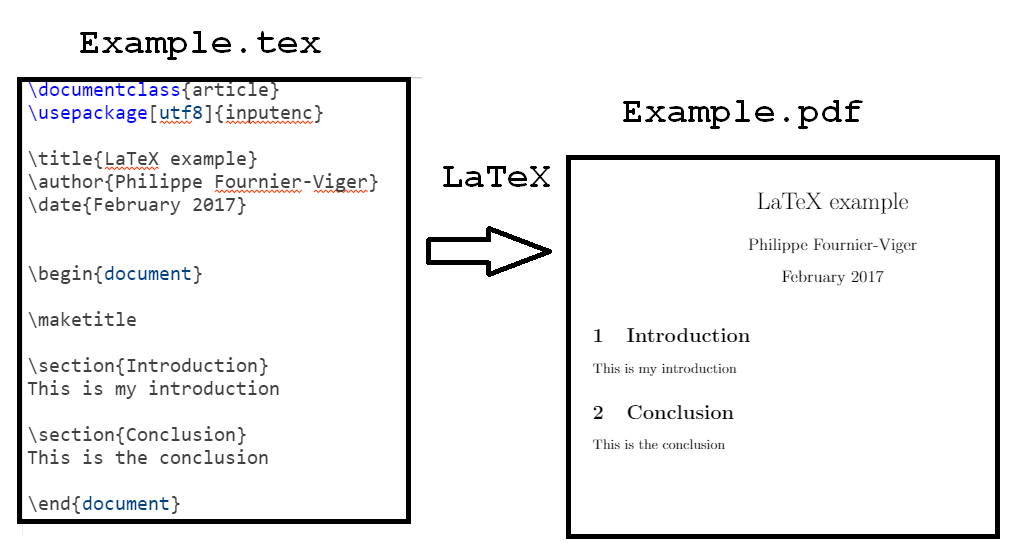
First, what is LaTeX? Unlike a WYSIWYG editor like Microsoft Word, LaTeX is a document preparation system. You write a plain text source file (with a .tex extension) that contains your content mixed with commands that describe the document's structure and formatting. A compiler, such as pdflatex, then processes this .tex file to produce a high-quality output document, typically a PDF.
This process is analogous to compiling C++ source code into an executable. You describe what you want, and the system figures out how to render it perfectly.
Generating a .tex File from C++
Since a .tex file is just a text file, we can generate it from C++ using the standard file I/O library. The process is straightforward: open a file stream and write the necessary strings—both content and LaTeX commands—to it.
The blog post "A C++ program for generating Latex table/tabular" provides a concise example of this exact technique. While its goal is to create a table, the underlying principle is identical to what we need.
A C++ program for generating Latex table/tabular
This post demonstrates how to write a simple C++ program that generates a .tex file. The code is a clear, if simple, illustration of the core task.
Focus on the C++ source code provided. Notice how it uses std::ofstream to open an output file. Then, observe how it writes literal LaTeX commands like \\begin{table} and data from an input file using the << stream operator. This is the fundamental pattern you will use: ofstream << "\\command{option}" << std::endl;.
The key takeaway is that generating a .tex file is a matter of string manipulation and file writing, a task for which C++ is well-suited.
The Anatomy of a LaTeX Document
A minimal LaTeX document has two main parts: the preamble and the document body.
- Preamble: This is everything before
\begin{document}. Here, you define the document type (\documentclass) and load packages (\usepackage) that add new features, such as the ability to include images. - Document Body: This is the content of your document, enclosed between
\begin{document}and\end{document}.
For your notebook, a typical document might start like this:
% Preamble
\documentclass{article}
\usepackage{graphicx}
\usepackage{svg}

% Document Body
\begin{document}

% Your content and commands go here...

\end{document}
We've included two important packages:
graphicx: The standard package for including images and provides powerful options for scaling, rotating, etc.svg: A specialized package designed to handle the inclusion of SVG files.
Including SVG Images in LaTeX
The svg package makes including your exported drawings incredibly simple. It provides the \includesvg command, which works much like the standard \includegraphics command from graphicx.
The article "Enhancing Your Beamer Presentations with SVG Figures" provides a great overview of using this package.
Enhancing Your Beamer Presentations with SVG Figures and Inkscape Layers | Laurent Jacques
This article explains exactly how to use the svg package to include SVG images in a LaTeX document.
Read the section on SVG image inclusion. It introduces the \usepackage{svg} and \includesvg commands. Also, review the minimal example shown further down in the file MiniEx.tex. This serves as a perfect template for the file your C++ function will generate.
To include an SVG named my_drawing.svg and scale it to 80% of the text width, the command would be:
\includesvg[width=0.8\textwidth]{my_drawing.svg}
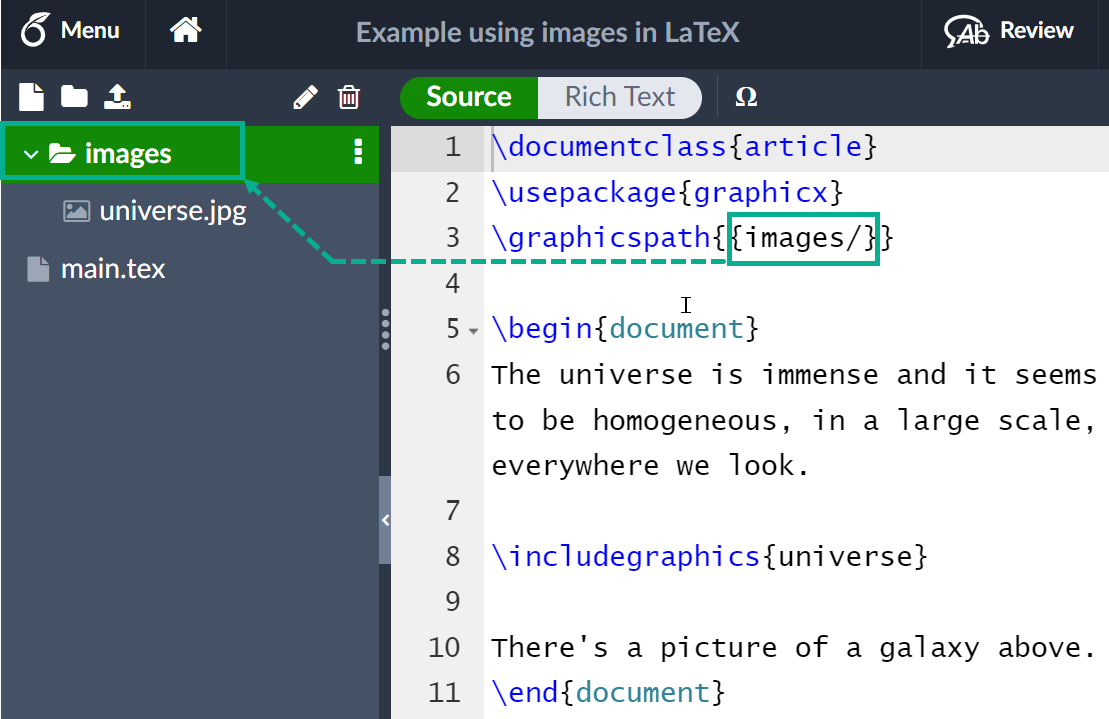
A common and highly recommended practice is to place all your images in a subdirectory. You can tell LaTeX where to look for them using the \graphicspath command in your preamble. This keeps your project organized.
Implementing the Exporter Function in C++
Now, let's design the C++ function. It needs to take a list of content blocks (which can be either text or a path to an SVG image) and generate a complete .tex file.
First, let's define a structure to represent these content blocks.
#include <string>
#include <vector>
#include <fstream>
#include <stdexcept>

// Represents a block of content in the final document.
struct ContentBlock {
    enum class Type { Text, SVGImage };

    Type type;
    std::string data; // Holds the text content or the path to the SVG file.
};
With this structure, we can now write the export function. The function will iterate through a std::vector<ContentBlock> and write the appropriate LaTeX command for each block.
// A utility function to escape special LaTeX characters in a string.
std::string escapeLatex(const std::string& input) {
    std::string output;
    output.reserve(input.size());
    for (char c : input) {
        switch (c) {
            case '&':  output += "\\&";        break;
            case '%':  output += "\\%";        break;
            case '$':  output += "\\$";        break;
            case '#':  output += "\\#";        break;
            case '_':  output += "\\_";        break;
            case '{':  output += "\\{";        break;
            case '}':  output += "\\}";        break;
            case '~':  output += "\\textasciitilde{}"; break;
            case '^':  output += "\\textasciicircum{}"; break;
            case '\\': output += "\\textbackslash{}"; break;
            default:   output += c;            break;
        }
    }
    return output;
}

void generateTexFile(
    const std::string& output_path,
    const std::vector<ContentBlock>& content,
    const std::string& image_directory = "images")
{
    // 1. Open the output file stream.
    std::ofstream tex_file(output_path);
    if (!tex_file.is_open()) {
        throw std::runtime_error("Failed to open " + output_path + " for writing.");
    }

    // 2. Write the LaTeX preamble.
    tex_file << "\\documentclass{article}\n";
    tex_file << "\\usepackage{graphicx}\n";
    tex_file << "\\usepackage{svg}\n";
    tex_file << "\\usepackage[a4paper, margin=1in]{geometry}\n"; // Set page margins
    tex_file << "\n";
    // Tell LaTeX where to find the SVG files.
    tex_file << "\\graphicspath{{" << image_directory << "/}}\n";
    tex_file << "\n";

    // 3. Begin the document body.
    tex_file << "\\begin{document}\n\n";

    // 4. Iterate through content blocks and write them to the file.
    for (const auto& block : content) {
        if (block.type == ContentBlock::Type::Text) {
            tex_file << escapeLatex(block.data) << "\n\n";
        } else if (block.type == ContentBlock::Type::SVGImage) {
            // Note: We only need the filename, not the whole path,
            // because we set \graphicspath.
            std::string filename = block.data;
            // A simple way to get filename from path
            auto last_slash = filename.find_last_of("/\\");
            if (last_slash != std::string::npos) {
                filename = filename.substr(last_slash + 1);
            }

            tex_file << "\\begin{figure}[h!]\n";
            tex_file << "    \\centering\n";
            tex_file << "    \\includesvg[width=0.8\\textwidth]{" << filename << "}\n";
            // \\caption{} could be added here if needed
            tex_file << "\\end{figure}\n\n";
        }
    }

    // 5. End the document.
    tex_file << "\\end{document}\n";

    // 6. File is automatically closed when tex_file goes out of scope (RAII).
}
Important Note: The escapeLatex utility function is crucial. LaTeX uses characters like \, {, }, and $ for commands. If your extracted text contains these characters, they must be "escaped" (preceded by a backslash) to be printed literally, otherwise they will cause compilation errors. The provided function is a basic starting point.
Compiling Your .tex File
After your program generates the .tex file and the associated SVGs in the images subdirectory, you need a LaTeX distribution (like TeX Live, MiKTeX, or MacTeX) to compile it. The svg package requires a special command-line flag, -shell-escape, which allows LaTeX to call external programs—in this case, it uses Inkscape to convert the SVG to a temporary PDF that can be embedded in the final document.
The command to compile your document would be:pdflatex -shell-escape your_document_name.tex
Conclusion
You have now bridged the gap between your application's data and a final, professional document. By generating .tex files programmatically, you can create dynamic, high-quality handouts that combine text and your users' vector drawings—fulfilling a key requirement of your project.
Key Takeaways:
- Programmatic
.texGeneration: You can create.texfiles from C++ by writing formatted strings to a file usingstd::ofstream. - LaTeX Document Structure: Documents consist of a preamble (for settings and packages) and a body (for content).
- Including SVGs: The
svgpackage provides the\includesvgcommand, which seamlessly integrates vector graphics into your document. - The Build Process: The generated
.texfile must be compiled using a LaTeX distribution, and thesvgpackage requires the-shell-escapeflag to function correctly. - Escaping Characters: Text from external sources must be sanitized to escape special LaTeX characters to prevent compilation errors.
With this lesson, you've completed the primary feature set of your application. In our final lesson, we will shift focus to a critical aspect of high-performance systems: profiling the application to identify and resolve performance bottlenecks, ensuring your whiteboard is not just functional, but truly optimized.