Introduction
In the previous lesson, you successfully deployed your application and verified that both the live API and its Swagger documentation are accessible online. This is a huge milestone.
With the application running, we now turn to the final but crucial pre-submission cleanup. This lesson focuses on a core professional practice: refactoring your project to eliminate any hardcoded secrets or configuration values. Storing sensitive information like database credentials directly in your code is a major security risk and makes your application inflexible. By the end of this lesson, you will have a secure, configurable, and production-ready codebase.
The Problem with Hardcoded Secrets
Throughout development, it's common to use hardcoded values for things like the server port or database connection string. For instance, you likely have code similar to this:
// Hardcoded port
const PORT = 3000;
app.listen(PORT, ...);

// Hardcoded and exposed database credentials
mongoose.connect('mongodb+srv://myuser:mypassword@cluster.xyz.mongodb.net/test');
This presents two major problems:
- Security Risk: If you push this code to a public GitHub repository, your database username and password will be exposed to the world.
- Inflexibility: When you deploy your app, the hosting service (like Render) might assign a different port. A hardcoded port will cause your application to fail on startup. Different environments (development, testing, production) often require different configurations.
The Solution: Environment Variables and dotenv
The industry-standard solution is to store configuration in environment variables. These are variables that exist outside your application's code, in the environment where the code is run. In Node.js, they are accessible via the global process.env object.
For local development, we use a fantastic package called dotenv. It loads variables from a special file named .env directly into process.env, simulating a real production environment.
The following video gives a great overview of this process.
3.4 Hiding API Keys with Environment Variables (dotenv) and Pushing Code to GitHub
This video from The Coding Train provides a clear, practical walkthrough of why we need to hide secrets and how to use the dotenv package to do it. Focus on the three key files involved: your server file, the .env file, and .gitignore.
Watch from the beginning to 04:02 to understand the core concept, and then from 05:26 to 06:47 to see how the .gitignore file is crucial for security. The video covers creating the .env file, configuring dotenv, using process.env, and updating .gitignore.
Your Refactoring Checklist: A Step-by-Step Guide
Let's apply these concepts directly to your project. Follow this checklist to systematically remove all hardcoded values.
Step 1: Install dotenv
In your project's root directory, open the terminal and run the following command to add dotenv as a dependency:
npm install dotenv
Step 2: Create the .env File
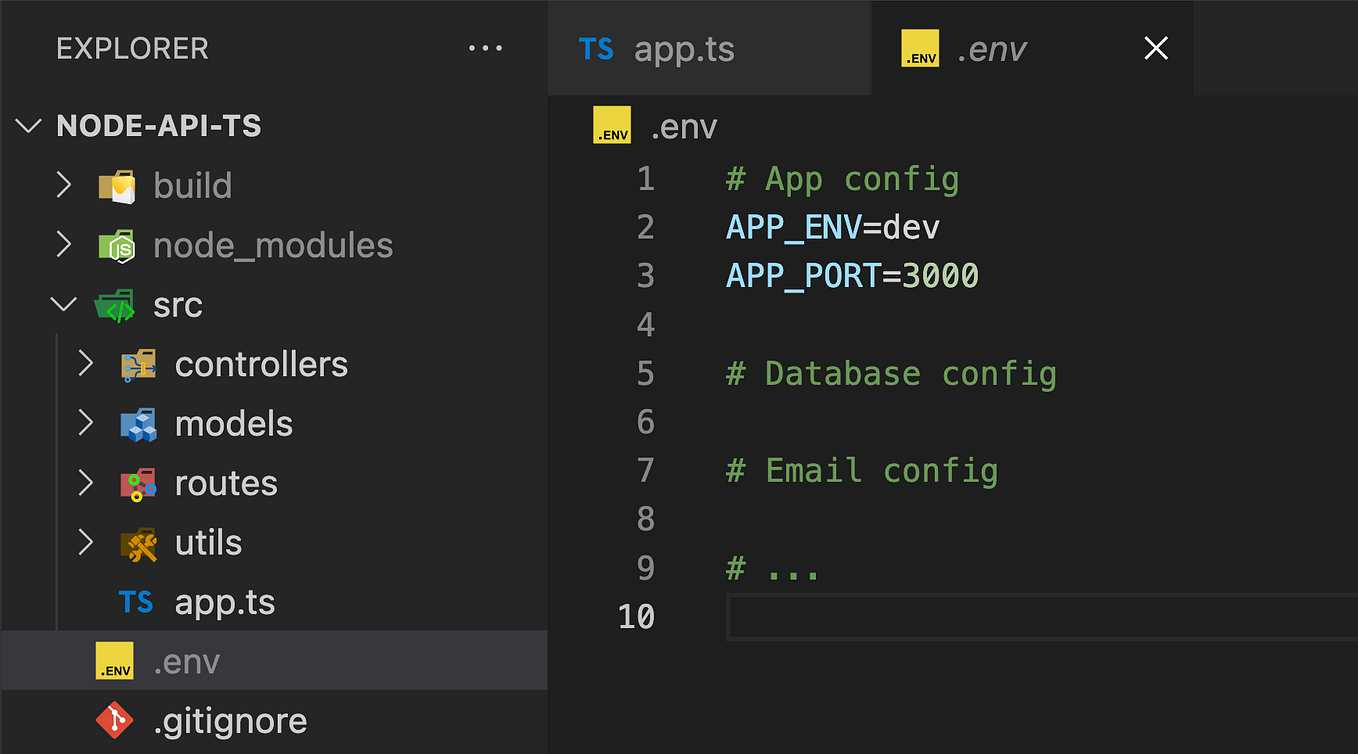
In the same root directory, create a new file named exactly .env. This file will hold your secrets. Add your PORT and MONGO_URI to it.
Important: The syntax is KEY=VALUE. Do not use quotes and ensure there are no spaces around the = symbol.
.env
PORT=3000
MONGO_URI=mongodb+srv://<your_username>:<your_password>@cluster0.xxxxx.mongodb.net/myDatabase?retryWrites=true&w=majority
- Replace the
MONGO_URIvalue with your actual MongoDB connection string.
Your project should now include a .env file, similar to the example shown here:
Step 3: Secure Your Secrets with .gitignore
This is the most critical step for security. You must prevent your .env file from ever being committed to Git.
Open your .gitignore file and add .env on a new line. It should look like this:
.gitignore
# Dependencies
node_modules


# Environment variables
.env
This instruction tells Git to ignore the .env file, keeping your secrets safe on your local machine.
Step 4: Load the Environment Variables
Now, you need to tell your application to load the variables from the .env file. Open your main application file (e.g., app.js or server.js) and add the following line at the very top:
// This line MUST be at the top of your file
require('dotenv').config();

const express = require('express');
// ... rest of your application setup
Placing this line first ensures that all environment variables are loaded and available before any other part of your code needs them.
Step 5: Refactor Your Code to Use process.env
Finally, replace the hardcoded values in your application with references to process.env.
-
Server Port: Find your
app.listencall and modify it. We provide a fallback value (3000) in caseprocess.env.PORTisn't defined. This is a common and robust practice.- Before:
const PORT = 3000; app.listen(PORT, () => { console.log(`Server is running on port ${PORT}`); }); - After:
const PORT = process.env.PORT || 3000;
app.listen(PORT, () => {
  console.log(`Server is running on port ${PORT}`);
});
- Before:
-
MongoDB Connection: Find your
mongoose.connectcall and update it to use theMONGO_URIfrom your environment.- Before:
mongoose.connect('mongodb+srv://user:pass@cluster.mongodb.net/db', { /* options */ }); - After:
mongoose.connect(process.env.MONGO_URI, { /* options */ });
- Before:
After these changes, your application is no longer tied to specific configuration values in the code.
Best Practice: Create a .env.example File
Since your .env file is ignored by Git, how will another developer (or your future self) know which environment variables are needed to run the project? The standard practice is to create a .env.example file.
- Copy your
.envfile and rename it to.env.example. - Remove the secret values, leaving only the keys.
.env.example
PORT=3000
MONGO_URI=
This file is committed to your repository and serves as a template for anyone setting up the project.
Conclusion
Congratulations! You have successfully refactored your application to securely manage configuration and secrets. This is a non-negotiable skill for any backend developer and a key requirement for a professional-grade project.
Key Takeaways:
- Never hardcode secrets like API keys or database strings in your code.
- Use a
.envfile to store these values during local development. - Always add
.envto your.gitignorefile to prevent exposing secrets in version control. - Use the
dotenvpackage and callrequire('dotenv').config()at the top of your application to load the variables. - Replace hardcoded values in your code with
process.env.VARIABLE_NAME. - Provide a
.env.examplefile as a template for other developers.
Next Up:
With your code now secure and configurable, we'll move to the final checks before submission. In the next lesson, you will perform a final review of all API endpoints to ensure they return the correct HTTP status codes for both success and error cases. This final polish ensures your API behaves predictably and professionally.