Introduction
Welcome to your next lesson on network security. In our last session, we explored the fundamental difference between symmetric and asymmetric encryption. We concluded that modern systems use a hybrid approach: slower asymmetric encryption is used to securely establish a shared secret key, and then faster symmetric encryption takes over for the bulk data transfer.
However, this left a critical question unanswered: when your browser receives a public key from a website like your bank, how can it be sure that the key actually belongs to the bank and not to a man-in-the-middle attacker?
This lesson directly addresses that question. We will explore how digital certificates and Certificate Authorities (CAs) create the fundamental layer of trust on the web. You'll learn how this system verifies identities and ensures that the public key you're using to start a secure conversation is legitimate. Understanding this is the key to understanding how the lock icon in your browser truly works.
The Problem of Trust
As we touched on previously, if you and a server simply exchange public keys over an open network, an attacker can intercept the server's key and substitute their own. You would then unknowingly use the attacker's public key to encrypt the symmetric session key, allowing the attacker to decrypt, read, and modify all your traffic.
Let's watch a video that visualizes this exact problem and introduces the solution: the digital certificate.
Digital Certificates Explained - How digital certificates bind owners to their public key
The video 'Digital Certificates Explained' from Destination Certification clearly demonstrates the man-in-the-middle vulnerability and introduces the concept of a digital certificate as the solution.
Watch from 02:16 to 05:27. Focus on two key points: How the attacker intercepts and replaces the server's public key. How a digital certificate is defined as a way to bind an owner to their public key.
As the video explains, a public key is just a string of data; it has no inherent identity information. A digital certificate wraps the public key in a verifiable package that includes information about its owner (like the domain name of a website).
Think of it like a passport. Your photo (the public key) is bound to your identity information (name, date of birth, etc.) inside a document that is issued and signed by a trusted entity (the government).
The Certificate Authority: The Internet's Passport Office
So, who issues these digital "passports"? This is the role of a Certificate Authority (CA). A CA is a trusted third-party organization that is responsible for verifying the identity of entities (like people or web servers) and issuing certificates to them.
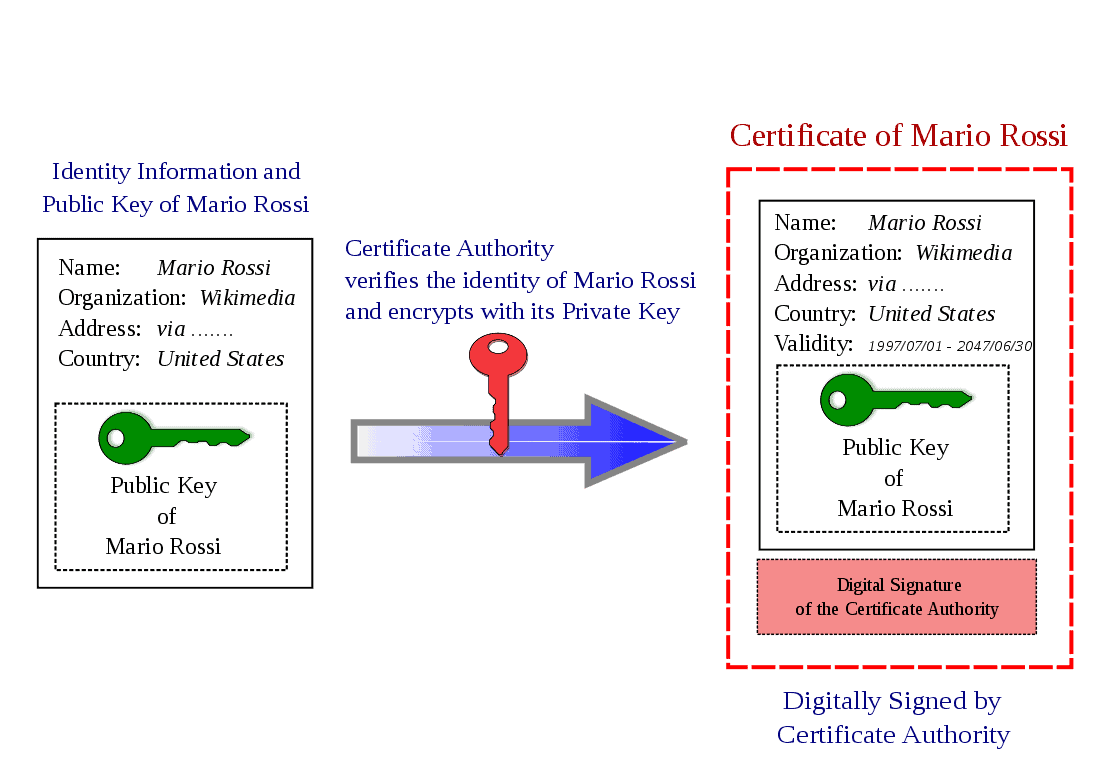
But this raises another question: why do we trust the CA? We trust them because their own certificates, called root certificates, come pre-installed in your operating system and web browser in a special location called a "trust store".
When a CA signs a website's certificate, it uses its private key. Since your browser already has the CA's corresponding public key in its trust store, it can verify that signature. This proves that the certificate was issued by a trusted CA and has not been tampered with.
Let's see how this system thwarts the man-in-the-middle attack.
Digital Certificates Explained - How digital certificates bind owners to their public key
We'll continue with the 'Digital Certificates Explained' video, which now shows how the certificate prevents the attack and explains the role of the trusted CA.
Watch from 05:27 to 09:32. Pay attention to: The process of a website operator proving their identity to a CA. How your browser uses the CA's public key (already on your system) to decrypt and verify the certificate from the server. Why the attacker cannot successfully forge a certificate.
To connect this to the real world, CAs offer different levels of verification when issuing certificates, which often correspond to different price points and levels of trust.
What Is a Certificate Authority (CA) and What Does It Do?
This article, 'What Is a Certificate Authority (CA) and What Does It Do?' from The SSL Store, provides more detail on the functions of a CA. We'll focus on the verification process and the different types of CAs.
Please read the following two sections: Start at the heading 'Verification'. Read through the descriptions of Domain Validation, Organization Validation, and Extended Validation. This explains the different vetting processes a CA might perform. Scroll down to the heading 'The Differences Between a Public Certificate Authority and a Private CA'. Read this section to understand why a large company might run its own internal CA versus using a public one like Let's Encrypt or DigiCert.
The Chain of Trust
For security and management reasons, root CAs don't typically sign server certificates directly. If a root CA's private key were ever compromised, every certificate it ever signed would become invalid, causing chaos.
Instead, they use a hierarchical structure called a Chain of Trust.
- The Root CA uses its private key to sign certificates for a few, highly-secured Intermediate CAs.
- The Intermediate CAs then use their private keys to sign the Server Certificates (also called leaf certificates) that are deployed on web servers.
When your browser receives a server certificate, the server also provides the necessary intermediate certificate(s). Your browser then verifies the entire chain:
- It checks the signature on the server certificate using the public key from the intermediate certificate.
- It checks the signature on the intermediate certificate using the public key from the root certificate.
- It confirms that the root certificate is in its local trust store.
If every link in the chain is valid, the server certificate is trusted.
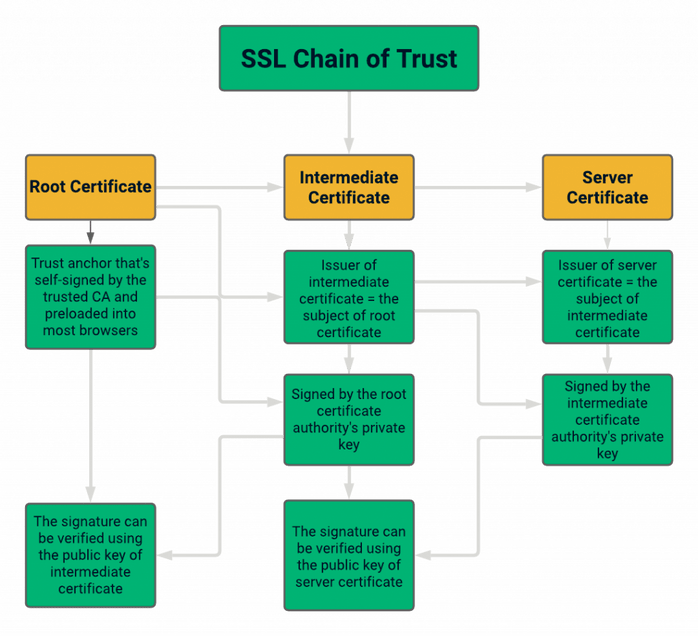
The following video provides an excellent, detailed walkthrough of this entire process.
Digital Certificates: Chain of Trust
The video 'Digital Certificates: Chain of Trust' by Dave Crabbe explains this crucial concept, including why intermediate CAs are used for security and how a browser walks the chain to verify a site.
Watch the video from the beginning to 03:18 to understand the roles of root and intermediate CAs. Then, watch the detailed explanation from 05:09 to 12:54. This segment provides a step-by-step breakdown of how the browser uses the certificate chain to establish a secure connection.
Seeing it in Action
You can inspect the certificate chain for any HTTPS website yourself! In most browsers, you can click the lock icon next to the URL, find an option like "Connection is secure," and then click on "Certificate is valid." This will open a viewer where you can see the certificate details, including a "Certification Path" or "Details" tab that shows the exact chain of trust—from the server certificate, through the intermediates, up to the trusted root CA. This is a great way to connect this theory directly to your everyday browsing experience.
Conclusion
In this lesson, you've unraveled the system of trust that secures the web. You now understand that it's not enough to just use encryption; we need a reliable way to verify identity, and digital certificates provide that mechanism.
Key Takeaways:
- The Problem: Exchanging public keys over an unsecured network is vulnerable to Man-in-the-Middle (MITM) attacks.
- The Solution: A Digital Certificate binds a public key to a verified identity (e.g., a domain name).
- Certificate Authorities (CAs): These are trusted third parties that verify identities and issue certificates. We trust them because their root certificates are pre-installed in our browsers' and operating systems' trust stores.
- The Chain of Trust: For security, a hierarchical model is used. A trusted Root CA signs certificates for Intermediate CAs, which in turn sign Server Certificates. A browser verifies the entire chain to establish trust.
Preview of the Next Lesson:
We now have all the building blocks in place: we know about symmetric and asymmetric encryption, and we know how certificates establish trust. In the next lesson, we will put it all together to explain how TLS secures HTTPS traffic, walking through the steps of the TLS handshake where encryption and authentication work in concert to create a secure connection.