Introduction
Welcome to the next lesson in our exploration of network security. In the previous lesson, we examined firewalls, the guardians that protect the perimeter of a trusted network by filtering traffic based on a set of rules. You saw how a stateful firewall intelligently tracks connections to provide robust security and even got a practical look at how these rules are implemented in Linux with iptables.
Firewalls are excellent for protecting a network's borders, but what about protecting your data as it travels across the vast, untrusted expanse of the public internet? That's where today's topic, Virtual Private Networks (VPNs), comes in.
In this lesson, we will demystify VPNs. You will learn their primary purposes—from securing your data on public Wi-Fi to accessing corporate resources remotely—and, most importantly, we will unpack the technology that makes them work: the creation of secure, encrypted "tunnels."
The Purpose of a VPN: Why Use One?
At its core, a VPN extends a private network across a public network, enabling users to send and receive data as if their devices were directly connected to the private network. This provides both security and privacy. But what does that mean in practice?
Let's start by exploring the common reasons people and organizations use VPNs.
What is a VPN? Why Should I Use a VPN? - Microsoft Azure
The Microsoft Azure article 'What is a VPN?' provides an excellent overview of the benefits and different types of VPNs. Reading these sections will help you understand the 'why' behind VPN technology.
Please read the following two sections of the article: 'Why should I use a VPN service?': This section details the main motivations for using a VPN, such as securing data, enabling remote work, and bypassing tracking. 'Types of VPN connections': Focus on understanding the distinction between a Remote access VPN (for individual users connecting to a network) and a Site-to-site VPN (for connecting entire office networks).
As you've just read, the purposes of a VPN are varied but all center on two key capabilities: confidentiality (through encryption) and anonymity (through IP masking and location spoofing).
Here's a summary of the key use cases:
- Securing Data on Public Networks: When you're on a public Wi-Fi network (like at a café or airport), your traffic is vulnerable to eavesdropping. A VPN encrypts your data, making it unreadable to anyone on the same network.
- Enabling Remote Work: A remote access VPN allows employees to securely connect to their company's internal network from anywhere, accessing files and resources as if they were in the office.
- Maintaining Privacy: A VPN hides your real IP address and routes your traffic through the VPN server. This prevents your Internet Service Provider (ISP), websites, and advertisers from tracking your online activity.
- Bypassing Geo-Restrictions and Censorship: By connecting to a VPN server in another country, you can make it appear as though you are browsing from that location. This allows you to access content that might be blocked in your region.
How VPNs Create a Secure Tunnel
Now for the technical core of the lesson: how does a VPN actually create this "secure tunnel"? It's a two-part process: tunneling (encapsulation) and encryption.
1. Tunneling: Encapsulating Packets
The term "tunnel" is an analogy. You aren't creating a physical channel; you're wrapping your network traffic inside other network traffic. This process is called encapsulation.
Imagine you want to send a package from House A to House B, but you have to send it through an insecure postal service where anyone can see the addresses. To hide the real destination, you put your original package (with the address of House B) inside a larger, nondescript box. On this outer box, you only write the address of a secure intermediary—a P.O. box. Once your package arrives at the P.O. box, the intermediary takes the original package out and sends it on its final leg to House B.
In networking, this is exactly what a VPN does. Your original IP packet is placed inside a new IP packet.
Let's watch a video that explains this concept with a clear analogy and then shows what the packets look like.
Can you explain what a "Network Tunnel" does❓ | Time to Level Up now.
The video 'Can you explain what a "Network Tunnel" does?' from Keith Barker provides a fantastic and easy-to-understand analogy for network tunneling.
Watch the video from 00:25 to 04:38. Pay close attention to: The analogy of sending a box inside another box through the 'jungle transport'. How this analogy translates to IP packets, where the original packet becomes the payload of a new packet with new source and destination IP addresses (the tunnel endpoints).
The key idea is that routers on the public internet only see the outer packet, which is addressed from you to the VPN server. They have no idea what's inside.
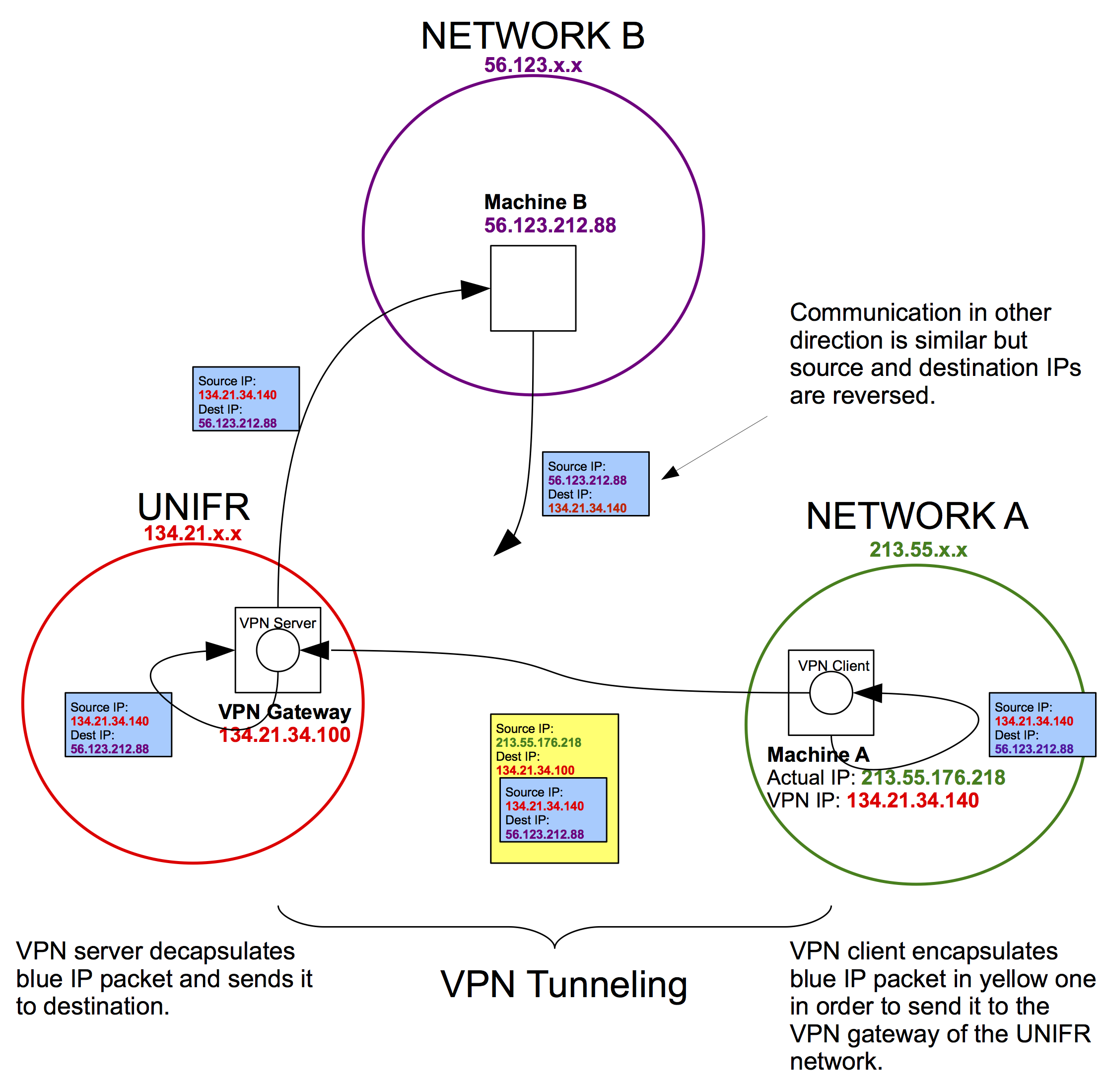
This mechanism is different from a simple proxy. A proxy typically works at the Application Layer, forwarding specific types of traffic (like HTTP requests). A VPN, however, operates at the Network Layer, encapsulating entire IP packets. This means all traffic from your device can be routed through the tunnel, not just web browsing.
Since you have a background in CS and operating systems, you might find the underlying mechanism interesting. VPN client software often creates a virtual network interface (like a TUN or TAP device in Linux/macOS). The operating system is configured to route traffic through this virtual interface. The VPN software reads the raw IP packets from this interface, encrypts and encapsulates them, and sends them out over the physical network interface (e.g., your Wi-Fi card).
The following video does an excellent job of building up from a simple proxy to a full VPN tunnel, highlighting this crucial distinction.
VPNs, Proxies and Secure Tunnels Explained (Deepdive)
The video 'VPNs, Proxies and Secure Tunnels Explained' by LiveOverflow provides a deeper, more technical explanation that builds from first principles. This will connect well with your CS background.
Watch from 06:15 to 11:15. Focus on: The difference between a proxy that forwards content and a VPN that encapsulates the entire IP/TCP packet. The explanation of how network layers are used to create the tunnel. The brief mention of TUN/TAP virtual network interfaces, which is how the OS hands packets to the VPN program.
2. The "Secure" Part: Authentication and Encryption
Tunneling hides your traffic's destination, but it doesn't necessarily hide the content. To ensure confidentiality, the data inside the tunnel must be encrypted. This is achieved through a carefully orchestrated process.
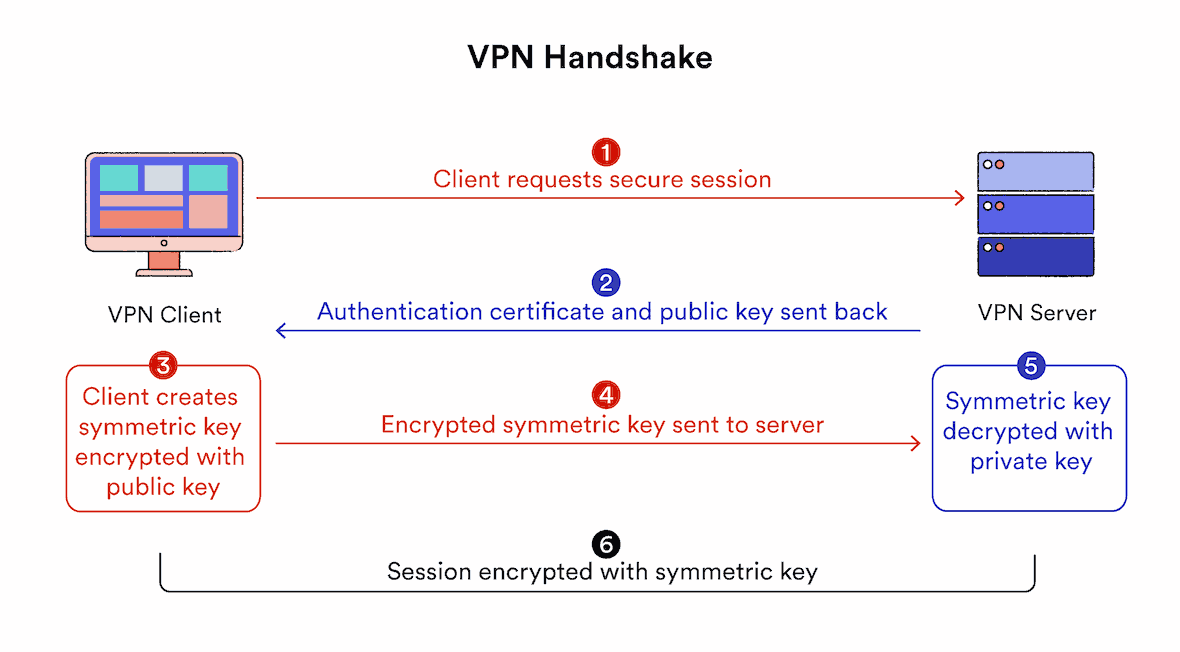
The process of setting up this secure channel involves several steps, similar in spirit to the TLS handshake you learned about previously.
How Does a VPN Work? - Palo Alto Networks
The article 'How Does a VPN Work?' from Palo Alto Networks breaks down the entire lifecycle of a VPN connection into clear, logical phases. We'll focus on how the secure connection is initiated and the tunnel is established.
Please read sections 2 and 3 of the article: '2. The Initiation Phase': This covers user authentication and the initial client-server handshake where cryptographic capabilities are negotiated. '3. Establishing the Tunnel': This is the most crucial part. It explains the selection of a tunneling protocol (like IPsec) and the key exchange mechanism (like Diffie-Hellman) used to securely generate a shared secret key for encrypting the data.
Let's synthesize what you've read into a simplified step-by-step process:
- Authentication: You provide credentials (e.g., username/password, or a digital certificate) to the VPN server to prove your identity.
- Handshake and Key Exchange: The client and server negotiate the encryption algorithms they will use. Then, using asymmetric cryptography (like the Diffie-Hellman key exchange), they securely agree upon a temporary, shared symmetric key. This is the key that will be used to encrypt the actual data.
- Data Transfer (The Tunnel in Action):
- Your device creates a standard IP packet destined for a server (e.g., google.com).
- The VPN client software intercepts this packet.
- It encrypts the entire packet using the shared symmetric key.
- It encapsulates the encrypted data into a new IP packet. The outer packet's destination is the VPN server.
- This outer packet travels across the internet.
- The VPN server receives it, strips the outer header, and decrypts the payload with the shared symmetric key, recovering your original packet.
- The VPN server then forwards the original, now-decrypted packet to its final destination (google.com).
The response from google.com follows the reverse path: it goes to the VPN server, which encrypts and tunnels it back to you. Your VPN client then decrypts it and delivers it to your application.
Practical Consideration: Split vs. Full Tunneling
One final, practical concept to be aware of is how a VPN client decides what traffic to send through the tunnel.
- Full Tunneling: All network traffic from your device is routed through the VPN tunnel. This is the most secure option as it protects everything you do online. However, it can be slower, as even traffic to a non-sensitive site has to make the round trip to the VPN server and back.
- Split Tunneling: Only specific traffic is sent through the VPN. For example, in a corporate setting, you might configure the VPN to only tunnel traffic destined for the company's internal network. Your regular web browsing would go directly to the internet, bypassing the VPN. This conserves bandwidth and can improve performance but means some of your traffic is not protected by the VPN.
Conclusion
In this lesson, we've pulled back the curtain on Virtual Private Networks. You've seen that they are versatile tools used for security, privacy, and circumventing restrictions online.
The magic of a VPN lies in its two-part mechanism: tunneling, which wraps your network packets inside other packets to hide their ultimate destination, and encryption, which scrambles the data within the tunnel to ensure confidentiality. This combination creates a secure, private channel over the untrusted public internet.
Key Takeaways:
- VPNs serve several purposes: securing data on public Wi-Fi, providing privacy from ISPs, enabling remote access to private networks, and bypassing geo-restrictions.
- A VPN tunnel is created through encapsulation, where an entire original IP packet is wrapped inside a new IP packet destined for the VPN server.
- The connection is made secure through encryption. A handshake process uses asymmetric cryptography to establish a shared symmetric key, which is then used to encrypt all data sent through the tunnel.
- The complete process is: encapsulate, encrypt, transmit, receive, decrypt, decapsulate, and forward.
Preview of the Next Lesson:
So far, our journey has focused on the protocols and security layers that make up the internet's backbone. In the next lesson, we will shift our focus to how we connect to this network wirelessly. We'll begin our final module by exploring Wi-Fi, diving into the common standards (like 802.11n/ac/ax) and the encryption protocols (like WPA2/WPA3) that protect your local wireless communications.