Introduction
Welcome to the final module of our course, "Modern Networking and Synthesis." In the last lesson, we concluded our deep dive into network security by exploring VPNs and how they create secure, encrypted tunnels over the public internet.
Now, we shift our focus from the wide-area network to the local network that you use every day. How do your devices connect to your router without cables? The answer, of course, is Wi-Fi. But "Wi-Fi" isn't a single technology; it's an evolving family of standards, each with different capabilities.
In this lesson, you will learn to identify common Wi-Fi standards (802.11a/b/g/n/ac/ax) and their characteristics. We'll trace their evolution, understand what the letters and numbers mean, and break down the key factors that determine their performance, like frequency bands and speed.
Wi-Fi Fundamentals: Standards and Frequencies
Before we compare the individual standards, let's clarify two foundational concepts: what "Wi-Fi" means and the radio frequencies it uses.
- IEEE 802.11: This is the formal name for the set of technical standards that define wireless local area networks (WLANs). The Institute of Electrical and Electronics Engineers (IEEE) creates these standards.
- Wi-Fi Alliance: This is a non-profit organization that promotes the technology and certifies that products from different manufacturers work together correctly. They coined the user-friendly term "Wi-Fi" as a trademark for certified 802.11 products.
Essentially, IEEE creates the blueprint (802.11), and the Wi-Fi Alliance ensures everything built from that blueprint is compatible and easy for consumers to identify.
The most important characteristics that differentiate Wi-Fi standards are the frequency bands they use and the speed they can achieve.
Wi-Fi Standards - GeeksforGeeks
To start, let's get a clear understanding of the different frequency bands Wi-Fi operates on. The article 'Wi-Fi Standards' from GeeksforGeeks has an excellent section that breaks this down.
Please read the section titled 'Wi-Fi Frequency Bands'. Pay close attention to the table comparing the 2.4 GHz, 5 GHz, and 6 GHz bands. This will give you a solid framework for understanding the trade-offs between them.
As you just read, the main trade-off is between range and speed/capacity:
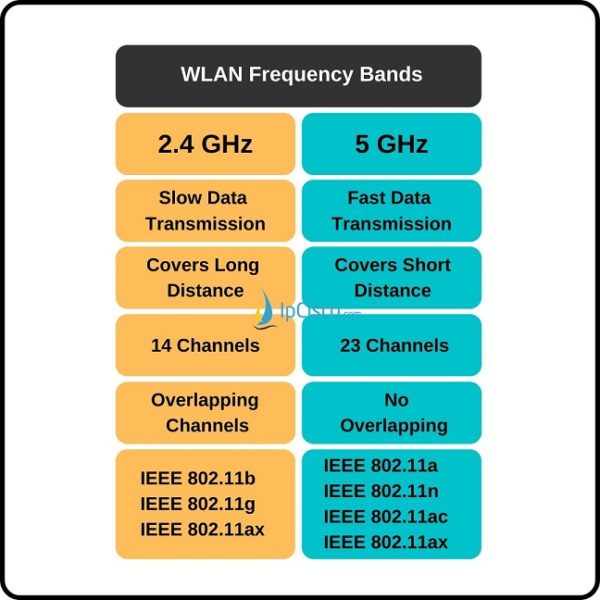
- 2.4 GHz: Travels further and penetrates walls better. However, it's slower and very congested, suffering from interference from Bluetooth devices, microwaves, and neighboring Wi-Fi networks.
- 5 GHz: Offers much higher speeds and has more non-overlapping channels, meaning less interference. Its main drawback is a shorter range and poorer penetration through solid objects.
- 6 GHz: The newest band, exclusive to Wi-Fi 6E and newer standards. It provides a massive, clean spectrum for very high speeds and low latency, but has an even shorter range than 5 GHz.
The Evolution of 802.11 Standards
Now that you understand the fundamental trade-offs, let's walk through the evolution of the most common Wi-Fi standards. Each new generation aimed to improve on the last, primarily by increasing speed, improving efficiency, or both.
Wireless Network Standards - CompTIA A+ 220-1101 - 2.3
This video from Professor Messer is a comprehensive and clear overview of the key 802.11 standards, from the early days to the present. It's one of the best resources for understanding this topic in a structured way.
Please watch the video from the beginning until the end (00:00 - 12:08). As you watch, focus on the key characteristics of each standard presented: 802.11a/b/g: The foundational standards and their different approaches. 802.11n (Wi-Fi 4): The introduction of MIMO and dual-band operation. 802.11ac (Wi-Fi 5): The shift to 5 GHz for higher performance. 802.11ax (Wi-Fi 6): The focus on efficiency (OFDMA) in crowded environments. Pay special attention to the summary table at the end of the video, which ties everything together.
Synthesizing the Standards
The video provided a fantastic chronological tour. Let's consolidate that information and add the simplified "Wi-Fi" generation names that the Wi-Fi Alliance introduced to make things clearer for consumers.
First, here's a direct mapping of the modern standards to their generational names:
| IEEE Standard | Wi-Fi Generation |
|---|---|
| 802.11n | Wi-Fi 4 |
| 802.11ac | Wi-Fi 5 |
| 802.11ax | Wi-Fi 6 / 6E |
| 802.11be | Wi-Fi 7 (Upcoming) |
And here is a summary table combining the key characteristics of all the standards we've discussed.

Key Evolutionary Steps:
- The Beginning (a/b): A fork in the road.
802.11awent for speed on the clean 5 GHz band, while802.11bchose range and affordability on the crowded 2.4 GHz band.802.11bwon the early consumer market due to cost. - The Upgrade (g):
802.11gwas a crucial step, bringing the speed of802.11a(54 Mbps) to the popular 2.4 GHz band while maintaining backward compatibility with802.11bdevices. - The Modern Age Begins (n / Wi-Fi 4): This was a major leap.
802.11nintroduced MIMO (Multiple-Input Multiple-Output), which uses multiple antennas to send and receive more data simultaneously. It was also the first major standard to be dual-band, operating on both 2.4 GHz and 5 GHz. - Need for Speed (ac / Wi-Fi 5):
802.11acfocused exclusively on the 5 GHz band to push for maximum throughput, introducing wider channels and more advanced MIMO (MU-MIMO, or Multi-User MIMO). Most "Wi-Fi 5" routers are dual-band, but they use the802.11nstandard to provide the 2.4 GHz network for older devices. - Efficiency is King (ax / Wi-Fi 6/6E): While
802.11axis faster, its main innovation is efficiency. It introduced OFDMA (Orthogonal Frequency-Division Multiple Access), a technology borrowed from cellular networks. It allows a router to talk to multiple devices at the exact same time within the same channel, dramatically improving performance in crowded environments like apartment buildings or airports. Wi-Fi 6E is simply Wi-Fi 6 extended into the new 6 GHz band.
A Practical Note: Theoretical vs. Real-World Speed
It's important to understand that the speeds listed (e.g., "up to 9.6 Gbps") are theoretical maximums. Your actual performance will be lower due to several factors: protocol overhead, distance from the router, physical obstructions (walls), and interference from other devices.
Explaining Wi-Fi: 802.11 Standards & Generations
The video 'Explaining Wi-Fi' by ExplainingComputers does a great job illustrating why your real-world speed doesn't match the number on the box.
Watch the segment from 03:38 to 05:20. This section explains the difference between the 'phy rate' (the theoretical maximum) and actual 'throughput', using a helpful train analogy.
This is a perfect example of connecting "book knowledge" to real-life experience. When you see a speed advertised for a Wi-Fi router, you now know it represents the maximum possible data rate under ideal lab conditions, not what you should expect for a typical file download.
Conclusion
In this lesson, we demystified the alphabet soup of Wi-Fi standards. We've seen how wireless technology has evolved over two decades, driven by the demand for more speed, greater capacity, and better efficiency.
Key Takeaways:
- Wi-Fi is the brand name for technologies based on the IEEE 802.11 standards.
- The primary characteristics differentiating standards are frequency band and maximum speed.
- The 2.4 GHz band offers better range, while the 5 GHz and 6 GHz bands offer higher speeds and less interference.
- Standards evolved from simple single-band operation (
a,b,g) to complex dual-band systems with MIMO (n,ac) and finally to highly efficient standards likeax(Wi-Fi 6) that excel in crowded environments. - The simplified naming scheme (Wi-Fi 4, 5, 6) makes it easier to identify the capability of modern devices.
Preview of the Next Lesson:
Having a fast Wi-Fi connection is great, but is it secure? In our next lesson, we will address that critical question by examining wireless encryption protocols (WEP, WPA, WPA2, WPA3) and their relative security, helping you understand why choosing the right security setting is just as important as choosing the right Wi-Fi standard.