Hello! Welcome back.
In our last lesson, we established a crucial distinction between public and private IP addresses and saw that your own computer uses a private IP from the RFC 1918 ranges. We ended with a key question: if private IPs can't be used on the public internet, how does your device access websites?
Today, we'll answer that question by diving into the mechanism that makes this possible: Network Address Translation (NAT). You will learn exactly how your home router acts as a translator, allowing all your private devices to share a single public IP address to communicate with the rest of the world. This is a cornerstone concept for understanding how today's internet functions at a practical level.
1. The Big Idea: NAT as a Receptionist
At its core, NAT is a process run by your router that rewrites the source and destination IP addresses in packets as they cross the boundary between your private network and the public internet.
A great way to think about this is to use an analogy. Imagine a large office building where each employee has a unique internal phone extension (like a private IP), but the entire company has only one public phone number (like a public IP).
NAT: How Network Address Translation Works
The article 'NAT: How Network Address Translation Works' from HowStuffWorks provides an excellent 'receptionist' analogy that makes the concept of NAT intuitive. It also introduces the main types of NAT.
Please read the first two sections, 'When the Global IP Address Pool Runs Dry' and 'What Does NAT Do?'. Focus on the receptionist analogy to build a strong mental model for how NAT manages traffic.
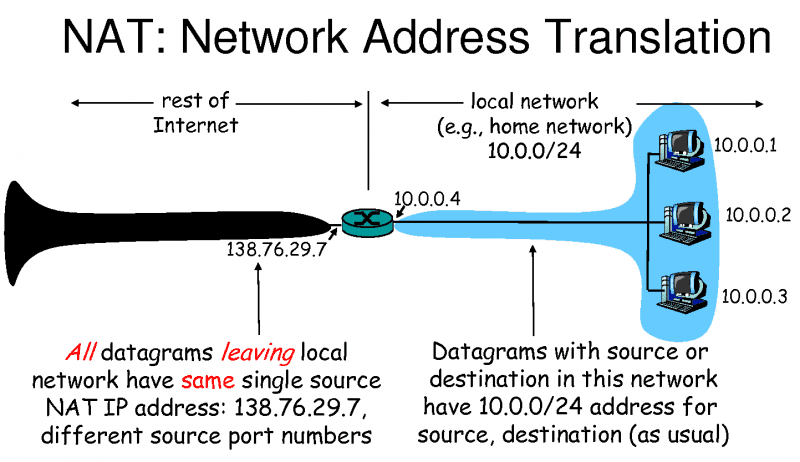
As the article explains, the NAT router acts like the company receptionist. When an internal device wants to talk to the internet, it tells the router. The router makes the connection on its behalf using the single public IP address and keeps a record of who made the request. When a reply comes back, the router checks its records and forwards the response to the correct internal device. To the outside world, it looks like the router itself is the one communicating.
This diagram shows this exact scenario:
2. The Real Magic: Port Address Translation (PAT)
The receptionist analogy is great, but it raises a technical question: if multiple devices (your phone and laptop) are browsing different websites at the same time, how does the router know which returning packet belongs to which device? They all use the same public IP address.
The answer is the most common form of NAT, called NAT Overloading or Port Address Translation (PAT).
PAT extends the translation process by not only changing the IP address but also the source port number. Here’s how it works step-by-step:
- Outbound Packet: Your laptop (private IP
192.168.1.100) sends a packet to a web server. The packet has a source IP:port pair, for example,192.168.1.100:54321. - Translation: The NAT router receives this packet. It replaces the private source IP and port with its own public IP and a unique port number, for example,
88.77.66.55:12345. - NAT Table Entry: The router records this translation in a special table called the NAT translation table:
Internal (192.168.1.100:54321) <---> External (88.77.66.55:12345) - Inbound Packet: The web server sends its reply to the public address
88.77.66.55:12345. - Reverse Translation: The router receives the reply. It looks up the destination port
12345in its translation table, finds the corresponding internal address192.168.1.100:54321, rewrites the destination IP and port, and forwards the packet to your laptop.
If your phone starts a new connection, the router will do the same thing but assign a different external port (e.g., 12346), allowing it to handle both connections simultaneously.
This video provides a great animated explanation of PAT.
NAT Explained | Overload, Dynamic & Static
This video from CertBros, titled 'NAT Explained', clearly visualizes how PAT (or Overload) uses a NAT table to manage multiple connections through a single public IP.
Please watch the section on PAT/Overload from 03:06 to 05:25. Pay close attention to how the NAT table is built and used to track the translations.
For a detailed textual breakdown of this process, you can refer back to the HowStuffWorks article.
NAT: How Network Address Translation Works
Let's reinforce the concept with a written explanation of how the port numbers are used.
Please read the sections 'The Connections of a NAT Overload' and 'How NAT Overloading Works'. These sections detail how the combination of IP addresses and port numbers creates unique connections that the NAT router can track.
3. Seeing NAT in Action
Theory is great, but seeing is believing. The following video demonstrates NAT in practice using Wireshark. The host initiates an SSH connection from a computer on a private network to a server on the public internet. He captures packets on both the client-side (inside the private network) and the server-side (on the public internet) to show you exactly how the source IP address is translated.
While watching, you'll hear the terms inside local and inside global. This is standard terminology for describing the translation:
- Inside Local: The private IP of a device inside your network.
- Inside Global: The public IP that same device appears as to the global internet (i.e., your router's public IP).
Finally Understand NAT and PAT, Wireshark shows every translation
In this video, David Bombal provides a fantastic practical demonstration of NAT. He uses Wireshark to prove that the IP address translation is really happening.
Watch from 07:41 to 19:22. The host will: Explain the terminology (inside/outside, local/global). Walk through the packet flow conceptually. Run a live Wireshark capture on both the client and server to show the IP addresses before and after NAT.
This demonstration perfectly illustrates your goal of connecting "book knowledge" to real-life internet functionality. You can see the IP address in the packet header being rewritten, just as we discussed.
4. Other Flavors of NAT
While PAT/Overloading is what your home network uses, it's helpful to be aware of two other, less common types of NAT.
- Static NAT: Creates a permanent, one-to-one mapping between a single private IP and a single public IP. This is used when you need a device on your private network (like a web server) to be accessible from the internet. The router will always forward traffic coming to that specific public IP to the designated private IP.
- Dynamic NAT: A router has a pool of public IP addresses. When an internal device wants to connect to the internet, the router picks an available public IP from the pool and assigns it for the duration of the session. It's still a one-to-one mapping, but it's temporary rather than permanent.
The CertBros video you watched earlier also gives a quick, clear explanation of these two types.
NAT Explained | Overload, Dynamic & Static
To round out your understanding, let's quickly review the other forms of NAT.
Watch the short sections explaining Dynamic NAT (05:25 - 07:03) and Static NAT (07:03 - 08:00).
Conclusion
You've now uncovered the "magic" that connects the private and public internet. NAT, and specifically PAT, is a clever and essential technology that has massively extended the life of the IPv4 protocol.
Key Takeaways:
- NAT is the process of a router rewriting IP addresses in packets that cross between a private network and the public internet.
- PAT (NAT Overloading) is the most common form. It allows many devices with private IPs to share a single public IP by using unique port numbers to track each connection.
- A router running NAT maintains a translation table to map internal IP:port pairs to external IP:port pairs, ensuring reply packets get to the right device.
- NAT provides a basic security benefit by hiding the internal IP structure from the public internet.
Preview of the Next Lesson:
We've now covered the fundamentals of addressing: binary-to-decimal, subnetting, public vs. private IPs, and NAT. The next module will introduce you to a few core "helper" protocols that work alongside IP to make a network function smoothly. We'll start by exploring ARP, the protocol that answers the question: "I know the IP address I want to talk to on my local network, but how do I physically send the data to that specific machine?" We'll also cover ping (ICMP) and DHCP.