Hello! Welcome back to our journey through the world of IP addressing.
In our last lesson, you mastered the crucial skill of calculating a network address from an IP address and subnet mask. This allows a device to determine the specific local network it belongs to. Now, we'll zoom out and look at the bigger picture: not all networks are created equal.
Today's lesson focuses on a fundamental distinction in the internet's architecture: the difference between public and private IP addresses. You'll learn why the IP address on your computer is almost certainly not the one the rest of the internet sees. This concept is key to understanding how millions of home and office networks connect to the single, global internet.
1. The Problem: A Shortage of Addresses
When the internet was first designed, its creators allocated about 4.3 billion addresses in the IPv4 system. This seemed like an enormous number at the time. However, they didn't anticipate the explosive growth of the internet and the proliferation of devices—from PCs and phones to smart TVs and refrigerators—that would all need to connect. This created a major problem: we were running out of public IPv4 addresses.
To solve this, engineers came up with a clever two-part solution: private IP addresses and Network Address Translation (NAT). Today, we'll focus on the first part. The following video provides an excellent animated overview of why this distinction was necessary and how it works.
This video from PowerCert Animated Videos clearly explains the motivation behind creating private IPs—the scarcity of public IPv4 addresses—and introduces how they work together.
Please watch from the beginning until 03:49. The video will cover: The basic difference between public and private IPs. Why public IPs are a limited resource. How private IPs were developed as a solution to prevent the exhaustion of public IPs.
2. Public vs. Private: Key Distinctions
As the video explained, the internet effectively has two categories of addresses. Let's formalize their definitions and characteristics.
Public IP Addresses
A public IP address is like the mailing address for your house. It is:
- Globally Unique: No two devices on the internet can have the same public IP address at the same time.
- Internet Routable: It can be reached from anywhere on the public internet.
- Assigned by an ISP: Your Internet Service Provider (e.g., Comcast, AT&T, Verizon) assigns one to your home router.
- Required for Internet Access: This is the address your network uses to communicate with the outside world.
Private IP Addresses
A private IP address is like a room number inside your house. It is:
- Not Unique: The same private IP addresses are reused in millions of private networks around the world. Your laptop could have the same private IP as someone else's laptop in another house.
- Not Internet Routable: Routers on the public internet are configured to ignore traffic destined for these addresses.
- Assigned by a Local Router: Your home router assigns a unique private IP to every device (your phone, laptop, etc.) on your local network, often using a protocol called DHCP (Dynamic Host Configuration Protocol).
- Used for Local Communication: Devices within your home use these addresses to talk to each other and to the router.
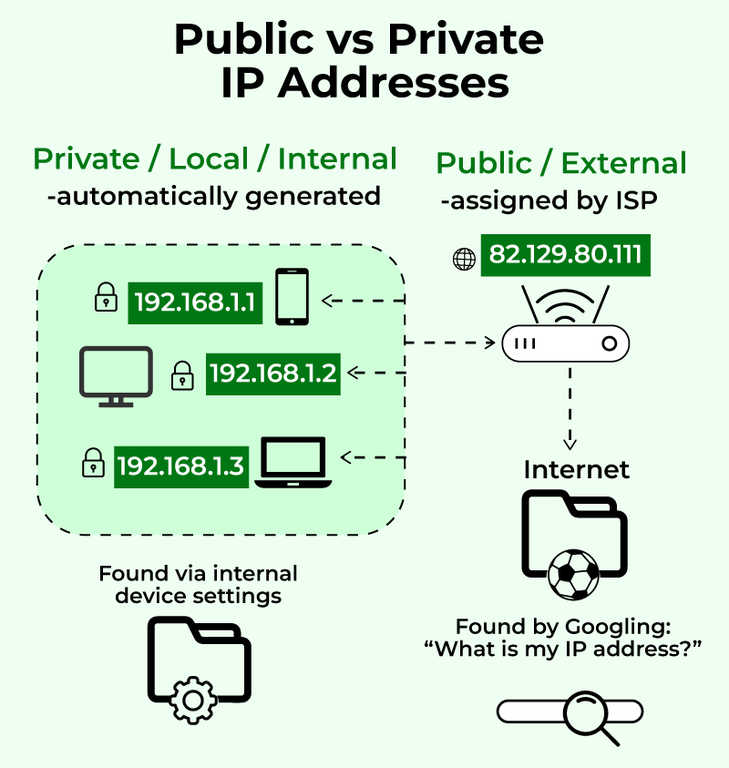
This image provides a great visual summary of the concept. Your internal devices each have a private IP, but they all share a single public IP when accessing the internet.
3. The Reserved Private Ranges (RFC 1918)
To ensure there's no confusion, the Internet Engineering Task Force (IETF) formally reserved specific ranges of IPv4 addresses for private use in a document called RFC 1918. Any IP address falling within these ranges is considered private and is not routed on the public internet.
It's essential to be able to recognize these ranges.
Private IP Addresses (RFC 1918) Tutorial - FlackBox
This article from FlackBox, 'Private IP Addresses (RFC 1918) Tutorial', clearly lays out the specific address ranges designated for private use. Knowing these is a key part of distinguishing public from private IPs.
Please read the section titled 'The range of private addresses in each of the different Classes, A, B, and C'. This section explicitly lists the three reserved blocks.
Here are the RFC 1918 private address ranges for your reference:
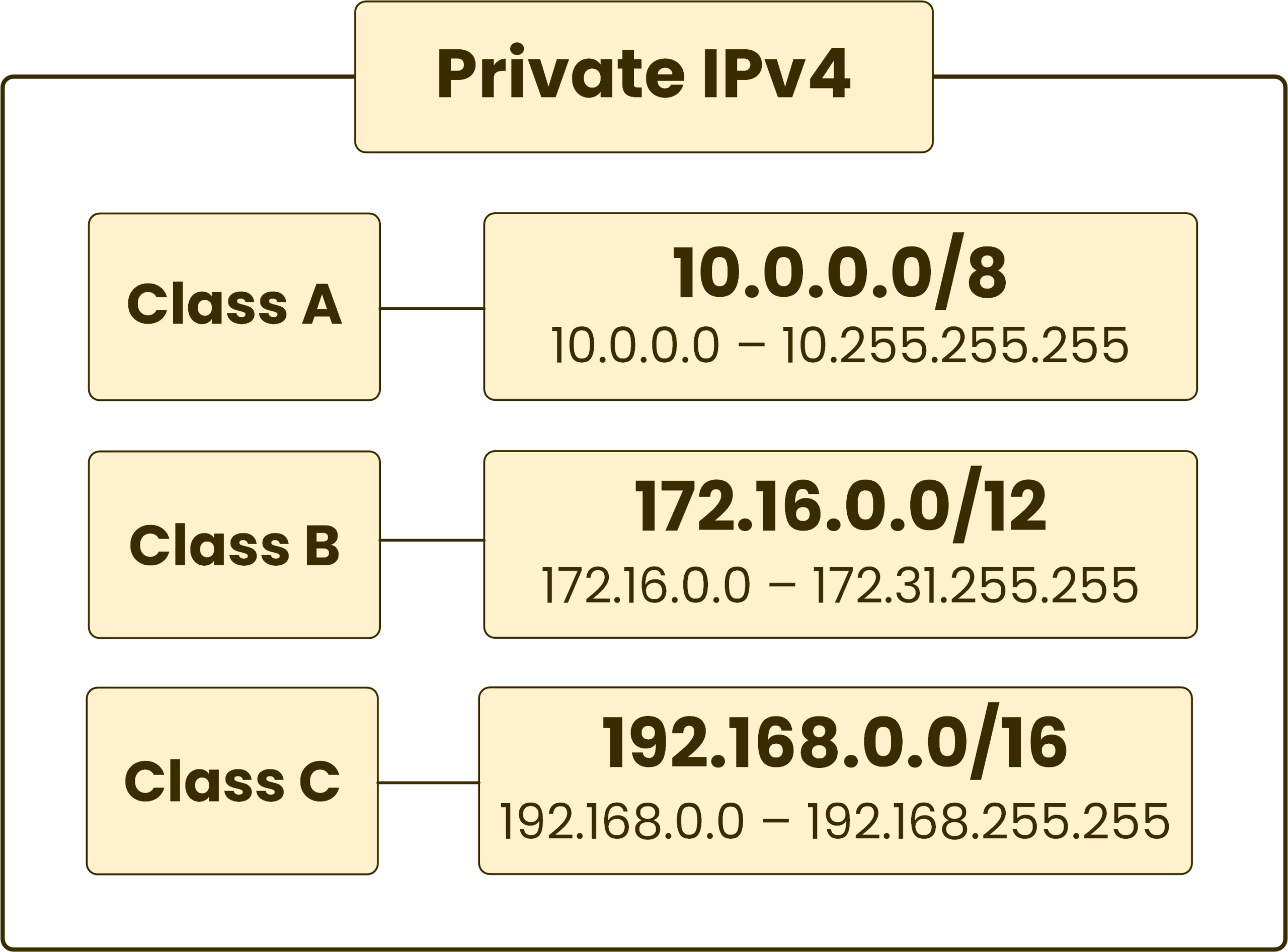
You will find the 192.168.x.x range used in the vast majority of home and small office networks. The other ranges are typically used in larger corporate environments.
4. Hands-On: Finding Your Own IP Addresses
Now, let's connect this theory to your own computer. You actually have both types of addresses associated with your current connection: a private IP on your local network and a public IP that the internet sees.
1. Finding Your Private IP Address
Your operating system can tell you the private IP address assigned to your network adapter by your router.
- On Windows, open the Command Prompt (
cmd) and type:ipconfig - On macOS or Linux, open the Terminal and type:
(Note: On some modern Linux systems,ifconfigip addris preferred.)
Look for the "IPv4 Address" line. It will almost certainly be an address within one of the RFC 1918 ranges we just discussed (likely starting with 192.168 or 10.).
2. Finding Your Public IP Address
Since this address belongs to your router, you can't find it using a command on your local machine. The easiest way to find it is to ask a server on the internet what it sees.
- Open a web browser and search Google for "what is my ip address".
- Alternatively, visit a website like
whatismyipaddress.com.
The IP address displayed is your public IP. Notice that it is different from the private IP you found earlier! This simple exercise is tangible proof of the public/private distinction at work.
Conclusion
Today, you've learned one of the most fundamental concepts of modern networking that allows the internet to scale.
Key Takeaways:
- Public IP addresses are globally unique, assigned by ISPs, and are used for communication over the internet.
- Private IP addresses are for use within a local network (like your home or office), are not unique globally, and are not routable on the public internet.
- The system of private IPs was created as a primary solution to the problem of IPv4 address exhaustion.
- Specific address blocks, defined in RFC 1918, are reserved for private use (10.0.0.0/8, 172.16.0.0/12, and 192.168.0.0/16).
- You can easily find your device's private IP with
ipconfig/ifconfigand your network's public IP using a web service.
Preview of the Next Lesson:
This lesson leaves us with a critical question: If private IP addresses can't be used on the internet, how does your computer, with its private IP of 192.168.1.5, load a webpage from a server on the public internet?
The answer is the other half of the solution: Network Address Translation (NAT). In the next lesson, we will explore exactly how your router performs this magic trick, translating between your private IP and its public one to make your internet connection seamless.