Hello! Welcome back to our exploration of IP addressing.
In the last lesson, we established that a subnet mask's primary role is to define the boundary between the network and host portions of an IP address. You learned how this boundary determines the size of a network and saw how CIDR (slash) notation provides a convenient shorthand.
Today, we're moving from the "what" to the "how." Our goal is to master a fundamental skill: to calculate the network address given any IP address and subnet mask. This is the mechanical process that computers and routers perform constantly. Since you have a background in computer science, you'll find the underlying logic quite familiar—it's all based on a simple binary operation.
The Core of the Calculation: The Bitwise AND
To find the network address, a device performs a bitwise logical AND operation between the IP address and its subnet mask. A logical AND operation compares two bits and produces a result based on these rules:
- 1 AND 1 = 1
- 1 AND 0 = 0
- 0 AND 1 = 0
- 0 AND 0 = 0
Essentially, the result is 1 only if both input bits are 1.
When we apply this to all 32 bits of an IP address and its subnet mask, the result is the network address. The 1s in the subnet mask act as a filter, preserving the network portion of the IP address, while the 0s in the mask ensure that the host portion of the resulting address is set to zero.
The following article explains this process and provides a clear, step-by-step guide.
What is a Subnet Mask? Examples, Uses and Benefits
This article, 'What is a Subnet Mask?', clearly defines the bitwise AND operation in the context of networking and lays out the four steps to calculate a network address.
Please read two short sections from this article: Start at the heading 'What is a subnet mask?' and read down to just before the 'Pro tip'. Focus on the explanation of the 'bitwise AND operation'. Then, scroll down to the heading 'Network address and subnet masks' and read the 4-step process for calculating the network address.
So, the four-step process is:
- Convert the IP address to its 32-bit binary form.
- Convert the subnet mask to its 32-bit binary form.
- Perform a bitwise AND operation on the two binary numbers.
- Convert the resulting 32-bit binary number back to dotted-decimal notation. This is your network address.
Let's look at a simple visualization of this process.
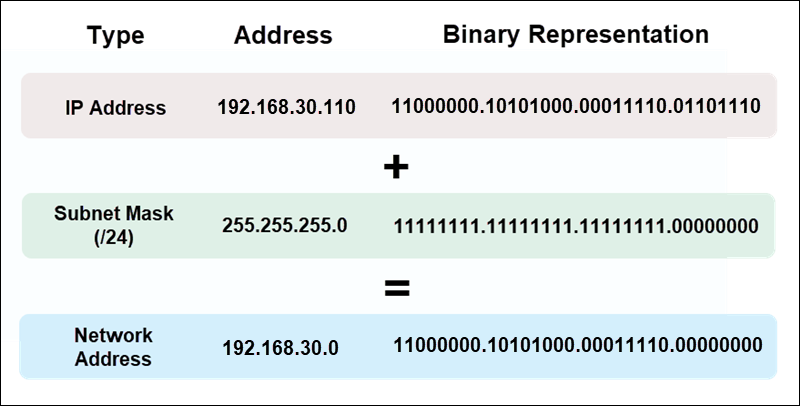
Case 1: Masks on Octet Boundaries
The process is most straightforward when the subnet mask aligns perfectly with an octet boundary, like /8, /16, or /24.
/8(255.0.0.0)/16(255.255.0.0)/24(255.255.255.0)
In these cases, you don't need to do a full binary conversion. The 255s in the mask correspond to the network portion, and the 0s correspond to the host portion.
Rule of thumb: Keep the octets of the IP address that align with 255 in the mask, and change the octets that align with 0 to zero.
Example:
- IP Address:
192.168.123.132 - Subnet Mask:
255.255.255.0(/24) - Network Address:
192.168.123.0
The following short video demonstrates this exact calculation.
IP address network and host portion | subnet mask explained in simple terms | CCNA 200-301 |
This clip from 'NETWORKING WITH H' provides a quick, clear example of calculating a network address for a /24 network.
Watch from 02:16 to 03:00. This section walks through the simple alignment of an IP address and a /24 subnet mask.
Case 2: Masks Within an Octet (Variable Length Subnet Masking)
This is where your binary skills become essential. In most modern networks, subnet masks don't fall neatly on octet boundaries. This practice is called Variable Length Subnet Masking (VLSM). Consider a mask like /26 (255.255.255.192) or /21 (255.255.248.0).
Here, the boundary between network and host bits falls within an octet. To find the network address, you must perform the binary AND operation on that "interesting" octet.
The next video provides excellent, detailed walkthroughs of these more complex scenarios. It's one of the best explanations available for this topic.
IPv4 Addressing Lesson 2: Network IDs and Subnet Masks
This video from NGT Academy is a masterclass in calculating network IDs for non-standard subnet masks. It will walk you through two different examples, step-by-step.
This is the core of the lesson, so please pay close attention. Watch the first segment from 02:41 to 08:54. This covers a /21 mask, where the boundary is in the third octet. Follow how the IP address 192.168.40.55 and the mask 255.255.248.0 are converted to binary to find the network address 192.168.40.0. Next, watch from 10:36 to 16:05. This example uses a /26 mask, where the boundary is in the fourth octet. See how the IP address 192.168.45.55 and the mask 255.255.255.192 result in the network address 192.168.45.0.
Let's summarize the process from the video for a /26 mask:
- IP Address:
192.168.45.55 - Subnet Mask:
255.255.255.192(/26) - The first three octets of the mask are
255, so the first three octets of the network address will be192.168.45. - The fourth octet is the interesting one. We must use binary:
- IP octet (55):
00110111 - Mask octet (192):
11000000
- IP octet (55):
- Perform the bitwise AND:
00110111 (55) & 11000000 (192) ---------- 00000000 (0) - The resulting fourth octet is
0. - Final Network Address:
192.168.45.0
Practice Problems
Now it's your turn. Use the bitwise AND method to find the network address for the following. You can check your work with the provided answers.
Problem 1:
- IP Address:
172.16.85.120 - Subnet Mask:
255.255.224.0(/19) - Hint: The "interesting" octet is the third one.
Click to see the solution
- The first two octets of the mask are
255, so the network address starts with172.16. - Third octet calculation:
- IP octet (85):
01010101 - Mask octet (224):
11100000
- IP octet (85):
- Bitwise AND:
01010101 (85) & 11100000 (224) ---------- 01000000 (64) - The fourth octet of the mask is
0, so the fourth octet of the network address is0. - Answer:
172.16.64.0
Problem 2:
- IP Address:
192.168.10.150 - Subnet Mask:
255.255.255.240(/28) - Hint: The "interesting" octet is the fourth one.
Click to see the solution
- The first three octets of the mask are
255, so the network address starts with192.168.10. - Fourth octet calculation:
- IP octet (150):
10010110 - Mask octet (240):
11110000
- IP octet (150):
- Bitwise AND:
10010110 (150) & 11110000 (240) ---------- 10010000 (144) - Answer:
192.168.10.144
You can find many more practice problems in the "Ip Addressing and Subnetting Workbook" on pages 14-27 ("Custom Subnet Masks" problems) and 30-57 ("Subnetting Problem" sections).
Conclusion
You have now learned the essential skill of calculating a network address. This process is fundamental to how routers build their routing tables and forward packets across the internet.
Key Takeaways:
- The network address is calculated by performing a bitwise logical AND between an IP address and its subnet mask.
- This operation effectively "filters" the IP address, preserving the network bits and zeroing out the host bits.
- For simple masks like
/8,/16, and/24, this means keeping the network octets and setting the host octets to zero. - For more complex masks like
/21or/28, you must convert the octet where the boundary lies into binary and perform the AND operation to find the correct value for that octet in the network address.
Preview of the Next Lesson:
With the ability to identify the network an IP address belongs to, we can now discuss a crucial real-world distinction. In the next lesson, we will cover the difference between public and private IP addresses. You'll learn why your computer's IP address is different from the one the rest of the world sees, which will set the stage for understanding Network Address Translation (NAT).