Hello! Welcome to the final lesson in our module on IP addressing.
In the last lesson, we saw how Network Address Translation (NAT) acts as a clever workaround, allowing many devices on a private network to share a single public IPv4 address. While NAT has been crucial for extending the life of IPv4, it was always intended as a patch for a bigger problem: the world was running out of IPv4 addresses.
Today, we'll explore the long-term solution to this problem: Internet Protocol version 6 (IPv6). Our goal is to understand why IPv6 was necessary and to get comfortable with its new, and initially intimidating, address format. By the end of this lesson, you'll be able to look at an IPv6 address, understand its structure, and appreciate the immense scale it brings to the internet.
1. The "Why": Solving IPv4 Address Exhaustion
The Internet Engineering Task Force (IETF) knew back in the 1990s that the 32-bit address space of IPv4, offering about 4.3 billion unique addresses, was not going to be enough. At the time, no one could have predicted the explosive growth of the internet, especially with the rise of mobile phones, smart home devices, and the Internet of Things (IoT), all of which need their own IP addresses.
NAT was a brilliant stopgap, but it has drawbacks. It adds complexity to networks and breaks the original "end-to-end" principle of the internet, where any host could directly communicate with any other host. IPv6 was designed to solve this problem at its root by providing a virtually inexhaustible supply of addresses.
To start, let's watch a short video that clearly explains the motivation behind this monumental shift in internet architecture.
IPv6 Addresses Explained | Cisco CCNA 200-301
The video 'IPv6 Addresses Explained' from CertBros begins by perfectly framing the problem of IPv4 address exhaustion that led to the development of IPv6.
Watch the first 1 minute and 34 seconds of the video. It clearly illustrates the scale of the problem and sets the stage for IPv6 as the solution.
The article from Red Hat also provides a concise summary of this history. It's a good quick read to reinforce the concept.
What you need to know about IPv6
For a textual summary, the article 'What you need to know about IPv6' from Red Hat quickly recaps the history and motivation.
Read the introductory section and the 'IPv4' section. This will connect what you know about IPv4 and NAT directly to the need for IPv6.
2. The IPv6 Address Format: A New Blueprint
An IPv6 address is fundamentally different from an IPv4 address. Let's break down its structure.
- Size: 128 bits, compared to IPv4's 32 bits. This provides 2¹²⁸ addresses, which is approximately 340 undecillion (3.4 x 10³⁸). That's enough to assign a unique address to every atom on the surface of the Earth, with plenty to spare.
- Notation: It's written in hexadecimal, not decimal. Hexadecimal uses digits 0-9 and letters A-F.
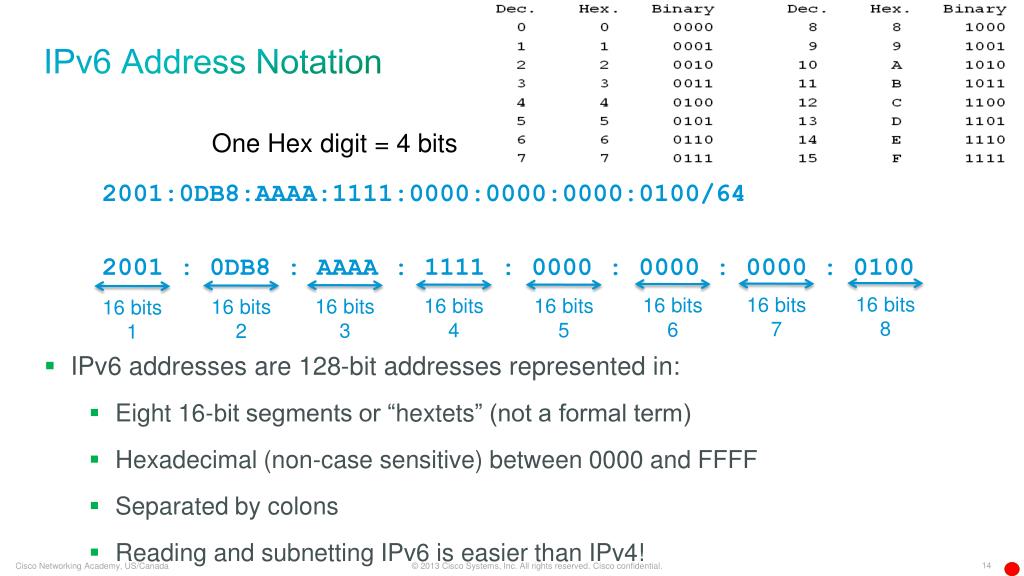
- Structure: The 128 bits are divided into eight 16-bit blocks, often called "hextets" or "quartets". Each hextet is represented by four hexadecimal digits and is separated by a colon (
:).
Here is a full, unabbreviated IPv6 address: 2001:0db8:85a3:0000:0000:8a2e:0370:7334
This image provides a great visual breakdown. Given your computer science background, you'll appreciate the clear mapping between the hexadecimal digits and their underlying binary values.
3. Making IPv6 Readable: Abbreviation Rules
Typing out a full 128-bit IPv6 address is cumbersome. Fortunately, there are two simple rules to shorten them significantly.
Rule 1: Omit Leading Zeros
Within any 16-bit hextet, you can remove the leading zeros.
0db8becomesdb80000becomes00370becomes370
Applying this to our example address:2001:0db8:85a3:0000:0000:8a2e:0370:7334
becomes:2001:db8:85a3:0:0:8a2e:370:7334
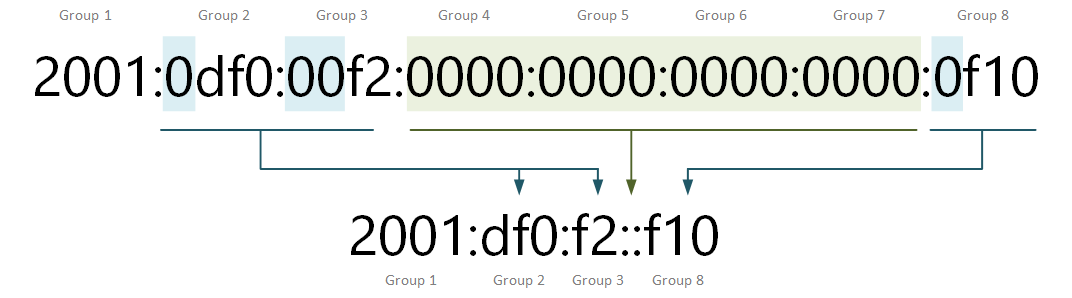
Rule 2: Compress Consecutive Zeros
A single, continuous sequence of all-zero hextets can be replaced with a double colon (::). This can only be done once per address to avoid ambiguity.
In our example, we have two consecutive all-zero hextets (:0:0:). We can compress them:2001:db8:85a3::8a2e:370:7334
This is much easier to read and write!
This image clearly illustrates the second rule:
Let's watch a video that walks through the full format and both abbreviation rules.
IPv6 Addresses Explained | Cisco CCNA 200-301
The CertBros video continues by explaining the hexadecimal format and the crucial rules for shortening IPv6 addresses.
Watch the segments from 01:34 to 03:12 and from 07:08 to 09:09. The first part covers the basic structure, and the second part demonstrates the abbreviation rules with clear examples.
Quick Practice
Let's test your understanding. Try to fully abbreviate the following IPv6 address:fe80:0000:0000:0000:02a0:c9ff:fe17:fc0f
Click to see the answer and explanation
Answer: fe80::2a0:c9ff:fe17:fc0f
Explanation:
- Original:
fe80:0000:0000:0000:02a0:c9ff:fe17:fc0f - There is a continuous block of three all-zero hextets (
:0000:0000:0000:). We can replace this with::. - In the other hextets, we remove leading zeros:
02a0becomes2a0. - Combining these gives us the final abbreviated address:
fe80::2a0:c9ff:fe17:fc0f
4. Address Structure and Types
Just like IPv4, an IPv6 address is split into a network portion and a host portion. However, instead of a subnet mask, IPv6 uses a prefix length in CIDR notation to define this split.
A very common configuration, especially for end-user networks, is a /64 prefix. This means:
- First 64 bits: The Network Prefix (identifies the network).
- Last 64 bits: The Interface ID (identifies the specific device on that network).
A key feature of IPv6 is that a single device can, and often does, have multiple IPv6 addresses simultaneously, each for a different purpose or "scope." Let's look at the most common types.
| Address Type | Prefix | Purpose & Analogy |
|---|---|---|
| Global Unicast | Starts with 2 or 3 (e.g., 2001::/16) |
A globally unique, public, and routable address. The equivalent of a public IPv4 address. |
| Unique Local | fc00::/7 |
Routable only within a private organization, not on the public internet. The equivalent of a private IPv4 address (RFC 1918). |
| Link-Local | fe80::/10 |
Used for communication only on a single local network link (like an Ethernet segment). Not routable. Every IPv6-enabled interface automatically generates one. |
| Loopback | ::1 |
Used for a device to talk to itself. The equivalent of 127.0.0.1 in IPv4. |
| Multicast | ff00::/8 |
An address for a group of devices. IPv6 uses multicast extensively and does away with broadcast addresses. |
This final video segment will walk you through these address types and the concept of a prefix length.
IPv6 Addresses Explained | Cisco CCNA 200-301
To complete our understanding, let's learn how IPv6 addresses are structured into network/host portions and explore the different address types.
Watch the segments from 06:22 to 07:08 and from 09:09 to 12:20. These parts explain the /64 prefix and then detail the different address types and how to identify them.
Conclusion
Congratulations on completing the module on IP addressing! You've journeyed from the binary bits of an IPv4 address all the way to the vast, modern landscape of IPv6. While IPv6 can seem complex at first, its design directly addresses the limitations of its predecessor and paves the way for the future growth of the internet.
Key Takeaways:
- Motivation: IPv6 was introduced primarily to solve the problem of IPv4 address exhaustion, driven by the massive growth of internet-connected devices.
- Format: IPv6 addresses are 128 bits long and are written as eight groups of four hexadecimal digits, separated by colons.
- Abbreviation: To make them manageable, you can omit leading zeros from any group and replace a single, continuous block of all-zero groups with a double colon (
::). - Structure: A prefix length (e.g.,
/64) divides the address into a network prefix and an interface ID. - Address Types: Devices typically have multiple IPv6 addresses, including a Link-Local address for local communication and a Global Unicast address for accessing the public internet.
Preview of the Next Lesson:
We've now thoroughly covered the "who" and "where" of network communication with IP addressing. In the next module, we'll dive into the core "helper" protocols that work alongside IP to make everything function. We'll start with the Address Resolution Protocol (ARP), which solves a critical local-level problem: "How does my computer find the physical hardware (MAC) address of another device on my local network when it only knows its IP address?" This will be our first practical step into the Data Link Layer. We will then explore ping (ICMP) and DHCP.