Introduction
Welcome back! In our last lesson, we established that a router's core job is to forward packets using a routing table. We ended with a crucial question: how do the routes get into that table in the first place? We briefly introduced three methods: directly connected networks, static routes, and dynamic routes.
Today, we will dive deep into the latter two. This lesson is all about distinguishing between static routing and dynamic routing. You will learn how each method works, their fundamental differences, and the specific scenarios where one is preferred over the other. Understanding this distinction is key to grasping how network administrators build and manage everything from small home networks to the global internet.
1. The Problem: Unreachable Networks
Before we compare routing methods, let's revisit why we need them. A router only knows about the networks it's directly connected to. If a packet arrives with a destination IP on a network the router has never heard of, it has no choice but to drop the packet.
The following video sets up a perfect scenario illustrating this exact problem.
Static vs Dynamic Routing Explained | CompTIA Network+
This video from ByteBite clearly visualizes what happens when a router receives a packet for a network that isn't in its routing table.
Watch the first 1 minute and 28 seconds (00:00 - 01:28). Notice how Router A only knows about its directly connected networks and, as a result, drops the packet destined for PC2's network.
This is the fundamental problem that both static and dynamic routing are designed to solve: teaching routers about remote networks.
2. Static Routing: The Manual Approach
The most direct way to solve the problem in the video is for a network administrator to manually tell the router what to do. This is the essence of static routing.
Think of it like giving a delivery driver a pre-printed map with a specific route highlighted. The route is fixed, predictable, and won't change unless you manually draw a new one.
How It Works
An administrator logs into the router and enters a command that essentially says: "To reach network X, send packets to the next-hop router at IP address Y."
Let's see how this fixes the problem from our first video.
Static vs Dynamic Routing Explained | CompTIA Network+
Continuing with the same scenario, this clip demonstrates how manually adding static routes on both routers enables communication.
Watch from 1:28 to 2:50. Observe how the administrator adds a route on Router A for PC2's network, and another route on Router B for PC1's network. With these static routes in place, the ping succeeds.
Advantages and Disadvantages
While simple in concept, static routing has significant trade-offs. It's not a one-size-fits-all solution.
Static and Dynamic Routing - CompTIA Network+ N10-007 - 1.3
Professor Messer provides a concise overview of the pros and cons of using static routes.
Watch from 1:08 to 2:30. Pay close attention to the discussion of simplicity and security versus the administrative difficulty and lack of adaptability.
To summarize the key points:
-
Advantages:
- Simplicity & Control: Straightforward to implement on small networks. The administrator has full control over the path.
- Security: Paths are explicit and cannot be influenced by potentially malicious routing updates from other routers.
- Low Overhead: It uses no extra router CPU, memory, or network bandwidth because the router isn't running a complex algorithm or sending update messages.
-
Disadvantages:
- Scalability: The administrative effort becomes unmanageable as the network grows. Imagine manually configuring routes on hundreds of routers for thousands of networks.
- Human Error: Manual configuration is prone to mistakes that can cause routing loops or black holes.
- Not Adaptive: If a link fails, traffic will not be automatically rerouted. The administrator must manually intervene to configure an alternate path, leading to network downtime.
3. Dynamic Routing: The Automated Approach
What if routers could figure out the best paths on their own? What if they could automatically adapt to network changes, like a failed link? That's exactly what dynamic routing accomplishes.
Using our delivery driver analogy, this is like swapping the printed map for a real-time GPS app like Google Maps or Waze. The app automatically discovers new roads, gets traffic updates, and reroutes the driver if there's an accident.
How It Works
With dynamic routing, routers run a routing protocol (e.g., OSPF, EIGRP, RIP, BGP). This protocol enables them to:
- Discover neighbors: Find other routers on the network running the same protocol.
- Exchange routes: Advertise the networks they know about to their neighbors.
- Calculate best paths: Use an algorithm to determine the most efficient path to every destination based on the information received.
- Adapt to changes: If a link goes down, routers send updates to their neighbors, triggering a recalculation across the network to find a new best path. This process is called convergence.
Static and Dynamic Routing - CompTIA Network+ N10-007 - 1.3
This clip from Professor Messer introduces the concept of dynamic routing as an automated alternative to static routing.
Watch from 3:42 to 5:35. Focus on how dynamic routing automates the process of updating routing tables, its scalability, and the resources it consumes (CPU, memory, bandwidth).
Advantages and Disadvantages
Dynamic routing is powerful, but that power comes at a cost.
-
Advantages:
- Scalability: It's the only practical choice for large, complex networks. New routes are learned automatically as the network expands.
- Adaptability: The network can automatically recover from link failures by finding alternative paths, which is crucial for high availability.
- Reduced Administrative Overhead: Once configured, it requires far less manual intervention than static routing.
-
Disadvantages:
- Complexity: Configuration and troubleshooting are more complex and require a deeper understanding of the specific protocol's behavior.
- Resource Intensive: The routing protocol itself consumes router CPU and memory to run its algorithms and store route information. It also uses network bandwidth to send update messages.
- Security: If not properly secured, routing protocols can be manipulated to divert traffic or disrupt the network.
4. Head-to-Head Comparison
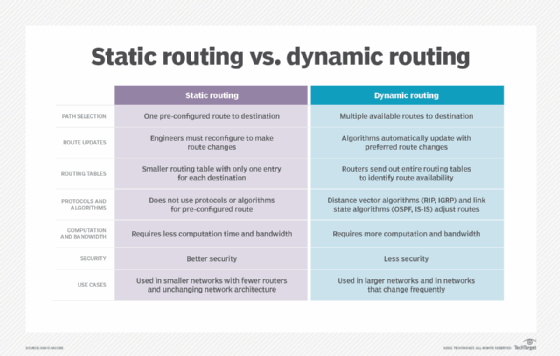
The choice between static and dynamic routing is a classic engineering trade-off between simplicity and control versus automation and scalability.
This table provides a clear, side-by-side comparison of the two approaches.
5. Choosing the Right Tool for the Job
In practice, the choice isn't always one or the other. Most production networks use a hybrid approach, leveraging the strengths of both methods.
-
When to use Static Routing:
- Small, stable networks: Where the topology rarely changes.
- Stub networks: A network with only one single path out to the rest of the world. There's no choice to make, so a simple static route works perfectly.
- Defining a default route: This is a special, "last resort" static route that tells a router where to send traffic for any destination not explicitly listed in its routing table. This is extremely common. For example, your home router has a default route pointing to your ISP. We will explore this in detail in the next lesson.
-
When to use Dynamic Routing:
- Medium to large networks: Any network with multiple paths and a need for scalability and automatic failover.
- The Internet: The global internet backbone relies entirely on a powerful dynamic routing protocol called BGP (Border Gateway Protocol) to manage routes between thousands of different service providers.
Static vs Dynamic Routing: What's The Difference
To reinforce these ideas, this article from ioriver provides a great summary of the pros, cons, and use cases for each method. It also confirms that many networks use a blend of both.
Read the sections 'Static Routing: Advantages and Disadvantages', 'Dynamic Routing: Advantages and Disadvantages', and the FAQ question 'Is it possible to use both routing methods together?'. This will solidify your understanding of when and why each approach is used.
Conclusion
In this lesson, we demystified the two primary methods for building a routing table. You can now confidently distinguish between the manual, fixed nature of static routing and the automated, adaptive nature of dynamic routing.
Key Takeaways:
- Static Routing involves an administrator manually defining fixed paths. It is simple, secure, and has low overhead, but does not scale and cannot adapt to network failures.
- Dynamic Routing uses protocols that allow routers to automatically discover networks and adapt to changes. It is scalable and provides high availability but is more complex and consumes more resources.
- The choice between them depends on network size, complexity, and the need for adaptability.
- Most real-world networks use a hybrid approach, using static routes for simple, predictable paths (like a default route) and dynamic routing for the complex, changing parts of the network.
Preview of the Next Lesson:
We've mentioned the default gateway or "default route" a few times as a key application of static routing. In our next lesson, we will focus entirely on this concept, explaining how it enables your computer to connect to the internet. We'll then get hands-on with the traceroute command to visualize a packet's journey across the internet, seeing the results of these routing decisions in action.