Introduction
Hello! In our last lesson, we took a close look at the structure of an IP packet, focusing on its header—the "shipping label" of the internet. We dissected fields like the source and destination IP addresses, TTL, and the Protocol field, which are all essential for getting data from point A to point B.
Today, we'll see how that shipping label is actually used. We're moving from the package to the postal service. This lesson focuses on the core function of a router: using its internal map, called a routing table, to decide where to send a packet next. You will learn how a router receives a packet, looks up the destination address in its routing table, and forwards it on its journey across networks. This process is the very heart of the Network Layer and the foundation of how the internet moves data globally.
1. The Router's Core Job: Forwarding Packets
First, what fundamentally separates a router from your computer (a "host")? While both have IP addresses and can send and receive packets, their primary roles are different. A host typically only processes packets addressed to itself. A router, on the other hand, has a special job.
To understand this distinction and get our first look at a routing table, let's watch a segment from a video by Practical Networking.
Everything Routers do - Part 1 - Networking Fundamentals - Lesson 5
This video clearly defines a router's primary function and introduces the concept of the routing table as its internal 'map'.
Watch from 03:20 to 07:17. As you watch, focus on: The official definition of a router: a node that forwards packets not addressed to itself. The introduction of the routing table as a map of known networks. The basic structure of a route: a destination network is associated with an outgoing interface on the router.
As the video explains, a router's forwarding decision is based entirely on its routing table. Think of this table as a set of instructions. Each entry, or route, in the table essentially says: "To reach this destination network, send the packet to this next router via this specific physical connection."
A basic routing table entry contains three key pieces of information:
- Destination Network: The network address (e.g.,
10.1.1.0) and subnet mask (e.g.,/24) of the target network. - Next-Hop IP Address: The IP address of the next router in the path. If the destination network is directly connected, this might be empty.
- Outgoing Interface: The physical port on the router (e.g.,
GigabitEthernet0/1) that the packet should be sent out of to reach the next hop.
The diagram below shows this in action. A packet from PC1 needs to get to PC2. Router R1 receives the packet, checks its destination IP, and its routing table tells it to forward the packet to R2 via its Serial0/0/0 interface.

2. The Forwarding Logic: Longest Prefix Match
Now for a crucial question: what if a destination IP address matches multiple entries in the routing table? For example, a table might have a general route for the entire 10.0.0.0/8 network and a more specific one for the 10.1.1.0/24 subnet within it.
To resolve this, routers use a simple but powerful rule: the Longest Prefix Match. The router will always choose the most specific route, which is the one with the longest subnet mask (the largest prefix length).
This image provides a great visual for the concept.
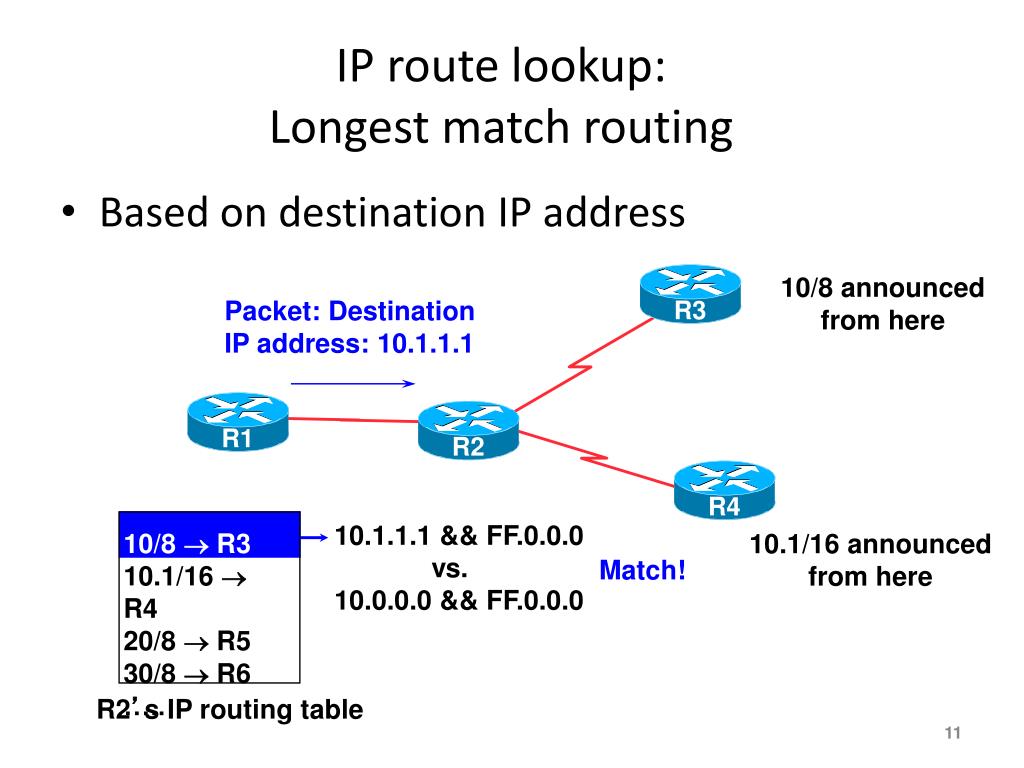
Given your computer science background, seeing this at the binary level will make it click. A longer prefix means more bits have to match between the destination IP address and the network prefix in the routing table.
This article provides an excellent technical explanation of the Longest Prefix Match rule, complete with binary examples that show exactly how the comparison works.
Read the 'Explanation', 'Binary Example 1', and 'Binary Example 2' sections. Pay close attention to how the bit-by-bit comparison between the destination IP and the available prefixes leads to the selection of the route with the most matching bits.
3. The Complete Process: From Routing Table to the Wire
Let's put everything together and trace a packet's full journey across two routers. This process beautifully integrates what we just learned about routing tables with what we know about IP headers (from the last lesson) and ARP (from a previous module).
The following video walks through every single step. You'll see how the router uses the routing table to make a Layer 3 decision (where to go next) and then uses ARP to solve the Layer 2 problem (how to physically get there).
Everything Routers do - Part 2 - How Routers forward Packets - Networking Fundamentals - Lesson 5
This video provides a fantastic, step-by-step walkthrough of a packet traversing a multi-router network. It connects the IP header, the routing table lookup, and the ARP process needed to build the next Layer 2 frame.
Watch the detailed walkthrough from 03:00 to 09:10. Follow the packet from Host A to Host C. For each router, notice the precise sequence: Receive packet, strip the incoming Layer 2 (Ethernet) header. Examine the destination IP address in the Layer 3 (IP) header. Look up this destination in the routing table to find the next-hop IP address. Perform an ARP request for the next-hop IP's MAC address (if not already in its ARP table). Create a new Layer 2 header with the next-hop's MAC address and forward the packet.
4. How are Routing Tables Built?
You might now be wondering where the routes in the table come from in the first place. This is a brief preview of topics we'll cover in more detail soon, but it's important to know the three sources.
Let's return to the first video, which explains this very clearly.
Everything Routers do - Part 1 - Networking Fundamentals - Lesson 5
A router's routing table is populated in a few key ways. This clip explains the three primary methods.
Watch from 07:17 to 15:35. You don't need to memorize the specific dynamic routing protocols (like OSPF or RIP). Just focus on understanding the difference between the three methods: Directly Connected: Routes automatically created for networks the router is physically plugged into. Static Routes: Routes manually programmed by a network administrator. Dynamic Routes: Routes learned automatically by communicating with other routers.
Conclusion
In this lesson, you've learned the fundamental process of IP routing. You now understand how a router acts as an intelligent mail-sorter for the internet, using its routing table to make hop-by-hop forwarding decisions.
Key Takeaways:
- A router's primary job is to forward packets between different networks based on the destination IP address in the packet header.
- The routing table is the router's "map," containing entries that link destination networks to a next-hop IP address and an outgoing interface.
- When a destination IP matches multiple routes, the router uses the Longest Prefix Match rule, selecting the most specific path (the one with the longest subnet mask).
- The complete forwarding process involves a Layer 3 lookup in the routing table, followed by a Layer 2 ARP lookup to find the MAC address of the next hop.
- Routes in a routing table are populated through three methods: directly connected networks, static configuration, and dynamic routing protocols.
Preview of the Next Lesson:
We've seen how a router uses its table. Next, we will dig deeper into how that table is built and managed. We will distinguish more formally between static and dynamic routing. We will also explore the concept of the default gateway, which is a special type of route that every computer on your home network uses to send traffic to the internet. Finally, you'll get to use the traceroute command to see this routing process in action for yourself.