Introduction
Welcome back! In our last few lessons, we've focused on getting a device ready to participate in a network. We saw how ARP finds a MAC address for a local IP, and how DHCP automates the assignment of an IP address, subnet mask, and default gateway. Your computer now has its network identity.
Now, we shift our focus to the next logical step: how is data actually packaged and sent across networks using this identity? This lesson drills down into the fundamental unit of data at the Network Layer: the IP packet. Your goal is to understand the structure of an IPv4 packet, specifically its header. Think of the header as the shipping label on a package; it contains all the critical information routers need to guide the packet to its final destination.
This is a direct continuation of our journey through the TCP/IP stack. We're firmly in Layer 3, the Network Layer, and understanding this structure is essential before we can explore how routing works in our next lesson.
1. The Anatomy of an IP Packet: Header and Payload
At its core, an IP packet consists of two main parts:
- The Payload: This is the actual data you want to send. It's the "letter" inside the envelope. This data is handed down from the Transport Layer (Layer 4), and is typically a TCP segment or a UDP datagram.
- The Header: This is the "envelope" itself, containing all the addressing and control information. Routers don't inspect the payload; they only read the header to make their forwarding decisions.
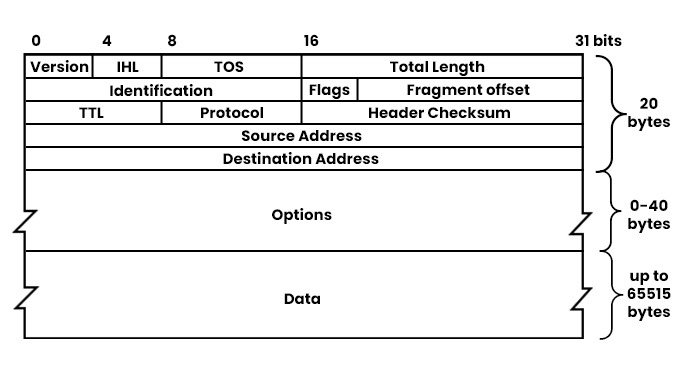
A standard IPv4 header is 20 bytes long, though it can be larger if optional fields are used. The entire structure is meticulously organized into fields, each with a specific purpose.
To get a clear visual map of these fields before we dive into them, take a look at the diagram below. We will be examining each of these components in detail.
2. A Field-by-Field Breakdown of the IPv4 Header
To understand how a packet navigates the internet, we need to understand the function of each field in its header. The following video from Jeremy's IT Lab provides a comprehensive and clear explanation of every field.
As you watch, think of the IPv4 header as a struct in C programming. It's a defined data structure with fixed-size members, and each member provides essential information for processing the packet.
Free CCNA | IPv4 Header | Day 10 | CCNA 200-301 Complete Course
This video will walk you through the entire IPv4 header, explaining the purpose and size of each field. It begins with a quick review of encapsulation before diving into the header details.
Watch the video from the beginning up to the 16:40 mark. The first part (00:28 - 03:16) sets the context by reviewing encapsulation. The main section (03:16 - 16:40) details each header field. Pay close attention to the purpose of fields like TTL, Protocol, and those related to fragmentation (Identification, Flags, Fragment Offset).
3. Grouping the Fields by Function
After watching the video, it's helpful to categorize the fields by their primary role. This makes the header structure easier to remember and understand.
| Category | Fields | Purpose |
|---|---|---|
| Packet Identity | Version, IHL, Total Length |
Basic information: defines the packet as IPv4, specifies header length, and gives the total packet size. |
| Addressing & Routing | Source IP Address, Destination IP Address |
The core addressing information that routers use to forward the packet toward its destination. |
| Loop Prevention | Time to Live (TTL) |
A counter that decrements at each router. It prevents packets from looping endlessly in the network. |
| Payload Handling | Protocol |
Tells the receiving operating system which protocol at the Transport Layer (e.g., TCP or UDP) should receive the payload. |
| Fragmentation | Identification, Flags, Fragment Offset |
Used to split a large packet into smaller pieces (fragments) to cross networks with smaller MTUs, and to reassemble them at the destination. |
| Error Checking | Header Checksum |
A value used to verify the integrity of the header. It is recalculated by every router because the TTL changes. |
| Special Handling | DSCP/ECN, Options |
Used for Quality of Service (prioritizing traffic) and other special, but rarely used, instructions. |
4. Seeing the Header in the Wild with Wireshark
Theory is great, but seeing these fields in a real packet brings the concepts to life. The next part of the video you just watched does exactly that, using Wireshark to inspect live packet captures. This will look very familiar after your hands-on DHCP lab.
Free CCNA | IPv4 Header | Day 10 | CCNA 200-301 Complete Course
Now, let's see how those theoretical fields appear in Wireshark. This section demonstrates a live capture, highlighting the values for each field and showing a practical example of fragmentation.
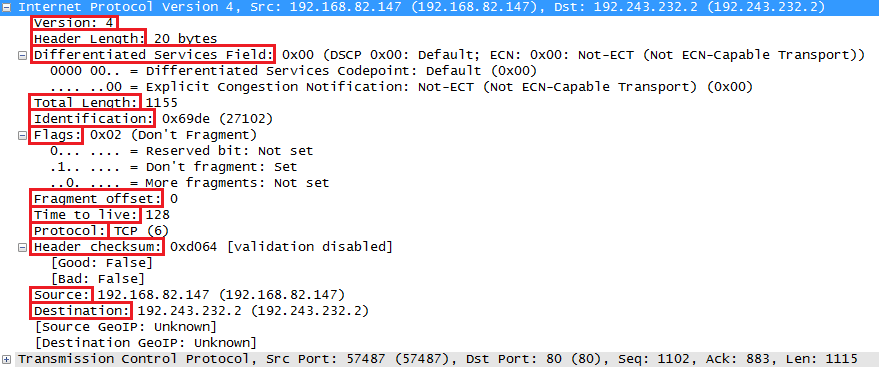
Watch the segment from 17:14 to 24:14. Notice how Wireshark neatly decodes the hexadecimal values into human-readable field names and values, just like in the diagram we saw earlier. Pay special attention to the demonstration of the 'Don't Fragment' bit and what happens when it's set on a large packet.
Here is a static image of a Wireshark capture that also illustrates the key fields in an IP header.
For a quick reference you can use now or in the future, the following article provides a concise, text-based summary of each header field.
IPv4 Packet Structure Explained
This article serves as an excellent written reference for the IPv4 header fields. It's perfect for quickly looking up the purpose of a specific field.
Read section 4, 'IPv4 Header Fields (Detailed Breakdown)'. You can skim this, as it covers the same material as the video, but it's useful to have a textual version to reinforce your learning.
Conclusion
In this lesson, you have dissected the structure of an IPv4 packet, the workhorse of the internet. You've learned what each field in the header is for and how it contributes to the successful delivery of data across complex networks.
Key Takeaways:
- An IP packet consists of a header (control information) and a payload (the actual data).
- The header contains crucial fields for routing and delivery, including the Source and Destination IP addresses.
- The Time to Live (TTL) field is a vital mechanism that prevents packets from getting stuck in routing loops.
- The Protocol field acts as a signpost, telling the destination host which transport layer protocol (TCP, UDP, etc.) should handle the payload.
- Fields like Identification, Flags, and Fragment Offset manage the process of breaking up and reassembling packets when they are too large for a network's MTU.
- Tools like Wireshark allow you to see these fields in real packets, bridging the gap between theory and practice.
Preview of the Next Lesson:
We've now examined the "shipping label" (the IP header) in detail. The next obvious question is: how do routers actually use this label? In the next lesson, we will explore how routers use the Destination IP Address in conjunction with an internal routing table to make intelligent, hop-by-hop decisions to forward packets closer to their final destination.