Introduction
Welcome to the next lesson! In our previous session, you became a network detective, learning how to interpret traceroute output to diagnose the path and performance of packets traveling across the internet. You saw how traceroute reveals a sequence of routers, each one a "hop" on the journey.
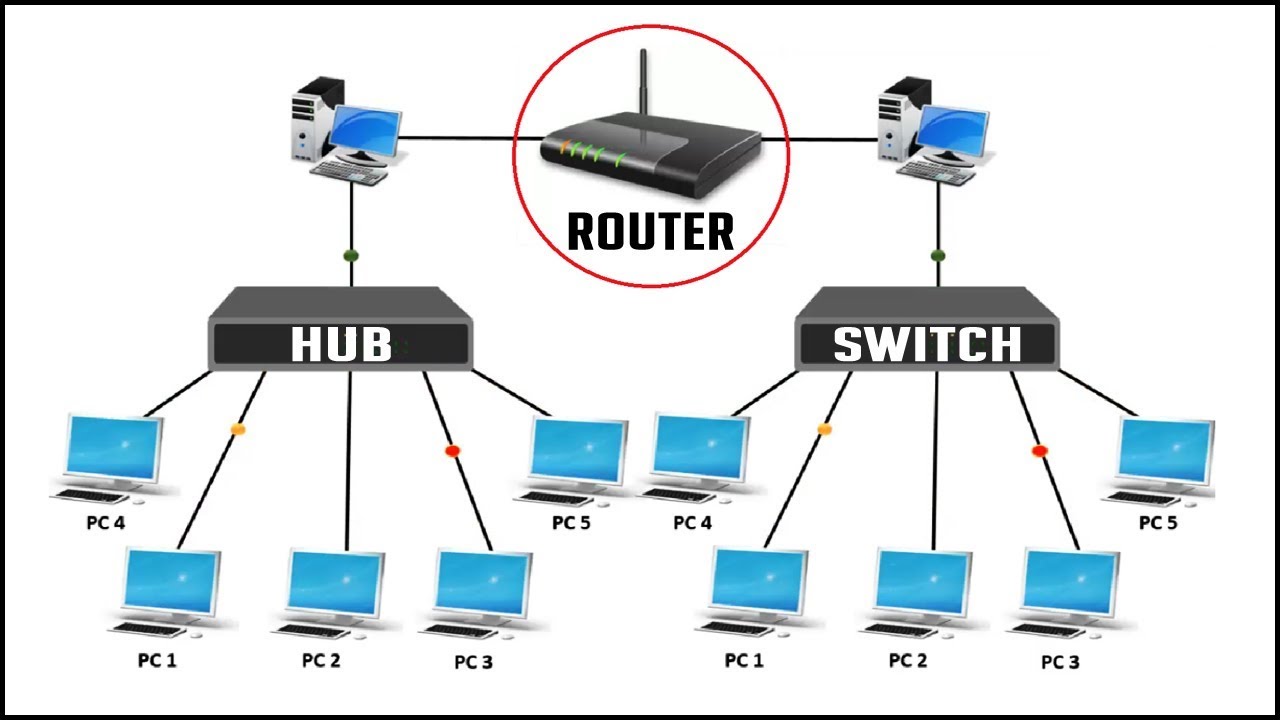
This raises a crucial question: what exactly are these devices? We often use terms like "hub," "switch," and "router" interchangeably in casual conversation, but in networking, they have very distinct roles. This lesson will precisely distinguish the roles and operating layers of hubs, switches, and routers. Understanding this distinction is fundamental to knowing how both your local home network and the global internet are constructed. We'll connect these physical devices back to the TCP/IP layers we've discussed, clarifying who does what, and where.
1. The Hub: The (Obsolete) Broadcast Device
Let's start with the simplest of the three: the hub. A hub is a basic network device used to connect multiple devices in a local area network (LAN). Think of it as a simple multiport repeater.
The key characteristic of a hub is that it's a Layer 1 (Physical Layer) device. It doesn't understand data structures like frames or packets; it only understands electrical signals (bits). When a signal comes in on one port, the hub regenerates it and broadcasts it out to all other ports.
Hub, Switch, & Router Explained - What's the difference?
To see this in action, watch this short, animated explanation from PowerCert Animated Videos. Notice how a packet sent to one computer is needlessly sent to all of them.
Watch from 0:20 to 1:39. This segment clearly demonstrates the ' unintelligent' nature of a hub and its drawbacks, such as security risks and wasted bandwidth.
This broadcasting behavior leads to several major problems:
- Collision Domain: Since all devices connected to a hub share the same wire (metaphorically), if two devices try to send data at the same time, their signals collide and the data is corrupted. The entire hub is a single collision domain.
- Wasted Bandwidth: Every device on the hub receives every piece of data, even if it's not the intended recipient. This creates unnecessary network traffic.
- Security Risk: Because all traffic is broadcast, it's easy for a malicious user on the network to "sniff" traffic not intended for them.
Due to these significant drawbacks, hubs are now considered obsolete and have been replaced by switches.
2. The Switch: The Intelligent LAN Director
A switch is the modern device used to connect devices within a single LAN. It looks similar to a hub, but it's far more intelligent.
A switch is a Layer 2 (Data Link Layer) device. This means it understands the structure of Ethernet frames and, most importantly, it can read MAC addresses.
This intelligence allows a switch to overcome the hub's biggest flaws. Instead of broadcasting data to everyone, a switch forwards a frame only to the specific port connected to the destination device.
How does it know where to send the data? It builds a MAC address table (also called a CAM table).
Hub, Switch, & Router Explained - What's the difference?
The same PowerCert video provides an excellent animation of how a switch learns MAC addresses and builds its table. Contrast this with the hub's behavior you just watched.
Watch from 1:39 to 3:05. Pay close attention to how the switch populates its MAC address table and uses it to direct traffic intelligently.
By directing traffic this way, a switch offers huge advantages over a hub:
- Collision Domains: Each port on a switch is its own separate collision domain. A device on port 1 can send data to a device on port 2 at the same time a device on port 3 is sending to port 4, without any collisions. This allows for full-duplex communication (sending and receiving simultaneously).
- Efficiency: Bandwidth is not wasted sending data to uninterested devices.
- Improved Security: Data is only sent to the intended recipient, making it much harder to eavesdrop.
Key Limitation: A switch is for communication within a single network (like your home LAN). It uses MAC addresses, which are local identifiers. To communicate between different networks, we need a device that understands global addresses—and that's the router.
3. The Router: The Gateway Between Networks
The router is the most sophisticated of the three. Its primary job is to connect different networks together. Your home router, for instance, connects your private LAN to your Internet Service Provider's (ISP's) public WAN.
A router is a Layer 3 (Network Layer) device. This means it makes its decisions based on IP addresses.
When a packet arrives at a router, the router inspects the destination IP address. It consults its routing table to determine the best path to forward the packet toward its final destination network.
Hub, Switch, & Router Explained - What's the difference?
Let's complete the picture with the PowerCert video's explanation of a router. This segment visualizes how a router acts as the gateway between networks.
Watch from 3:42 to 4:36 and then from 5:35 to 6:46. The first part explains the router's core function. The second part shows a great animation of a packet traveling from a computer on one network, through multiple routers, to a computer on another network.
Routers perform two critical functions that hubs and switches do not:
- Path Determination: They use routing protocols to learn about other networks and find the most efficient path to send packets. This is what makes the internet, a vast network of networks, possible.
- Broadcast Domain Separation: A switch will forward a broadcast frame to all its ports. If the internet were just one giant switched network, it would collapse under a "broadcast storm." Routers, by design, do not forward broadcast traffic from one network to another. Each interface on a router is a separate broadcast domain, which contains and isolates this noisy traffic.
4. Summary and Comparison
You've now seen the individual roles of these three fundamental devices. To consolidate this knowledge, it's helpful to see them compared side-by-side. The most important distinction is the layer at which they operate, as this dictates their function.

This PDF from RouterAlley.com provides a more technical breakdown, which is perfect for your background. It delves deeper into the concepts of collision and broadcast domains.
Read the sections 'Layer-1 Hubs' (page 3), 'Layer-2 Switching' (pages 4-5), 'Layer-3 Routing' (page 7), and 'Collision vs. Broadcast Domain Example' (page 8). Focus on how each device creates or separates these domains.
The GeeksforGeeks article, "Network Devices," provides a concise summary table that is excellent for a final review.
Network Devices - GeeksforGeeks
For a final, clear summary, let's look at a comparison table.
Scroll down to the 'Summary Table: Hub vs. Switch vs. Router'. This table perfectly encapsulates the key differences we've discussed.
Here is a summary based on that table and our discussion:
| Feature | Hub | Switch | Router |
|---|---|---|---|
| Operating Layer | Layer 1 (Physical) | Layer 2 (Data Link) | Layer 3 (Network) |
| Address Used | None | MAC Address | IP Address |
| Data Unit Handled | Bits | Frames | Packets |
| Primary Function | Connect devices (broadcast) | Connect devices within a LAN (unicast) | Connect different networks |
| Collision Domain | One single domain | One per port | One per port |
| Broadcast Domain | One single domain | One single domain | One per port (separates them) |
| Status | Obsolete | Standard for LANs | Standard for connecting networks |
Conclusion
Today you've solidified your understanding of the hardware that underpins computer networks. You can now clearly distinguish between the roles of hubs, switches, and routers based on the network layer they operate at and the type of address they use to make decisions.
Key Takeaways:
- Hubs (Layer 1): Obsolete devices that connect hosts by broadcasting electrical signals to all ports, creating network congestion and security issues.
- Switches (Layer 2): Intelligently connect hosts within a single LAN by learning MAC addresses and forwarding frames only to the intended destination port.
- Routers (Layer 3): Connect different networks together by using IP addresses and routing tables to forward packets along the best path. They are essential for creating the internet and for separating broadcast domains.
In short: Hubs create a network, switches manage a network, and routers connect networks.
Preview of the Next Lesson:
We have now firmly established the roles of devices at Layers 1, 2, and 3. Our next step is to move up the TCP/IP stack to Layer 4: the Transport Layer. In the next lesson, we will begin exploring the two most important protocols at this layer: TCP and UDP. You'll learn how the network ensures data gets to the right application on a host computer using port numbers, and we'll start to unpack the crucial differences between TCP's reliable, connection-oriented service and UDP's fast, connectionless approach.