Introduction
Hello! In our last lesson, you used the netstat command to see the state of your computer's network connections, identifying them as ESTABLISHED, TIME_WAIT, and so on. This gave you a high-level view of the TCP connection lifecycle.
Today, we're going to zoom in from that high-level state to the packet-level process that creates it. You will learn how to use Wireshark, a powerful network protocol analyzer, to capture and dissect the famous TCP three-way handshake. This hands-on exercise will make the theoretical SYN, SYN-ACK, ACK exchange tangible, allowing you to see exactly how two computers agree to start a conversation. This directly addresses your goal of connecting "book knowledge" with real-life internet functionality.
1. The Three-Way Handshake: A Quick Refresher
Before we open Wireshark, let's quickly review the purpose of the three-way handshake. It's designed to ensure that both the client and server are ready to communicate and have synchronized their initial sequence numbers.
Here are the three steps:
- [SYN] Client → Server: The client initiates the connection by sending a TCP segment with the
SYN(Synchronize) flag set. This packet essentially says, "I'd like to connect. My starting sequence number is X." - [SYN, ACK] Server → Client: The server, if it's ready to accept the connection, replies with a segment that has both the
SYNandACK(Acknowledge) flags set. This packet says, "I acknowledge your request (your sequence number X+1), and I'm also ready to connect. My starting sequence number is Y." - [ACK] Client → Server: Finally, the client sends a segment with the
ACKflag set to acknowledge the server's sequence number. This packet says, "I acknowledge your sequence number Y+1. The connection is now established."
After this exchange, both sides are in the ESTABLISHED state (which you saw in netstat), and data transfer can begin.
To see this explained visually, please watch the first part of the following video. It does an excellent job breaking down the role of sequence and acknowledgment numbers.
TCP - Three-way Handshake in detail - Full Wireshark Breakdown!.
This video from Packet Pulse - IT explains the theory behind the handshake and the importance of sequence and acknowledgment numbers.
Watch from the beginning until 04:17. Focus on understanding the purpose of each packet (SYN, SYN-ACK, ACK) and how the sequence and acknowledgment numbers are related in each step.
2. Hands-On Lab: Capturing Your First Handshake
Now it's time to put theory into practice. In this section, you'll use Wireshark to capture a live TCP handshake.
Step 1: Prepare Your Tools
First, you'll need Wireshark installed on your system. If you don't have it, you can download it from wireshark.org.
You'll also need a way to generate simple, unencrypted web traffic. The curl command-line tool, which is built into macOS, Linux, and modern Windows, is perfect for this.
Step 2: Start the Capture
- Open Wireshark. You'll be greeted with a list of network interfaces (e.g., "Wi-Fi," "Ethernet").
- Select the active interface. Choose the one that you use to connect to the internet. It will usually have a sparkline graph next to it showing live traffic.
- Start the capture by double-clicking the interface name or by selecting it and clicking the blue shark fin icon. You'll see packets start to fly by.
- Apply a display filter. To clear out the noise, type
tcp.port == 80into the display filter bar at the top and press Enter. This tells Wireshark to only show you packets traveling to or from port 80 (the standard port for HTTP).
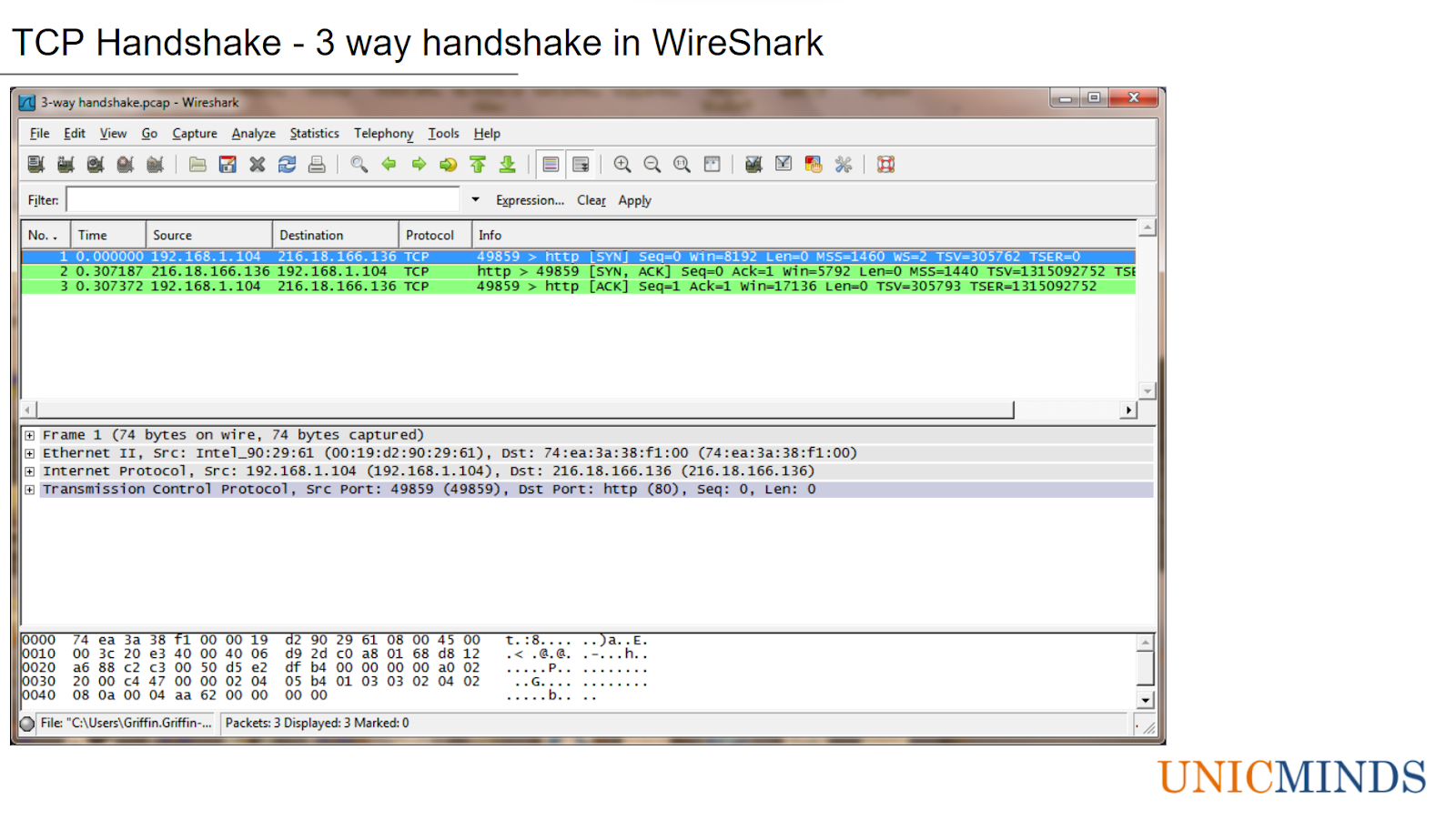
Step 3: Generate Traffic
With the capture running, open your terminal or command prompt and run the following command:
curl http://example.com
This command makes a simple HTTP request to example.com. Because we're using http (not https), the traffic is unencrypted and perfect for our analysis.
Step 4: Stop and Analyze
- Immediately after the
curlcommand finishes, go back to Wireshark and stop the capture by clicking the red square button. - You should now see a short list of packets. Look for the first three:
- A packet with
[SYN]in the "Info" column. This is your client's request. - A packet with
[SYN, ACK]in the "Info" column. This is the server's response. - A packet with
[ACK]in the "Info" column. This is your client's final acknowledgment.
- A packet with
Congratulations, you've captured a three-way handshake!
3. Dissecting the Packets
Now let's examine the details to confirm what happened. The next segment of the video you watched earlier provides a great walkthrough of this exact process.
TCP - Three-way Handshake in detail - Full Wireshark Breakdown!.
Please watch the rest of the video, where the presenter analyzes a captured handshake in Wireshark.
Watch from 04:17 to the end. Pay close attention to how they click on each packet and inspect the 'Sequence number' and 'Acknowledgment number' fields within the TCP header details.
Now, try this on your own capture.
-
Select the
[SYN]packet (the first one).- In the packet details pane, expand the "Transmission Control Protocol" section.
- Find the Flags field. You'll see that the
Synbit is set. - Find the Sequence number. Wireshark conveniently shows this as a relative number,
0, to make it easy to follow.
-
Select the
[SYN, ACK]packet (the second one).- Expand the TCP section.
- Notice the Flags: both
SynandAckare set. - Look at the Acknowledgment number. It should be
1(your client's relative sequence number0+ 1). - Look at the Sequence number. This is the server's own starting sequence number, which Wireshark also shows as a relative
0.
-
Select the
[ACK]packet (the third one).- Expand the TCP section.
- Notice the Flags: only
Ackis set. - Look at the Acknowledgment number. It should be
1(the server's relative sequence number0+ 1).
By following these numbers, you've just traced the synchronization and acknowledgment process that underpins every reliable TCP connection on the internet.
For a more detailed textual guide that you can refer back to, the following article provides a superb step-by-step walkthrough.
Understanding the TCP 3-Way Handshake with Wireshark
This article, 'Understanding the TCP 3-Way Handshake with Wireshark,' serves as an excellent reference for the lab you just performed.
Read sections 4 ('Quick theory refresher'), 5 ('Start capturing'), 6 ('Generate traffic'), and 7 ('Read a handshake like a pro'). These sections reinforce the concepts and provide clear instructions for filtering and analysis that you can use in the future.
Conclusion
In this lesson, you moved from observing connection states with netstat to capturing the process of connection establishment with Wireshark. You saw firsthand how the exchange of three simple packets—SYN, SYN-ACK, and ACK—lays the foundation for reliable data transfer over TCP.
Key Takeaways:
- The three-way handshake is used to synchronize sequence numbers and verify that both hosts are ready to communicate.
- Wireshark can capture live network traffic, and display filters (like
tcp.port == 80) are essential for isolating the packets you want to analyze. - The
Infocolumn in Wireshark helps you quickly identify the packets of the handshake. - By inspecting the TCP header of each packet, you can verify the sequence of flags (
SYN,SYN-ACK,ACK) and the logic of the sequence and acknowledgment numbers.
Preview of the Next Lesson:
We've seen how a connection is established at the packet level. But how does an application on your computer—like a web browser or a program you write—tell the operating system to create these packets? The answer lies in the Socket API. In the next lesson, we will begin our journey into network programming by exploring the concept of a socket and the sequence of function calls a C program uses to create, manage, and use these network connections.