Introduction
Hello! In our last lesson, you successfully captured a TCP three-way handshake using Wireshark, seeing exactly how the SYN and ACK flags and sequence numbers work to establish a reliable connection. This gave you a view from the "bottom up"—how the operating system and network stack build a connection at the packet level.
Today, we'll look at the same process from the "top down." We'll answer the question: how does an application, like a web browser or a program you'll soon write, ask the operating system to initiate that handshake?
This brings us to the learning outcome for this lesson: to explain the concept of a socket as an endpoint for network communication. Sockets are the fundamental abstraction that makes all network programming possible. Understanding what they are is the first and most crucial step in our journey into socket programming in C.
1. What is a Socket? The Core Abstraction
At its heart, a socket is an abstraction provided by the operating system. It's a programming interface (API) that allows an application to "plug into" the network.
To get a precise definition, let's start with a short clip from a video by Prof. Jim Kurose, a leading author in computer networking.
This video defines a socket as the API that sits between the application layer (where your code runs) and the transport layer (which is managed by the OS). This is a key concept for a computer science student.
Watch the first 1 minute and 26 seconds. Pay attention to the distinction between 'user space' (your application) and the 'operating system' (the network stack) and where the socket fits in.
As the video explains, your application doesn't build TCP or UDP packets manually. Instead, it interacts with a socket. The operating system then handles the complexities of the transport layer and below on your behalf.
Think of it this way: to deliver a message to an application on a remote computer, you need three pieces of information:
- The computer's address (IP address).
- The specific application's "door" on that computer (port number).
- The rules for communication (protocol, e.g., TCP or UDP).
A socket is the software object that bundles these three things together.
This next resource provides a fantastic explanation of how these different address types work together.
[PDF] Socket Programming through C - IIEST Shibpur
This section from the 'Socket Programming through C' PDF explains the roles of the physical (MAC) address, IP address, and port number in getting data not just to the right machine, but to the right application process on that machine.
Read the section titled '1.3 The addresses'. Focus on understanding why an IP address alone is not enough and why port numbers are necessary.
This next image provides a great visual summary of how sockets function as the interface between your application and the network stack.

2. Sockets as Communication Endpoints
So, a socket is an endpoint for communication. When two applications want to talk, each one creates its own socket. The communication channel exists between these two sockets.
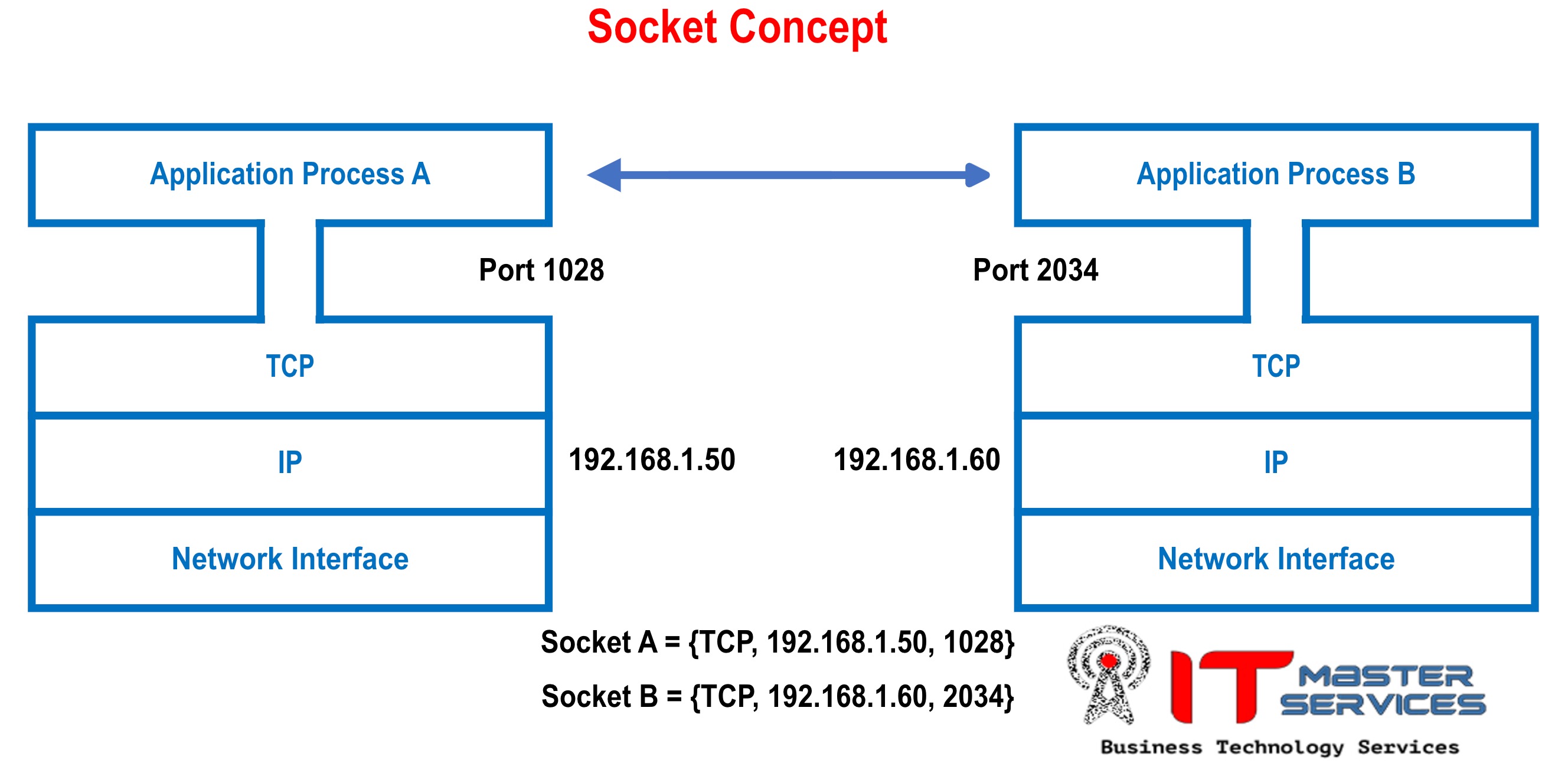
A single computer can have hundreds of network connections active at the same time (as you saw with netstat). How does the operating system distinguish between your web browser talking to Google, your email client fetching mail, and a game connecting to its server?
It uses a unique identifier for each connection called a five-tuple. The following video explains this concept perfectly.
99% of Developers Don't Get Sockets
This short clip explains the five-tuple and uses a telephone analogy to clarify the concept of a socket.
First, watch from 00:53 to 01:43 to hear the core definition and the telephone analogy. Then, watch from 08:16 to 08:52, which explains the 5-tuple that uniquely identifies every socket connection.
As the video states, every active TCP connection on the internet is uniquely defined by this 5-tuple:
- Protocol (e.g., TCP)
- Source IP Address
- Source Port Number
- Destination IP Address
- Destination Port Number
Change any one of these values, and you have a different connection. This is how multiple tabs in your browser can all connect to google.com on port 443 simultaneously; the OS assigns a different, unique source port to each connection, making each 5-tuple distinct.
3. Sockets and the Operating System: A Familiar Concept
Given your background in C and operating systems, there's a very powerful and familiar analogy for sockets: file descriptors.
In Unix-like operating systems (including Linux and macOS), almost everything is treated as a file. When you open a file, the OS gives you back a small integer—a file descriptor—and you use that integer for all subsequent read() and write() operations. Sockets work the same way.
99% of Developers Don't Get Sockets
This clip explains how Unix-like systems treat sockets just like files, representing them with file descriptors.
Watch from 06:36 to 07:28. This directly connects the concept of a socket to the concept of a file descriptor, which should be familiar from your OS and C programming experience.
When you create a socket, the OS returns a socket descriptor. You then use this integer with functions like read() and write() (or their network-specific cousins recv() and send()) to communicate over the network. This "everything is a file" philosophy elegantly extends file I/O concepts to network I/O.
A Glimpse into C Structures
To create a socket, your C program needs to provide the address information (IP and port) to the OS. This is done using a specific C struct, sockaddr_in, defined in the <netinet/in.h> header.
Socket Programming - Dartmouth Computer Science
This resource from Dartmouth's CS department shows the actual C structures used in socket programming. This is our first bridge from the abstract concept of a socket to its concrete implementation in C.
Read the sections 'Socket addresses' and 'Host Byte Order to Network Byte Order Conversion'. Don't worry about memorizing the structs. The goal is to see how an IP address and port are represented in C and to understand the concept of byte order.
The key takeaways from that reading are:
- The
sockaddr_instruct is the standard way to hold an IPv4 address and a port number. - Different computers might store numbers differently (little-endian vs. big-endian). The internet has a standard, called network byte order (which is big-endian).
- You must use functions like
htons()(Host to Network Short) andhtonl()(Host to Network Long) to ensure that port numbers and IP addresses are in the correct format before passing them to any socket functions. This is a classic "gotcha" for beginners in C socket programming.
4. Socket Types and Roles
Finally, it's important to understand that sockets behave differently depending on the underlying transport protocol and their role in the communication.
TCP vs. UDP Sockets
You've already learned about TCP (reliable, connection-oriented) and UDP (unreliable, connectionless). This distinction maps directly to the types of sockets you can create.
99% of Developers Don't Get Sockets
This clip recaps the difference between TCP and UDP, this time from the perspective of the sockets that use them.
Watch from 02:28 to 03:38. Note the different characteristics and use cases for TCP (stream) sockets and UDP (datagram) sockets.
Client vs. Server Sockets
Sockets also have different roles. In the common client-server model, one side (the server) waits for incoming connections, while the other side (the client) initiates them.
A server doesn't just have one socket; it actually uses two types of sockets, which is a crucial concept to understand.
Prof. Kurose explains the most important—and often confusing—aspect of TCP server sockets: the difference between the 'welcoming socket' and the 'connection socket'.
Watch from 09:21 to 11:28. Focus on understanding why the server needs two sockets: one to listen for new clients, and a new one that is created for each client that connects.
To summarize this critical point:
- The Server creates a listening (or welcoming) socket on a well-known port (e.g., port 80 for HTTP). This socket's only job is to wait for connection requests.
- The Client creates a single socket and uses it to connect to the server's listening socket.
- When the server's listening socket receives a connection request, it doesn't use itself for communication. Instead, it tells the OS to create a brand new connection socket.
- This new socket is dedicated to communicating with that specific client. The original listening socket goes back to waiting for other clients. This allows a single server to handle many clients concurrently.
Conclusion
In this lesson, we demystified the concept of a socket. You've learned that a socket is much more than just a single thing; it's an API, an endpoint, a file descriptor, and a combination of addresses and protocols.
Key Takeaways:
- A socket is an operating system abstraction that provides the API for applications to communicate over a network. It's the interface between the Application and Transport layers.
- A network connection is uniquely identified by a 5-tuple: protocol, source IP, source port, destination IP, and destination port.
- In C on Unix-like systems, a socket is represented by an integer file descriptor, allowing you to use familiar I/O concepts.
- Practical details like byte order (
htons) are critical when translating between how your program represents data and how the network expects it. - In the client-server model, a server uses a listening socket to accept new connections and creates a new connection socket for each client.
Preview of the Next Lesson:
Now that you have a solid conceptual understanding of what a socket is, we're ready to start building. In the next lesson, you will learn about the first part of the C socket API: the sequence of function calls a server uses to create, configure, and activate a listening socket. We'll explore socket(), bind(), listen(), and accept()—the four system calls that bring a TCP server to life.