Hello! Welcome to the final lesson of our module on Layered Network Models.
In our last lesson, we dug into the mechanics of data encapsulation, learning how each layer of the TCP/IP model wraps data in a header, creating segments, packets, and frames. We saw how this "packaging" process prepares data for its journey across the network.
Today, we're going to put everything we've learned in this module together. We'll achieve this lesson's learning outcome: to trace an everyday internet action (e.g., loading a webpage) through the TCP/IP layers. This will be a complete start-to-finish narrative, following a single request from your browser to a web server and back again. Think of this as the grand tour that connects all the abstract concepts to a concrete, real-world process.
The Anatomy of a Web Request
When you type a URL like http://www.google.com into your browser and press Enter, you kick off a complex but highly organized sequence of events. At a high level, your computer (the client) sends a request for the webpage, and the Google server sends back a response containing the page's content.
Let's trace this entire flow. The following reading from Stack Overflow provides a fantastic, developer-oriented walkthrough. It breaks down the process layer by layer before giving a concrete, step-by-step example.
Understanding TCP/IP layering through internet flow?
To start, let's get a comprehensive overview of the entire process. Read the accepted answer by Luciano Afranllie. First, read the descriptions for each layer to solidify your understanding of their roles in this specific scenario. Then, carefully read the 'A Concrete Example' section, which puts all the pieces together in sequence.
Read the entire answer. Focus on how the initial request for 'www.google.com' involves two distinct networking actions: A DNS query to translate the name to an IP address. An HTTP request to the resulting IP address to get the page content. Pay close attention to the 'Concrete Example' section, as it highlights the interplay between protocols like ARP, TCP, IP, and HTTP.
Deconstructing the Journey
That was a detailed and comprehensive explanation. Given your background in computer science, you can see how the operating system and network hardware work in concert, using this layered model to manage the complexity. Let's break down the key stages from that reading and add some visual context.
1. The Outbound Trip: From Your Browser to the Internet
The journey begins on your computer. Before your browser can even ask for the webpage, it needs to know the server's IP address.
- Application Layer: The browser initiates a DNS query to find the IP address for
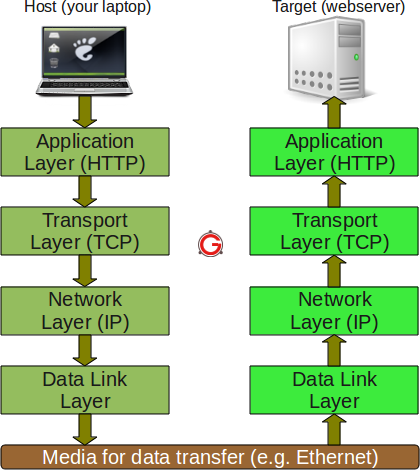
www.google.com. This is itself a mini network communication. Once the IP is found, the browser creates an HTTPGETrequest and hands it to the operating system. - Transport Layer: The OS establishes a TCP connection with the server's IP on port 80 (for HTTP) or 443 (for HTTPS). This involves the three-way handshake we'll cover later. The OS then takes the HTTP data, adds a TCP header (with source and destination ports), and creates a segment.
- Network Layer: The OS takes the segment, adds an IP header (with your IP and the server's IP), and creates a packet.
- Data Link Layer: The packet needs to be sent to your local router (the default gateway). The OS uses ARP to find the router's MAC address. It then wraps the packet in an Ethernet header (with your MAC and the router's MAC) and adds a trailer, creating a frame.
- Physical Layer: Your Network Interface Card (NIC) converts the frame into electrical signals and sends them over the Ethernet cable or Wi-Fi.
This entire sequence of encapsulation is what we covered in the last lesson. Here's a quick visual recap:
2. The Relay Race: Navigating the Internet
Your frame doesn't go directly to the server. It's passed from device to device in a relay race.
- Switches: If you're on a wired network, your frame first goes to a switch. The switch looks only at the Layer 2 header, finds the destination MAC address (your router's), and forwards the frame out of the correct port towards the router. It doesn't need to know anything about the IP packet or HTTP request inside.
- Routers: Your router receives the frame. It performs de-encapsulation up to Layer 3:
- It strips off the Layer 2 Ethernet header.
- It looks at the Layer 3 IP header to find the final destination IP address.
- It consults its routing table to decide which router to send the packet to next.
- Crucially, it re-encapsulates the packet in a new Layer 2 frame, with its own MAC address as the source and the next router's MAC address as the destination.
This process of de-encapsulating to L3, routing, and re-encapsulating at L2 is repeated at every router hop across the internet.
Let's watch a video that visualizes this journey through a switch and a router.
REAL LIFE example!! (TCP/IP and OSI layers) // FREE CCNA // EP 4
This video from NetworkChuck uses a network simulator to show a packet's journey from a client, through a switch, to a router, and onward. It does an excellent job of showing how the router de-encapsulates and re-encapsulates the data.
Watch from 08:09 to 12:16. Focus on these key moments: At the switch (08:09): Notice it only processes Layer 1 and 2 information. At the router (08:45): See how it de-encapsulates the frame to look at the Layer 3 packet, makes a routing decision, and then creates a new Layer 2 frame for the next hop. At the server (10:38): Observe the full de-encapsulation process, where each layer is stripped away until the original application data is revealed.
3. Arrival and Turnaround at the Server
When the frames finally arrive at the destination server, the full de-encapsulation process occurs, moving up the stack:
- Physical/Data Link: The server's NIC receives the frame.
- Network: The OS strips the frame header, sees the destination IP matches, and passes the segment up.
- Transport: The OS strips the IP header, reads the destination port (e.g., 443), and delivers the data to the web server application.
- Application: The web server gets the clean HTTP request, processes it, and prepares an HTTP response (containing the HTML of the webpage).
This response then begins its own journey back to you, going through the full encapsulation process on the server and being routed back across the internet.
What the Tools See
This entire conversation of protocols is visible using tools like Wireshark. The image below shows a capture of the exact process we've been discussing. You can clearly see the sequence: DNS queries, the TCP handshake (SYN, SYN-ACK), and finally the HTTP request.
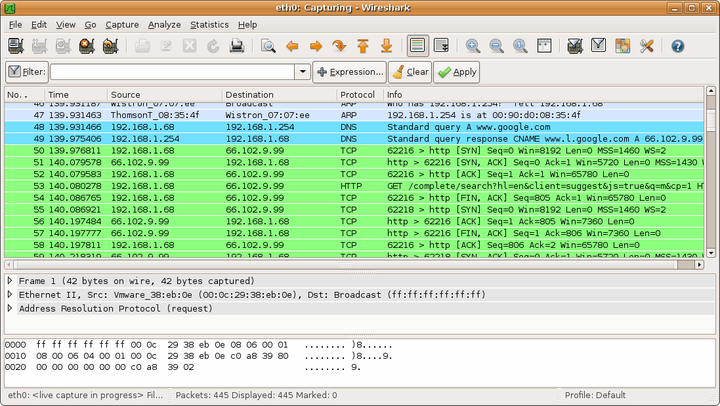
This is the "ground truth" that network engineers work with daily. Each line in that list is a frame that has been captured and de-encapsulated by Wireshark for analysis.
The Final Step: Rendering the Page
When the HTTP response arrives back at your computer and is fully de-encapsulated, the browser's job begins. It parses the HTML content. If the HTML references other resources—like CSS stylesheets, JavaScript files, or images—the browser initiates new, separate requests for each of those items, repeating the entire process we just traced. Once all necessary components are downloaded, the browser assembles them into the visual webpage you see on your screen.
For a deeper look into this entire end-to-end process, the following article is an excellent, in-depth resource.
What happens when you type a URL into your browser
This article by Kirill Vasiltsov provides a very thorough narrative of what happens when you type a URL. It's a great supplementary text that reinforces what we've learned and adds detail on topics like routing and what the browser does after receiving the data.
You don't need to read the whole article right now, but I recommend bookmarking it. For now, quickly skim these sections to see how they map to our discussion: Start reading at the heading 'If everything is alright...' and read through the paragraph about BGP. This section gives another excellent description of encapsulation and routing. Read the section 'Now that it is clear what route...'. This describes what happens on the server side. Finally, read from the heading 'The response tracks the similar route...' to the end. This explains how the browser handles the response and renders the page.
Conclusion
Congratulations on completing this module! We have successfully traced a web request from keystroke to rendered page, seeing how each layer of the TCP/IP model plays its indispensable role.
Key Takeaways:
- Loading a webpage is not a single action but a series of communications, starting with DNS and followed by one or more HTTP requests.
- The journey of a request involves encapsulation on the client, hop-by-hop routing across the internet, and full de-encapsulation at the server.
- Routers are the key players in the internet, performing partial de-encapsulation to read Layer 3 IP addresses and make routing decisions before re-encapsulating the packet for its next hop.
- The response from the server follows the same symmetrical process back to the client.
- Tools like Wireshark allow us to see the individual packets and verify this layered communication in practice.
Preview of the Next Module:
We now have a solid high-level understanding of how the internet works. In the next module, "Data Link Layer: Local Area Networks," we will begin our deep dive into the individual layers, starting with Layer 2. We'll explore MAC addresses, Ethernet frames, and how network switches build local networks—all concepts we were introduced to today.