Hello! Welcome to the first lesson in our new module, "Data Link Layer: Local Area Networks."
In our last session, we took a bird's-eye view of the internet by tracing a web request through all the layers of the TCP/IP model. We saw that for your computer to send a packet to the internet, it first had to send it to your local router. To do this, it needed the router's MAC address. This was a crucial step for communication within your local network.
Today, we're zooming in on that exact concept. Our goal is to address the first learning outcome of this module: to explain the role of MAC addresses in identifying devices on a local network. We'll explore what a MAC address is, how it's structured, and why it's the fundamental identifier for local network communication.
What is a MAC Address?
At its core, a MAC (Media Access Control) address is a unique serial number for a piece of network hardware, like the Ethernet port or Wi-Fi card in your computer. Think of it as the device's fingerprint. While an IP address can change depending on which network you join, a MAC address is typically permanent and burned into the device by its manufacturer.
To get a clear introduction, let's start with a short animated video.
This video from PowerCert Animated Videos provides an excellent overview of what a MAC address is, its structure, and its purpose. Pay close attention to its uniqueness and the two parts that make it up.
Watch the video from the beginning until 00:52. Focus on what a MAC address is, its format (hexadecimal), and the breakdown into a manufacturer part and a device part.
As the video explained, every network device has a MAC address that is, in theory, globally unique. This prevents any confusion on a network about which device is which.
The Structure of a MAC Address
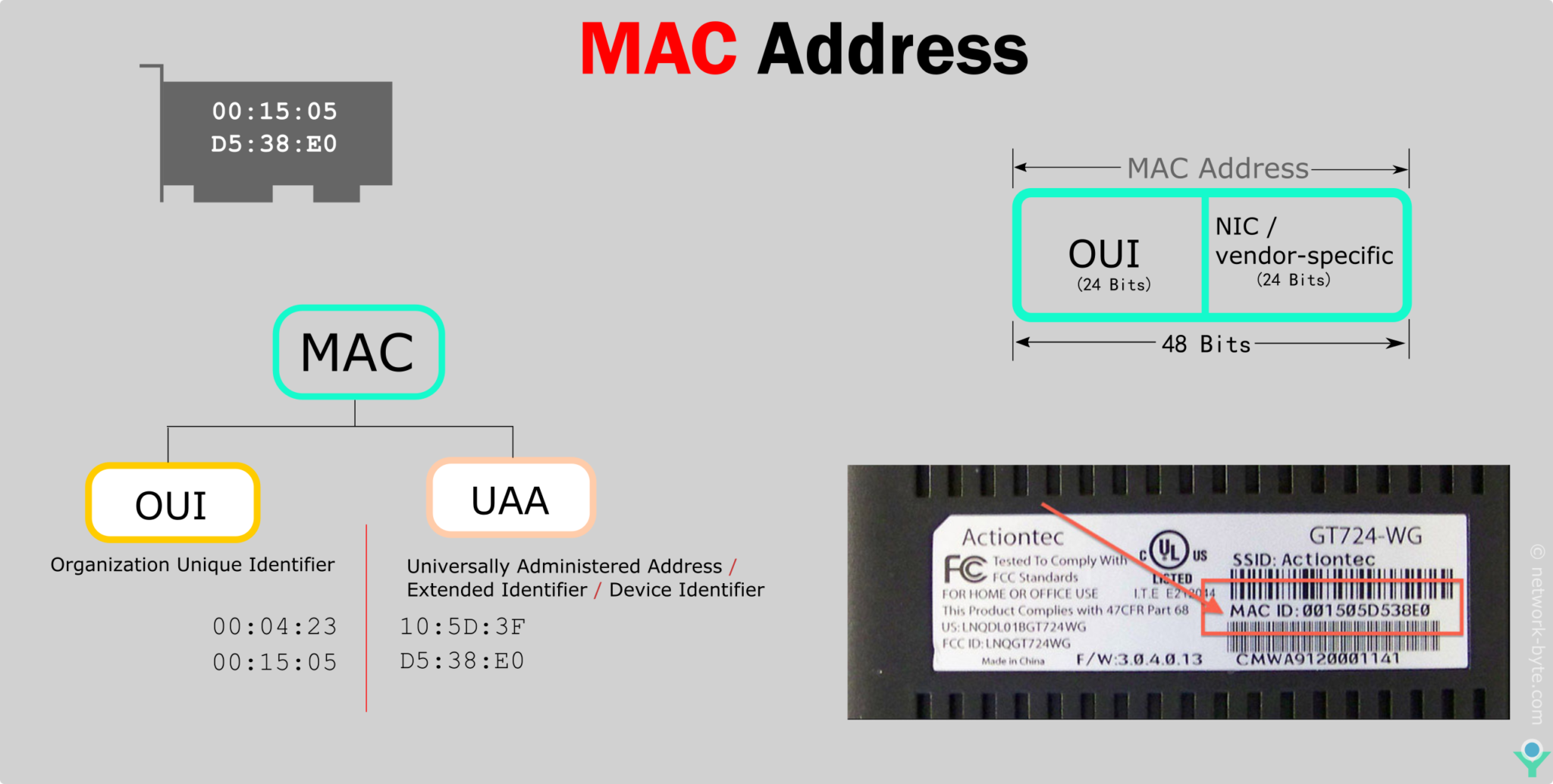
A standard MAC address is a 48-bit number, which is a lot to remember. For human readability, it's expressed as 12 hexadecimal digits, often grouped in pairs and separated by colons or hyphens (e.g., 00:1A:2B:3C:4D:5E).
This 48-bit address isn't random; it has a clever structure that ensures uniqueness and provides information about the device's origin. It's split into two halves:
- Organizationally Unique Identifier (OUI): The first 24 bits (or 6 hex digits) identify the manufacturer of the network interface. The IEEE, a standards organization, assigns these OUIs to companies like Intel, Apple, or Cisco.
- Device Identifier: The last 24 bits (or 6 hex digits) are assigned by the manufacturer itself. They use this part to give each device they produce a unique serial number.
This two-part system ensures that no two manufacturers will ever create a device with the same MAC address.
The Role of MAC vs. IP Addresses
You might be wondering: if we have IP addresses, why do we need MAC addresses? This is a fundamental concept in networking. The two addresses operate at different layers and serve different purposes.
- IP Address (Network Layer / Layer 3): An IP address is a logical address that tells you where a device is on the internet. It's like a house's mailing address. It's hierarchical and can change when you move from one network to another (e.g., from your home Wi-Fi to a coffee shop). Its primary purpose is to route packets across different networks to get them to the correct destination network.
- MAC Address (Data Link Layer / Layer 2): A MAC address is a physical address that identifies who a specific device is. It's like the name of a person living in a house. It's used for delivering data to the correct device within the same local network. It's a flat address, meaning it has no routing information.
Let's watch another segment of the video, which uses this very analogy.
This part of the PowerCert video explains the different roles of IP and MAC addresses using a great analogy. It will help clarify why both are necessary for network communication to function.
Watch from 01:19 to 03:32. Focus on the house address (IP) vs. person's name (MAC) analogy. This is a key concept for understanding their distinct roles.
This distinction is crucial: IP addresses get the data to the right city and street (network), and MAC addresses get it to the right person (device) inside the house.
MAC Addresses in Local Communication
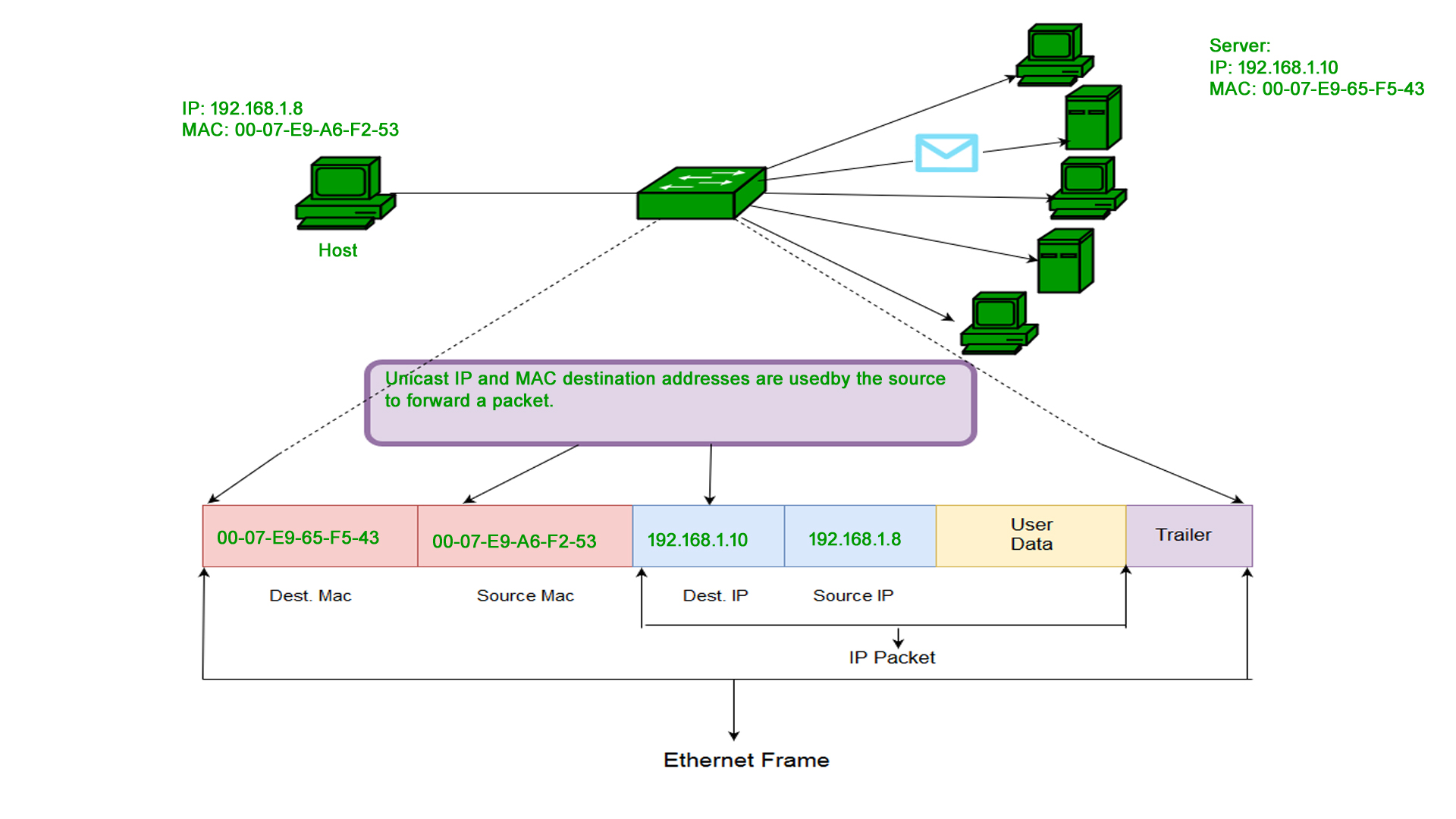
Let's put this into practice. Imagine you have two computers, Host A and Host B, connected to the same switch in your home network. Host A wants to send a file to Host B.
- At the Application layer, you initiate the file transfer.
- The data moves down the TCP/IP stack. At the Network Layer, a packet is created with Host B's IP address as the destination.
- Now at the Data Link Layer, the network card needs to create an Ethernet frame to send over the local network. This frame needs a destination MAC address.
- Host A knows Host B's IP address, but it doesn't know its MAC address yet. It will use a protocol called ARP (Address Resolution Protocol) to discover it. It sends a broadcast message to every device on the local network that essentially asks, "Who has this IP address? Please tell me your MAC address."
- Host B receives this broadcast, recognizes its own IP address, and sends a reply directly to Host A, saying, "That's me! Here is my MAC address."
- Now that Host A has Host B's MAC address, it can create the Ethernet frame with the correct destination MAC address and send it. The switch will then forward this frame only to the port connected to Host B.
To reinforce this distinction between local (Layer 2) and global (Layer 3) communication, the next video offers a concise explanation.
MAC Addresses Explained | Cisco CCNA 200-301
This clip from CertBros clearly distinguishes between Layer 2 communication, which uses MAC addresses on the local network (LAN), and Layer 3 communication, which uses IP addresses to cross network boundaries.
Watch from 03:11 to 04:14. Notice the clear roles assigned: switches operate at Layer 2 using MAC addresses, while routers operate at Layer 3 using IP addresses.
Types of MAC Addresses
While we've mostly discussed one-to-one communication, there are three types of MAC addresses used for different communication patterns:
- Unicast: This is the standard address assigned to a single network card. It's used for direct, one-to-one communication between two devices.
- Broadcast: This is a special address (
FF:FF:FF:FF:FF:FF) that sends a frame to every device on the local network simultaneously. The ARP request we mentioned earlier is a classic example of a broadcast. - Multicast: This address sends a frame to a specific group of interested devices, but not all of them. This is more efficient than broadcasting if only a subset of devices needs the information, such as in video streaming to multiple subscribers on a network.
Conclusion
In this lesson, we've drilled down into Layer 2 to understand the vital role of MAC addresses. You now have a solid foundation for how devices identify each other on a local network.
Key Takeaways:
- A MAC address is a unique 48-bit hardware identifier burned into a Network Interface Card (NIC).
- Its structure consists of a 24-bit OUI (manufacturer ID) and a 24-bit device-specific ID.
- MAC addresses are used for local network communication (Layer 2), answering the question of "who" a device is locally.
- IP addresses are used for internetwork communication (Layer 3), answering the question of "where" a device is globally.
- Protocols like ARP bridge the gap by allowing devices to discover the MAC address associated with a known IP address on the local network.
Preview of the Next Lesson:
Theory is great, but it's time to get practical. In the next lesson, we will move on to the next outcome: Use ipconfig/ifconfig to find your device's MAC address. You'll learn the commands to see this information on your own computer and understand the output.