Introduction
Welcome back! In our last lesson, we established that the Domain Name System (DNS) is the internet's "phonebook," translating human-friendly domain names into network-friendly IP addresses. We saw that its distributed nature was a deliberate design choice to overcome the scaling limitations of a centralized HOSTS.TXT file.
Today, we're going to map out that distributed system. Your learning outcome is to describe the DNS hierarchy (root, TLD, and authoritative servers). We will break down the different types of servers that work together to resolve a query, understanding their specific roles and how they form a logical pyramid structure. This will lay the groundwork for tracing a complete DNS query in our next lesson.
The DNS Hierarchy: A Library Analogy
Before diving into the technical specifics, let's use an analogy. Imagine you're in a massive global library and need to find a very specific piece of information in a book. You wouldn't wander aimlessly. Instead, you'd ask a librarian for help.
This is where our DNS journey begins. The four main types of servers involved can be thought of like this:
-
DNS Recursor (or Recursive Resolver): This is your helpful librarian. You give it the name of what you're looking for (e.g.,
google.com), and it does all the legwork to find the answer for you. It's usually operated by your Internet Service Provider (ISP) or a third party like Google (8.8.8.8) or Cloudflare (1.1.1.1). -
Root Nameserver: The librarian doesn't know where every book is, but they know where to start. They first consult a master index of the library. This index doesn't have the final answer, but it points to the right section or floor. This is the role of the root server.
-
Top-Level Domain (TLD) Nameserver: The master index directs the librarian to a specific section, like the "non-fiction" or "periodicals" section. In DNS, this is the TLD server, which handles a specific top-level domain like
.com,.org, or.net. This server knows which specific bookshelf (which authoritative server) holds the book you need. -
Authoritative Nameserver: This is the final destination—the specific bookshelf and, ultimately, the book itself, which contains the definitive answer you were looking for. The authoritative server holds the actual DNS records for a specific domain (e.g.,
google.com) and provides the corresponding IP address.
This article from Cloudflare provides an excellent summary of these four server types.
What is DNS? | How DNS works - Cloudflare
Read this section from the Cloudflare article 'What is DNS?' to solidify your understanding of the four key server types and the library analogy.
Read the section titled 'There are 4 DNS servers involved in loading a webpage:'. Focus on the description and analogy for each of the four server types.
Now, let's visualize this structure.
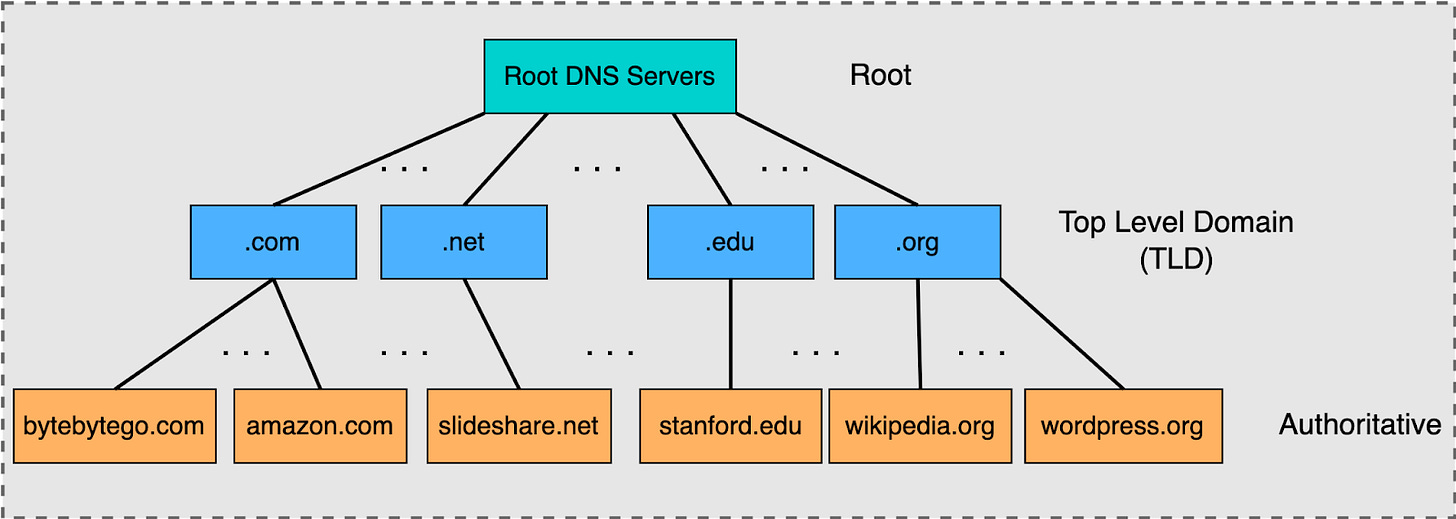
The Hierarchical Query in Action
Knowing the players is the first step. Now let's see how they interact. The recursive resolver (our librarian) methodically queries each level of the hierarchy to find the answer.
This short video provides a clear, animated walkthrough of this process. It shows how a request for a website address travels from the resolver to the root, then to the TLD, and finally to the authoritative server.
DNS Explained | Domain Name System | Cisco CCNA 200-301
This clip from the 'DNS Explained' video by CertBros visually demonstrates the query flow through the DNS hierarchy.
Watch the segment from 01:55 to 04:28. Pay close attention to the sequence of queries: your computer asks the resolver, the resolver asks the root, the root refers it to the TLD, the TLD refers it to the authoritative server, and the authoritative server gives the final answer.
Recursive vs. Iterative Queries: A Crucial Distinction
The video you just watched highlights a fundamental concept in how these servers communicate, which is highly relevant given your background in computer science: the difference between recursive and iterative queries.
-
Recursive Query: This is a query where the client asks the server to perform the full resolution and return a final answer. It's essentially saying, "Please find this IP address for me. I'll wait." Your computer makes a recursive query to your ISP's recursive resolver.
-
Iterative Query: This is a query where the server is not required to find the final answer. Instead, it provides the best answer it has, which is usually a referral to another server that is "closer" to the answer. It's like saying, "I don't know, but you should ask that server over there." The recursive resolver uses iterative queries to talk to the root, TLD, and authoritative servers.
This design is critical for the internet's scalability. Root servers are incredibly busy; they can't afford to do the full resolution for every query on the internet. By only responding with iterative referrals, they delegate the work, ensuring they remain available.
The following video explains this distinction in detail.
Recursive and Iterative Queries
This video from ITFreeTraining provides an excellent technical explanation of recursive vs. iterative queries and why both are necessary for DNS to function at scale.
Watch from 01:16 to 04:28, and then the summary from 05:34 to 06:49. Focus on understanding why the resolver's communication with the root and TLD servers is iterative and how this protects the core DNS infrastructure from being overloaded.
A Deeper Look at Each Level
Now that you understand the roles and the query process, let's add a bit more technical detail to each level of the hierarchy.
How DNS Works: A Guide to Understanding the Internet's Address ...
This article from freeCodeCamp offers more technical details about each server type in the hierarchy. We'll read it in three parts.
Please read the following three sections from the article: Root Servers: Start at 'Exploring Root Name Servers' and read down to the end of that subsection (before 'How Recursive Resolvers Query...'). Note the concept of 13 root server clusters and the use of anycast routing. TLD Servers: Read the section titled 'Recursive Resolver and TLD Server Interaction'. Pay attention to the role of 'zone files' and 'glue records'. Authoritative Servers: Read the section 'Recursive Resolver and Authoritative Name Server Interaction'. This explains the final step where the actual DNS record (like an 'A' record for an IP address) is found.
From the reading, here are some key technical points a computer science student might find interesting:
- Root Servers: There are conceptually only 13 root server IP addresses, managed by organizations like Verisign and ICANN. However, through anycast routing, these 13 addresses are announced from thousands of physical locations worldwide. When you query a root server, you are routed to the nearest physical instance, which provides low latency and high availability. Your resolver knows where to find them thanks to a built-in
root.hintsfile. - TLD Servers: These servers are managed by different organizations depending on the TLD. For example, Verisign manages the
.comand.netTLDs, while other national bodies manage country-code TLDs (like.defor Germany). - Authoritative Servers: This is the server that a domain owner has direct or indirect control over. When you register a domain and set up hosting, you are configuring which authoritative name servers are responsible for your domain's DNS records. The authoritative server is the ultimate source of truth for a domain.
Conclusion
In this lesson, we've dissected the distributed structure of DNS and defined the roles of its key components. You now have a mental model of the DNS hierarchy and the query flow that navigates it.
Key Takeaways:
- The DNS hierarchy consists of Root, Top-Level Domain (TLD), and Authoritative nameservers.
- The DNS Recursive Resolver is the client-facing server that performs the lookup on behalf of the user.
- The lookup process involves a recursive query from the client to the resolver, followed by a series of iterative queries from the resolver to the different levels of the hierarchy.
- This hierarchical and distributed design with a distinction between query types is essential for the scalability, resilience, and efficiency of the entire system.
- Technologies like anycast routing are used to make core infrastructure like the root servers highly available and performant.
Preview of the Next Lesson:
We've described the players and the game board. In the next lesson, "Trace the steps of a recursive DNS query from client to resolution," we will put everything together. We will use command-line tools like dig or nslookup with special options to trace a live DNS query, step-by-step, observing the communication with the root, TLD, and authoritative servers in real-time.